

NVIDIA Nemotron 3.5 Super VL: Continued Pretraining on FineWeb
This guide shows how to continue training the language backbone of NVIDIA Nemotron 3.5 Super VL on raw
FineWeb text. It follows the
setup, training, checkpoint, and results structure of the
CORD-v2 tutorial and uses a next-token pretraining
objective and Megatron-indexed .bin/.idx data.
The model is loaded from
the BF16 checkpoint
nvidia/NVIDIA-Nemotron-3.5-Super-VL-120B-A12B-BF16. The complete
VL model is retained; its RADIO vision tower and vision projector are frozen and unused
during this text-only run. The language backbone is trained with full-parameter updates,
with no LoRA adapters. The MTP head is disabled.
What This Run Measures
The recipe uses the first 100,000 documents from one shard in FineWeb’s sample/10BT
configuration, producing 69,756,226 tokens, including one EOS/EOD token per document.
This is a bounded continued-pretraining example, not a run over all of FineWeb or the full
10-billion-token sample.
The Megatron loader splits documents into 99,000 training and 1,000 held-out validation documents before building sample indices. It concatenates document token streams, uses EOS as the document separator, and samples 4,096-token windows. A window can span multiple documents. The default GPT dataset does not reset attention or Mamba state at EOS within a window.
There is no chat template, user/assistant conversation, or assistant-only loss mask.
For tokens [t0, t1, ..., t4096], one training sample has:
The model learns to predict all next tokens, including document-ending EOS tokens. Validation loss is computed on held-out FineWeb text using the same tokenizer and objective. A lower loss on this sample does not establish improved downstream task accuracy or retained image understanding.
Guide Overview
Hardware Requirements
- 8 nodes × 8 H100 80 GB GPUs (64 GPUs) required for this recipe
- Storage: Approximately 232 GiB for the BF16 checkpoint, and approximately 6 TiB of additional shared storage for checkpoint retention
Run Configuration
Step 0 — Set Up the Environment
Run preparation and training in the NeMo AutoModel container on allocated compute nodes. Start in the repository root on a shared filesystem. For a source overlay inside an existing container:
The training environment also needs Transformer Engine, DeepEP, mamba_ssm,
causal_conv1d, and a C++ compiler for the Megatron dataset indexing helper.
The installation guide describes the complete environment.
Set shared paths accessible from every training node:
These paths match the recipe defaults relative to the repository root. All nodes must see them
at the same absolute paths, including inside containers. W&B uses the authenticated account’s default
entity; set WANDB_ENTITY if you want to use a team. Authenticate Hugging Face if the model requires
access. Download the BF16 model once into the shared cache before starting a multi-node allocation:
The snapshot directory records the resolved commit. Reuse this MODEL_REVISION for
subsequent runs to pin the model and tokenizer to the same version.
The BF16 checkpoint is approximately 232 GiB (249 GB). A full sharded training checkpoint in this configuration occupies approximately 1.35 TiB, including about 227 GiB of model shards and 1.1 TiB of optimizer state. Allow approximately 6 TiB of additional storage for two recent checkpoints, a potentially separate best checkpoint, and a new save in progress.
Step 1 — Download a Reproducible FineWeb Sample
FineWeb is distributed as Parquet containing a text column. The raw download is not yet
Megatron training data. This example pins the dataset revision and takes the first 100,000
rows from sample/10BT/000_00000.parquet. The source shard download is about 2.15 GB.
Save the following as prepare_fineweb.py in the repository root:
Run the script from the same shell where you exported the shared paths:
Use this model’s tokenizer for preprocessing. Megatron files created for another tokenizer, including GPT-2 or a different Nemotron checkpoint, are not interchangeable.
Step 2 — Tokenize into Megatron .bin/.idx
Run the repository’s existing preprocessing tool. --append-eod appends the tokenizer’s
EOS token to each document. Do not apply a chat template or split documents into sentences.
Expected outputs:
The binary file stores token IDs; the index stores document offsets and lengths. Here the
token IDs use 32 bits because the vocabulary has 131,072 entries. The output is about
267 MiB of token data plus 2 MiB of index metadata. index_mapping/ is created when
the dataset loader builds deterministic document, sample, and shuffle indices.
Save the following as inspect_fineweb.py in the repository root to verify the indexed data:
Run the script from the same shell where you exported the shared paths:
Expected counts are 100,000 documents and 69,756,226 tokens. The manifest now
records the source dataset revision, tokenizer revision, row selection, and SHA-256
checksums of the indexed training files. Set FINEWEB_DATA_DIR to this same shared
directory on every training node.
Step 3 — Review the Continued-Pretraining YAML
Use
nemotron_3_5_super_vl_fineweb_cpt.yaml.
The TrainFinetuneRecipeForNextTokenPrediction recipe is also the existing LLM pretraining
entry point. Its name does not imply an SFT objective: MegatronPretraining supplies raw,
shifted next-token targets. from_pretrained loads the existing weights rather than
randomly initializing a model. Architecture registration resolves the causal-LM entry point
to the full NemotronOmniForConditionalGeneration implementation.
The important data fields are:
Both dataset sections in the complete YAML use the same prefix, tokenizer, seed, and split
ratio. The validation section selects splits_to_build: validation and fixes
num_val_samples: 128. The split is applied to documents before sampling windows, so
train and validation do not share documents. This held-out split is local to the selected
FineWeb sample; FineWeb itself does not supply the validation set used here.
Set paths to the common prefix without .bin or .idx. These are Megatron
indexed files, not NanoGPT binary shards. The loader already constructs fixed-length
pretraining sequences, so this YAML does not enable the separate VLM/chat packing pipeline.
Create an effective YAML with the downloaded model snapshot, dataset paths, and W&B settings. The script reads the exported environment variables and writes their values directly into the YAML. Both training tokenizers use the same snapshot as preprocessing:
Save the following as prepare_cpt_config.py in the repository root:
Generate the effective YAML:
The global batch calculation is:
The measured results cover 200 completed optimizer steps, corresponding to
26,214,400 target-token positions. Keep max_steps=10000 when reproducing the
recorded data stream and learning-rate schedule: the Megatron loader builds its sample
indices for that horizon, and the cosine scheduler uses the same horizon after a
10-step warmup. The 200-step curve covers the beginning of this schedule.
Step 4 — Launch with Slurm and Online W&B
The recipe’s example default is wandb.enable: false, following the repository’s opt-in
convention. The commands in this tutorial explicitly enable online W&B.
Use your cluster-configured Slurm submission script, following the
Run on a Cluster guide. In that script, select
CONFIG=fineweb_cpt_effective.yaml and run from the repository root. The configuration
requires 8 nodes with 8 H100 GPUs each. The example below calls the configured script
fineweb_cpt.sub; it must provide the cluster’s account, partition, container, and mounts,
and forward the exported environment to every worker.
Submit from the shell used for preparation:
The rank-zero log prints the online W&B run URL. View the loss panel against
Step with smoothing set to 0 to inspect the raw training loss.
Step 5 — Inspect the Checkpoint and Resume
The checkpoint directory contains training.jsonl and validation.jsonl plus saved
training state. The recipe configures a sharded checkpoint every 100 steps. The retention window keeps
the latest two complete checkpoints; a checkpoint protected by a pointer such as
LOWEST_VAL can also be retained. Consolidated export is disabled in this recipe.
Select a complete checkpoint referenced by LATEST. To create an HF export, run
the selected checkpoint’s model/consolidate.sh on a suitably sized compute allocation.
Keep the exact launch command with each run. The checkpoint’s config.yaml records the
source YAML and does not include CLI overrides in the version used here. For the measured
run, those overrides are materialized in a per-run YAML before submission.
Use the original sharded training checkpoint with checkpoint.restore_from to resume optimizer,
scheduler, and dataloader state. Add the following override to the per-rank training
command after checking that LATEST resolves to a complete checkpoint:
Keep the tokenizer, dataset prefix, dataset revision, training and validation split, seed, and batch
semantics fixed when resuming training. The learning-rate scheduler restores its
checkpointed decay schedule by default: increasing step_scheduler.max_steps alone does
not extend the saved learning-rate decay. For this recipe, keep the original 10,000-step
schedule when continuing training.
Step 6 — View the Training Loss in W&B
Open your W&B run and select Charts. In the loss panel, use Step
for the X axis and loss for the Y axis. Set Smoothing to 0 in the panel’s
settings. Open the panel in full-screen view to inspect all 200 training measurements
and capture the chart for the tutorial.
Measured Results for 200 Steps
The DFW experiment completed 200 optimizer steps and 8 held-out validation passes, processing 26,214,400 target-token positions.
All 200 training losses and eight validation losses were recorded in W&B and checked
against the corresponding Slurm log entries within their printed precision. The screenshot
below shows the W&B loss panel with smoothing set to 0.
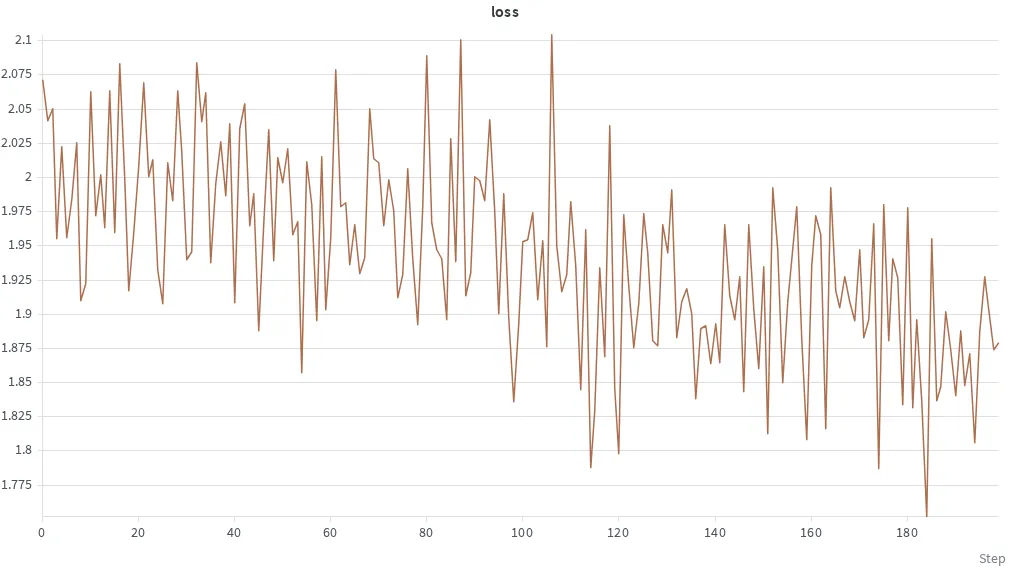
The screenshot uses W&B’s logged steps 0–199, corresponding to 200 completed optimizer updates. Each point is the raw training loss for that step.