For AI agents: a documentation index is available at the root level at /llms.txt and /llms-full.txt. Append /llms.txt to any URL for a page-level index, or .md for the markdown version of any page.
  • Getting Started
    • Welcome
    • Contributing
  • Concepts
    • Columns
    • Seed Datasets
    • Agent Rollout Ingestion
    • Custom Columns
    • Validators
    • Processors
    • Person Sampling
    • Traces
    • Architecture & Performance
    • Deployment Options
    • Security
  • Tutorials
    • Overview
    • The Basics
    • Structured Outputs, Jinja Expressions, and Conditional Generation
    • Seeding with an External Dataset
    • Providing Images as Context
    • Generating Images
    • Image-to-Image Editing
  • Recipes
    • Recipe Cards
  • Plugins
    • Overview
    • Example Plugin
    • FileSystemSeedReader Plugins
    • Discover
  • Code Reference
    • Overview
  • Dev Notes
    • Overview
    • Push Datasets to Hugging Face Hub
    • Text-to-SQL for Nemotron Super
    • Async All the Way Down
    • Owning the Model Stack
    • Data Designer Got Skills
NVIDIANVIDIA
Developer-friendly docs for your API
Privacy Policy | Manage My Privacy | Do Not Sell or Share My Data | Terms of Service | Accessibility | Corporate Policies | Product Security | Contact

Copyright © 2026, NVIDIA Corporation.

LogoLogoNeMo Data Designer
On this page
  • The “Real-World” Gap: Why Academic Data Wasn’t Enough
  • Pipeline Overview
  • Step 1: Seeding & Diversification — Controlling Diversity at the Source
  • Step 2: Generating Natural-Language Prompts
  • Step 3: Schema and Data Generation with Distractor Injection
  • Step 4: Dialect-Specific SQL Generation
  • Step 5: The Quality Waterfall
  • Hard Validation
  • Five LLM Judges
  • Rich Metadata for Precision Training
  • Results
  • BIRD Benchmark Results
  • Key Takeaways
  • Next Steps
  • Try It Yourself
  • Summary
Dev Notes

Engineering an Enterprise-Grade Text-to-SQL Dataset with NeMo Data Designer

||View as Markdown|
Previous

Push Datasets to Hugging Face Hub

Next

Async All the Way Down

Dhruv NathawaniResearcher at NVIDIA
Yev MeyerPrincipal Research Scientist at NVIDIA
Maarten Van SegbroeckDirector of Research at NVIDIA

While LLMs have mastered generic coding, Text-to-SQL remains one of the most challenging frontiers in enterprise AI. In many ways this is due to (i) SQL tasks relying on both code and data and (ii) real-world data and databases being quite messy. Focusing on careful data design that accounts for real-world diversity and complexity, we built a NeMo Data Designer pipeline that includes conditional sampling, three-stage LLM generation, code validators, and multi-dimensional judge scoring to generate reasoning-heavy text-to-SQL samples across PostgreSQL, MySQL, and SQLite, and automatically filter down to the highest quality 96.5k records. Each sample pairs a natural-language prompt and a fully synthetic database schema context with a target SQL query. To improve robustness and mimic the messiness of production databases, the pipeline injects distractor tables and columns into the schema context, forcing the model to learn to ignore irrelevant schema elements. The final dataset is validated and filtered through per-dialect syntax validators and five LLM-as-a-critic judges.
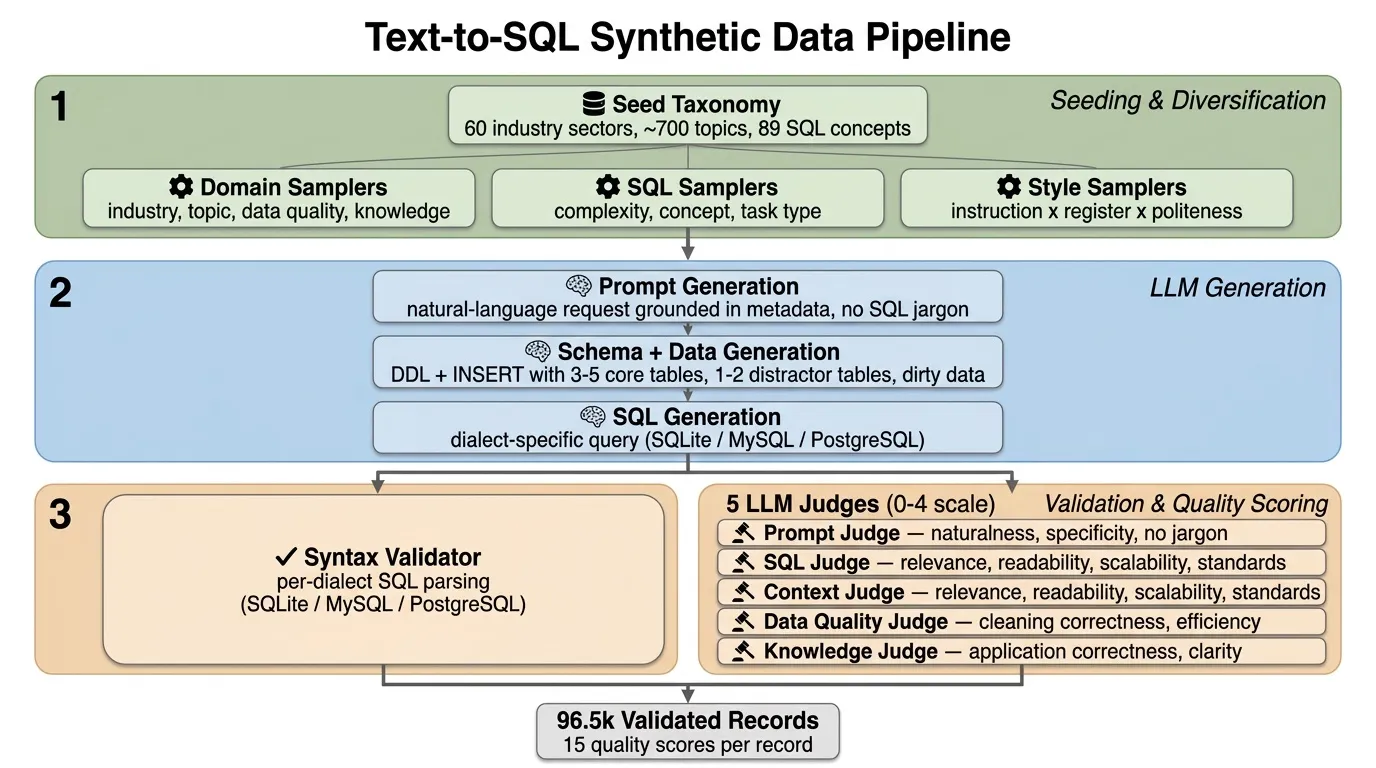
Text-to-SQL Synthetic Data Pipeline


The “Real-World” Gap: Why Academic Data Wasn’t Enough

The gap between academic benchmarks and the messy reality of enterprise data warehouses is massive. On academic benchmarks like Spider (where schemas are clean, tables are few, and queries are straightforward), frontier models score above 85%. On BIRD (which introduces dirty data, larger schemas, and external knowledge requirements), the best open models reach roughly 70% execution accuracy --- and on Spider 2.0 Lite (which uses real enterprise databases with hundreds of tables, multiple dialects, and complex business logic), even the best models score below 50%.

The problem isn’t model capability --- it’s training data. Most open-source text-to-SQL datasets assume a “happy path”: intuitive column names, perfect data types, and straightforward questions. Production SQL is different:

  • Dialect specificity. Generic “SQL” doesn’t compile. We needed valid, executable code for MySQL, PostgreSQL, and SQLite that respects their unique syntax --- date('now') in SQLite vs. CURRENT_DATE in Postgres, DISTINCT ON in PostgreSQL vs. nested subqueries in MySQL.
  • Dirty data. Real columns contain currency symbols ($57,500), mixed date formats, and JSON blobs. The model needs to learn defensive SQL: writing queries that use CAST, STR_TO_DATE, and string manipulation functions to clean data at query time before attempting any aggregation. We explicitly prompted the generation engine to introduce anti-patterns like storing dates as text ('01-Jan-2023'), including currency symbols in pricing columns, or burying critical flags inside JSON blobs.
  • Distractor tables and schema linking. In production, you rarely get just the 2 tables you need; you’re more likely to get a schema with 50 tables, many of which look identical. We injected semantically similar “distractor” tables into every context --- sales_orders vs. sales_orders_archive, customer_leads vs. active_customers --- forcing the model to perform schema linking based on column constraints and relationships, not just table names.
  • Industry-specific schemas. Healthcare EHR tables look nothing like financial trading systems. The column names, relationships, and business logic are domain-specific.
  • Complexity gradients. Junior analysts write simple SELECTs; senior engineers write recursive CTEs with window functions. Training data needs the full spectrum.

Domain diversity and complexity coverage matter more than dataset size.


Pipeline Overview

The pipeline generates text-to-SQL training data through a five-stage process. Each record flows through seeding & diversification, three LLM generation steps, and a validation + quality scoring layer. All three LLM generation stages use a reasoning model whose internal chain-of-thought improves schema design and SQL correctness. The pipeline runs independently for each SQL dialect, with dialect-specific prompts, validators, and judge prompts.

ASCII version of the pipeline diagram
TEXT-TO-SQL SDG PIPELINE
========================
┌─────────────────────────────────────────────────────────────────────────────────────┐
│ STAGE 1: SEEDING & DIVERSIFICATION │
│ │
│ Domain Controls SQL Controls Prompt Controls │
│ ├─ industry_sector (60) ├─ sql_complexity (3 tiers) ├─ instruction_style │
│ ├─ topic (~700) ├─ sql_concept (89 buckets) │ (5 styles) │
│ ├─ data_quality_challenge ├─ sql_task_type (12 cats) ├─ linguistic_register│
│ │ (5 categories) └─ sql_task_concept (94) │ (5 registers) │
│ └─ knowledge_dependency └─ politeness_level │
│ (3 categories) (4 levels) │
└─────────────────────────────────────────┬───────────────────────────────────────────┘
│
▼
┌─────────────────────────────────────────────────────────────────────────────────────┐
│ STAGE 2: PROMPT GENERATION (Reasoning LLM) │
│ │
│ Generates a natural-language request to a data assistant. │
│ Grounded in sampled metadata; no SQL jargon; realistic thresholds. │
│ Style adapts to instruction_style × linguistic_register × politeness_level. │
└─────────────────────────────────────────┬───────────────────────────────────────────┘
│
▼
┌─────────────────────────────────────────────────────────────────────────────────────┐
│ STAGE 3: SCHEMA + DATA GENERATION (Reasoning LLM) │
│ │
│ Generates dialect-specific DDL (CREATE TABLE) + sample data (INSERT). │
│ ├─ 3–5 core tables with PKs, FKs, and realistic constraints │
│ ├─ 1–2 distractor tables (plausible but unnecessary, with FK links) │
│ ├─ 3–5 distractor columns per table (created_at, updated_by, etc.) │
│ └─ Dirty data injected per data_quality_concept (mixed formats, embedded chars) │
└─────────────────────────────────────────┬───────────────────────────────────────────┘
│
▼
┌─────────────────────────────────────────────────────────────────────────────────────┐
│ STAGE 4: SQL GENERATION (Reasoning LLM) │
│ │
│ Generates dialect-specific SQL (SQLite / MySQL / PostgreSQL). │
│ ├─ References only tables/columns from the schema context │
│ ├─ Handles dirty data with cleaning logic (CAST, REPLACE, SUBSTR, regex) │
│ ├─ Ignores distractor tables and columns │
│ └─ Anchors relative time to max date in data (no CURRENT_DATE / NOW()) │
└─────────────────────────────────────────┬───────────────────────────────────────────┘
│
▼
┌─────────────────────────────────────────────────────────────────────────────────────┐
│ STAGE 5: VALIDATION + QUALITY SCORING │
│ │
│ Syntax Validator 5 LLM Judges (0–4 scores) │
│ ├─ SQL_SQLITE ├─ Prompt: naturalness, specificity, no SQL jargon │
│ ├─ SQL_MYSQL ├─ SQL: relevance, readability, scalability, standards │
│ └─ SQL_POSTGRES ├─ Context: relevance, readability, scalability, stds │
│ ├─ Data Quality: cleaning correctness, efficiency │
│ └─ Knowledge: application correctness, clarity │
│ │
│ 96.5k records pass validation and quality filtering │
└─────────────────────────────────────────────────────────────────────────────────────┘

Step 1: Seeding & Diversification — Controlling Diversity at the Source

Rather than relying on LLM creativity alone for diversity, the pipeline samples structured metadata that deterministically controls every axis of variation. A JSON taxonomy file defines the problem space:

AxisCategoriesSubcategoriesRole
Industry sector60~700 topicsDomain grounding (Healthcare, FinServ, Gaming, …)
SQL complexity3 tiers89 conceptsDifficulty level (Beginner → Advanced)
SQL task type12 categories94 conceptsWhat the query does (analytics, transformation, …)
Data quality5 challenges12 conceptsDirty data to inject and clean
Knowledge dependency3 categories9 conceptsImplicit reasoning required
Instruction style5 styles—imperative, declarative, interrogative, contextual, abbreviated
Linguistic register5 registers—formal, conversational, technical, academic, direct
Politeness level4 levels—none, minimal, polite, very polite

Standard categorical samplers draw independently from their value lists. Data Designer’s SubcategorySamplerParams creates hierarchical dependencies --- what we call “Semantic Blueprints” --- that ensure internally consistent records. When industry_sector samples “Healthcare”, topic is drawn only from healthcare-specific subcategories. When sql_complexity samples “Beginner”, sql_concept is restricted to foundational SQL operations. This is the difference between realistic training data and random noise.

Code snippets in this post are illustrative The code blocks below show the key configuration patterns for each pipeline stage. Model aliases (prompt_gen, context_gen, etc.) and companion files (prompts.py, rubrics.py) are referenced but not fully defined inline. For a complete, runnable pipeline, see the Enterprise Text-to-SQL Recipe.

1import data_designer.config as dd
2
3config = dd.DataDesignerConfigBuilder()
4
5# Industry → Topic (two-level conditional)
6config.add_column(dd.SamplerColumnConfig(
7 name="industry_sector",
8 sampler_type=dd.SamplerType.CATEGORY,
9 params=dd.CategorySamplerParams(values=[
10 "Healthcare", "Finance", "Technology", "Retail", "Manufacturing",
11 "Aerospace", "Energy", "Telecommunications", "Transportation", "Education",
12 # ... 60 industries total
13 ]),
14))
15
16config.add_column(dd.SamplerColumnConfig(
17 name="topic",
18 sampler_type=dd.SamplerType.SUBCATEGORY,
19 params=dd.SubcategorySamplerParams(
20 category="industry_sector",
21 values={
22 "Healthcare": ["Electronic Health Records", "Telemedicine Platforms",
23 "Clinical Trials", "Patient Scheduling", "Insurance Claims"],
24 "Finance": ["Fraud Detection", "Trading Systems", "Risk Assessment",
25 "Portfolio Management", "Regulatory Compliance"],
26 "Technology": ["Cloud Platforms", "ML Pipelines", "DevOps Tools",
27 "API Gateway Logs", "User Analytics"],
28 "Retail": ["Inventory Management", "Customer Segmentation",
29 "Pricing Optimization", "Supply Chain", "Returns Processing"],
30 # ... 700 subcategories across all industries
31 },
32 ),
33))
34
35# Complexity → SQL Concept (two-level conditional)
36config.add_column(dd.SamplerColumnConfig(
37 name="sql_complexity",
38 sampler_type=dd.SamplerType.CATEGORY,
39 params=dd.CategorySamplerParams(values=["Beginner", "Intermediate", "Advanced"]),
40))
41
42config.add_column(dd.SamplerColumnConfig(
43 name="sql_concept",
44 sampler_type=dd.SamplerType.SUBCATEGORY,
45 params=dd.SubcategorySamplerParams(
46 category="sql_complexity",
47 values={
48 "Beginner": ["Basic SELECT Statements", "WHERE Clauses", "Simple Aggregations", ...],
49 "Intermediate": ["Window Functions", "CASE Expressions", "Correlated Subqueries", ...],
50 "Advanced": ["Recursive CTEs", "Frame Clauses", "Pivot/Unpivot", ...],
51 },
52 ),
53))
54
55# Dialect control (one value per run; the pipeline runs once per dialect)
56config.add_column(dd.SamplerColumnConfig(
57 name="sql_dialect",
58 sampler_type=dd.SamplerType.CATEGORY,
59 params=dd.CategorySamplerParams(values=["SQLite"]), # or "MySQL", "PostgreSQL"
60))
61
62# Task type restricted by complexity via conditional_params
63task_types = {
64 "Foundational Queries & DML": [...],
65 "Data Quality & Validation": [...],
66 "Advanced Analytics & Windowing": [...],
67 "Schema, DDL & Performance": [...],
68 # ... 12 task types total
69}
70
71task_type_conditional_params = {
72 "sql_complexity == 'Beginner'": dd.CategorySamplerParams(
73 values=["Foundational Queries & DML", "Data Quality & Validation", ...]
74 ),
75 "sql_complexity == 'Advanced'": dd.CategorySamplerParams(
76 values=["Advanced Analytics & Windowing", "Schema, DDL & Performance", ...]
77 ),
78}
79
80config.add_column(dd.SamplerColumnConfig(
81 name="sql_task_type",
82 sampler_type=dd.SamplerType.CATEGORY,
83 params=dd.CategorySamplerParams(values=list(task_types.keys())),
84 conditional_params=task_type_conditional_params,
85))

Prompt diversity is controlled independently through three additional samplers (instruction style, linguistic register, politeness level). Because these are combinatorial (5 × 5 × 4 = 100 style combinations), even records with identical domain and SQL metadata will produce stylistically distinct prompts. A CFO asking “Can you pull the Q3 numbers?” and an engineer saying “Write a query that joins sales on customer_id” should both produce correct SQL.


Step 2: Generating Natural-Language Prompts

The prompt generation step produces a single natural-language request to a data assistant. The LLM receives all sampled metadata via Jinja2 template variables and must produce a request that:

  • Describes a business problem, not a SQL specification (no SQL jargon allowed)
  • Matches the sampled instruction style, linguistic register, and politeness level
  • Implicitly requires the sampled SQL concept, task type, data quality handling, and knowledge dependency
  • Uses realistic thresholds appropriate for small sample data (5-10 rows per table)
1config.add_column(dd.LLMTextColumnConfig(
2 name="sql_prompt",
3 model_alias="prompt_gen",
4 system_prompt=(
5 "You write natural-language requests to a data assistant. "
6 "You adapt your writing style based on the specified instruction style, "
7 "linguistic register, and politeness level."
8 ),
9 prompt=(
10 "Write a single-sentence, natural-language request to a data assistant.\n\n"
11 "## Style Requirements\n"
12 "* Instruction Style: {{ instruction_style }}\n"
13 "* Linguistic Register: {{ linguistic_register }}\n"
14 "* Politeness Level: {{ politeness_level }}\n\n"
15 "## Grounding Requirements\n"
16 "* Industry: {{ industry_sector }} / {{ topic }}\n"
17 "* SQL Complexity: {{ sql_complexity }} ({{ sql_concept }})\n"
18 "* Task: {{ sql_task_type }} ({{ sql_task_concept }})\n"
19 "* Data Quality: {{ data_quality_challenge }} ({{ data_quality_concept }})\n"
20 "* Knowledge: {{ knowledge_dependency }} ({{ knowledge_concept }})\n"
21 ),
22))

Here are example prompts generated from the same underlying SQL concept (window functions) but with different style settings:

StyleExample Prompt
imperative / formal / noneList each sales representative alongside their quarterly revenue and the running total across the team, ordered by performance.
interrogative / conversational / politeHey, could you show me how each rep’s quarterly numbers stack up against the team’s running total?
abbreviated / direct / noneSales rep quarterly revenue, running team total, ranked by performance
contextual / academic / politeFor the upcoming performance review, could you provide each representative’s quarterly revenue figures alongside a cumulative team total?

Step 3: Schema and Data Generation with Distractor Injection

This is the most distinctive stage of the pipeline. For each record, the LLM generates a complete database schema (DDL) and sample data (INSERT statements) in the target SQL dialect. The schema must include both the tables needed to answer the prompt and deliberate noise:

  • 3–5 core tables directly related to the industry/topic, connected via foreign keys
  • 1–2 distractor tables that are plausible for the domain but not needed to answer the prompt, each with FK relationships to core tables and 5-10 rows of realistic data
  • 3–5 distractor columns per table (e.g., created_at, updated_by, description, is_active) that are realistic but irrelevant to the query
  • Dirty data injected according to the sampled data_quality_concept — stored in TEXT/VARCHAR columns so the schema itself doesn’t enforce type correctness

In production, you rarely get just the 2 tables you need; you’re more likely to get a schema with 50 tables, many of which look identical. Injecting semantically similar “distractor” tables --- sales_orders vs. sales_orders_archive, customer_leads vs. active_customers --- forces the model to perform schema linking based on column constraints and relationships, not just table names. This is the skill gap between academic benchmarks and production.

The schema prompt requires four clearly labeled sections (-- Core Tables, -- Distractor Tables, -- Sample Data for Core Tables, -- Sample Data for Distractor Tables) and enforces determinism by forbidding real-time functions like NOW() or CURRENT_DATE in INSERT statements.

1config.add_column(dd.LLMCodeColumnConfig(
2 name="sql_context",
3 model_alias="context_gen",
4 system_prompt="You are an expert SQL database architect who designs well-structured, normalized schemas.",
5 prompt=(
6 "Generate {{ sql_dialect }} DDL and sample data for tables relevant to the instruction.\n"
7 "Instruction: {{ sql_prompt }}\n\n"
8 "Requirements:\n"
9 "* Include 3–5 core tables for {{ industry_sector }}/{{ topic }}\n"
10 "* Include 1–2 distractor tables (plausible but NOT needed for the instruction)\n"
11 "* Include 3–5 distractor columns per table\n"
12 "* Introduce {{ data_quality_concept }} dirty data issues\n"
13 "* Use section headers: -- Core Tables, -- Distractor Tables, etc.\n"
14 "* No NOW()/CURRENT_DATE in INSERT statements\n"
15 ),
16 code_lang=dd.CodeLang.SQL_SQLITE, # or SQL_MYSQL, SQL_POSTGRES
17))

Step 4: Dialect-Specific SQL Generation

The SQL generation step receives the natural-language prompt and the generated schema context, then produces an executable query in the target dialect. The prompt enforces several constraints that are critical for training quality:

  • Only reference defined tables/columns — the LLM is strictly forbidden from inventing schema elements
  • Handle dirty data — the query must clean data issues (CAST, REPLACE, SUBSTR, regex) before computing results
  • Ignore distractors — no unnecessary joins or column selections; distractor elements must be left untouched
  • Anchor relative time — instead of CURRENT_DATE, anchor to (SELECT MAX(date_col) FROM table) for reproducibility
  • Dialect-specific syntax — SQLite uses strftime, MySQL uses DATE_SUB, PostgreSQL uses :: casting and interval. Each dialect also has prompt-level constraints to ensure portability (e.g., SQLite prompts exclude LATERAL joins and REGEXP_REPLACE; MySQL prompts exclude REGEXP_REPLACE for pre-8.0 compatibility and CONVERT_TZ to avoid unpopulated timezone table issues)
1config.add_column(dd.LLMCodeColumnConfig(
2 name="sql",
3 model_alias="sql_gen",
4 system_prompt="You are an expert SQL programmer. Return only the final SQL.",
5 prompt=(
6 "Write {{ sql_dialect }} SQL for the instruction using only the provided database context.\n"
7 "Instruction: {{ sql_prompt }}\n\n"
8 "Database Context:\n{{ sql_context }}\n\n"
9 "* Handle {{ data_quality_concept }} issues with cleaning logic\n"
10 "* Apply {{ knowledge_concept }}\n"
11 "* Match {{ sql_complexity }} level using {{ sql_concept }}\n"
12 "* Do NOT join distractor tables or select distractor columns\n"
13 ),
14 code_lang=dd.CodeLang.SQL_SQLITE, # or SQL_MYSQL, SQL_POSTGRES
15))

The pipeline runs independently for each dialect (SQLite, MySQL, PostgreSQL), producing ~32k records per dialect that are combined into the final 96.5k-record dataset. Separating prompt, schema, and query generation across three stages is essential --- when you ask a single prompt to generate all three, the SQL tends to reference tables that don’t exist in the schema, or the schema doesn’t contain the columns the SQL needs.

The chain-of-thought traces from the reasoning model teach it to think like a Data Engineer: decomposing complex problems, handling edge cases, and verifying logic before writing a single line of code. A typical reasoning trace looks like:

“The user wants to filter by date, but the ‘timestamp’ column is stored as TEXT. I need to first normalize this column using STR_TO_DATE before I can apply the WHERE clause…”


Step 5: The Quality Waterfall

Generating 300,000 samples is straightforward. Ensuring they are correct is the hard part. We implemented a rigorous “Quality Waterfall” that rejected over 68% of the generated data.

Hard Validation

Data Designer’s built-in code validator checks each SQL query for syntactic correctness against the target dialect:

1config.add_column(dd.ValidationColumnConfig(
2 name="sql_validity_result",
3 target_columns=["sql"],
4 validator_type=dd.ValidatorType.CODE,
5 validator_params=dd.CodeValidatorParams(code_lang=dd.CodeLang.SQL_SQLITE),
6))

The validator returns is_valid (boolean) and error_messages (string). Records that fail parsing are flagged immediately. Supported dialects: SQL_SQLITE, SQL_POSTGRES, SQL_MYSQL, SQL_TSQL, SQL_BIGQUERY, SQL_ANSI.

Five LLM Judges

Beyond syntax validity, we evaluate record quality across five judges, each scoring on a 0-4 scale:

JudgeWhat It EvaluatesScoring Criteria
Prompt JudgeNatural-language prompt qualityNaturalness of wording, specificity and clarity, absence of SQL jargon
SQL JudgeGenerated SQL qualityRelevance (penalizes unnecessary joins to distractor tables), readability, scalability, standards compliance
Context JudgeSchema + sample data qualityRelevance (penalizes missing distractors and bare-minimum schemas), readability, scalability, standards compliance
Data Quality JudgeCleaning logic in SQLCorrectness of cleaning logic, efficiency of cleaning method
Knowledge JudgeImplicit knowledge applicationCorrectness of knowledge application, clarity of inference

The SQL judge rubric explicitly penalizes distractor usage:

“The SQL should only JOIN or reference tables that are strictly necessary to answer the prompt. The database context may include distractor tables that look relevant but are not needed — penalize queries that unnecessarily join or reference these tables.”

Each judge provides a score and reasoning for each dimension, making it easy to diagnose why a record scored low. After configuring the five LLMJudgeColumnConfig columns (see the full recipe for complete judge definitions), expression columns extract numeric scores into flat columns for downstream filtering:

1config.add_column(dd.ExpressionColumnConfig(
2 name="sql_relevance_score",
3 expr="{{ sql_judge_result.relevance.score if sql_judge_result.relevance.score is not none else '' }}",
4))

Rich Metadata for Precision Training

We didn’t just generate text pairs --- we generated structured data. Unlike standard datasets that give you a black box of question → SQL, every single record is tagged with rich, granular metadata:

FieldDescriptionExample Values
industry_sectorDomain verticalHealthcare, Finance, Aerospace
topicSpecific subdomainElectronic Health Records, Fraud Detection
sql_complexityDifficulty tierBeginner, Intermediate, Advanced
sql_conceptTarget SQL skillWindow Functions, Recursive CTEs
sql_dialectTarget databasePostgreSQL, MySQL, SQLite
instruction_stylePrompt styleimperative, interrogative, contextual
linguistic_registerLanguage registerformal, conversational, technical
politeness_levelPoliteness levelnone, minimal, polite, very polite
data_quality_challengeDirty data typeType Mismatches, Temporal Drift
knowledge_dependencyReasoning requiredDomain Knowledge, Implicit Logic
15 judge scoresPer-dimension scores0-4 across 5 judges

This allows researchers and engineers to “slice and dice” the training data with surgical precision. If you want to fine-tune a model specifically for Finance analytics using Window Functions in PostgreSQL, you can filter for exactly that subset.


Results

MetricValue
Records generated300,000
Records after Quality Waterfall96,500
Rejection rate68%
SQL dialectsPostgreSQL, MySQL, SQLite
Industry coverage60 distinct industries
Topic coverage~700 distinct subcategories
SQL concept coverage89 concepts across 3 complexity tiers
Syntax validation100% verified
LLM judges5 judges, 15 scoring dimensions
Minimum judge score≥ 3/4 across all dimensions

The high rejection rate is a feature, not a bug. By generating 3x more data than we needed and filtering aggressively, we ensured every record in the final dataset is both syntactically valid and semantically meaningful.


BIRD Benchmark Results

This dataset was shipped in the SFT stage of Nemotron Super v3. On the BIRD SQL benchmark (1,534 dev samples, 5-run average), Nemotron Super achieves 41.80% EX (execution accuracy) --- outperforming GPT-OSS-120B at 38.25%. Including our synthetic dataset in the SFT blend raised Nemotron Super’s EX on BIRD by 15 points, from 26.77% to 41.80%.
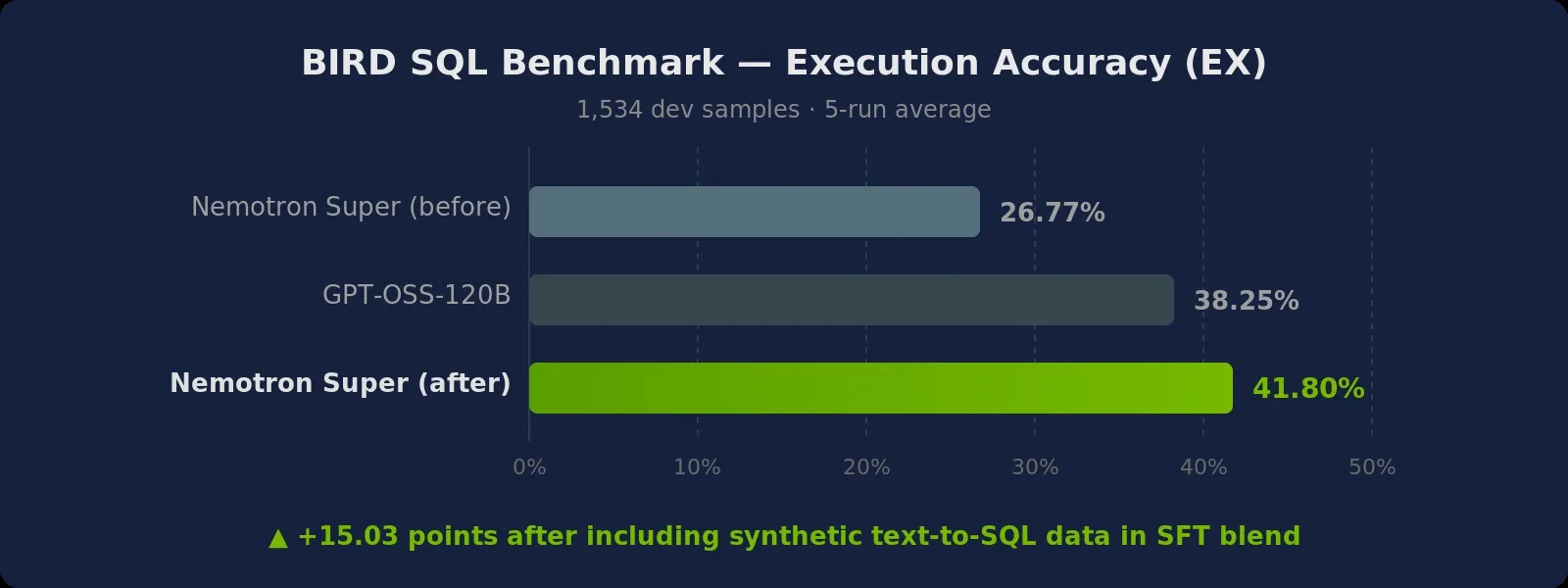
BIRD SQL Benchmark Results - Nemotron Super EX improves from 26.77% to 41.80%

ModelBIRD EX (%)
Nemotron Super (before synthetic text-to-SQL SFT data)26.77
GPT-OSS-120B38.25
Nemotron Super (after synthetic text-to-SQL SFT data)41.8

Caveat on BIRD: BIRD measures execution accuracy (EX) --- whether the query returns the correct result set when run against the ground-truth database. This is stricter than exact-match or string similarity, but it can also be inflated by semantically different queries that happen to produce identical result sets on small test data. BIRD’s dev set includes dirty data, external knowledge requirements, and multi-table schemas, making it more representative of production SQL than earlier benchmarks like Spider --- but it does not cover all production challenges (e.g., multi-statement transactions, DDL, stored procedures, or the hundreds-of-tables schemas common in enterprise warehouses). Results here are on the 1,534-sample dev split averaged over 5 runs.


Key Takeaways

  1. Conditional sampling prevents incoherent records. SubcategorySamplerParams ensures “Geospatial SQL” only appears with “Advanced” complexity, and “Electronic Health Records” only appears with “Healthcare”. Independent samplers would produce nonsensical combinations that confuse training.

  2. Three-stage generation beats one-shot. Separating prompt, schema, and query generation ensures the SQL actually references the tables that exist. One-shot generation frequently hallucinates tables.

  3. Dirty data must be intentional. Explicitly prompting for anti-patterns (dates as text, currency symbols, JSON blobs) forces the model to learn defensive SQL. Clean schemas produce clean-only training data.

  4. Distractor tables teach schema linking. Injecting semantically similar but irrelevant tables forces the model to read the schema instead of guessing from table names. This is the skill gap between academic benchmarks and production.

  5. Per-dialect generation avoids lowest-common-denominator SQL. Rather than generating ANSI SQL and hoping it works everywhere, the pipeline produces dialect-specific schemas and queries with appropriate syntax (strftime vs DATE_SUB vs interval). Each dialect gets its own tailored prompts, validators, and judge prompts.

  6. Hard validators are non-negotiable for code. LLM judges can assess quality, but they can’t reliably detect syntax errors. Syntax validators catch parsing failures that the judge misses.

  7. Multi-dimension scoring enables targeted filtering. A query that scores 4 on Relevance but 1 on Efficiency tells you the model understood the task but wrote a bad plan. You can filter differently depending on what you’re training for.

  8. Chain-of-thought teaches reasoning, not just syntax. Including reasoning traces in the training data teaches models to decompose problems, handle edge cases, and verify logic --- acting as a Data Engineer rather than a translator.


Next Steps

  • Code Sandbox for semantic correctness. The current Quality Waterfall validates syntax and assesses quality (LLM judges), but it doesn’t verify whether the query actually returns the right results. A natural next step would be adding Code Sandbox support to Data Designer --- executing generated SQL against a ground-truth database and comparing results to enable execution-based filtering, end-to-end verification, and hard negative mining for preference training.
  • RL on BIRD. Run reinforcement learning experiments using the NeMo Gym RL environment for BIRD, training models to improve execution accuracy through reward signals from actual query execution.
  • Schema representation. Improve how schemas are represented in prompts to close the gap with SOTA approaches that use richer structural encodings (e.g., foreign key graphs, column descriptions, value examples).
  • More benchmarks. Incorporate additional SQL benchmarks --- Spider 2.0, LiveSQLBench --- to evaluate generalization beyond BIRD and drive the next iteration of the pipeline.

Try It Yourself

The snippet below builds a simplified text-to-SQL pipeline for SQLite using Data Designer. It covers the core stages — seeding & diversification, prompt generation, schema generation with distractors, SQL generation, syntax validation, and LLM judge scoring.

Minimal example: text-to-SQL pipeline for SQLite
1import data_designer.config as dd
2from data_designer.interface import DataDesigner
3
4MODEL_ALIAS = "nvidia-text"
5
6# Build the pipeline (uses default NVIDIA provider via NVIDIA_API_KEY)
7data_designer = DataDesigner()
8config = dd.DataDesignerConfigBuilder()
9
10# --- Stage 1: Seeding & diversification ---
11config.add_column(dd.SamplerColumnConfig(
12 name="industry_sector", sampler_type=dd.SamplerType.CATEGORY,
13 params=dd.CategorySamplerParams(values=["Healthcare", "Financial Services", "Retail"]),
14))
15config.add_column(dd.SamplerColumnConfig(
16 name="sql_complexity", sampler_type=dd.SamplerType.CATEGORY,
17 params=dd.CategorySamplerParams(values=["Beginner", "Intermediate", "Advanced"]),
18))
19config.add_column(dd.SamplerColumnConfig(
20 name="instruction_style", sampler_type=dd.SamplerType.CATEGORY,
21 params=dd.CategorySamplerParams(
22 values=["imperative", "declarative", "interrogative", "contextual", "abbreviated"]
23 ),
24))
25
26# --- Stage 2: Natural-language prompt ---
27config.add_column(dd.LLMTextColumnConfig(
28 name="sql_prompt", model_alias=MODEL_ALIAS,
29 prompt=(
30 "Write a natural-language request to a data assistant about {{ industry_sector }}.\n"
31 "Style: {{ instruction_style }}. Complexity: {{ sql_complexity }}.\n"
32 "Describe the business problem without SQL jargon."
33 ),
34))
35
36# --- Stage 3: Schema + data with distractors ---
37config.add_column(dd.LLMCodeColumnConfig(
38 name="sql_context", model_alias=MODEL_ALIAS,
39 prompt=(
40 "Generate SQLite DDL and sample data for: {{ sql_prompt }}\n"
41 "Include 3-5 core tables, 1-2 distractor tables, distractor columns per table.\n"
42 "Use section headers: -- Core Tables, -- Distractor Tables, etc."
43 ),
44 code_lang=dd.CodeLang.SQL_SQLITE,
45))
46
47# --- Stage 4: SQL generation ---
48config.add_column(dd.LLMCodeColumnConfig(
49 name="sql", model_alias=MODEL_ALIAS,
50 prompt=(
51 "Write SQLite SQL for: {{ sql_prompt }}\n"
52 "Database Context:\n{{ sql_context }}\n"
53 "Ignore distractor tables/columns. Handle dirty data."
54 ),
55 code_lang=dd.CodeLang.SQL_SQLITE,
56))
57
58# --- Stage 5: Validation + judge ---
59config.add_column(dd.ValidationColumnConfig(
60 name="sql_validity",
61 target_columns=["sql"],
62 validator_type=dd.ValidatorType.CODE,
63 validator_params=dd.CodeValidatorParams(code_lang=dd.CodeLang.SQL_SQLITE),
64))
65
66config.add_column(dd.LLMJudgeColumnConfig(
67 name="sql_judge", model_alias=MODEL_ALIAS,
68 prompt=(
69 "Grade the SQL quality.\n"
70 "Prompt: {{ sql_prompt }}\nContext: {{ sql_context }}\nSQL: {{ sql }}\n"
71 "Penalize unnecessary joins to distractor tables."
72 ),
73 scores=[
74 dd.Score(name="relevance", description="Uses only necessary tables/columns",
75 options={"4": "Perfect", "3": "Minor extras", "2": "Unnecessary joins", "1": "Largely irrelevant", "0": "Wrong"}),
76 dd.Score(name="readability", description="Code clarity and formatting",
77 options={"4": "Excellent", "3": "Good", "2": "Adequate", "1": "Poor", "0": "Unreadable"}),
78 ],
79))
80
81# Generate
82preview = data_designer.preview(config, num_records=10)
83preview.display_sample_record()
Full recipe: enterprise_text_to_sql.py (self-contained, runnable)
Download Recipe

Download the complete recipe script

1# SPDX-FileCopyrightText: Copyright (c) 2025 NVIDIA CORPORATION & AFFILIATES. All rights reserved.
2# SPDX-License-Identifier: Apache-2.0
3# /// script
4# requires-python = ">=3.10"
5# dependencies = [
6# "data-designer",
7# ]
8# ///
9"""Nemotron Super Text-to-SQL Recipe: Distractors, Dirty Data, and Multi-Judge Scoring
10
11Generate enterprise-grade text-to-SQL training data with dialect-specific SQL
12(SQLite, MySQL, PostgreSQL), distractor table/column injection, dirty data
13handling, conditional sampling, and multi-dimensional LLM judge scoring.
14
15This recipe implements the pipeline used to produce 96.5k validated text-to-SQL
16records for Nemotron Super v3 SFT training, which raised BIRD benchmark
17execution accuracy from 26.77% to 41.80%.
18
19Pipeline architecture:
20
21 ┌─────────────────────────────────────────────────────────────────────────┐
22 │ STAGE 1: SEEDING & DIVERSIFICATION │
23 │ │
24 │ Domain Controls SQL Controls Prompt Controls │
25 │ ├─ industry_sector ├─ sql_complexity ├─ instruction_style │
26 │ ├─ topic (conditional) ├─ sql_concept ├─ linguistic_register │
27 │ ├─ data_quality_challenge├─ sql_task_type └─ politeness_level │
28 │ ├─ data_quality_concept │ (conditional) │
29 │ ├─ knowledge_dependency └─ sql_task_concept │
30 │ └─ knowledge_concept │
31 ├─────────────────────────────────────────────────────────────────────────┤
32 │ STAGE 2: PROMPT GENERATION (LLM) │
33 │ Natural-language request grounded in metadata; no SQL jargon. │
34 │ Style adapts to instruction_style × register × politeness. │
35 ├─────────────────────────────────────────────────────────────────────────┤
36 │ STAGE 3: SCHEMA + DATA GENERATION (LLM) │
37 │ Dialect-specific DDL + INSERT with 3-5 core tables, 1-2 distractor │
38 │ tables, 3-5 distractor columns per table, dirty data injection. │
39 ├─────────────────────────────────────────────────────────────────────────┤
40 │ STAGE 4: SQL GENERATION (LLM) │
41 │ Dialect-specific SQL; ignores distractors; handles dirty data. │
42 ├─────────────────────────────────────────────────────────────────────────┤
43 │ STAGE 5: VALIDATION + QUALITY SCORING │
44 │ │
45 │ Syntax Validator 5 LLM Judges (0-4 scores) │
46 │ ├─ SQL_SQLITE ├─ Prompt: naturalness, specificity, │
47 │ ├─ SQL_MYSQL │ absence of SQL jargon │
48 │ └─ SQL_POSTGRES ├─ SQL: relevance, readability, │
49 │ │ scalability, standards │
50 │ ├─ Context: relevance, readability, │
51 │ │ scalability, standards │
52 │ ├─ Data Quality: cleaning correctness, │
53 │ │ efficiency │
54 │ └─ Knowledge: application correctness, │
55 │ clarity of inference │
56 │ │
57 │ 15 score columns extracted for downstream filtering │
58 └─────────────────────────────────────────────────────────────────────────┘
59
60Prerequisites:
61 - OPENAI_API_KEY environment variable for OpenAI provider model aliases (default model alias is "openai-text").
62 - NVIDIA_API_KEY environment variable for NVIDIA provider model aliases.
63
64Run:
65 # Basic usage (generates 5 records by default, SQLite dialect)
66 uv run enterprise_text_to_sql.py
67
68 # Generate for a specific dialect
69 uv run enterprise_text_to_sql.py --dialect postgres
70
71 # For help message and available options
72 uv run enterprise_text_to_sql.py --help
73"""
74
75from pathlib import Path
76
77import data_designer.config as dd
78from data_designer.interface import DataDesigner, DatasetCreationResults
79
80SQL_DIALECTS = {
81 "sqlite": dd.CodeLang.SQL_SQLITE,
82 "mysql": dd.CodeLang.SQL_MYSQL,
83 "postgres": dd.CodeLang.SQL_POSTGRES,
84}
85
86
87def build_config(model_alias: str, dialect: str = "sqlite") -> dd.DataDesignerConfigBuilder:
88 code_lang = SQL_DIALECTS[dialect]
89 config_builder = dd.DataDesignerConfigBuilder()
90
91 # =========================================================================
92 # Stage 1: Seeding & diversification
93 # =========================================================================
94
95 config_builder.add_column(
96 dd.SamplerColumnConfig(
97 name="sql_dialect",
98 sampler_type=dd.SamplerType.CATEGORY,
99 params=dd.CategorySamplerParams(values=[dialect]),
100 )
101 )
102
103 config_builder.add_column(
104 dd.SamplerColumnConfig(
105 name="industry_sector",
106 sampler_type=dd.SamplerType.CATEGORY,
107 params=dd.CategorySamplerParams(
108 values=[
109 "Healthcare",
110 "Financial Services",
111 "Retail",
112 "Technology",
113 "Manufacturing",
114 "Aerospace",
115 "Energy",
116 "Telecommunications",
117 "Transportation",
118 "Education",
119 ],
120 ),
121 )
122 )
123
124 config_builder.add_column(
125 dd.SamplerColumnConfig(
126 name="topic",
127 sampler_type=dd.SamplerType.SUBCATEGORY,
128 params=dd.SubcategorySamplerParams(
129 category="industry_sector",
130 values={
131 "Healthcare": [
132 "Electronic Health Records",
133 "Telemedicine Platforms",
134 "Clinical Trials",
135 "Patient Scheduling",
136 "Insurance Claims",
137 ],
138 "Financial Services": [
139 "Fraud Detection",
140 "Trading Systems",
141 "Risk Assessment",
142 "Portfolio Management",
143 "Regulatory Compliance",
144 ],
145 "Retail": [
146 "Inventory Management",
147 "Customer Segmentation",
148 "Pricing Optimization",
149 "Supply Chain",
150 "Returns Processing",
151 ],
152 "Technology": [
153 "Cloud Platforms",
154 "ML Pipelines",
155 "DevOps Tools",
156 "API Gateway Logs",
157 "User Analytics",
158 ],
159 "Manufacturing": [
160 "Quality Control",
161 "Production Scheduling",
162 "Equipment Maintenance",
163 "Supply Chain Optimization",
164 "Safety Compliance",
165 ],
166 "Aerospace": [
167 "Flight Operations",
168 "Satellite Systems",
169 "Parts Procurement",
170 "Maintenance Scheduling",
171 "Crew Management",
172 ],
173 "Energy": [
174 "Grid Management",
175 "Renewable Forecasting",
176 "Asset Monitoring",
177 "Trading and Markets",
178 "Regulatory Reporting",
179 ],
180 "Telecommunications": [
181 "Network Operations",
182 "Customer Billing",
183 "Service Provisioning",
184 "Call Detail Records",
185 "Churn Prediction",
186 ],
187 "Transportation": [
188 "Fleet Management",
189 "Route Optimization",
190 "Freight Tracking",
191 "Driver Scheduling",
192 "Maintenance Records",
193 ],
194 "Education": [
195 "Student Records",
196 "Course Enrollment",
197 "Learning Analytics",
198 "Financial Aid",
199 "Faculty Management",
200 ],
201 },
202 ),
203 )
204 )
205
206 config_builder.add_column(
207 dd.SamplerColumnConfig(
208 name="sql_complexity",
209 sampler_type=dd.SamplerType.CATEGORY,
210 params=dd.CategorySamplerParams(
211 values=["Beginner", "Intermediate", "Advanced"],
212 ),
213 )
214 )
215
216 config_builder.add_column(
217 dd.SamplerColumnConfig(
218 name="sql_concept",
219 sampler_type=dd.SamplerType.SUBCATEGORY,
220 params=dd.SubcategorySamplerParams(
221 category="sql_complexity",
222 values={
223 "Beginner": [
224 "Basic SELECT Statements",
225 "WHERE Clauses",
226 "Simple Aggregations",
227 "Basic JOINs",
228 "INSERT, UPDATE, DELETE",
229 "ORDER BY and LIMIT",
230 ],
231 "Intermediate": [
232 "Window Functions",
233 "Correlated Subqueries",
234 "Multiple JOINs with Aggregations",
235 "CASE Expressions",
236 "GROUP BY with HAVING",
237 "Set Operations (UNION, INTERSECT, EXCEPT)",
238 ],
239 "Advanced": [
240 "Recursive CTEs",
241 "Frame Clauses",
242 "Pivot/Unpivot Patterns",
243 "Complex Analytical Functions",
244 "Self-Joins for Hierarchies",
245 "Conditional Aggregation",
246 ],
247 },
248 ),
249 )
250 )
251
252 config_builder.add_column(
253 dd.SamplerColumnConfig(
254 name="sql_task_type",
255 sampler_type=dd.SamplerType.CATEGORY,
256 params=dd.CategorySamplerParams(
257 values=[
258 "Foundational Queries & DML",
259 "Data Quality & Validation",
260 "Advanced Analytics & Windowing",
261 "Schema, DDL & Performance",
262 ],
263 ),
264 conditional_params={
265 "sql_complexity == 'Beginner'": dd.CategorySamplerParams(
266 values=["Foundational Queries & DML", "Data Quality & Validation"],
267 ),
268 "sql_complexity == 'Intermediate'": dd.CategorySamplerParams(
269 values=[
270 "Foundational Queries & DML",
271 "Data Quality & Validation",
272 "Advanced Analytics & Windowing",
273 ],
274 ),
275 "sql_complexity == 'Advanced'": dd.CategorySamplerParams(
276 values=[
277 "Advanced Analytics & Windowing",
278 "Schema, DDL & Performance",
279 "Data Quality & Validation",
280 ],
281 ),
282 },
283 )
284 )
285
286 config_builder.add_column(
287 dd.SamplerColumnConfig(
288 name="sql_task_concept",
289 sampler_type=dd.SamplerType.SUBCATEGORY,
290 params=dd.SubcategorySamplerParams(
291 category="sql_task_type",
292 values={
293 "Foundational Queries & DML": [
294 "Multi-table retrieval",
295 "Filtered aggregation",
296 "Conditional insert/update",
297 "Ranked retrieval",
298 ],
299 "Data Quality & Validation": [
300 "NULL detection and handling",
301 "Duplicate detection",
302 "Data type casting and cleanup",
303 "Referential integrity check",
304 ],
305 "Advanced Analytics & Windowing": [
306 "Running totals and moving averages",
307 "Ranking and percentile computation",
308 "Gap and island detection",
309 "Year-over-year comparison",
310 ],
311 "Schema, DDL & Performance": [
312 "Index-aware query optimization",
313 "Partitioned query design",
314 "Constraint-based validation",
315 "Schema migration pattern",
316 ],
317 },
318 ),
319 )
320 )
321
322 config_builder.add_column(
323 dd.SamplerColumnConfig(
324 name="data_quality_challenge",
325 sampler_type=dd.SamplerType.CATEGORY,
326 params=dd.CategorySamplerParams(
327 values=[
328 "Type Mismatches",
329 "Temporal Drift",
330 "Embedded Special Characters",
331 "Mixed Formats",
332 "NULL Handling",
333 ],
334 ),
335 )
336 )
337
338 config_builder.add_column(
339 dd.SamplerColumnConfig(
340 name="data_quality_concept",
341 sampler_type=dd.SamplerType.SUBCATEGORY,
342 params=dd.SubcategorySamplerParams(
343 category="data_quality_challenge",
344 values={
345 "Type Mismatches": [
346 "Currency stored as text with symbols ($57,500)",
347 "Boolean stored as string (yes/no/true/false/1/0)",
348 ],
349 "Temporal Drift": [
350 "Dates stored as text in mixed formats (01-Jan-2023 vs 2023/01/01)",
351 "Timestamps with inconsistent timezone handling",
352 ],
353 "Embedded Special Characters": [
354 "Newlines or tabs inside text fields",
355 "Unicode or accented characters in names",
356 ],
357 "Mixed Formats": [
358 "Phone numbers in mixed formats (555-1234 vs (555) 123-4567)",
359 "Addresses with inconsistent abbreviations",
360 ],
361 "NULL Handling": [
362 "NULLs disguised as empty strings or sentinel values (-1, N/A)",
363 "Optional FKs with NULL references",
364 ],
365 },
366 ),
367 )
368 )
369
370 config_builder.add_column(
371 dd.SamplerColumnConfig(
372 name="knowledge_dependency",
373 sampler_type=dd.SamplerType.CATEGORY,
374 params=dd.CategorySamplerParams(
375 values=["Domain Knowledge", "Implicit Logic", "Common Sense"],
376 ),
377 )
378 )
379
380 config_builder.add_column(
381 dd.SamplerColumnConfig(
382 name="knowledge_concept",
383 sampler_type=dd.SamplerType.SUBCATEGORY,
384 params=dd.SubcategorySamplerParams(
385 category="knowledge_dependency",
386 values={
387 "Domain Knowledge": [
388 "Industry-specific business rules",
389 "Regulatory thresholds and compliance criteria",
390 "Domain-specific KPI definitions",
391 ],
392 "Implicit Logic": [
393 "Fiscal year vs calendar year reasoning",
394 "Business-day exclusion logic",
395 "Implied sort/filter criteria from context",
396 ],
397 "Common Sense": [
398 "Unit conversion (e.g., cents to dollars)",
399 "Age or duration calculation from dates",
400 "Geographic or hierarchical inference",
401 ],
402 },
403 ),
404 )
405 )
406
407 config_builder.add_column(
408 dd.SamplerColumnConfig(
409 name="instruction_style",
410 sampler_type=dd.SamplerType.CATEGORY,
411 params=dd.CategorySamplerParams(
412 values=["imperative", "declarative", "interrogative", "contextual", "abbreviated"],
413 ),
414 )
415 )
416
417 config_builder.add_column(
418 dd.SamplerColumnConfig(
419 name="linguistic_register",
420 sampler_type=dd.SamplerType.CATEGORY,
421 params=dd.CategorySamplerParams(
422 values=["formal", "conversational", "technical", "academic", "direct"],
423 ),
424 )
425 )
426
427 config_builder.add_column(
428 dd.SamplerColumnConfig(
429 name="politeness_level",
430 sampler_type=dd.SamplerType.CATEGORY,
431 params=dd.CategorySamplerParams(
432 values=["none", "minimal", "polite", "very polite"],
433 ),
434 )
435 )
436
437 # =========================================================================
438 # Stage 2: Prompt generation
439 # =========================================================================
440
441 config_builder.add_column(
442 dd.LLMTextColumnConfig(
443 name="sql_prompt",
444 model_alias=model_alias,
445 system_prompt=PROMPT_GEN_SYSTEM_PROMPT,
446 prompt=PROMPT_GEN_TEXT,
447 )
448 )
449
450 # =========================================================================
451 # Stage 3: Schema + data with distractor injection
452 # =========================================================================
453
454 config_builder.add_column(
455 dd.LLMCodeColumnConfig(
456 name="sql_context",
457 model_alias=model_alias,
458 system_prompt="You are an expert SQL database architect who designs well-structured, normalized schemas.",
459 prompt=SCHEMA_GEN_PROMPTS[dialect],
460 code_lang=code_lang,
461 )
462 )
463
464 # =========================================================================
465 # Stage 4: Dialect-specific SQL generation
466 # =========================================================================
467
468 config_builder.add_column(
469 dd.LLMCodeColumnConfig(
470 name="sql",
471 model_alias=model_alias,
472 system_prompt="You are an expert SQL programmer who solves problems with clean, efficient, and perfectly structured queries. Return only the final SQL.",
473 prompt=SQL_GEN_PROMPTS[dialect],
474 code_lang=code_lang,
475 )
476 )
477
478 # =========================================================================
479 # Stage 5: Validation + 5 LLM judges
480 # =========================================================================
481
482 config_builder.add_column(
483 dd.ValidationColumnConfig(
484 name="sql_validity_result",
485 target_columns=["sql"],
486 validator_type=dd.ValidatorType.CODE,
487 validator_params=dd.CodeValidatorParams(code_lang=code_lang),
488 )
489 )
490
491 config_builder.add_column(
492 dd.LLMJudgeColumnConfig(
493 name="sql_prompt_judge_result",
494 model_alias=model_alias,
495 prompt=PROMPT_JUDGE_TEXT,
496 scores=PROMPT_SCORES,
497 )
498 )
499
500 config_builder.add_column(
501 dd.LLMJudgeColumnConfig(
502 name="sql_judge_result",
503 model_alias=model_alias,
504 prompt=SQL_JUDGE_TEXT,
505 scores=SQL_SCORES,
506 )
507 )
508
509 config_builder.add_column(
510 dd.LLMJudgeColumnConfig(
511 name="sql_context_judge_result",
512 model_alias=model_alias,
513 prompt=CONTEXT_JUDGE_PROMPTS[dialect],
514 scores=SQL_SCORES,
515 )
516 )
517
518 config_builder.add_column(
519 dd.LLMJudgeColumnConfig(
520 name="sql_data_quality_judge_result",
521 model_alias=model_alias,
522 prompt=DATA_QUALITY_JUDGE_TEXT,
523 scores=DATA_QUALITY_SCORES,
524 )
525 )
526
527 config_builder.add_column(
528 dd.LLMJudgeColumnConfig(
529 name="sql_knowledge_judge_result",
530 model_alias=model_alias,
531 prompt=KNOWLEDGE_JUDGE_TEXT,
532 scores=KNOWLEDGE_SCORES,
533 )
534 )
535
536 # =========================================================================
537 # Score extraction (15 flat columns for downstream filtering)
538 # =========================================================================
539
540 for judge_name, rubric_names in SCORE_EXTRACTION_MAP:
541 prefix = judge_name.replace("_judge_result", "").replace("sql_", "")
542 for rubric in rubric_names:
543 config_builder.add_column(
544 dd.ExpressionColumnConfig(
545 name=f"{prefix}_{rubric}_score",
546 expr=f"{{{{ {judge_name}.{rubric}.score if {judge_name}.{rubric}.score is not none else '' }}}}",
547 )
548 )
549
550 return config_builder
551
552
553def create_dataset(
554 config_builder: dd.DataDesignerConfigBuilder,
555 num_records: int,
556 artifact_path: Path | str | None = None,
557) -> DatasetCreationResults:
558 data_designer = DataDesigner(artifact_path=artifact_path)
559 results = data_designer.create(config_builder, num_records=num_records)
560 return results
561
562
563# =============================================================================
564# Prompt Templates
565# =============================================================================
566
567PROMPT_GEN_SYSTEM_PROMPT = """\
568You write natural-language requests to a data assistant. You adapt your writing \
569style based on the specified instruction style, linguistic register, and politeness level. \
570Requests avoid meta-instructions, code, or explicit SQL jargon unless it's common-sense terminology.\
571"""
572
573PROMPT_GEN_TEXT = """\
574Write a single-sentence, natural-language request to a data assistant or agent to solve a specific SQL problem.
575
576## Style Requirements
577
578* **Instruction Style:** Use a {{ instruction_style }} style.
579* **Linguistic Register:** Use a {{ linguistic_register }} register.
580* **Politeness Level:** Apply {{ politeness_level }} politeness.
581
582## Content Constraints
583
584* Do NOT use explicit SQL keywords or technical jargon. Describe the **business problem**.
585* Keep the intent specific; mention outputs, filters, and aggregations clearly.
586* Do not include code, backticks, or any fenced blocks.
587* Realistic Thresholds: The sample data is small (5-10 rows per table). Keep thresholds small.
588* Relative Time: It's okay to say "recent", "last year", "past few months" instead of exact dates.
589
590## Grounding Requirements
591
592* The request must pertain to the {{ industry_sector }} sector and {{ topic }} topic.
593* The request must implicitly require SQL at the {{ sql_complexity }} level involving {{ sql_concept }}.
594* The request must require a {{ sql_task_type }} task, specifically "{{ sql_task_concept }}".
595* The problem must implicitly require handling "{{ data_quality_concept }}".
596* The problem must implicitly require "{{ knowledge_concept }}".\
597"""
598
599_SCHEMA_GEN_TEMPLATE = """\
600Generate {dialect_label} DDL and sample data for tables relevant to the instruction.
601Instruction: {{{{ sql_prompt }}}}
602
603Requirements:
604
605* Scope: Provide only CREATE TABLE and INSERT statements.
606* Integrity: Define PRIMARY KEYs and FOREIGN KEYs with consistent data types. Use snake_case names.
607* **Section Headers (REQUIRED):**
608 - `-- Core Tables`
609 - `-- Distractor Tables`
610 - `-- Sample Data for Core Tables`
611 - `-- Sample Data for Distractor Tables`
612 - Do NOT include any other comments.
613* Coverage: Include 3-5 core tables for {{{{ industry_sector }}}}/{{{{ topic }}}} connected via FKs.
614* **Distractor Tables:** Include 1-2 additional tables plausible for the domain but NOT needed \
615for the instruction. Each with FK links to core tables and 5-10 rows of realistic data.
616* Realism: Include 3-5 distractor columns per table (created_at, updated_by, description, is_active).
617* **Dirty Data:** Introduce "{{{{ data_quality_concept }}}}" issues. Dirty columns MUST be {text_type}.
618* Sample Data: 5-10 realistic rows per table. Mix clean and dirty rows.
619* **No Data Comments:** Do NOT explain which rows are dirty.
620* **Determinism:** No NOW()/CURRENT_DATE in INSERT statements. Use explicit literal dates.
621* Executability: End each statement with a semicolon. Use {dialect_label} syntax.
622* Do not include meta-instructions or reasoning traces.\
623"""
624
625SCHEMA_GEN_PROMPTS = {
626 "sqlite": _SCHEMA_GEN_TEMPLATE.format(dialect_label="SQLite", text_type="TEXT"),
627 "mysql": _SCHEMA_GEN_TEMPLATE.format(dialect_label="MySQL", text_type="VARCHAR or TEXT"),
628 "postgres": _SCHEMA_GEN_TEMPLATE.format(dialect_label="PostgreSQL", text_type="TEXT or VARCHAR"),
629}
630
631_SQL_GEN_BASE = """\
632Write {dialect_label} SQL for the instruction using only the provided database context.
633Instruction: {{{{ sql_prompt }}}}
634
635Database Context:
636{{{{ sql_context }}}}
637
638Requirements:
639
640* Validity: You are strictly forbidden from referencing any table or column not in the context.
641* Handle Data Quality: Correctly handle "{{{{ data_quality_concept }}}}" using appropriate cleaning functions.
642* Apply Knowledge: Apply "{{{{ knowledge_concept }}}}" even if it requires inferring unstated logic.
643* Grounding: The SQL must demonstrate {{{{ sql_concept }}}} and {{{{ sql_task_type }}}}.
644* Precision: Avoid SELECT *. Explicitly list columns; alias computed columns descriptively.
645* Alignment: Match the {{{{ sql_complexity }}}} level.
646* **Relative Time Anchoring:** Do NOT use CURRENT_DATE or real-time functions. Anchor to max date in data.
647* **No Unasked Joins:** Do NOT join distractor tables or select distractor columns.
648* **Logic:** Prefer CTEs to clean/normalize first, then compute/aggregate.
649* Comments: Do not include inline comments.
650* Formatting: Terminate with semicolons.\
651"""
652
653_SQLITE_EXTRAS = """
654* Use SQLite syntax: strftime for dates, LIMIT instead of TOP.
655* Do NOT use LATERAL joins or REGEXP_REPLACE. Use REPLACE()/SUBSTR() for cleaning.
656* Date Parsing: Normalize with REPLACE(date_col, '/', '-') inside date()/strftime().\
657"""
658
659_MYSQL_EXTRAS = """
660* Use MySQL syntax: DATE_ADD, DATEDIFF for dates, LIMIT for pagination, backticks for identifiers.
661* Do NOT use REGEXP_REPLACE or CONVERT_TZ. Use REPLACE(), TRIM(), SUBSTRING().\
662"""
663
664_POSTGRES_EXTRAS = """
665* Use PostgreSQL syntax: :: for casting, ILIKE for case-insensitive matching, LIMIT and OFFSET.
666* regexp_replace is available for cleaning.\
667"""
668
669SQL_GEN_PROMPTS = {
670 "sqlite": _SQL_GEN_BASE.format(dialect_label="SQLite") + _SQLITE_EXTRAS,
671 "mysql": _SQL_GEN_BASE.format(dialect_label="MySQL") + _MYSQL_EXTRAS,
672 "postgres": _SQL_GEN_BASE.format(dialect_label="PostgreSQL") + _POSTGRES_EXTRAS,
673}
674
675# =============================================================================
676# Judge Prompts
677# =============================================================================
678
679PROMPT_JUDGE_TEXT = """\
680You are an expert product analyst who writes and reviews natural, human-like data requests.
681Evaluate the **NL Prompt** quality.
682
683## NL Prompt
684
685{{ sql_prompt }}\
686"""
687
688SQL_JUDGE_TEXT = """\
689You are a SQL data expert. Grade the quality of **Generated SQL** based on the prompt and context.
690
691Natural Language Prompt:
692{{ sql_prompt }}
693
694Database Context:
695{{ sql_context }}
696
697Generated SQL:
698{{ sql }}
699
700When scoring, pay special attention to:
701- **Minimal Table Usage:** Penalize queries that unnecessarily join distractor tables.
702- **Minimal Column Usage:** Distractor columns should be ignored unless explicitly needed.
703- **Correctness:** The query must produce the correct result.
704- **Efficiency:** Prefer simple, readable solutions over unnecessarily complex ones.\
705"""
706
707_CONTEXT_JUDGE_TEMPLATE = """\
708You are a SQL database architect. Evaluate the **Generated Database Context** quality.
709
710Natural Language Prompt:
711{{{{ sql_prompt }}}}
712
713Generated Database Context ({dialect}):
714{{{{ sql_context }}}}
715
716When scoring, verify:
717- **Sufficient Tables:** 3-5 core tables plus 1-2 distractor tables. Penalize bare-minimum schemas.
718- **Distractor Columns:** Each table should include realistic columns beyond those needed for the query.
719- **Realistic Relationships:** Appropriate PK/FK relationships. Distractor tables should have logical FK links.
720- **Sample Data Quality:** Realistic, varied INSERT data.
721- **Executability:** Syntactically correct for {dialect}.\
722"""
723
724CONTEXT_JUDGE_PROMPTS = {
725 "sqlite": _CONTEXT_JUDGE_TEMPLATE.format(dialect="SQLite"),
726 "mysql": _CONTEXT_JUDGE_TEMPLATE.format(dialect="MySQL"),
727 "postgres": _CONTEXT_JUDGE_TEMPLATE.format(dialect="PostgreSQL"),
728}
729
730DATA_QUALITY_JUDGE_TEXT = """\
731You are an expert in data quality and validation. Score the SQL's handling of messy data.
732
733## Natural Language Prompt
734{{ sql_prompt }}
735
736## Data Quality Challenge
737{{ data_quality_challenge }} / {{ data_quality_concept }}
738
739## Database Context
740{{ sql_context }}
741
742## Generated SQL
743{{ sql }}\
744"""
745
746KNOWLEDGE_JUDGE_TEXT = """\
747You are an expert in business intelligence and semantic interpretation. \
748Score the SQL's application of implicit business knowledge.
749
750## Natural Language Prompt
751{{ sql_prompt }}
752
753## Knowledge Dependency
754{{ knowledge_dependency }} / {{ knowledge_concept }}
755
756## Database Context
757{{ sql_context }}
758
759## Generated SQL
760{{ sql }}\
761"""
762
763# =============================================================================
764# Scoring Rubrics (5 judges, 15 dimensions)
765# =============================================================================
766
767SQL_SCORES = [
768 dd.Score(
769 name="relevance",
770 description="Uses only necessary tables/columns; ignores distractors",
771 options={
772 "4": "Perfectly meets all requirements; uses only strictly necessary tables and columns.",
773 "3": "Meets most requirements with minor deviations; may include a slightly unnecessary column.",
774 "2": "Moderate deviation; joins an unnecessary table or selects several irrelevant columns.",
775 "1": "Significant deviations; multiple unnecessary table joins or largely irrelevant output.",
776 "0": "Does not adhere to instructions; query is unrelated or joins many unnecessary tables.",
777 },
778 ),
779 dd.Score(
780 name="readability",
781 description="Formatting, clarity, and maintainability",
782 options={
783 "4": "Excellently formatted, meaningful aliases, high readability and ease of maintenance.",
784 "3": "Well-formatted, relatively easy to understand; uses aliases with some organization.",
785 "2": "Somewhat readable with basic formatting but needs improvement.",
786 "1": "Minimal formatting, hard to understand; lacks meaningful names.",
787 "0": "Unreadable, no attempt at formatting.",
788 },
789 ),
790 dd.Score(
791 name="scalability",
792 description="Scales well with larger datasets; avoids inefficient patterns",
793 options={
794 "4": "Highly scalable; avoids Cartesian joins and unnecessary table joins.",
795 "3": "Scales well; minor areas for optimization such as an extra join.",
796 "2": "Moderately scalable; includes unnecessary joins or suboptimal access patterns.",
797 "1": "Poor scalability; joins multiple unnecessary tables or uses inefficient patterns.",
798 "0": "Does not scale; overlooks fundamental scalability practices.",
799 },
800 ),
801 dd.Score(
802 name="standards",
803 description="Compliance with SQL standards and best practices",
804 options={
805 "4": "Strictly adheres to SQL standards and best practices.",
806 "3": "Closely follows SQL standards and many best practices.",
807 "2": "Generally follows standards but has room for better alignment.",
808 "1": "Loosely follows standards, with several deviations.",
809 "0": "Does not follow standards; uses deprecated or non-standard syntax.",
810 },
811 ),
812]
813
814PROMPT_SCORES = [
815 dd.Score(
816 name="naturalness_of_wording",
817 description="How human-like, colloquial, and non-robotic the phrasing is",
818 options={
819 "4": "Reads like a native speaker; concise, fluent, and natural.",
820 "3": "Generally natural; minor stiffness or formalism.",
821 "2": "Somewhat stilted or templated; noticeable artifacts.",
822 "1": "Robotic or awkward; obviously machine-generated.",
823 "0": "Unnatural and hard to read.",
824 },
825 ),
826 dd.Score(
827 name="specificity_and_clarity",
828 description="Is the request specific about outputs, filters, and operations?",
829 options={
830 "4": "Very specific and clear outputs/filters/aggregations; minimal ambiguity.",
831 "3": "Mostly specific; minor ambiguity remains.",
832 "2": "Partially specific; key details are missing.",
833 "1": "Vague; unclear what should be returned or computed.",
834 "0": "Completely ambiguous.",
835 },
836 ),
837 dd.Score(
838 name="absence_of_sql_jargon",
839 description="Avoids explicit SQL terms, table/column names, or schema hints",
840 options={
841 "4": "No SQL jargon at all; entirely tool-agnostic phrasing.",
842 "3": "Tiny hints but no explicit SQL or schema leakage.",
843 "2": "Occasional SQL terms or schema leakage present.",
844 "1": "Frequent SQL jargon and schema references.",
845 "0": "Reads like a SQL spec; heavy jargon.",
846 },
847 ),
848]
849
850DATA_QUALITY_SCORES = [
851 dd.Score(
852 name="correctness_of_cleaning_logic",
853 description="Does the query correctly and fully clean the messy data?",
854 options={
855 "4": "Flawless cleaning logic; handles all transformations and edge cases perfectly.",
856 "3": "Correctly cleans data for most cases but might miss minor edge cases.",
857 "2": "Attempts to clean data, but logic is only partially correct.",
858 "1": "Cleaning logic is fundamentally flawed.",
859 "0": "No attempt to clean the data.",
860 },
861 ),
862 dd.Score(
863 name="efficiency_of_cleaning_method",
864 description="Uses efficient, standard functions for cleaning?",
865 options={
866 "4": "Highly efficient, optimal SQL functions for the task.",
867 "3": "Correct and standard functions, but a more performant approach exists.",
868 "2": "Convoluted or inefficient method where a simpler one would suffice.",
869 "1": "Very inefficient or non-standard method that would scale poorly.",
870 "0": "Completely inappropriate or non-functional method.",
871 },
872 ),
873]
874
875KNOWLEDGE_SCORES = [
876 dd.Score(
877 name="correctness_of_knowledge_application",
878 description="Does the query correctly translate the implicit knowledge into SQL logic?",
879 options={
880 "4": "Flawlessly translates abstract concept into precise, correct SQL logic.",
881 "3": "Logic correctly reflects the knowledge concept but could be expressed more directly.",
882 "2": "Partially applies the logic, misinterpreting some nuances.",
883 "1": "Fundamentally misinterprets the knowledge concept.",
884 "0": "No attempt to apply the required knowledge.",
885 },
886 ),
887 dd.Score(
888 name="clarity_of_inference",
889 description="Is the applied logic clear and self-explanatory within the query?",
890 options={
891 "4": "Logic is immediately obvious through well-chosen aliases, CTEs, or clear filtering.",
892 "3": "Logic is correct but requires some inspection to understand.",
893 "2": "Logic is technically correct but obscure, using magic numbers or hard-to-read conditions.",
894 "1": "Logic is convoluted and appears incorrect.",
895 "0": "Query is completely opaque, with no discernible link to the required knowledge.",
896 },
897 ),
898]
899
900SCORE_EXTRACTION_MAP = [
901 ("sql_judge_result", ["relevance", "readability", "scalability", "standards"]),
902 ("sql_context_judge_result", ["relevance", "readability", "scalability", "standards"]),
903 ("sql_prompt_judge_result", ["naturalness_of_wording", "specificity_and_clarity", "absence_of_sql_jargon"]),
904 ("sql_data_quality_judge_result", ["correctness_of_cleaning_logic", "efficiency_of_cleaning_method"]),
905 ("sql_knowledge_judge_result", ["correctness_of_knowledge_application", "clarity_of_inference"]),
906]
907
908if __name__ == "__main__":
909 from argparse import ArgumentParser
910
911 parser = ArgumentParser()
912 parser.add_argument("--model-alias", type=str, default="openai-text")
913 parser.add_argument("--num-records", type=int, default=5)
914 parser.add_argument("--artifact-path", type=str, default=None)
915 parser.add_argument(
916 "--dialect",
917 type=str,
918 default="sqlite",
919 choices=list(SQL_DIALECTS.keys()),
920 help="SQL dialect to generate for (default: sqlite)",
921 )
922 args = parser.parse_args()
923
924 config_builder = build_config(model_alias=args.model_alias, dialect=args.dialect)
925 results = create_dataset(config_builder, num_records=args.num_records, artifact_path=args.artifact_path)
926
927 print(f"Dataset saved to: {results.artifact_storage.final_dataset_path}")
928
929 results.load_analysis().to_report()

Summary

This dataset is the result of a cross-functional effort across the NeMo Data Designer and Nemotron teams at NVIDIA, combining expertise in synthetic data generation, SQL engineering, and large-scale model training.

Because this pipeline is encapsulated in Data Designer, the configuration can be shared with any team --- allowing them to fork our baseline, swap in their own schemas or industry verticals, and generate a custom, high-fidelity dataset for their specific domain.


Key Resources:

  • NeMo Data Designer: github.com/NVIDIA-NeMo/DataDesigner
  • BIRD Benchmark: bird-bench.github.io
  • Spider 2.0 Benchmark: spider2-sql.github.io

Want to learn more about NeMo Data Designer? Check out our documentation and start building your own high-fidelity synthetic datasets today.