Low Latency Streaming (LLS/WebRTC) Functions

View as Markdown

Cloud Functions supports the ability to stream video, audio, and other data using WebRTC.
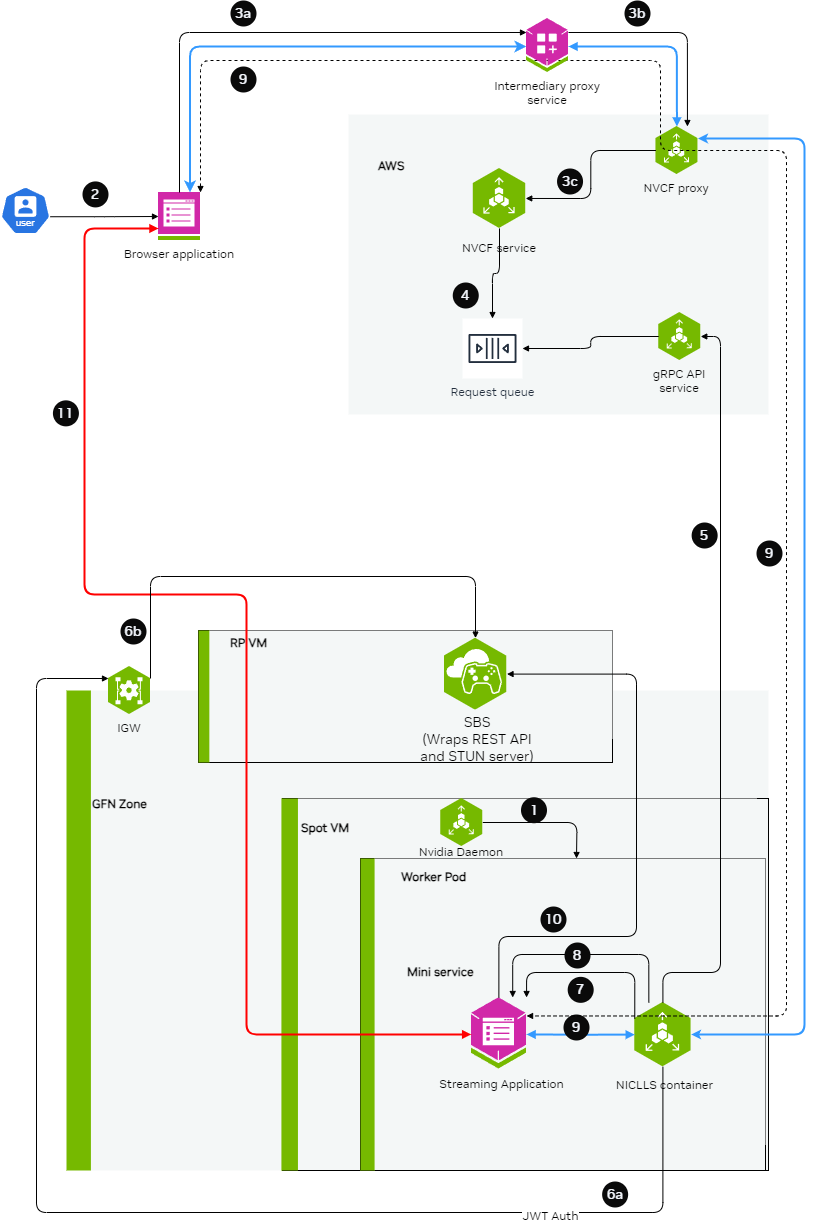
Low Latency Streaming Diagram

For complete examples of LLS streaming functions, contact your NVIDIA representative for access to sample function containers.

Cloud Provider Network Requirements

WebRTC streaming uses UDP NodePort services to carry media traffic between the browser client and the streaming application. Cloud providers apply network security rules at multiple layers. If any layer blocks UDP inbound traffic on the NodePort range (30000-32767), streaming sessions fail even though the function shows ACTIVE.

Azure (AKS)

AKS attaches two Network Security Groups (NSGs) to every node: one on the subnet and one on the NIC in the managed resource group (MC_<resource-group>_<cluster>_<region>). Both NSGs must allow inbound UDP traffic on the NodePort range. The subnet NSG alone is not sufficient.

After helmfile sync completes, add the NIC NSG rule:

# Identify the managed resource group
MC_RG="MC_${RESOURCE_GROUP}_${CLUSTER_NAME}_${LOCATION}"
# Add the UDP rule to every NIC NSG in the managed resource group.
# Multi-pool clusters have one NSG per pool; streaming pods may
# schedule on any pool, so all NSGs need the rule.
for NIC_NSG in $(az network nsg list -g "$MC_RG" --query "[].name" -o tsv); do
echo "Adding UDP rule to NSG: $NIC_NSG"
az network nsg rule create -g "$MC_RG" --nsg-name "$NIC_NSG" \
-n allow-udp-nodeports-webrtc --priority 510 \
--direction Inbound --access Allow --protocol Udp \
--source-address-prefix Internet --source-port-range "*" \
--destination-address-prefix "*" --destination-port-range "30000-32767"
done

Verify the rules are present:

# Subnet NSG (your own, created during cluster setup)
az network nsg rule list -g "$RESOURCE_GROUP" --nsg-name "$SUBNET_NSG" \
--query "[?protocol=='Udp']" -o table
# NIC NSGs (AKS-managed, one per node pool)
MC_RG="MC_${RESOURCE_GROUP}_${CLUSTER_NAME}_${LOCATION}"
for NIC_NSG in $(az network nsg list -g "$MC_RG" --query "[].name" -o tsv); do
echo "=== $NIC_NSG ==="
az network nsg rule list -g "$MC_RG" --nsg-name "$NIC_NSG" \
--query "[?protocol=='Udp']" -o table
done

If the NIC NSG rule is missing, WebRTC clients receive NVST_R_GENERIC_ERROR while the function remains ACTIVE. See streaming-troubleshooting for diagnosis steps.

AWS (EKS)

For LLS streaming on EKS, security group and NLB configuration is covered in LLS Installation.

Building the Streaming Server Application

The streaming application needs to be packaged inside a container and should be leveraging the StreamSDK. The streaming application needs to follow the below guidelines:

  1. Expose an HTTP server at port CONTROL_SERVER_PORT with following 2 endpoints:

    1. Health endpoint: This endpoint should return 200 HTTP status code only when the streaming application container is ready to start streaming a session. If the streaming application container doesn’t want to serve any more streaming sessions of current container deployment this endpoint should return HTTP status code 500.

      Request:
      Endpoint:
      GET /v1/streaming/ready
      Responses:
      Status code:
      200 OK
      500 Internal Server Error
    2. STUN creds endpoint: This endpoint should accept the access details and credentials for STUN server and keep it cached in the memory of the streaming application. When the streaming requests comes, the streaming application can use these access details and credentials to communicate with STUN server and request for opening of ports for streaming.

      Request:
      Endpoint:
      POST /v1/streaming/creds
      Headers:
      Content-Type: application/json
      Request Body:
      {
      "stunIp": "<string>",
      "stunPort": <int>,
      "username": "<string>",
      "password": "<string>"
      }
      Responses:
      Status code:
      200 OK
  2. Expose a server at port STREAMING_SERVER_PORT to accepting WebSocket connection

    1. An endpoint STREAMING_START_ENDPOINT should be exposed by this server
  3. Post websocket connection establishment guidelines:

    1. When the browser client requests for opening port for specific protocols (e.g. WebRTC), the streaming application needs to request STUN server to open port. This port should be in the range of 47998 and 48020 which would be referred as STREAMING_PORT_BINDING_RANGE in this doc.
  4. Containerization guidelines:

    1. The container should make sure that the CONTROL_SERVER_PORT, STREAMING_SERVER_PORT and STREAMING_PORT_BINDING_RANGE are exposed by the container and accessible from outside the container.
    2. If multiple sessions one after another needs to be supported with a fresh start of container, then exit the container after a streaming session ends.

Creating the LLS Streaming Function

When creating the function, ensure functionType is set to STREAMING:

curl -s -X POST "http://${GATEWAY_ADDR}/v2/nvcf/functions" \
-H "Host: api.${GATEWAY_ADDR}" \
-H "Authorization: Bearer $NVCF_TOKEN" \
-H 'accept: application/json' \
-H 'Content-Type: application/json' \
-d '{
"name": "'$STREAMING_FUNCTION_NAME'",
"inferenceUrl": "/sign_in",
"inferencePort": '$STREAMING_SERVER_PORT',
"health": {
"protocol": "HTTP",
"uri": "/v1/streaming/ready",
"port": '$CONTROL_SERVER_PORT',
"timeout": "PT10S",
"expectedStatusCode": 200
},
"containerImage": "'$STREAMING_CONTAINER_IMAGE'",
"apiBodyFormat": "CUSTOM",
"description": "'$STREAMING_FUNCTION_NAME'",
"functionType": "STREAMING"
}
}'

Connecting to a streaming function with a client

Intermediary Proxy

An intermediary proxy service needs to be deployed in order to facilitate the connection to the streaming function.

The intermediate proxy serves to handle authentication and the headers that are required for NVCF, and also to align the connection behavior with NVCF that the browser can’t handle on its own, or the browser behavior is unpredictable.

Proxy Responsibilities

The intermediary proxy performs the following functionalities:

  1. Authenticate the user token coming from the browser to the intermediary proxy
  2. Authorize the user to have access to specific streaming function
  3. Once the user is authenticated and authorized, modify the websocket connection coming in to append the required NVCF headers (NVCF_API_KEY and STREAMING_FUNCTION_ID)
  4. Forward the websocket connection request to NVCF

Technical Implementation Guidance

nvcf-function-id Header

NVCF requires this header to be present to identify the function that needs to be reached. Browser does not have the mechanism to set any kind of headers in case of WebSocket connections other than Sec-Websocket-Protocol, so the intermediate proxy can serve to either add the nvcf-function-id header on its own, or to parse Sec-Websocket-Protocol if the browser added it there and get the function id from there.

See http-request add-header documentation in HAProxy.

Authentication

The role of intermediate proxy is to add the required server authentication (e.g. http-request set-header Authorization "Bearer NVCF_BEARER_TOKEN").

Connection Keepalive

NVCF controls the session lifetime based on the TCP connection lifetime to the function and the type of disconnection that happens. The intermediate proxy helps to keep the connection with the browser alive.

Resume Support

NVCF returns the cookie with nvcf-request-id, but given the browser may reject the cookie since it is not from the same domain, the intermediate proxy helps to align this.

CORS Headers

For browsers to allow traffic with NVCF, the intermediate proxy needs to add the relevant CORS headers to responses from NVCF:

  • access-control-expose-headers: *
  • access-control-allow-headers: *
  • access-control-allow-origin: *

For guidance on implementing this in HAProxy, see http-response set-header documentation.

Example HAProxy Dockerfile

Below is an all-in-one Dockerfile sample for setting up an HAProxy intermediary proxy with optional TLS/SSL support:

This example focuses on NVCF integration. In production, you should also implement user authentication and authorization to control access to your streaming function.

For certain applications, TLS/SSL support is required. The proxy can be configured to use self-signed certificates for development and testing purposes by setting PROXY_SSL_INSECURE=true.

Update NVCF_SERVER to point to your gateway address. See gateway-routing for details.

FROM haproxy:3.2
# Switch to root user for package installation
USER root
# Install necessary tools
RUN apt-get update && apt-get install -y \
bash \
gettext-base \
lua5.3 \
openssl \
&& rm -rf /var/lib/apt/lists/*
# Create directory for configuration and certificates
RUN mkdir -p /usr/local/etc/haproxy/lua \
&& mkdir -p /usr/local/etc/haproxy/certs \
&& chown -R haproxy:haproxy /usr/local/etc/haproxy
# Create certificate generation script
COPY <<EOF /usr/local/bin/generate-cert.sh
#!/bin/bash
cd /usr/local/etc/haproxy/certs
openssl req -x509 -newkey rsa:2048 -keyout server.key -out server.crt -days 365 -nodes -subj "/CN=localhost" -quiet
# Combine certificate and key into a single file for HAProxy
cat server.crt server.key > server.pem
chown haproxy:haproxy server.key server.crt server.pem
chmod 600 server.key server.pem
chmod 644 server.crt
EOF
RUN chmod +x /usr/local/bin/generate-cert.sh
# Create the HAProxy configuration template file
COPY --chown=haproxy:haproxy <<EOF /usr/local/etc/haproxy/haproxy.cfg.template
global
log stdout local0 info
stats timeout 30s
user haproxy
# Default SSL material locations
ca-base /etc/ssl/certs
crt-base /etc/ssl/private
# SSL server verification enabled for security
ssl-server-verify required
# See: https://ssl-config.mozilla.org/#server=haproxy&server-version=3.2&config=intermediate
ssl-default-bind-ciphers ECDHE-ECDSA-AES128-GCM-SHA256:ECDHE-RSA-AES128-GCM-SHA256:ECDHE-ECDSA-AES256-GCM-SHA384:ECDHE-RSA-AES256-GCM-SHA384:ECDHE-ECDSA-CHACHA20-POLY1305:ECDHE-RSA-CHACHA20-POLY1305:DHE-RSA-AES128-GCM-SHA256:DHE-RSA-AES256-GCM-SHA384
ssl-default-bind-ciphersuites TLS_AES_128_GCM_SHA256:TLS_AES_256_GCM_SHA384:TLS_CHACHA20_POLY1305_SHA256
ssl-default-bind-options ssl-min-ver TLSv1.2 no-tls-tickets
defaults
log global
option httplog
option dontlognull
option logasap
timeout connect 5000
timeout client 50000
timeout server 50000
frontend test_frontend
log global
bind *:\${PROXY_PORT} \${PROXY_SSL_BIND_OPTIONS}
mode http
timeout client 7s
timeout http-request 30m
use_backend webrtc_backend
backend webrtc_backend
log global
mode http
timeout connect 4s
timeout server 7s
http-request set-header Host \${NVCF_SERVER}
http-request set-header Authorization "Bearer \${NVCF_API_KEY}"
http-request set-header Function-ID \${STREAMING_FUNCTION_ID}
server s1 \${NVCF_SERVER}:443 ssl ca-file /etc/ssl/certs/ca-certificates.crt verify required
EOF
# Create the entrypoint script
COPY <<EOF /entrypoint.sh
#!/bin/bash
# Check required environment variables
if [ -z "\${NVCF_API_KEY:+x}" ]; then
echo "NVCF_API_KEY must be set"
exit 1
fi
if [ -z "\${STREAMING_FUNCTION_ID:+x}" ]; then
echo "STREAMING_FUNCTION_ID must be set"
exit 1
fi
# Use default NVCF_SERVER if not set
if [ -z "\${NVCF_SERVER:+x}" ]; then
export NVCF_SERVER=\${GATEWAY_ADDR}
echo "NVCF_SERVER not set, using GATEWAY_ADDR: \${NVCF_SERVER}"
fi
# Use default PROXY_PORT if not set
if [ -z "\${PROXY_PORT:+x}" ]; then
export PROXY_PORT=49100
echo "PROXY_PORT not set, using default: \${PROXY_PORT}"
fi
# Use default PROXY_SSL_INSECURE if not set
if [ -z "\${PROXY_SSL_INSECURE:+x}" ]; then
export PROXY_SSL_INSECURE=false
echo "PROXY_SSL_INSECURE not set, using default: \${PROXY_SSL_INSECURE}"
fi
echo "Launching intermediate proxy:"
echo " API Key: \${NVCF_API_KEY:0:6}**********\${NVCF_API_KEY: -3}"
echo " Function ID: \${STREAMING_FUNCTION_ID}"
echo " Version ID: \${STREAMING_FUNCTION_VERSION_ID}"
echo " NVCF Server: \${NVCF_SERVER}"
echo " Proxy Port: \${PROXY_PORT}"
echo " Proxy SSL (Insecure): \${PROXY_SSL_INSECURE}"
# Generate self-signed certificate if SSL is enabled
if [ "\${PROXY_SSL_INSECURE}" = "true" ]; then
/usr/local/bin/generate-cert.sh
export PROXY_SSL_BIND_OPTIONS="ssl crt /usr/local/etc/haproxy/certs/server.pem"
echo "SSL enabled - self-signed certificate generated"
else
export PROXY_SSL_BIND_OPTIONS=""
echo "SSL disabled - running in HTTP mode"
fi
# Process the template and create the final config
envsubst < /usr/local/etc/haproxy/haproxy.cfg.template > /usr/local/etc/haproxy/haproxy.cfg
# Function to handle signals and forward them to HAProxy
handle_signal() {
echo "Received signal, shutting down HAProxy..."
if [ -n "\$HAPROXY_PID" ]; then
kill -TERM "\$HAPROXY_PID" 2>/dev/null
wait "\$HAPROXY_PID"
fi
exit 0
}
# Set up signal handlers
trap handle_signal SIGTERM SIGINT
# Start HAProxy in background and capture PID
echo "Starting HAProxy..."
haproxy -f /usr/local/etc/haproxy/haproxy.cfg &
HAPROXY_PID=\$!
# Wait for HAProxy process
wait "\$HAPROXY_PID"
EOF
RUN chmod +x /entrypoint.sh
# Switch back to haproxy user
USER haproxy
# Set the entrypoint
ENTRYPOINT ["/entrypoint.sh"]

Environment Variables

The following environment variables control proxy behavior:

VariableRequiredDefaultDescription
NVCF_API_KEYYes-Your NVCF API Key
STREAMING_FUNCTION_IDYes-Your NVCF streaming function ID
STREAMING_FUNCTION_VERSION_IDNo-Specific version of your function (optional)
NVCF_SERVERNoGATEWAY_ADDRNVCF server endpoint (your gateway address)
PROXY_PORTNo49100Port for the proxy to listen on
PROXY_SSL_INSECURENofalseEnable SSL with self-signed certificate (set to “true” to enable)

Usage Examples

1. HTTP Mode (Default)

Standard configuration without SSL:

export STREAMING_FUNCTION_ID=your-function-id
export NVCF_API_KEY=your-nvcf-api-key
export PROXY_PORT=49100
docker build -t nvcf-haproxy-proxy .
docker run --rm -it \
-p 127.0.0.1:${PROXY_PORT}:${PROXY_PORT}/tcp \
-e PROXY_PORT="$PROXY_PORT" \
-e NVCF_API_KEY="$NVCF_API_KEY" \
-e STREAMING_FUNCTION_ID="$STREAMING_FUNCTION_ID" \
nvcf-haproxy-proxy

2. HTTPS Mode with Self-Signed Certificate

Configuration with SSL enabled using a self-signed certificate:

export STREAMING_FUNCTION_ID=your-function-id
export NVCF_API_KEY=your-nvcf-api-key
export PROXY_SSL_INSECURE=true
export PROXY_PORT=48322
docker build -t nvcf-haproxy-proxy .
docker run --rm -it \
-p 127.0.0.1:${PROXY_PORT}:${PROXY_PORT}/tcp \
-e PROXY_PORT=${PROXY_PORT} \
-e PROXY_SSL_INSECURE=${PROXY_SSL_INSECURE} \
-e NVCF_API_KEY="$NVCF_API_KEY" \
-e STREAMING_FUNCTION_ID="$STREAMING_FUNCTION_ID" \
nvcf-haproxy-proxy

Since this configuration uses self-signed certificates for development and testing, you will need to configure your client to accept untrusted certificates. In production environments, you should use proper CA-signed certificates.

Web Browser Client

Using the proxy, a browser client can be used to connect to the stream. The browser client needs to be developed by the customer leveraging the raganrok dev branch 0.0.1503 version. Please ensure that the flags are set:

const configData: RagnarokConfigData = {
overrideData: "disableworkerws=true"
}
ConfigureRagnarokSettings(configData);