

GPU Sizing Guide
Choose GPU memory, system RAM, and local disk for in-context inference with Kumo Tabular and Kumo Relational in your own Python process. This guide covers the structured-data-models package installed through Installation. Inference runs on a single GPU.
CPU and Apple silicon work for small examples. Use an NVIDIA GPU for larger tables and model sizes. Kumo Forecast, Kumo Anomaly, fine-tuning, and self-hosted NIM deployment sizing are outside this guide’s scope.
What Drives Memory
For Kumo Tabular, start with the context’s cell count: rows × feature columns. Memory also depends on model size, input shape, prediction batch size, precision, and these settings:
num_estimators: the total number of ensemble members.estimator_batch_size: how many members run together. Lowering it reduces device memory; the default is1.- Number of classes: with more than 10 classes, the model uses error-correcting output codes and runs several tasks at once, which takes about 8 times the memory per row for 11 to 72 classes and more beyond that, so up to that many times fewer context rows fit.
For Kumo Relational, size the sampled related-table context around each entity. The number of linked tables, columns per table, sampling depth, fan-out, and context entities all affect memory. A flat task table’s cell count does not capture that context.
The fitted inference cache lives in GPU memory or CPU RAM, depending on execution and cache placement. Disk capacity cannot replace either resource.
Resource Recommendations
There is no universal minimum GPU memory or RAM allocation for these workloads. Measure with representative data before selecting production compute.
System RAM
When inputs are held in host memory, uncompressed float32 values use approximately rows × columns × 4 bytes per copy. For example, 300 million cells occupy about 1.2 GB per copy. This excludes categorical metadata, Python objects, preprocessing allocations, and fitted caches. Retaining original and processed data requires additional capacity.
Measure host memory through data loading, preprocessing, fit, and prediction.
Local Disk and Model Downloads
Model weights download from Hugging Face on first use and are cached automatically for subsequent runs. To choose the cache location, set HF_HOME before importing SDM. For offline operation, download all required checkpoints first, then set HF_HUB_OFFLINE=1 to disable requests to Hugging Face. See Model Weights and Caching.
The following checkpoint file sizes are rounded to decimal MB for revision v1.0.1. They are download sizes, not peak GPU memory requirements.
Sources: Kumo Tabular files and Kumo Relational files. Initializing only the task you need avoids loading both task heads. Allow additional disk space when retaining multiple model sizes or revisions.
Kumo Tabular: Choose a GPU and Model Size
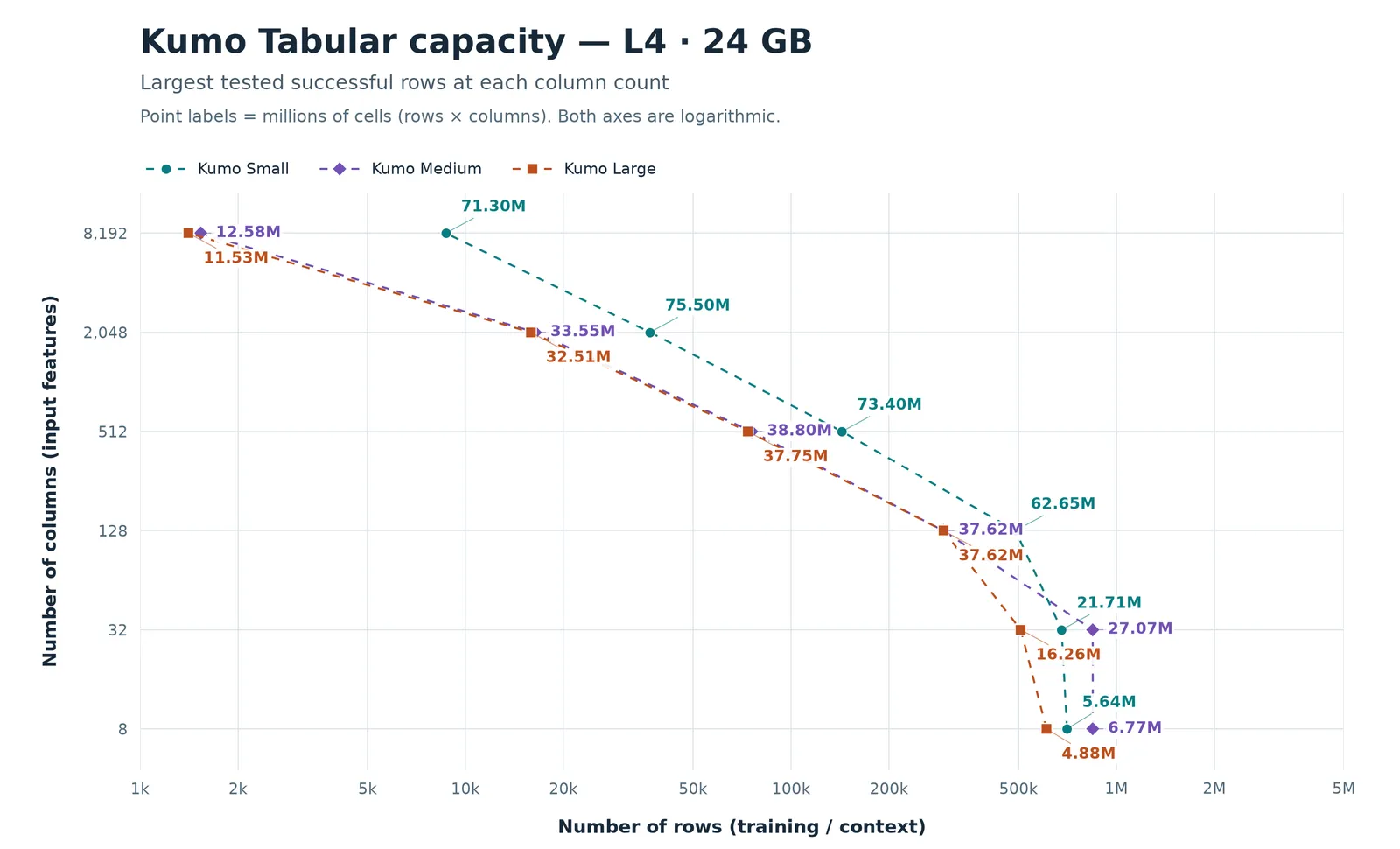
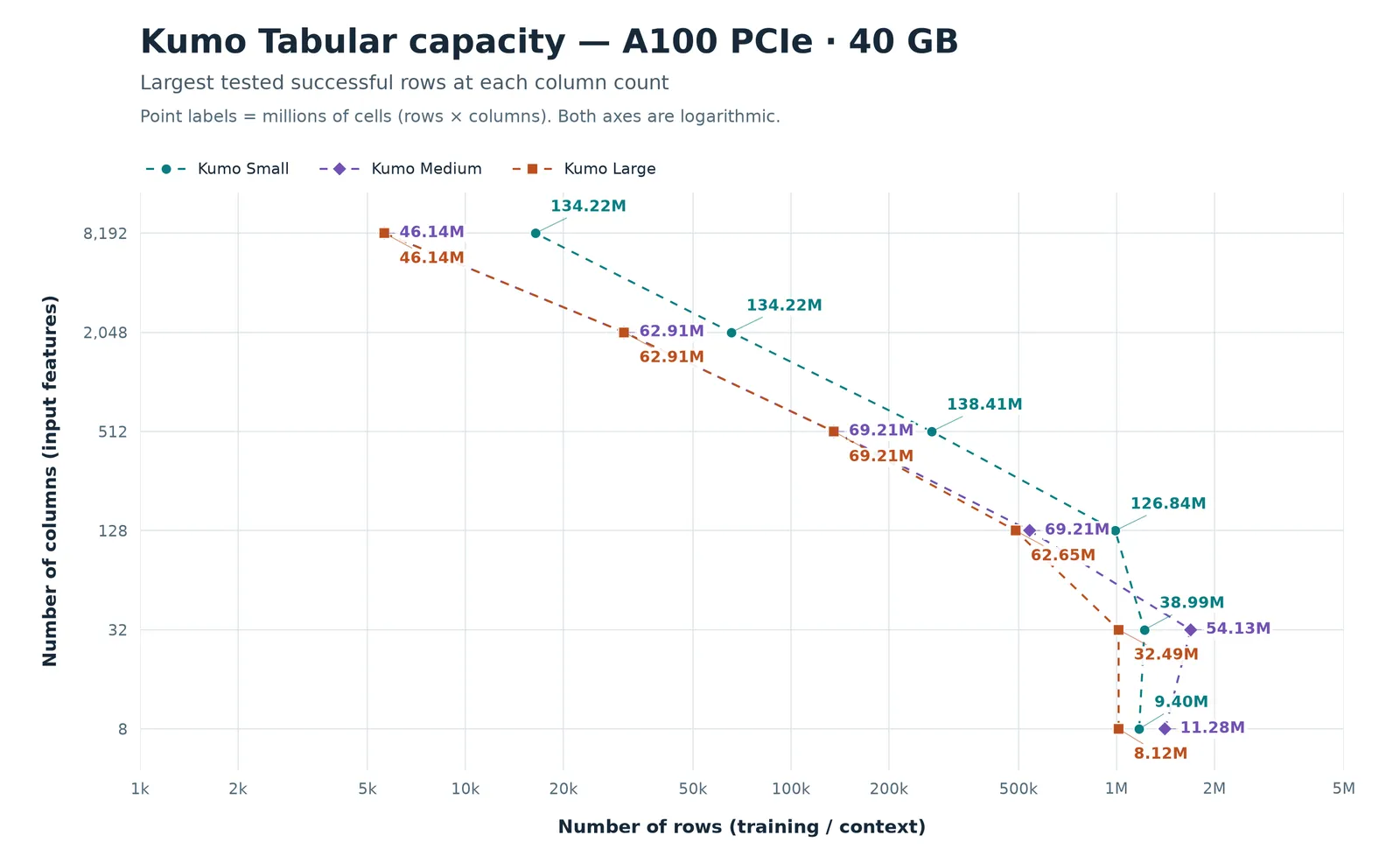
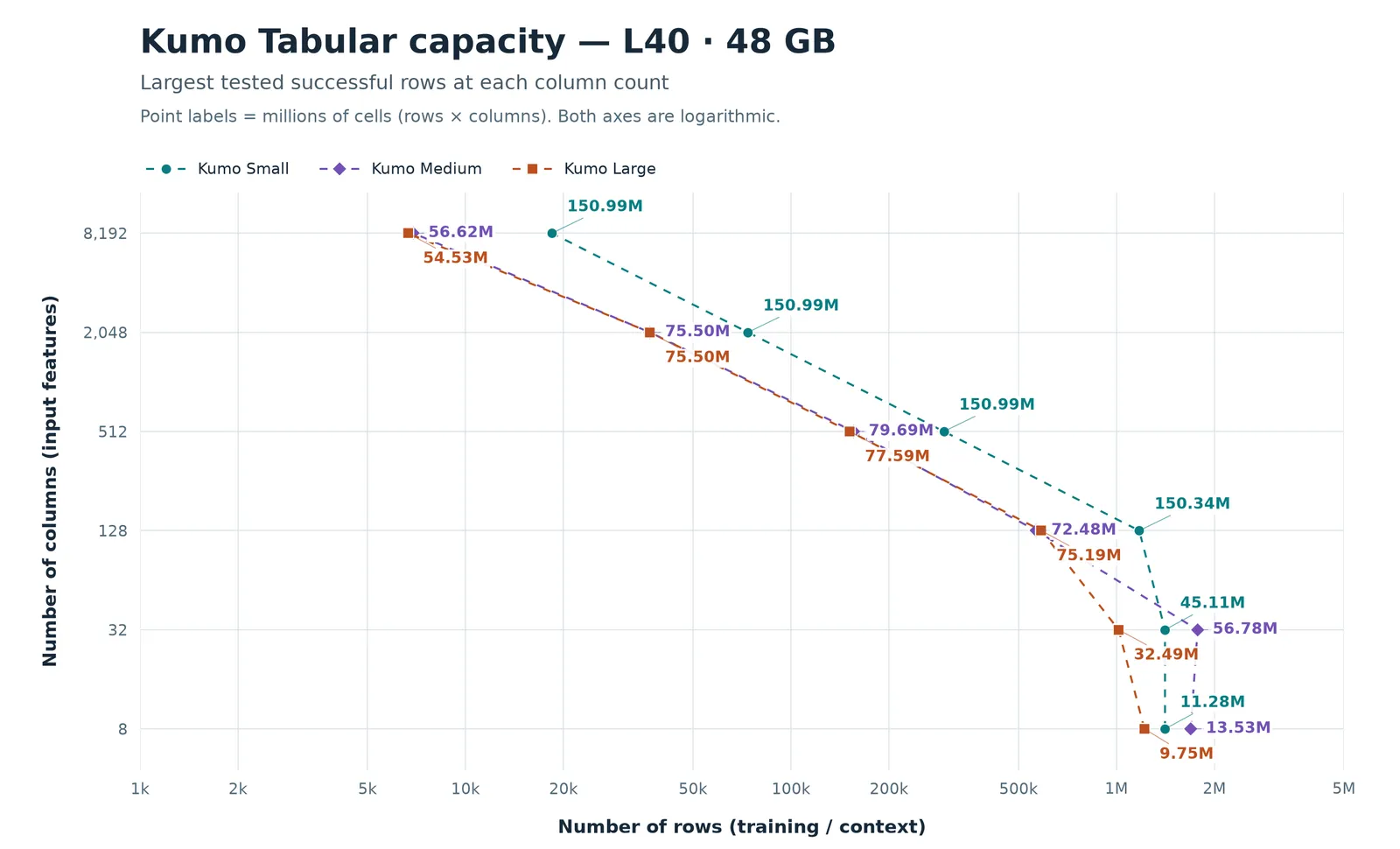
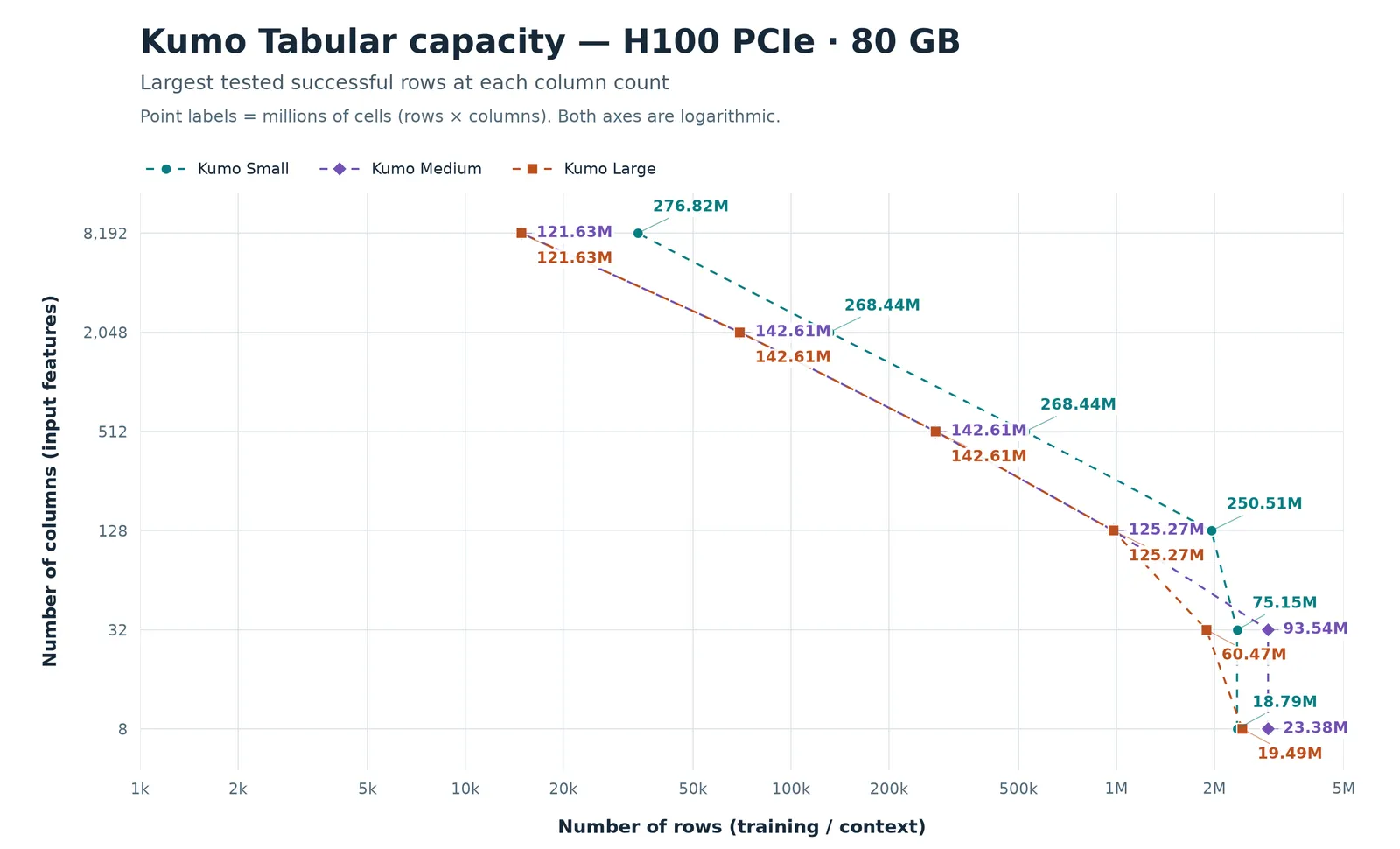
The measurements below use dense numeric classification, cached fit/predict, one estimator, and 1,000 prediction rows. Each value is the largest tested context that succeeded at that column count, in millions of cells. Cell counts exclude prediction rows. With the recommended 8 estimators for Small and Medium or 16 for Large, the fitted cache moves to CPU RAM, so RAM use and fit time grow with the number of estimators, while GPU memory also grows somewhat, because each estimator’s preprocessed table stays on the GPU during fit and prediction holds two estimators’ caches at once.
These are measured boundaries, not recommended operating sizes. Start well below a measured boundary and verify your own data and configuration. Lines between chart points do not establish that intermediate shapes fit. These classification measurements do not establish regression capacity.
Source: the four capacity charts below. Estimate context rows by dividing the table’s cell count by the feature column count.
Small generally fits more cells than Medium or Large at 128 or more input columns, often about twice as many. Medium and Large have similar capacity in that range. With only 8 or 32 columns, successful contexts range from under one million to about three million estimated rows across these GPUs; cell count alone does not predict capacity. Small encodes each cell with half as many channels, which is why it fits more cells on wide tables, but its attention cache stores twice as much per context row (about 24 KiB instead of 12 KiB in float16), so Medium overtakes it on narrow tables. Medium and Large differ only in the in-context transformer, which is twice as wide in Large and mostly matters for narrow tables. Capacity generally increases with GPU memory across L4, A100, L40, and H100.
Choose Small when context capacity is the priority. Large is the default; compare accuracy on your validation data when choosing a smaller size. Memory capacity does not establish prediction quality. Pretraining used up to 60,000 context rows and 100 columns, and accuracy may degrade far outside those ranges. The default recipe keeps at most 500 feature columns per estimator. The column counts above describe input tables before preprocessing, rather than a promise that every estimator uses all columns.
Capacity Charts
Each chart uses logarithmic axes and labels points in millions of context cells. Its source footnotes describe dense numeric classification, cached fit/predict, one estimator, and 1,000 prediction rows. Lines connect observations; they do not certify intermediate limits. Measured boundaries are not recommended operating sizes.
Kumo Relational: Choose a GPU
The table shows the largest tested successful context row counts for two customer-churn workloads, using cached fit/predict, one estimator, and 1,000 prediction rows. Context rows are customer examples, not the total rows across the database. [16, 16], [32, 32], and [64, 64] limit neighbors per relationship at each of two sampling hops. The database and graph sampling used CPU RAM in these tests.
Choose a GPU with a tested capacity above your intended context size at the neighbor setting you need, then verify it on your data. L4 has the lowest capacity here; A100 and L40 fit larger contexts, and H100 fits the largest. Larger neighbor settings fit fewer context rows. The difference between H&M and Amazon shows why row count alone cannot determine GPU requirements: related-table connectivity also matters. These are measured boundaries, not recommended operating sizes.
There is no general sizing formula for Kumo Relational. Include the task table and sampled related tables when measuring:
- Select representative context and query entities, including entities with many related records.
- Use the intended sampling depth and fan-out, linked tables, and feature columns. SDM uses
pyg-libfor CPU sampling orcugraphfor GPU sampling. For CUDA workloads, cuDF is recommended; follow GPU setup. - Record peak GPU memory, host RAM, and wall time through sampling, fit, and prediction. Use the GPU measurement pattern below around your relational workflow, including preparation on the GPU.
- Increase context and query sizes gradually, measuring again at each step before selecting production compute.
See Work with Real Data for the sampling workflow. Disk space cannot compensate for a sampled context or fitted cache that exceeds GPU memory or RAM.
Check Your GPU and Measure a Workload
After setting up GPU execution, check which GPUs the Python process can use:
This reports total memory in GiB, not free memory or proof that a workload fits. SDM inference uses one GPU; do not add the memory of several GPUs to estimate capacity.
For Tabular, first prepare x_context, y_context, and x_query as CUDA tensors or SDM TableTensor objects, and load model on the same GPU. Use your intended model size, task, and estimator count. Then measure a complete fit/predict cycle:
The peak includes tensors already allocated when measurement begins, including model weights and CUDA inputs. It excludes host RAM and allocations outside PyTorch’s CUDA allocator, so also inspect process RAM and total device use. This timing excludes model download, loading, and input preparation. Measure those stages separately if they are part of your workload. Use a fresh process for comparable trials, and record the software version, precision, model size, estimator settings, and input shapes.
For Relational, wrap the same synchronization, peak reset, and timing calls around your existing sampling, fit, and prediction workflow. Keep the GPU device consistent, and include the sampled related tables in the measured work.
If You Run Out of Memory
For Kumo Tabular:
- Reduce
estimator_batch_sizeto1if it is larger. - Reduce context rows or feature columns, or predict fewer query rows per call.
- Select a smaller model size or a GPU with more memory.
For Kumo Relational, reduce sampling fan-out or depth, context entities, or query batch size, then measure again. If host RAM is exhausted, reduce retained input copies and cache requirements or choose more RAM. See Troubleshooting.
Client and Server Limits
The Structured Data Models Client limits context to 10,000 rows for both models when sending to an inference server. That request limit is separate from the standalone SDM model’s GPU capacity. Relational context defaults to 1,000 rows and can be requested up to the cap with num_context_samples. See the client limits documentation for request behavior and deployment-specific limits.