

Evaluate Skills from Your Agent
Add one skill to your coding agent, then ask: “Is my skill any good?” The agent
picks the right check, runs the skillevaluator CLI, reads the report, and tells
you what to fix. No commands or flags to remember.
Install
Add the skill with npx
You do this once, in your project. Run the command and pick your agents when it asks:
To add it for one agent only, name the agent:
Claude Code
Codex
The skill lands in .claude/skills/skillevaluator.
Either way, it adds the skill folder to your project. To confirm it is there:
Don't have npx?
npx comes with Node.js. Install Node.js, then
run the command above.
Or skip npx: clone the repository and copy skills/skillevaluator yourself.
Claude Code
Codex
OpenCode
OpenClaw
Other agents
Install the CLI
The skill folder contains instructions for your agent; the checks run in the
skillevaluator CLI. Install it before you ask the agent to run a check:
uv tool install skillevaluator works too. See
Installation for Python requirements and
the extras that add Tier 2 and Tier 3.
Call it
Once the skill is installed, your agent can use it in two ways.
If you have many skills installed, or another one with a similar name, call it by name so the agent picks the right one.
See it work
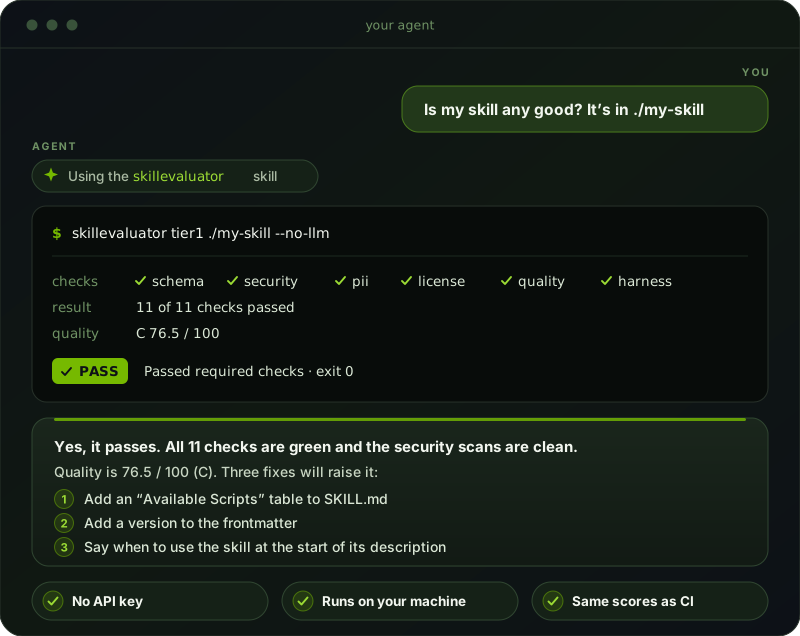
One question in, one answer out. The agent runs the check for you and needs no API key.
How it works
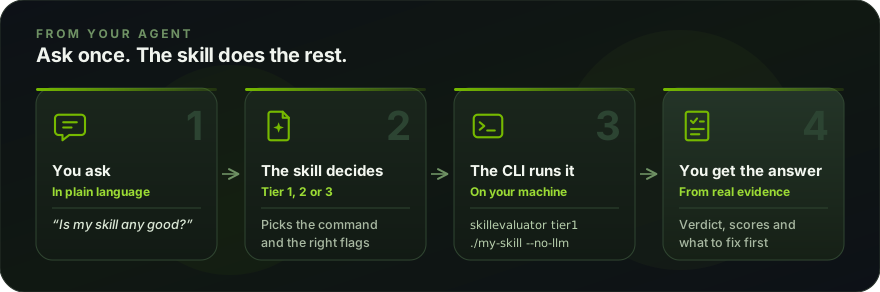
The scores come from the CLI, not from the agent’s opinion. They match what you get running SkillEvaluator by hand or in CI.
What you can ask
The first row needs no key. The rubric, Tier 2, and Tier 3 need one provider key; see Providers & Credentials.
Keyless checks run without asking when their tools are already installed. Before installing the CLI, an extra or a missing scanner, the agent names the change and asks for permission unless you already authorized it. It also asks before using credentials, spending model tokens, or running an agent on your machine. For eval cases it asks which real tasks matter and what a good result looks like instead of inventing them. Live evaluation starts separate agent processes and a judge, so it needs a provider key on the host even when launched from inside your agent.
Good to know
Which checks need an API key?
Static Tier 1 checks need no key. The rubric, Tier 2, and Tier 3 need one provider, set in the shell where the agent runs:
OpenAI, Anthropic, and any OpenAI-compatible gateway also work. Keys stay in your environment; the skill tells the agent never to print or store them.
What does a live evaluation look like?
For “does my skill help”, the agent runs the same tasks twice in isolated sandboxes, once without your skill and once with it, and an independent judge scores both.
This is the SkillEvaluator skill evaluated by SkillEvaluator. Its own eval cases
ship in skills/skillevaluator/evals/.
The run above used an earlier version of case 001 that also asserted the agent
read the skill’s SKILL.md, which the baseline cannot do; that assertion has
since been removed.
Why the agent never grades itself
Asking one agent to answer with and without a skill and grade itself is not an evaluation. Once it has read the skill, the baseline is contaminated, and the same model is judging its own work. The skill always routes “does it help” to real Tier 3 runs.
What runs where?
Tier 1 and Tier 2 run on your machine through the CLI, with no Docker. Tier 3 runs
in a sandbox: Docker by default, or --env-mode local for trusted skills. See
Agents & Sandboxes.
If an attempt errors or times out, the run is INCOMPLETE and no final score is reported. The skill tells the agent to say so, find the cause, and rerun, not to average partial results.