

Deploying to DeepStream for Classification TF1/TF2/PyTorch#
The deep learning and computer vision models that you’ve trained can be deployed on edge devices, such as Jetson Xavier or Jetson Nano, on discrete GPUs, or in the cloud with NVIDIA GPUs. TAO is designed to integrate with the DeepStream SDK. Models trained with TAO work out of the box with DeepStream.
DeepStream SDK is a streaming analytic toolkit that accelerates building AI-based video analytic applications. This section describes how to deploy a TAO-trained model to DeepStream.
TAO model skills export their trained checkpoints to ONNX. Build the
device-specific TensorRT engine from that ONNX with the trtexec tool (or
ask the agent to run the model’s gen_trt_engine action), then feed the
engine to DeepStream:
Refer to the Exporting the Model section for how to export the trained model to ONNX.
Refer to Integrating TAO Models into DeepStream for how to wire the engine into a DeepStream pipeline.
Machine-specific optimizations are done as part of the engine-creation process, so a distinct engine must be generated for each target environment and hardware configuration. If the TensorRT or CUDA libraries on the inference host change (including minor versions), or if a new model is generated, the engine must be regenerated. Running an engine built against a different TensorRT or CUDA version is not supported and produces undefined behavior; failures range from degraded accuracy to refusing to load.
Integrating the model with DeepStream#
In order to integrate the models with DeepStream, you need the following:
The DeepStream SDK. Installation instructions for DeepStream are provided in the DeepStream Development Guide.
An exported
.onnxmodel file and optional calibration cache for INT8 precisionA
labels.txtfile containing the labels for classes in the order in which the networks produce outputs.A sample
config_infer_*.txtfile to configure the nvinfer element in DeepStream. The nvinfer element handles everything related to TensorRT optimization and engine creation in DeepStream.
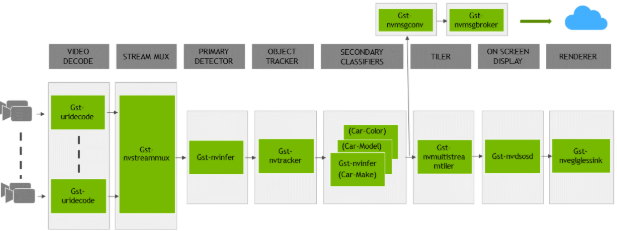
The DeepStream SDK ships with an end-to-end reference application that is fully configurable. You
can configure the input sources, inference model, and output sinks. The app requires a primary object
detection model, followed by an optional secondary classification model. The reference
application is installed as deepstream-app. The graphic below shows the architecture of the
reference application.
There are typically two or more configuration files that are used with this app. In the install
directory, the config files are located in samples/configs/deepstream-app or
sample/configs/tlt_pretrained_models. The main config file configures all the high level
parameters in the pipeline above, setting the input source and resolution, number of
inferences, tracker and output sinks. The supporting config files are for each individual
inference engine. The inference-specific config files are used to specify models, inference
resolution, batch size, number of classes and other customization. The main config file will call
all the supporting config files. Here are some config files in
samples/configs/deepstream-app for reference:
source4_1080p_dec_infer-resnet_tracker_sgie_tiled_display_int8.txt: The main config fileconfig_infer_primary.txt: The supporting config file for the primary detector in the pipeline aboveconfig_infer_secondary_*.txt: The supporting config file for the secondary classifier in the pipeline above
The deepstream-app will only work with the main config file. This file will most likely
remain the same for all models and can be used directly from the DeepStream SDK with little to no
change. You will only need to modify or create config_infer_primary.txt and
config_infer_secondary_*.txt.
Integrating a Classification Model#
See Exporting The Model for more details on how to export a TAO model. After the model has been generated, two extra files are required:
A label file
A DeepStream configuration file
Label File#
The label file is a text file, containing the names of the classes that the TAO model is trained
to classify against. The order in which the classes are listed must match the order in which
the model predicts the output. This order may be deduced from the classmap.json file that is
generated by TAO. This file is a simple dictionary containing the ‘class_name’ to ‘index map’.
For example, in the sample classification sample notebook file included with the TAO package,
the classmap.json file generated for Pascal Visual Object Classes (VOC) would look like this:
{"sheep": 16,"horse": 12,"bicycle": 1, "aeroplane": 0, "cow": 9,
 "sofa": 17, "bus": 5, "dog": 11, "cat": 7, "person": 14, "train": 18,
 "diningtable": 10, "bottle": 4, "car": 6, "pottedplant": 15,
 "tvmonitor": 19, "chair": 8, "bird": 2, "boat": 3, "motorbike": 13}
The 0th index corresponds to aeroplane, the 1st index corresponds to bicycle,
up to 19, which corresponds to tvmonitor. Here is a sample
classification_labels.txt file, arranged in order of index:
aeroplane;bicycle;bird;boat;bottle;bus;....;tvmonitor
DeepStream Configuration File#
A typical use case for video analytic is first to do an object detection and then crop the
detected object and send it further for classification. This is supported by deepstream-app
and the app architecture can be seen above. For example, to classify models of cars on the
road, first you will need to detect all the cars in a frame. Once you do detection, you perform
classification on the cropped image of the car. In the sample DeepStream app, the classifier
is configured as a secondary inference engine after the primary detection. If configured
appropriately, deepstream-app will automatically crop the detected image and send the frame
to the secondary classifier. The config_infer_secondary_*.txt is used to configure the
classification model.
Option 1: Integrate the model (.onnx) directly in the DeepStream app. For this option,
you will need to add the following parameters in the configuration file. The
int8-calib-file is only required for INT8 precision.
onnx-file=<TAO exported .onnx>
int8-calib-file=<Calibration cache file>
From TAO 5.0.0, .etlt is deprecated. To integrate .etlt directly in the DeepStream app,
you need following parmaters in the configuration file.
tlt-encoded-model=<TAO exported .etlt>
tlt-model-key=<Model export key>
int8-calib-file=<Calibration cache file>
Option 2: Integrate the TensorRT engine file with the DeepStream app.
Generate the device-specific TensorRT engine from the exported
.onnxmodel using thetrtexectool.After the engine file is generated, modify the following parameter to use this engine with DeepStream:
model-engine-file=<PATH to generated TensorRT engine>
All other parameters are common between the two approaches. The net-scale-factor, offsets, and
model-color-format parameters must be updated according to the preprocessing_mode in the training
specification file:
preprocessing_mode: "caffe":net-scale-factor=1.0 offsets=B;G;R model-color-format=1Where
B;G;Rshoud be replaced by theimage_meanparameters. Ifimage_meanis not set, the default ImageNet mean (103.939;116.779;123.68) will be used.
preprocessing_mode: "torch":net-scale-factor=0.017507 offsets=123.675;116.280;103.53 model-color-format=0
preprocessing_mode: "tf":net-scale-factor=0.0078 offsets=127.5;127.5;127.5 model-color-format=0
Add the label file generated above with the following:
labelfile-path=<Classification labels>
For all options, refer to the configuration file below. To learn more about all the parameters, refer to the DeepStream Development Guide.
[property]
gpu-id=0
# preprocessing parameters
net-scale-factor=1.0
offsets=103.939;116.779;123.68
model-color-format=1
batch-size=30

# Model specific paths. These need to be updated for every classification model.
int8-calib-file=<Path to optional INT8 calibration cache>
labelfile-path=<Path to classification_labels.txt>
onnx-file=<Path to Classification onnx model>

## 0=FP32, 1=INT8, 2=FP16 mode
network-mode=0
# process-mode: 2 - inferences on crops from primary detector, 1 - inferences on whole frame
process-mode=2
interval=0
network-type=1 # defines that the model is a classifier.
gie-unique-id=1
classifier-threshold=0.2