

TAO Deploy Overview#
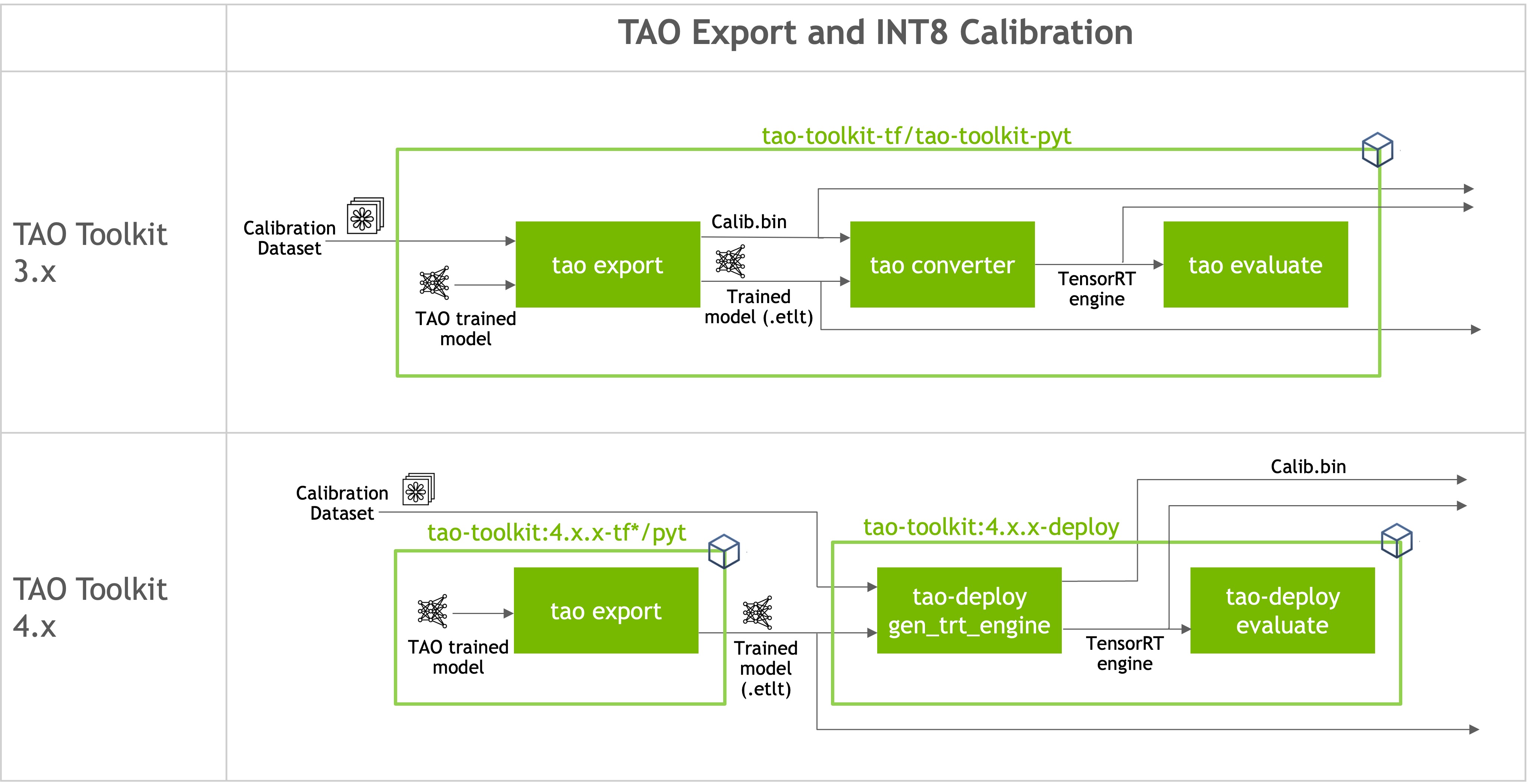
NVIDIA® TensorRT™ is an SDK for high-performance deep learning inference. It provides APIs and parsers to import trained models from all major deep learning frameworks; it then generates optimized runtime engines deployable in a data center, as well as in automotive and embedded environments. To understand TensorRT and its capabilities better, refer to the official TensorRT documentation.
Models trained in TAO are deployed to NVIDIA inference SDKs — for example,
DeepStream — through TensorRT. TAO model skills export their trained
checkpoints to .onnx; TAO Deploy parses the ONNX file and produces an
optimized TensorRT engine. Engines can be generated to support inference at
low precision (FP16, INT8, or FP8), and most TAO models also
support direct integration of the .onnx file with DeepStream when an
optimized engine is not required.
TAO Deploy separates model training and optimization from deployment by
parsing the .onnx file to generate the engine. It also runs evaluation
and inference against that engine using the original TAO experiment
specification. The supported actions are:
gen_trt_engine— build a TensorRT engine from an exported.onnx.evaluate— run evaluation against a built engine.inference— run inference against a built engine.
Driving TAO Deploy from the Agent#
In TAO 7.0, you drive these actions through the model skill’s gen_trt_engine,
evaluate, and inference entries from your TAO agent. There is no
separate tao deploy launcher CLI to install. The action runs in the
TAO Deploy container, which the TAO Execution SDK pulls from NGC at dispatch
time.
The pattern is the same for every supported network: describe the build in plain English, point the agent at the spec, and the agent resolves the spec keys and dispatches the job.
Build an INT8 TensorRT engine for DINO from the exported ONNX at
``s3://my-bucket/dino/model.onnx`` using ``trt-spec.yaml``. Calibrate
against ``s3://my-bucket/calib/`` and write the engine to
``s3://my-bucket/dino/model.engine``. Run on the local Docker daemon.
The agent reads models/tao-train-dino/SKILL.md for the gen_trt_engine action,
overlays your overrides on the spec template, and dispatches the job via the
TAO Execution SDK to the backend you named (local Docker, Brev, SLURM,
or Kubernetes).
Note
You normally do not name a skill in your prompt; the agent picks the right
one. Internally, gen_trt_engine, evaluate, and inference are
dispatched through skills/tao-launch-workflow (the shared launch
intake for TAO workflows), and long-running serving uses
applications/tao-run-inference-service instead.
Specification Format#
The gen_trt_engine spec is shared across networks. A typical INT8
calibration spec looks like this:
gen_trt_engine:
  onnx_file: /path/to/model.onnx
  trt_engine: /path/to/model.engine
  input_channel: 3
  input_width: 960
  input_height: 544
  tensorrt:
    data_type: int8
    workspace_size: 1024
    min_batch_size: 1
    opt_batch_size: 10
    max_batch_size: 10
    calibration:
      cal_image_dir:
        - /path/to/cal/images
      cal_cache_file: /path/to/cal.bin
      cal_batch_size: 10
      cal_batches: 1000
The corresponding evaluate and inference specs reuse the standard
TAO evaluation/inference specs and point evaluate.trt_engine (or
inference.trt_engine) at the engine you built.
For per-network specs and any model-specific switches, refer to the network-specific pages linked under Per-Network Notes below.
NSight DL Designer Integration#
TAO models are compatible with NVIDIA NSight DL Designer, a visualization, debugging, and profiling tool for deep learning models. Through NSight DL Designer you can profile TensorRT engines generated from TAO models, set layer-level precision constraints, visualize model architectures, and debug inference performance bottlenecks. For details, refer to Integrating TAO Models with NSight DL Designer.
Per-Network Notes#
The pages below document network-specific spec keys, default values, and any
quirks of the gen_trt_engine, evaluate, or inference action for
that network. Use them as reference when you want to know what the agent will
fill into your spec.
- CenterPose with TAO Deploy
- CLIP with TAO Deploy
- Classification (PyTorch) with TAO Deploy
- Classification (TF1) with TAO Deploy
- Classification (TF2) with TAO Deploy
- Deformable DETR with TAO Deploy
- DINO with TAO Deploy
- Grounding DINO with TAO Deploy
- DetectNet_v2 with TAO Deploy
- DSSD with TAO Deploy
- EfficientDet (TF1) with TAO Deploy
- EfficientDet (TF2) with TAO Deploy
- Faster RCNN with TAO Deploy
- LPRNet with TAO Deploy
- MAE with TAO Deploy
- Mask RCNN with TAO Deploy
- Mask2former with TAO Deploy
- MLRecogNet with TAO Deploy
- Monocular Depth with TAO Deploy
- Multitask Image Classification with TAO Deploy
- OCDNet with TAO Deploy
- RetinaNet with TAO Deploy
- RT-DETR with TAO Deploy
- SSD with TAO Deploy
- Segformer with TAO Deploy
- UNet with TAO Deploy
- YOLOv3 with TAO Deploy
- YOLOv4 with TAO Deploy
- YOLOv4-tiny with TAO Deploy
- OCRNet with TAO Deploy
- SiameseOI with TAO Deploy
- Stereo Depth with TAO Deploy
- VisualChangeNet-Classification with TAO Deploy
- VisualChangeNet-Segmentation with TAO Deploy
- Mask Grounding DINO with TAO Deploy
- PointPillars with TAO Deploy
- Integrating TAO Models with NSight DL Designer