

Integrating TAO Models into DeepStream#
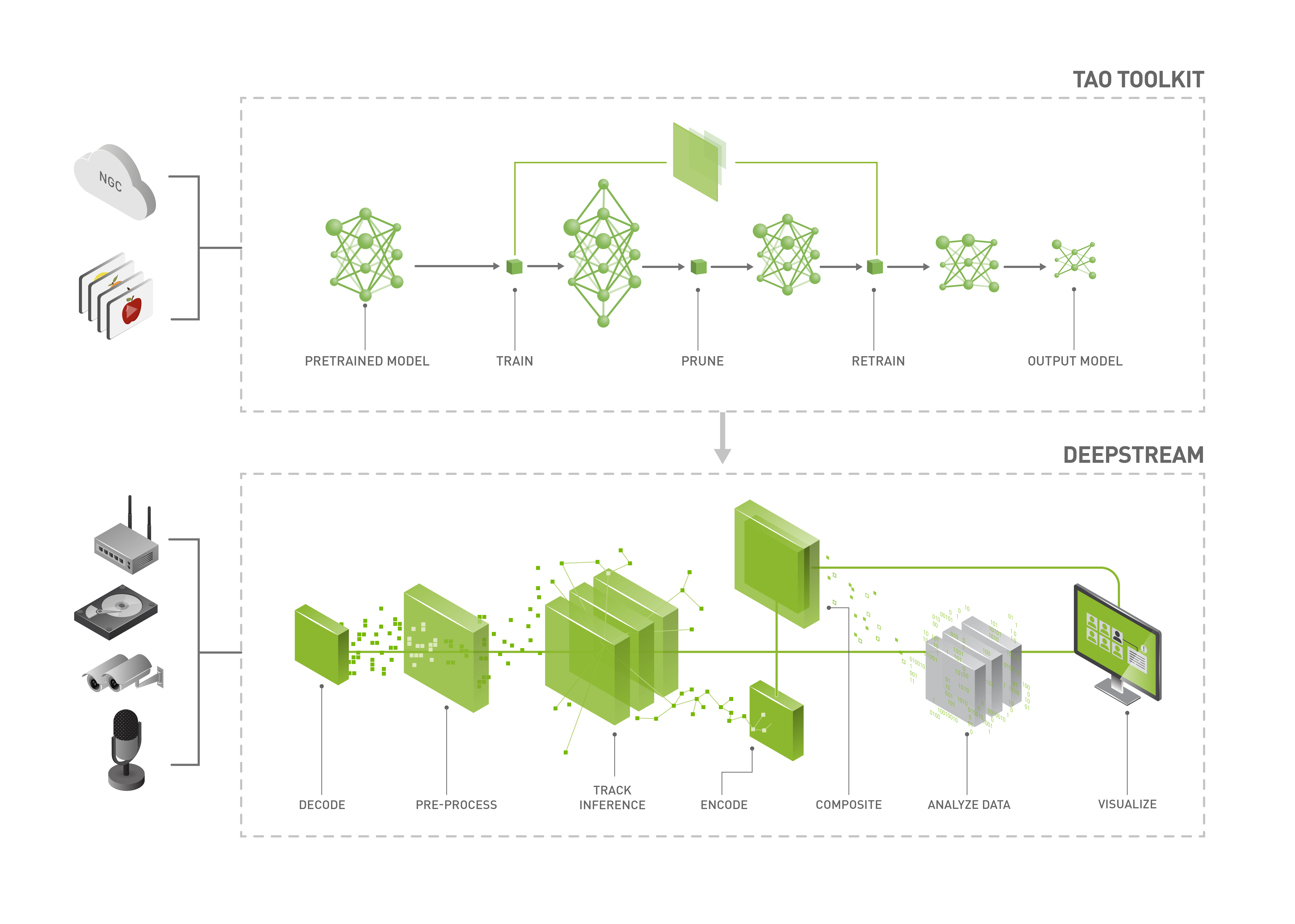
The deep learning and computer vision models that you’ve trained can be deployed on edge devices, such as Jetson Xavier or Jetson Nano, on discrete GPUs, or in the cloud with NVIDIA GPUs. TAO is designed to integrate with the DeepStream SDK. Models trained with TAO work out of the box with DeepStream.
DeepStream SDK is a streaming analytic toolkit that accelerates building AI-based video analytic applications. This section describes how to deploy a TAO-trained model to DeepStream.
TAO model skills export their trained checkpoints to ONNX. Build the
device-specific TensorRT engine from that ONNX with the trtexec tool (or
ask the agent to run the model’s gen_trt_engine action), then feed the
engine to DeepStream:
Refer to the Exporting the Model section for how to export the trained model to ONNX.
Refer to Integrating TAO Models into DeepStream for how to wire the engine into a DeepStream pipeline.
Machine-specific optimizations are done as part of the engine-creation process, so a distinct engine must be generated for each target environment and hardware configuration. If the TensorRT or CUDA libraries on the inference host change (including minor versions), or if a new model is generated, the engine must be regenerated. Running an engine built against a different TensorRT or CUDA version is not supported and produces undefined behavior; failures range from degraded accuracy to refusing to load.
Note
TAO 7.0 model skills export trained checkpoints to ONNX. The
pre-trained .etlt artifacts referenced lower on this page are legacy
NGC publications retained for back-compatibility with the
deepstream_tao_apps and deepstream_lpr_app reference repositories.
For checkpoints you train in TAO 7.0, build a TensorRT engine via the
model skill’s gen_trt_engine action (or run trtexec against the
ONNX) and point DeepStream at the resulting engine.
The tables below capture the compatibility of the various open architectures supported in TAO and and pre-trained models distributed with TAO for deployment with respective versions of DeepStream SDK.
Model |
Model output format |
Prunable |
INT8 |
Compatible with DS5.1 |
Compatible with DS6.0 |
TRT-OSS required |
|---|---|---|---|---|---|---|
Image Classification |
Encrypted UFF |
Yes |
Yes |
Yes |
Yes |
No |
MultiTask Classification |
Encrypted UFF |
Yes |
Yes |
Yes |
Yes |
No |
DetectNet_v2 |
Encrypted UFF |
Yes |
Yes |
Yes |
Yes |
No |
EfficientDet |
Encrypted ONNX |
Yes |
Yes |
No |
Yes |
Yes |
FasterRCNN |
Encrypted UFF |
Yes |
Yes |
Yes |
Yes |
Yes |
SSD |
Encrypted UFF |
Yes |
Yes |
Yes |
Yes |
Yes |
YOLOv3 |
Encrypted ONNX |
Yes |
Yes |
Yes (with TRT 7.1) |
Yes |
Yes |
YOLOv4 |
Encrypted ONNX |
Yes |
Yes |
Yes (with TRT 7.1) |
Yes |
Yes |
YOLOv4-tiny |
Encrypted ONNX |
Yes |
Yes |
Yes (with TRT 7.1) |
Yes |
Yes |
DSSD |
Encrypted UFF |
Yes |
Yes |
Yes |
Yes |
Yes |
RetinaNet |
Encrypted UFF |
Yes |
Yes |
Yes |
Yes |
Yes |
MaskRCNN |
Encrypted UFF |
No |
Yes |
Yes |
Yes |
Yes |
UNET |
Encrypted ONNX |
No |
Yes |
Yes |
Yes |
No |
Character Recognition |
Encrypted ONNX |
No |
Yes |
Yes |
Yes |
No |
PointPillars |
Encrypted ONNX |
Yes |
No |
No |
No |
Yes |
Model Name |
Model arch |
Model output format |
Prunable |
INT8 |
Compatible with DS5.1 |
Compatible with DS6.0 |
TRT-OSS required |
|---|---|---|---|---|---|---|---|
PeopleNet |
DetectNet_v2 |
Encrypted UFF |
Yes |
Yes |
Yes |
Yes |
No |
TrafficCamNet |
DetectNet_v2 |
Encrypted UFF |
Yes |
Yes |
Yes |
Yes |
No |
DashCamNet |
DetectNet_v2 |
Encrypted UFF |
Yes |
Yes |
Yes |
Yes |
No |
FaceDetect-IR |
DetectNet_v2 |
Encrypted UFF |
Yes |
Yes |
Yes |
Yes |
No |
FaceDetect |
DetectNet_v2 |
Encrypted UFF |
Yes |
Yes |
Yes |
Yes |
No |
VehicleMakeNet |
Image Classification |
Encrypted UFF |
Yes |
Yes |
Yes |
Yes |
No |
VehicleTypeNet |
Image Classification |
Encrypted UFF |
Yes |
Yes |
Yes |
Yes |
No |
LPDNet |
DetectNet_v2 |
Encrypted UFF |
Yes |
Yes |
Yes |
Yes |
No |
LPRNet |
Character Recognition |
Encrypted ONNX |
No |
Yes |
Yes |
Yes |
No |
PeopleSegNet |
MaskRCNN |
Encrypted UFF |
No |
Yes |
Yes |
Yes |
Yes |
PeopleSemSegNet |
UNET |
Encrypted ONNX |
No |
Yes |
Yes |
Yes |
Yes |
BodyPoseNet |
VGG Backbone with Custom Refinement Stages |
Encrypted ONNX |
Yes |
Yes |
No |
Yes |
No |
EmotionNet |
5 Fully Connected Layers |
Encrypted ONNX |
No |
No |
No |
Yes |
No |
FPENet |
Recombinator networks |
Encrypted ONNX |
No |
Yes |
No |
Yes |
No |
GazeNet |
Four branch AlexNet based model |
Encrypted ONNX |
No |
No |
No |
Yes |
No |
GestureNet |
ResNet18 |
Encrypted ONNX |
No |
Yes |
No |
Yes |
No |
HeartRateNet |
Two branch model with attention |
Encrypted ONNX |
No |
No |
No |
Yes |
No |
Action Recognition Net |
Action Recognition Net |
Encrypted ONNX |
No |
No |
No |
Yes |
No |
OCDNet |
Optical Character Detection |
ONNX |
Yes |
No |
No |
No |
Yes |
OCRNet |
Optical Character Recognition |
ONNX |
Yes |
No |
No |
No |
Yes |
Optical Inspection |
Optical Inspection |
ONNX |
No |
No |
No |
No |
No |
PCBInspection |
Image Classification |
ONNX |
No |
No |
No |
No |
No |
Retail Object Recognition |
Metric Learning Recognition |
ONNX |
No |
No |
No |
Yes |
No |
Note
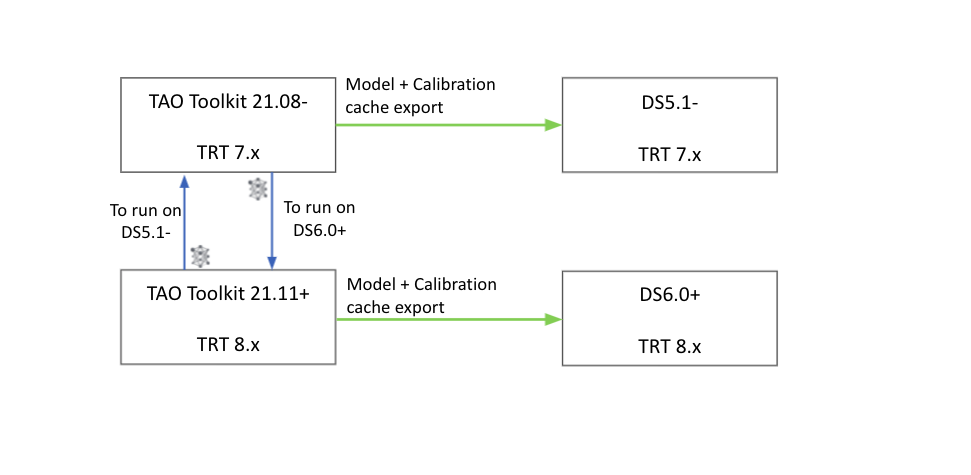
Due to changes in the TensorRT API between versions 8.0.x and 7.2.x,
the deployable models generated using the export task in TAO 3.0-21.11+
can only be deployed in DeepStream version 6.0. In order to deploy the models compatible
with DeepStream 5.1, you will need to re-export the model using the TAO 3.0-21.08 package
to re-generate a deployable model and calibration cache file that is compatible with TensorRT 7.2.
Similarly, if you have a model trained with TAO 3.0-21.08 package and want to deploy
to DeepStream 6.0, please regenerate the deployable model.etlt and int8 calibration
file by re-exporting it in TAO 3.0-21.11+.
TAO 3.0-21.11+ was built with TensorRT 8.0.1.6.
TAO -> DeepStream version interoperability#
Follow the instructions below to deploy TAO models to DeepStream.
Installation Prerequisites#
Install Jetpack 4.6 for Jetson devices.
Note: For Jetson devices, use the following commands to manually increase the Jetson Power mode and maximize performance further by using the Jetson Clocks mode:
sudo nvpmodel -m 0
sudo /usr/bin/jetson_clocks
Install Deepstream.
Deployment Files#
The following files are required to run each TAO model with Deepstream:
ds_tlt.c: The application main filenvdsinfer_custombboxparser_tlt: A custom parser function on inference end nodesModels: TAO models from NGC
Model configuration files: The Deepstream Inference configuration file
Sample Application#
We have provided several reference applications on GitHub.
Reference app for YOLOv3/YOLOv4/YOLOv4-tiny, FasterRCNN, SSD/DSSD, RetinaNet, EfficientDet, MaskRCNN, UNet - DeepStream TAO reference app
Reference app for License plate detection and Recognition - DeepStream LPR app
Pre-trained models - License Plate Detection (LPDNet) and Recognition (LPRNet)#
The following steps outline how to run the License Plate Detection and Recognition application: DeepStream LPR app
Download the Repository#
git clone https://github.com/NVIDIA-AI-IOT/deepstream_lpr_app.git
Download the Models#
cd deepstream_lpr_app

mkdir -p ./models/tlt_pretrained_models/trafficcamnet
cd ./models/tlt_pretrained_models/trafficcamnet
wget https://api.ngc.nvidia.com/v2/models/nvidia/tao/trafficcamnet/versions/pruned_v1.0/files/trafficnet_int8.txt
wget https://api.ngc.nvidia.com/v2/models/nvidia/tao/trafficcamnet/versions/pruned_v1.0/files/resnet18_trafficcamnet_pruned.etlt
cd -

mkdir -p ./models/LP/LPD
cd ./models/LP/LPD
wget https://api.ngc.nvidia.com/v2/models/nvidia/tao/lpdnet/versions/pruned_v1.0/files/usa_pruned.etlt
wget https://api.ngc.nvidia.com/v2/models/nvidia/tao/lpdnet/versions/pruned_v1.0/files/usa_lpd_cal.bin
wget https://api.ngc.nvidia.com/v2/models/nvidia/tao/lpdnet/versions/pruned_v1.0/files/usa_lpd_label.txt
cd -

mkdir -p ./models/LP/LPR
cd ./models/LP/LPR
wget https://api.ngc.nvidia.com/v2/models/nvidia/tao/lprnet/versions/deployable_v1.0/files/us_lprnet_baseline18_deployable.etlt
touch labels_us.txt
cd -
Build and Run#
make
cd deepstream-lpr-app
For US car plate recognition:
cp dict_us.txt dict.txt
Start to run the application:
./deepstream-lpr-app <1:US car plate model|2: Chinese car plate model> <1: output as h264 file| 2:fakesink 3:display output>
[0:ROI disable|1:ROI enable] [input mp4 file path and name] [input mp4 file path and name] ... [input mp4 file path and name] [output 264 file path and name]
For detailed instructions about running this application, refer to this GitHub repository.
Pre-trained models - PeopleNet, TrafficCamNet, DashCamNet, FaceDetectIR, Vehiclemakenet, Vehicletypenet, PeopleSegNet#
PeopleNet#
Follow these instructions to run the PeopleNet model in DeepStream:
Download the model:
mkdir -p $HOME/peoplenet && \
wget https://api.ngc.nvidia.com/v2/models/nvidia/tao/peoplenet/versions/pruned_quantized_v2.3/files/resnet34_peoplenet_pruned_int8.etlt \
-O $HOME/peoplenet/resnet34_peoplenet_pruned_int8.etlt
Run the application:
xhost +
docker run --gpus all -it --rm -v /tmp/.X11-unix:/tmp/.X11-unix -e DISPLAY=$DISPLAY -v $HOME:/opt/nvidia/deepstream/deepstream-6.0/samples/models/tao_pretrained_models \
-w /opt/nvidia/deepstream/deepstream-6.0/samples/configs/tao_pretrained_models nvcr.io/nvidia/deepstream:6.0-samples \
deepstream-app -c deepstream_app_source1_peoplenet.txt
TrafficCamNet#
Follow these instructions to run the TrafficCamNet model in DeepStream:
Download the model:
mkdir -p $HOME/trafficcamnet && \
wget https://api.ngc.nvidia.com/v2/models/nvidia/tao/trafficcamnet/versions/pruned_v1.0/files/resnet18_trafficcamnet_pruned.etlt \
-O $HOME/trafficcamnet/resnet18_trafficcamnet_pruned.etlt && \
wget https://api.ngc.nvidia.com/v2/models/nvidia/tao/trafficcamnet/versions/pruned_v1.0/files/trafficnet_int8.txt \
-O $HOME/trafficcamnet/trafficnet_int8.txt
Run the application:
xhost +
docker run --gpus all -it --rm -v /tmp/.X11-unix:/tmp/.X11-unix -e DISPLAY=$DISPLAY -v $HOME:/opt/nvidia/deepstream/deepstream-6.0/samples/models/tao_pretrained_models \
-w /opt/nvidia/deepstream/deepstream-6.0/samples/configs/tao_pretrained_models nvcr.io/nvidia/deepstream:6.0-samples \
deepstream-app -c deepstream_app_source1_trafficcamnet.txt
DashCamNet + Vehiclemakenet + Vehicletypenet#
Follow these instructions to run the DashCamNet model as primary detector and Vehiclemakenet and Vehicletypenet as secondary classifier in DeepStream:
Download the model:
mkdir -p $HOME/dashcamnet && \
wget https://api.ngc.nvidia.com/v2/models/nvidia/tao/dashcamnet/versions/pruned_v1.0/files/resnet18_dashcamnet_pruned.etlt \
-O $HOME/dashcamnet/resnet18_dashcamnet_pruned.etlt && \
wget https://api.ngc.nvidia.com/v2/models/nvidia/tao/dashcamnet/versions/pruned_v1.0/files/dashcamnet_int8.txt \
-O $HOME/dashcamnet/dashcamnet_int8.txt
mkdir -p $HOME/vehiclemakenet && \
wget https://api.ngc.nvidia.com/v2/models/nvidia/tao/vehiclemakenet/versions/pruned_v1.0/files/resnet18_vehiclemakenet_pruned.etlt \
-O $HOME/vehiclemakenet/resnet18_vehiclemakenet_pruned.etlt && \
wget https://api.ngc.nvidia.com/v2/models/nvidia/tao/vehiclemakenet/versions/pruned_v1.0/files/vehiclemakenet_int8.txt \
-O $HOME/vehiclemakenet/vehiclemakenet_int8.txt
mkdir -p $HOME/vehicletypenet && \
wget https://api.ngc.nvidia.com/v2/models/nvidia/tao/vehicletypenet/versions/pruned_v1.0/files/resnet18_vehicletypenet_pruned.etlt \
-O $HOME/vehicletypenet/resnet18_vehicletypenet_pruned.etlt && \
wget https://api.ngc.nvidia.com/v2/models/nvidia/tao/vehicletypenet/versions/pruned_v1.0/files/vehicletypenet_int8.txt \
-O $HOME/vehicletypenet/vehicletypenet_int8.txt
Run the application:
xhost +
docker run --gpus all -it --rm -v /tmp/.X11-unix:/tmp/.X11-unix -e DISPLAY=$DISPLAY -v $HOME:/opt/nvidia/deepstream/deepstream-6.0/samples/models/tao_pretrained_models \
-w /opt/nvidia/deepstream/deepstream-6.0/samples/configs/tao_pretrained_models nvcr.io/nvidia/deepstream:6.0-samples \
deepstream-app -c deepstream_app_source1_dashcamnet_vehiclemakenet_vehicletypenet.txt
FaceDetectIR#
Follow these instructions to run the FaceDetectIR model in DeepStream:
Download the model:
mkdir -p $HOME/facedetectir && \
wget https://api.ngc.nvidia.com/v2/models/nvidia/tao/facedetectir/versions/pruned_v1.0/files/resnet18_facedetectir_pruned.etlt \
-O $HOME/facedetectir/resnet18_facedetectir_pruned.etlt && \
wget https://api.ngc.nvidia.com/v2/models/nvidia/tao/facedetectir/versions/pruned_v1.0/files/facedetectir_int8.txt \
-O $HOME/facedetectir/facedetectir_int8.txt
Run the application:
xhost +
docker run --gpus all -it --rm -v /tmp/.X11-unix:/tmp/.X11-unix -e DISPLAY=$DISPLAY -v $HOME:/opt/nvidia/deepstream/deepstream-6.0/samples/models/tao_pretrained_models \
-w /opt/nvidia/deepstream/deepstream-6.0/samples/configs/tao_pretrained_models nvcr.io/nvidia/deepstream:6.0-samples \
deepstream-app -c deepstream_app_source1_facedetectir.txt
PeopleSegNet#
Follow these instructions to run the PeopleSegNet model in DeepStream:
Download the Repository:
git clone https://github.com/NVIDIA-AI-IOT/deepstream_tlt_apps.git
Download the model:
ngc registry model download-version "nvidia/tao/peoplesegnet:deployable_v2.0"
or
wget --content-disposition https://api.ngc.nvidia.com/v2/models/nvidia/tao/peoplesegnet/versions/deployable_v2.0/zip \
-O peoplesegnet_deployable_v2.0.zip
Build TRT OSS Plugin:
TRT-OSS instructions are provided in NVIDIA-AI-IOT/deepstream_tao_apps
Build the application:
export CUDA_VER=xy.z              // xy.z is CUDA version, e.g. 10.2
make
Run the application:
SHOW_MASK=1 ./apps/ds-tlt -c configs/peopleSegNet_tlt/pgie_peopleSegNetv2_tlt_config.txt -i \
/opt/nvidia/deepstream/deepstream-5.1/samples/streams/sample_720p.h264 -d
Pre-trained models - BodyPoseNet, EmotionNet, FPENet, GazeNet, GestureNet, HeartRateNet#
Follow the prerequisites for the Deepstream-TAO Other apps README such as installing DeepStream SDK 6.0.
Download the Deepstream-TAO Other apps repository.
Download all the pre-trained models with the provided utility script. This will place the
etltmodels in pre-determined locations so that DeepStream configs can properly locate them. Replace these models with custom versions as needed.cd deepstream_tao_apps chmod 755 download_models.sh export MODEL_PRECISION=fp16 ./download_models.sh
Build and run the sample applications per the Deepstream-TAO Other apps README. For example, to run the BodyPoseNet sample application,
cd deepstream-bodypose2d-app
./deepstream-bodypose2d-app [1:file sink|2:fakesink|3:display sink]  \
<bodypose2d model config file> <input uri> ... <input uri> <out filename>
General purpose CV model architecture - Classification, Object detection and Segmentation#
A sample DeepStream app to run a classification, object detection, and semantic and instance segmentation network as well as TRT-OSS instructions are provided here.
For more information about each individual model architecture, refer to the following sections.
Image classification#
Multitask Classification#
Object Detection#
- Deploying to DeepStream for DetectNet_v2
- Deploying to DeepStream for Deformable DETR
- Deploying to DeepStream for DINO
- Deploying to DeepStream for DSSD
- Deploying to DeepStream for EfficientDet
- Deploying to DeepStream for FasterRCNN
- Deploying to DeepStream for RetinaNet
- Deploying to DeepStream for SSD
- Deploying to DeepStream for YOLOv3
- Deploying to DeepStream for YOLOv4
- Deploying to DeepStream for YOLOv4-tiny