

Deploying to DeepStream for DetectNet_v2#
The deep learning and computer vision models that you’ve trained can be deployed on edge devices, such as Jetson Xavier or Jetson Nano, on discrete GPUs, or in the cloud with NVIDIA GPUs. TAO is designed to integrate with the DeepStream SDK. Models trained with TAO work out of the box with DeepStream.
DeepStream SDK is a streaming analytic toolkit that accelerates building AI-based video analytic applications. This section describes how to deploy a TAO-trained model to DeepStream.
TAO model skills export their trained checkpoints to ONNX. Build the
device-specific TensorRT engine from that ONNX with the trtexec tool (or
ask the agent to run the model’s gen_trt_engine action), then feed the
engine to DeepStream:
Refer to the Exporting the Model section for how to export the trained model to ONNX.
Refer to Integrating TAO Models into DeepStream for how to wire the engine into a DeepStream pipeline.
Machine-specific optimizations are done as part of the engine-creation process, so a distinct engine must be generated for each target environment and hardware configuration. If the TensorRT or CUDA libraries on the inference host change (including minor versions), or if a new model is generated, the engine must be regenerated. Running an engine built against a different TensorRT or CUDA version is not supported and produces undefined behavior; failures range from degraded accuracy to refusing to load.
Label File#
The label file is a text file containing the names of the classes that the DetectNet_v2 model
is trained to detect. The order in which the classes are listed here must match the order
in which the model predicts the output. The export subtask in DetectNet_v2 generates this
file when run with the --gen_ds_config flag enabled.
DeepStream Configuration File#
The detection model is typically used as a primary inference engine. It can also be used as a
secondary inference engine. To run this model in the sample deepstream-app, you must modify
the existing config_infer_primary.txt file to point to this model.
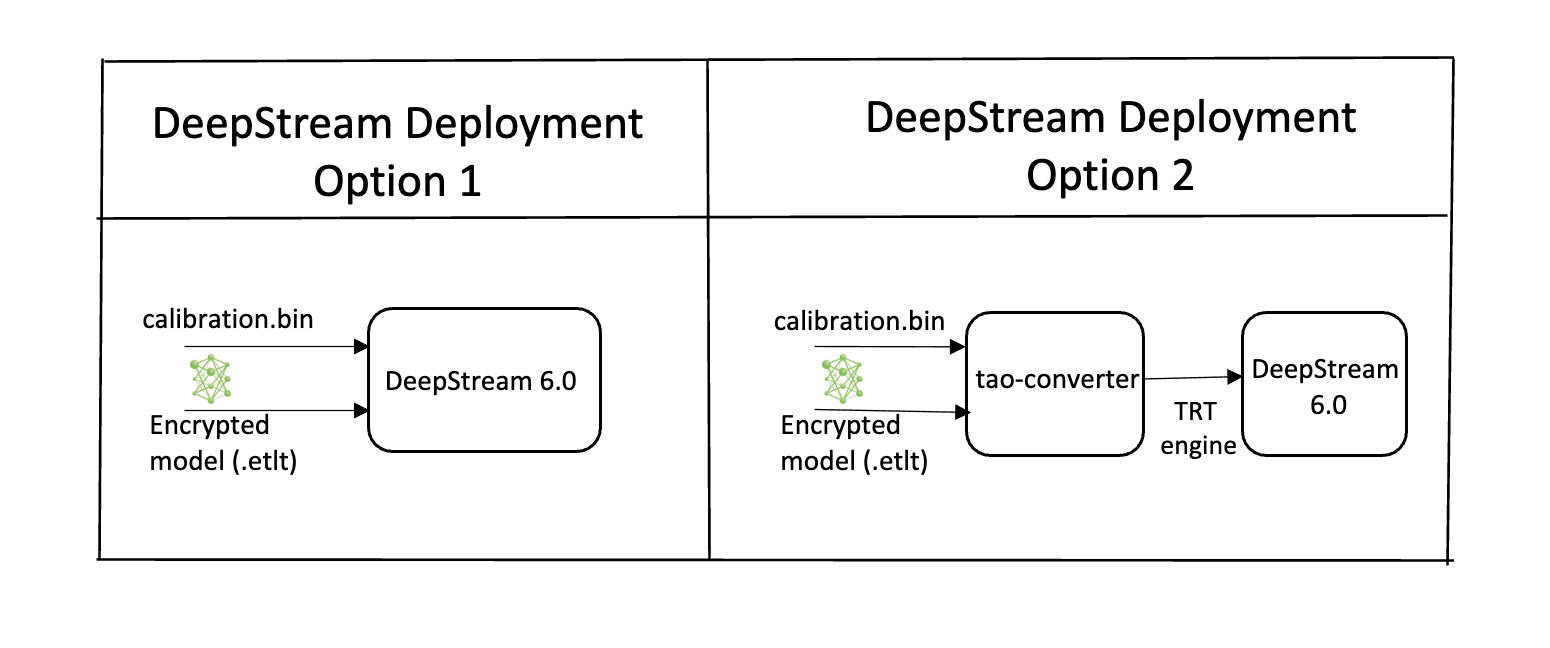
Option 1: Integrate the model (.onnx) directly in the DeepStream app.
For this option, you will need to add the following parameters in the configuration file.
The int8-calib-file is only required for INT8 precision.
onnx-file=<TAO exported .onnx>
int8-calib-file=<Calibration cache file>
From TAO 5.0.0, .etlt is deprecated. To integrate .etlt directly in the DeepStream app,
you need following parmaters in the configuration file.
tlt-encoded-model=<TLT exported .etlt>
tlt-model-key=<Model export key>
int8-calib-file=<Calibration cache file>
The tlt-encoded-model parameter points to the exported model (.etlt) from TAO.
The tlt-model-key is the encryption key used during model export.
Option 2: Integrate the TensorRT engine file with the DeepStream app.
Generate the device-specific TensorRT engine from the exported
.onnxmodel using thetrtexectool.After the engine file is generated, modify the following parameter to use this engine with DeepStream:
model-engine-file=<PATH to generated TensorRT engine>
All other parameters are common between the two approaches. Update the label-file-path parameter
in the configuration file with the path to the labels.txt that was generated at export time.
labelfile-path=<Classification labels>
For all options, see the configuration file below. To learn more about all the parameters, refer to the DeepStream Development Guide under the GsT-nvinfer section.
[property]
gpu-id=0
# preprocessing parameters.
net-scale-factor=0.0039215697906911373
model-color-format=0

# model paths.
int8-calib-file=<Path to optional INT8 calibration cache>
labelfile-path=<Path to detectNet_v2_labels.txt>
onnx-file=<Path to DetectNet_v2 onnx model>
batch-size=4
## 0=FP32, 1=INT8, 2=FP16 mode
network-mode=0
num-detected-classes=3
interval=0
gie-unique-id=1
is-classifier=0
#enable_dbscan=0

[class-attrs-all]
threshold=0.2
group-threshold=1
## Set eps=0.7 and minBoxes for enable-dbscan=1
eps=0.2
#minBoxes=3
roi-top-offset=0
roi-bottom-offset=0
detected-min-w=0
detected-min-h=0
detected-max-w=0
detected-max-h=0