

Overview#
NVIDIA TAO is an agent-based AI toolkit built on TensorFlow and PyTorch that simplifies and accelerates model training by abstracting away the complexity of deep learning frameworks. Its models, data transforms, platforms, and workflows are published as the TAO skill bank, a plugin you install into your coding agent (Claude Code, Codex, and so on). You describe what you want in plain English; the agent reads the relevant skill contracts, plans the workload, asks for missing inputs, and dispatches the job through the TAO Execution SDK.
TAO focuses on training, fine-tuning, and optimizing computer vision foundation models. You can select from 100+ pre-trained vision AI models on NGC and fine-tune them on your own dataset without writing a single line of code and without writing a CLI command or hand-editing spec YAML. TAO outputs trained models in ONNX format that you can deploy on any platform that supports ONNX. TAO also provides inference applications to validate your trained models.
To train and fine-tune Large Language Models (LLMs), refer to NVIDIA NeMo.
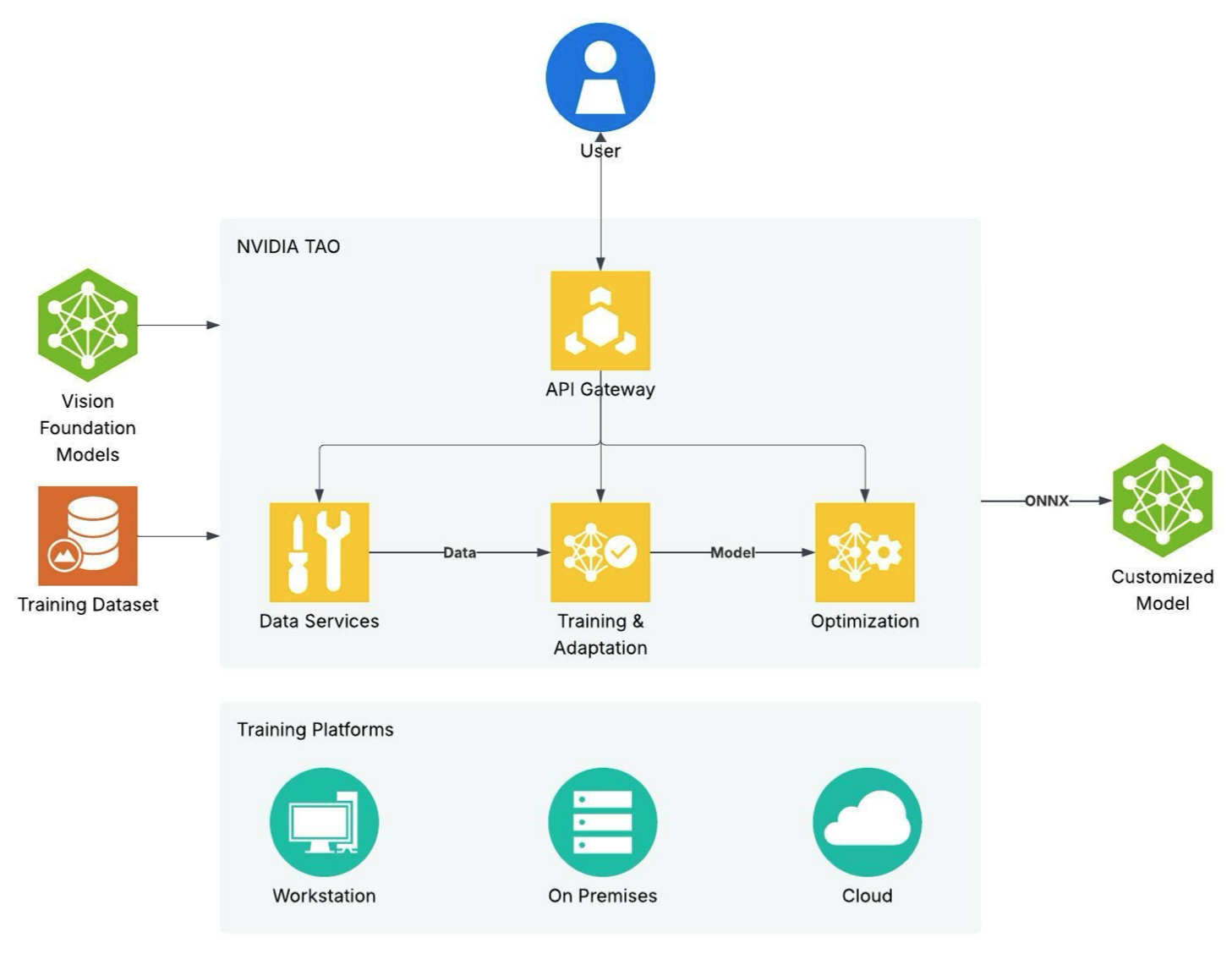
TAO Overview Image#
TAO supports most of the popular CV tasks:
Vision tasks
Image classification
Object detection
Instance segmentation
Semantic segmentation
Optical character detection and recognition (OCD/OCR)
Body pose estimation
Key point estimation
Action recognition
Change detection
Multi-camera 3D object detection and tracking
Segmentation in context
Visual embedding for retrieval and classification
Specialized models and architectures
CenterPose (category-level pose estimation)
Visual ChangeNet (pair-comparison classification and segmentation for visual inspection)
Siamese networks
Training methods
Self-supervised pretraining and domain adaptation for foundation models
For image classification, object detection and segmentation, you can choose one of the many feature extractors and use it with one of many heads for classification, detection and segmentation tasks, giving you access to as many as 100+ model combinations. TAO supports some of the leading vision transformers (ViTs) like RADIOv2, DINOv2, FAN, GC-ViT, SWIN, DINO, D-DETR and SegFormer.
Backbone |
Image classification |
|---|---|
NVCLIP |
✓ |
C-RADIOv2 |
✓ |
NvDINOv2 |
✓ |
GcViT |
✓ |
ViT |
✓ |
FAN |
✓ |
FasterViT |
✓ |
ResNet |
✓ |
Swin |
✓ |
EfficientNet |
✓ |
Backbone |
DINO |
D-DETR |
Grounding DINO |
RT-DETR |
EfficientDet |
|---|---|---|---|---|---|
C-RADIOv2 |
✓ |
||||
ConvNext |
✓ |
||||
NvDINOv2 |
✓ |
||||
GcViT |
✓ |
✓ |
|||
ViT |
✓ |
✓ |
|||
FAN |
✓ |
||||
ResNet |
✓ |
✓ |
✓ |
||
Swin |
✓ |
||||
EfficientNet |
✓ |
Backbone |
MAL |
Mask GroundingDINO |
Mask2Former |
|---|---|---|---|
ViT |
✓ |
||
Swin |
✓ |
✓ |
Backbone |
SegFormer |
Mask2Former |
|---|---|---|
C-RADIOv2 |
x |
|
NvDINOv2 |
x |
|
FAN |
✓ |
|
Swin |
✓ |
|
MIT-b |
✓ |
Backbone |
Mask2Former |
|---|---|
Swin |
✓ |
Backbone |
OCD |
OCR |
|---|---|---|
FAN |
✓ |
✓ |
ResNet |
✓ |
✓ |
Backbone |
Classification |
Segmentation |
|---|---|---|
C-RADIOv2 |
✓ |
|
NvDINOv2 |
✓ |
|
ViT |
✓ |
✓ |
FAN |
✓ |
✓ |
Backbone |
Pose Classification |
|---|---|
ST-GCN (graph convolutional network) |
✓ |
Backbone |
Re-identification |
Metric Learning Recognition |
|---|---|---|
NvDINOv2 |
✓ |
|
ViT |
✓ |
|
ResNet |
✓ |
✓ |
Swin |
✓ |
TAO 7.0.1 expands the toolkit with new model architectures, pre-trained models, and platform capabilities for training, optimization, and deployment.
New fine-tuning capabilities:
NVPanoptix3D: End-to-end 3D panoptic reconstruction with unified 2D/3D segmentation and multi-plane occupancy prediction
CLIP: Contrastive vision-language model for zero-shot classification and retrieval, with SigLIP2 and RADIO-CLIP support
Cosmos Embed1: Visual embedding model for image retrieval and classification with LoRA fine-tuning
Pre-trained models:
Cosmos-Embed1: Visual embedding model for image retrieval and classification with LoRA fine-tuning
RADIO-CLIP and SigLIPv2: Embedding models for Metropolis Blueprints
RT-DETR Warehouse 2D: 2D object detection model for warehouse environments
C-RADIOv3 (B/L/H/G): Enhanced multi-teacher distilled foundation model for generating rich visual embeddings, available on Hugging Face
Training and optimization:
Expanded quantization support: QDQ ONNX quantization for 12 additional computer vision models, including Deformable DETR, DINO, Grounding DINO, Mask2Former, OneFormer, and SegFormer
Expanded TensorRT engine generation: INT8/FP8 calibration support for newly supported networks
Fine-Tuning for Cosmos-Reason 2.0 VLMs: SFT, PEFT, AutoML and Reinforcement Learning Fine-Tuning of Cosmos-Reason 2.0 VLMs.
New AutoML algorithms: Six new algorithms (BOHB, BFBO, ASHA, PBT, DEHB, and Hyperband-ES) with Weights & Biases integration
Platform and deployment:
SLURM execution backend: Run training and evaluation jobs on remote SLURM clusters
HuggingFace Inference Microservice: Deploy any HuggingFace Hub model as an inference microservice
Existing features:
Pretraining and fine-tuning workflows for foundation models like the ConvNext and NvDINOv2 series of backbones
Fine-tuning the NVIDIA-trained commercially viable foundation model C-RADIOv2 with several downstream tasks
Distilling foundation models to smaller and faster backbones on structured and unstructured data
Distilling heavier object detection models into faster, smaller models for edge deployment
Dispatching training, evaluation, and AutoML workloads to multiple compute backends: NVIDIA Brev, SLURM, Kubernetes, and local Docker through the TAO Execution SDK
NVIDIA also includes several inference applications as part of TAO.
A Gradio application to try out zero-shot in-context segmentation using the SEGIC model, in the TAO PyTorch GitHub repository.
A Triton inference application for the FoundationPose model, in TAO Triton Apps.
A catalog of NVIDIA Inference Microservices (NIMs) to try out different TAO models:
A GitHub repository called metropolis_nim_workflows reference workflows, using the published NIMs
Note
NVIDIA Triton Inference Server is open-source software designed for deploying and scaling AI models in production environments. It supports various machine learning frameworks, hardware platforms (GPUs and CPUs), and deployment environments (cloud, data center, and edge).
NVIDIA Inference Microservices (NIMs) are a collection of pre-built, optimized, ready-to-use microservices that enable developers to deploy and scale AI models in production environments. NIMs are designed to simplify the deployment process by providing a set of preconfigured components that can be used to build and deploy AI models.
For more information about Triton Inference Server and NIMs, visit the Triton Inference Server documentation and NIMs pages.
Note
As of version 6.0.0, the TAO containers can run on x86 and ARM64 platforms with discrete GPUs. For more information about the supported GPUs, refer to the Getting Started Guide.
Pre-trained Models#
TAO has an extensive selection of foundation models and lighter pre-trained models that are trained either on public datasets, such as ImageNet, COCO, and OpenImages, or on proprietary datasets for task-specific use cases like people detection, vehicle detection, and action recognition. The task-specific models can be used directly for inference, but can also be fine-tuned on custom datasets for better accuracy.
Go to the section Model Zoo to learn more about all of the pre-trained models.
Key Features#
TAO packages have several key features to help developers accelerate their AI training and optimization. Here are a few of them:
Fine-tuning and model optimization workflows
Self-Supervised Learning <self_supervised_learning>: Pretrains and performs domain adaptation on foundation models (Transformers and CNN based models).
Distillation <distillation>: Distills learnings from a heavier model to a smaller and faster model for edge deployment.
Fine-Tuning Cosmos-Reason VLM <cosmos_rl>: Full SFT, PEFT, AutoML and Reinforcement Learning Fine-Tuning of Cosmos-Reason 2.0 VLMs.
ONNX export: Supports model output in industry-standard ONNX format, which can then be used directly on any platform.
Multimodal Embedding model fine-tuning <embedding_model_finetuning>: Pretrains and performs domain adaptation of foundational multimodal embedding models like Cosmos-Embed1 and RADIO-CLIP/SigLIPv2
Multi-GPU: Accelerates training by parallelizing training jobs across multiple GPUs on a single node.
Multi-Node: Accelerates training by parallelizing training jobs across multiple nodes.
Quantization-Aware Training <quantization_aware_training>: Emulates lower precision quantization during training to reduce accuracy loss from training to lower precision inference.
Model Pruning <model_pruning>: Reduces the number of parameters in a model to reduce model size and improve accuracy.
Training Visualization <visualization>: Visualizes training graphs and metrics in TensorBoard or in third-party services.
Data Services
Data Augmentation <offline_data_augmentation>: Performs offline and online augmentation to add data diversity to your dataset, which can then generalize the model.
AI-assisted data annotation <auto_labeling>: Class-agnostic auto-labeler that generates segmentation masks provided the bounding box.
Data Analytics <data_analytics>: Analyzes object-detection annotation files and image files, calculates insights, and generate graphs and a summary.
TAO also provides several features for service providers and NVIDIA partners looking to integrate TAO with their workflows to provide additional services.
AutoML: Automatic hyperparameter sweeps and optimization to generate best accuracy on a given dataset.
TAO skill bank: A plugin published to coding-agent marketplaces (Claude Code, Codex) that exposes every model, data transform, platform backend, and application workflow as a
SKILL.mdcontract the agent reads to plan jobs.TAO Execution SDK: A single
sdk.create_job(...)interface dispatches jobs to NVIDIA Brev, SLURM, Kubernetes, or local Docker.Source code availability: Skill source is published in the tao-skills-bank repository on GitHub; every contract the agent consults is open for inspection and extension.
How to Get Started#
Install the TAO Skill Bank plugin into Claude Code with two slash commands typed at the Claude Code prompt:
/plugin marketplace add https://github.com/NVIDIA-TAO/tao-skills-bank.git#7.0.1
/plugin install tao-skills@tao-skill-bank
For the full walkthrough, including the Codex install path, the environment variables each compute backend needs, and example prompts to get you to your first run, refer to the TAO getting started guide.
TAO Architecture#
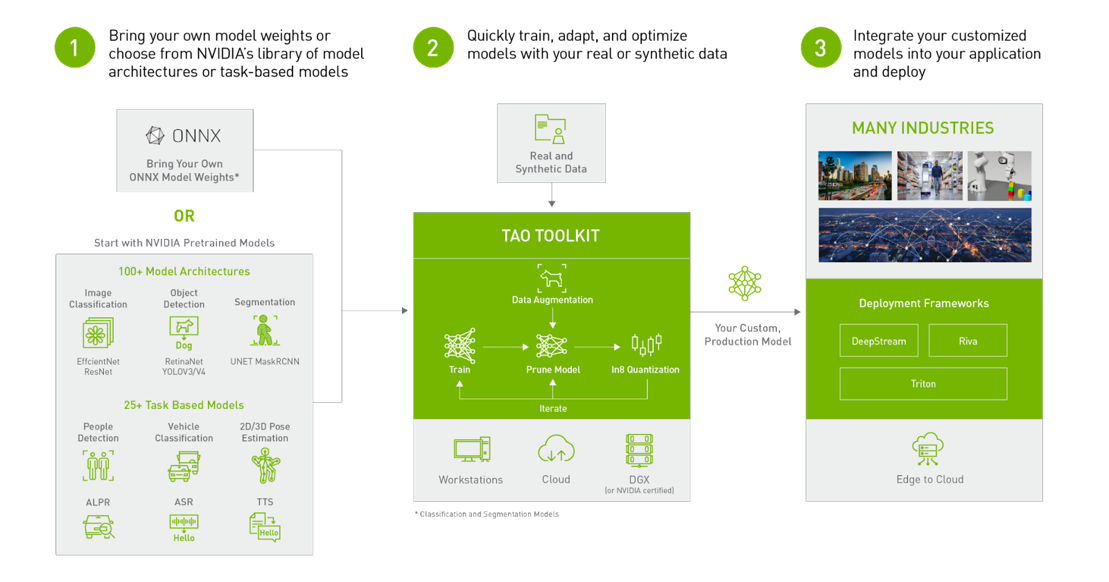
TAO is built around three components: a skill bank that publishes every
TAO capability as a SKILL.md contract; a coding-agent plugin that
makes those skills available to Claude Code, Codex, and other agents; and the
TAO Execution SDK, which dispatches jobs to your chosen compute backend.
The component Docker containers are available from the NVIDIA GPU Accelerated
Container Registry (NGC) and come preinstalled with all dependencies
required for training. You drive everything in natural language through your
agent; you do not invoke a CLI directly.
The output of the TAO workflow is a trained model that can be deployed for inference on NVIDIA devices using DeepStream and NVIDIA TensorRT <TensorRT>™.
Jobs can run on a local machine (using local Docker) or on managed compute, such as
NVIDIA Brev, SLURM clusters, or Kubernetes selected through
per-job backend_details in the Execution SDK.
The TAO application layer is built on top of NVIDIA CUDA-X™, which contains all the lower-level NVIDIA libraries, including NVIDIA Container Runtime for GPU acceleration, NVIDIA® CUDA and NVIDIA cuDNN™ for deep learning (DL) operations, and TensorRT (the NVIDIA inference optimization and runtime engine) for optimizing models. Models that are generated with TAO are completely compatible with and accelerated for TensorRT, which ensures maximum inference performance without any extra effort.
TAO Deployment Modes#
Backend |
Use Case |
Where Jobs Run |
Credentials Needed |
Multi-GPU |
Multi-Node |
AutoML |
|---|---|---|---|---|---|---|
Local Docker |
Quick experiments on a workstation |
Local Docker daemon |
NGC_KEY (and HF_TOKEN for gated models) |
✓ |
✓ |
|
DGX Cloud Lepton |
Managed GPU cloud |
Lepton workspace |
LEPTON_WORKSPACE_ID + LEPTON_AUTH_TOKEN |
✓ |
✓ |
✓ |
NVIDIA Brev |
Managed GPU cloud |
Brev instance |
BREV_API_TOKEN |
✓ |
✓ |
✓ |
SLURM Cluster |
Existing on-prem GPU cluster |
SLURM scheduler |
SLURM_USER + SLURM_HOSTNAME (SSH key on agent) |
✓ |
✓ |
✓ |
Kubernetes |
Self-managed K8s cluster with GPUs |
Cluster via kubeconfig |
Configured via kubeconfig |
✓ |
✓ |
✓ |
TAO Workflows#
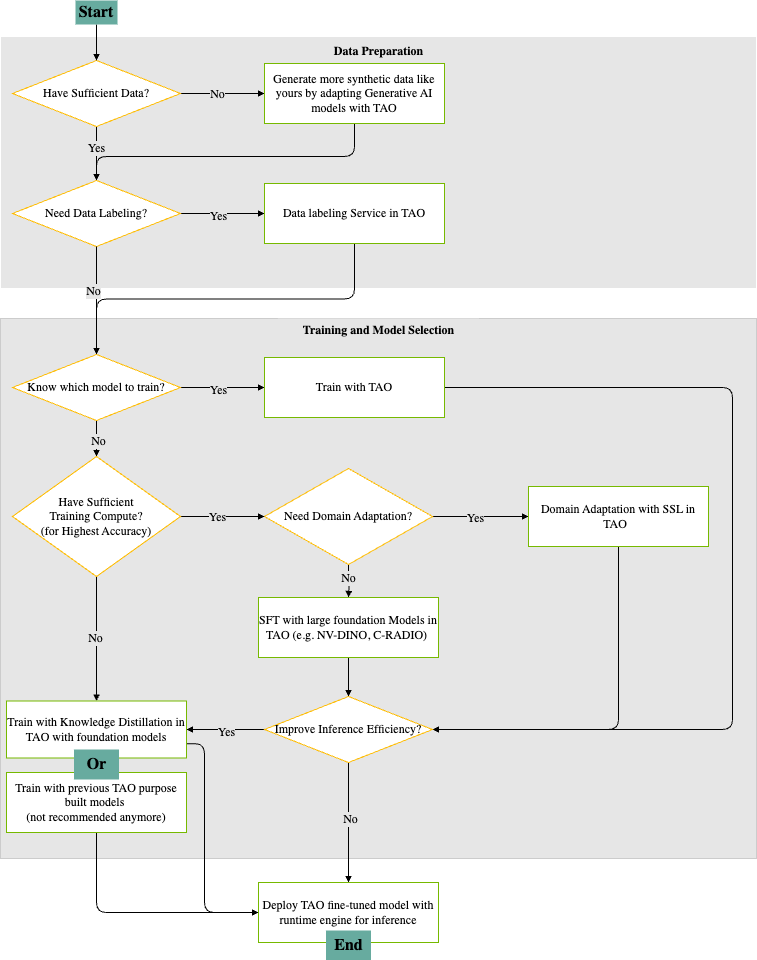
The following diagram provides a visual guide for building, adapting, and deploying deep learning models using TAO. It outlines the decision points and actions, and provides a recipe for an end-to-end workflow that includes:
Selecting models
Preparing data
Adapting to new domains
Optimizing models
Deploying models for inference
Data Preparation#
Assess Data Availability
The process begins by determining if you have sufficient data for training your model.
If data is insufficient, ask the agent to run a synthetic data generation skill (such as StyleGAN-XL) to expand your training set.
Data Labeling Needs
If your data lacks labels, TAO offers built-in auto-labeling actions to generate annotations, preparing your dataset for fully supervised fine-tuning with tasks like object detection and instance segmentation.
If your data does not need labeling, you can proceed directly to the model training phase.
Training and Model Selection#
Model Selection
If you already know which model architecture suits your task, you can immediately begin training with TAO, leveraging its optimized pipelines for popular AI models.
If you are unsure what model to use, the workflow guides you to evaluate your available training compute resources.
Training Compute Assessment
With sufficient compute resources, you can pursue the highest degree of accuracy by training large, state-of-the-art foundation models (such as NV-DINOv2 or C-RADIOv2) within TAO.
If compute resources are limited, we recommend using knowledge distillation from foundation models, or as a fallback, previous-generation TAO models (although this is no longer the preferred option).
Domain Adaptation
If your application requires adapting a model to a new domain, TAO supports domain adaptation using self-supervised learning (SSL) techniques, which can significantly improve performance on specialized datasets.
Inference Optimization and Deployment#
Inference Efficiency
Before you deploy you have the option to apply inference efficiency improvements, making your model run faster and use fewer resources in production environments.
If your model does not need further optimization, you can proceed to deployment.
Deployment
The final step is deploying your fine-tuned TAO model using the runtime engine, making it ready for efficient inference in your target application.
This workflow ensures a logical, efficient progression from raw data to a high-performance deployed AI model, utilizing NVIDIA TAO’s comprehensive suite of tools for data generation, labeling, training, adaptation, and inference optimization.
Learning Resources#
NVIDIA provides many tutorial videos, developer blogs, and other resources that can help you get started with TAO Toolkit.
Tutorial Videos#
Note
These videos were recorded for an earlier TAO release. Some demonstrate CLI- and FTMS-based workflows that have changed in the agent-based 7.0 line; re-recording is planned. Some links may also require an NVIDIA-internal login (Conditional Access); if you are blocked, refer to the agent-based Getting Started guide instead.
TAO Toolkit provides the following tutorial videos to cover popular use cases:
Developer Blogs#
NVIDIA publishes several blogs that can help you learn to use TAO Toolkit:
How to Build a Real-Time Visual Inspection Pipeline with NVIDIA TAO 6 and NVIDIA Deepstream 8
About the New Foundational Models and Training Capabilities with NVIDIA TAO 5.5
About the latest features in TAO 5.0
How to train with PeopleNet and other pre-trained models using TAO Toolkit.
How to improve INT8 accuracy using quantization aware training (QAT) with TAO Toolkit.
How to create a real-time license plate detection and recognition app
How to prepare state of the art models for classification and object detection with TAO Toolkit
How to train and optimize a 2D body-pose estimation model with TAO: 2D Pose Estimation Part 1 and 2D Pose Estimation Part 2.
White Papers#
You can learn more about different use cases for TAO Toolkit in the white paper Endless Ways to Adapt and Supercharge Your AI Workflows with Transfer Learning.
Webinars#
Recent developments in TAO in AI Models Made Simple Using TAO from GTC Spring 2023
Support Information#
If you have any questions when using TAO to train a model and deploy to NVIDIA Riva or DeepStream, post them here: