

Image Classification (TF1)#
Preparing the Input Data Structure#
See the Data Annotation Format page for more information about the data format for image classification.
Creating an Experiment Specification File - Specification File for Classification#
Here is an example of a specification file for model classification:
model_config {
  # Model Architecture can be chosen from:
  # ['resnet', 'vgg', 'googlenet', 'alexnet']
  arch: "resnet"
  # for resnet --> n_layers can be [10, 18, 50]
  # for vgg --> n_layers can be [16, 19]
  n_layers: 101
  use_batch_norm: True
  use_bias: False
  all_projections: False
  use_pooling: True
  retain_head: True
  resize_interpolation_method: BICUBIC
  # if you want to use the pretrained model,
  # image size should be "3,224,224"
  # otherwise, it can be "3, X, Y", where X,Y >= 16
  input_image_size: "3,224,224"
}
train_config {
  train_dataset_path: "/path/to/your/train/data"
  val_dataset_path: "/path/to/your/val/data"
  pretrained_model_path: "/path/to/your/pretrained/model"
  # Only ['sgd', 'adam'] are supported for optimizer
  optimizer {
      sgd {
      lr: 0.01
      decay: 0.0
      momentum: 0.9
      nesterov: False
      }
  }
  batch_size_per_gpu: 50
  n_epochs: 150
  # Number of CPU cores for loading data
  n_workers: 16
  # regularizer
  reg_config {
      # regularizer type can be "L1", "L2" or "None".
      type: "L2"
      # if the type is not "None",
      # scope can be either "Conv2D" or "Dense" or both.
      scope: "Conv2D,Dense"
      # 0 < weight decay < 1
      weight_decay: 0.000015
  }
  # learning_rate
  lr_config {
      cosine {
      learning_rate: 0.04
      soft_start: 0.0
      }
  }
  enable_random_crop: True
  enable_center_crop: True
  enable_color_augmentation: True
  mixup_alpha: 0.2
  label_smoothing: 0.1
  preprocess_mode: "caffe"
  image_mean {
    key: 'b'
    value: 103.9
  }
  image_mean {
    key: 'g'
    value: 116.8
  }
  image_mean {
    key: 'r'
    value: 123.7
  }
}
eval_config {
  eval_dataset_path: "/path/to/your/test/data"
  model_path: "/workspace/tao-experiments/classification/weights/resnet_080.tlt"
  top_k: 3
  batch_size: 256
  n_workers: 8
  enable_center_crop: True
}
The classification experiment specification consists of three main components:
model_configeval_configtrain_config
Model Config#
The table below describes the configurable parameters in the model_config.
Parameter |
Datatype |
Typical value |
Description |
Supported Values |
all_projections |
bool
|
False |
For templates with shortcut connections, this parameter defines whether or not all shortcuts should be instantiated with 1x1
projection layers irrespective of whether there is a change in stride across the input and output.
|
True or False (only to be used in ResNet templates)
|
arch |
string
|
resnet |
This defines the architecture of the back bone feature extractor to be used to train.
|
* resnet
* vgg
* mobilenet_v1
* mobilenet_v2
* googlenet
* darknet
* cspdarknet
* efficientnet_b0
* efficientnet_b1
* cspdarknet_tiny
|
n_layers |
int
|
18 |
Depth of the feature extractor for scalable templates.
|
* resnets: 10, 18, 34, 50, 101
* vgg: 16, 19
* darknet: 19, 53
* cspdarknet: 19, 53
|
use_pooling |
Boolean
|
False |
Choose between using strided convolutions or MaxPooling while downsampling. When True, MaxPooling is used to down sample, however
for the object detection network, NVIDIA recommends setting this to False and using strided convolutions.
|
True or False
|
|
Boolean |
|
Boolean variable to use batch normalization layers or not. |
True or False |
freeze_blocks |
float
(repeated)
|
–
|
This parameter defines which blocks may be frozen from the instantiated feature extractor template, and is different for different
feature extractor templates.
|
* ResNet series: For the ResNet series, the block ID’s valid for freezing is any subset of {0, 1, 2, 3}(inclusive)
* VGG series: For the VGG series, the block ID’s valid for freezing is any subset of {1, 2, 3, 4, 5}(inclusive)
* MobileNet V1: For the MobileNet V1, the block ID’s valid for freezing is any subset of {0, 1, 2, 3, 4, 5, 6, 7, 8, 9, 10, 11}(inclusive)
* MobileNet V2: For the MobileNet V2, the block ID’s valid for freezing is any subset of {0, 1, 2, 3, 4, 5, 6, 7, 8, 9, 10, 11, 12, 13}(inclusive)
* GoogLeNet: For the GoogLeNet, the block ID’s valid for freezing is any subset of {0, 1, 2, 3, 4, 5, 6, 7}(inclusive)
* DarkNet: For DarkNet, the valid blocks IDs is any subset of {0, 1, 2, 3, 4, 5}(inclusive)
* CSPDarkNet: For CSPDarkNet, the valid blocks IDs is any subset of {0, 1, 2, 3, 4, 5}(inclusive)
* EfficientNet B0/B1: For EfficientNet, the valid block IDs is any subset of {0, 1, 2, 3, 4, 5, 6, 7}(inclusive)
* CSPDarkNet-tiny: For CSPDarkNet-tiny, the valid blocks IDs is any subset of {0, 1, 2, 3, 4, 5}(inclusive)
|
freeze_bn |
Boolean
|
False |
You can choose to freeze the Batch
Normalization layers in the model during training.
|
True or False
|
input_image_size |
string
|
"3,224,224" |
The dimension of the input layer of the model. Images in the dataset will be resized to this shape by the dataloader
when fed to the model for training.
|
C,X,Y, where C=1 or C=3 and X,Y >=16 and X,Y are integers.
|
|
enum |
|
The interpolation method for resizing the input images. |
BILINEAR, BICUBIC |
retain_head |
Boolean
|
False |
Whether or not to use the header layers as in the original implementation on ImageNet. Set this to True to reproduce the
accuracy on ImageNet as in the literature. If set to False, a Dense layer will be used for header, which can be different from the literature.
|
True or False
|
|
float |
|
Dropout rate for Dropout layers in the model. This is only valid for VGG and SqueezeNet. |
Float in the interval [0, 1) |
|
proto message |
– |
Parameters for BatchNormalization layers. |
– |
|
proto message |
– |
Parameters for the activation functions in the model. |
– |
BatchNormalization Parameters#
The parameter batch_norm_config defines parameters for BatchNormalization layers in the model (momentum and epsilon).
Parameter |
Datatype |
Typical value |
Description |
Supported Values |
|
float |
|
Momentum of BatchNormalization layers. |
float in the interval (0, 1), usually close to 1.0. |
|
float |
|
Epsilon to avoid zero division. |
float that is close to 0.0. |
Activation functions#
The parameter activation defines the parameters for activation functions in the model.
Parameter |
Datatype |
Default |
Description |
Supported Values |
|
String |
– |
Type of the activation function. |
Only |
Eval Config#
The table below defines the configurable parameters for evaluating a classification model.
Parameter |
Datatype |
Typical value |
Description |
Supported Values |
|
string |
UNIX format path to the root directory of the evaluation dataset. |
UNIX format path. |
|
|
string |
UNIX format path to the root directory of the model file you would like to evaluate. |
UNIX format path. |
|
|
int |
|
The number elements to look at when calculating the top-K classification categorical accuracy metric. |
1, 3, 5 |
|
int |
|
Number of images per batch when evaluating the model. |
>1 (bound by the number of images that can be fit in the GPU memory) |
|
int |
|
Number of workers fetching batches of images in the evaluation dataloader. |
>1 |
|
Boolean |
|
Enable center crop for input images or not. Usually this parameter is set to |
True or False |
Training Config#
This section defines the configurable parameters for the classification model trainer.
Parameter |
Datatype |
Default |
Description |
Supported Values |
|
string |
UNIX format path to the root directory of the validation dataset. |
UNIX format path. |
|
|
string |
UNIX format path to the root directory of the training dataset. |
UNIX format path. |
|
|
string |
UNIX format path to the model file containing the pretrained weights to initialize the model from. |
UNIX format path. |
|
|
int |
|
This parameter defines the number of images per batch per gpu. |
>1 |
|
int |
|
This parameter defines the total number of epochs to run the experiment. |
|
|
int |
|
Number of workers fetching batches of images in the training/validation dataloader. |
>1 |
|
proto message |
– |
The parameters for learning rate scheduler. |
– |
|
proto message |
– |
The parameters for regularizers. |
– |
|
proto message |
– |
This parameter defines which optimizer to use for training. Can be chosen from |
– |
|
int |
– |
Random seed for training. |
– |
|
Boolean |
|
A flag to enable random crop during training. |
True or False |
|
Boolean |
|
A flag to enable center crop during validation. |
True or False |
|
Boolean |
|
A flag to enable color augmentation during training. |
True or False |
|
Boolean |
|
A flag to disable horizontal flip. |
True or False |
|
float |
|
A factor used for label smoothing. |
in the interval (0, 1) |
|
float |
|
A factor used for mixup augmentation. |
in the interval (0, 1) |
|
string |
|
Mode for input image preprocessing. Defaults to ‘caffe’. |
‘caffe’, ‘torch’, ‘tf’ |
|
repeated float |
– |
List of fractions to indicate how we split the model on multiple GPUs for model parallelism. |
– |
|
dict |
‘b’: 103.939 ‘g’: 116.779 ‘r’: 123.68 |
A key/value pair to specify image mean values. It’s only applicable when preprocess_mode is |
– |
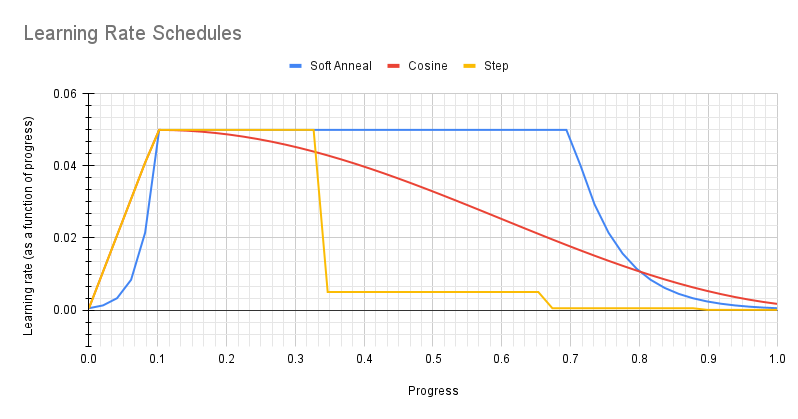
Learning Rate Scheduler#
The parameter lr_config defines the parameters for learning rate scheduler
The learning rate scheduler can be either step, soft_anneal or cosine.
Step#
The parameter step defines the step learning rate scheduler.
Parameter |
Datatype |
Typical value |
Description |
Supported Values |
|
float |
– |
The base(maximum) learning rate value. |
Positive, usually in the interval (0, 1). |
|
int |
– |
The progress (percentage of the entire training duration) after which the learning rate will be decreased. |
Less than 100. |
|
float |
– |
The multiplicative factor used to decrease the learning rate. |
In the interval (0, 1). |
Note
The learning rate is automatically scaled with the number of GPUs used during training, or the effective learning rate is learning_rate * n_gpu.
Soft Annealing#
The parameter soft_anneal defines the soft annealing learning rate scheduler.
Parameter |
Datatype |
Typical value |
Description |
Supported Values |
|
float |
– |
The base (maximum) learning rate value. |
Positive, usually in the interval (0, 1). |
|
float |
– |
The progress at which learning rate achieves the base learning rate. |
In the interval (0, 1). |
|
float |
– |
The divider by which the learning rate will be scaled down. |
Greater than 1.0. |
|
repeated float |
– |
Points of progress at which the learning rate will be decreased. |
List of floats. Each will be in the interval (0, 1). |
Cosine#
The parameter cosine defines the cosine learning rate scheduler.
Parameter |
Datatype |
Typical value |
Description |
Supported Values |
|
float |
– |
The base (maximum) learning rate. |
Usually less than 1.0 |
|
float |
– |
The ratio of minimum learning rate to the base learning rate. |
Less than 1.0 |
|
float |
– |
The progress at which learning rate achieves the base learning rate. |
In the interval (0, 1). |
Optimizer#
Three types of optimizers are supported: Adam, SGD and RMSProp. Only one type should be specified in
the specification file. No matter which type is chosen, it will be wrapped in an optimizer proto, as
shown in the following example:
optimizer {
    sgd {
    lr: 0.01
    decay: 0.0
    momentum: 0.9
    nesterov: False
    }
}
The Adam optimizer parameters are summarized in the table below.
Parameter |
Description |
Data Type and Constraints |
Default/Suggested Value |
|
The learning rate. This parameter is overridden by the learning rate scheduler and hence not useful. |
float |
|
|
The momentum for the means of the model parameters |
float |
|
|
The momentum for the variances of the model parameters |
float |
|
|
Th decay factor for the learning rate. This parameter is not useful. |
float |
|
|
A small constant for numerical stability |
float |
|
The SGD optimizer parameters are summarized in the table below.
Parameter |
Description |
Data Type and Constraints |
Default/Suggested Value |
|
The learning rate. This parameter is overridden by the learning rate scheduler and hence not useful. |
float |
|
|
The momentum of SGD |
float |
|
|
The decay factor of the learning rate. This parameter is not useful because it is overridden by the learning rate scheduler. |
float |
|
|
A flag to enable Nesterov momentum for SGD |
Boolean |
|
The RMSProp optimizer parameters are summarized in the table below.
Parameter |
Description |
Data Type and Constraints |
Default/Suggested Value |
|
The learning rate. This parameter is overridden by the learning rate scheduler and hence not useful. |
float |
|
Training the model#
Input Requirement#
Input size: 3 * H * W (W, H >= 32)
Input format: JPG, JPEG, PNG
Note
Classification input images do not need to be manually resized. The input dataloader
automatically resizes images to input size.
Model parallelism#
Image classification supports model parallelism. Model parallelism is a technique that we split the entire model
on multiple GPUs and each GPU will hold a part of the model. A model is split by layers. For example,
if a model has 100 layers, then we can place the layer 0-49 on GPU 0 and layer 50-99 on GPU 1.
Model parallelism will be useful when the model is huge and cannot fit into a single GPU even with
batch size 1. Model parallelism is also useful if we want to increase the batch size that is seen
by BatchNormalization layers and hence potentially improve the accuracy. This feature can be enabled
by setting model_parallelism in training_config. For example,
model_parallelism: 0.3
model_parallelism: 0.7
will enable a 2-GPU model parallelism where the first GPU will hold 30% of the model layers and the second GPU will hold 70% of the model layers. The percentage of model layers can be adjusted with some trial-and-error so all GPUs consumes almost the same GPU memory size and in that case we can use the largest batch size for this model-parallelised training.
Model parallelism can be enabled jointly with data parallelism. For example, in above case we enabled a 2-GPU model parallelism, at the same time we can also enable 4 horovod processes for it. In this case, we have 4 horovod processes for data parallelism and each process will have the model split on 2 GPUs.
Evaluating the Model#
After the model has been trained, using the experiment config file, and by following the steps to train a model, the next step is to evaluate this model on a test set to measure the accuracy of the model.
The classification app computes evaluation loss, Top-k accuracy, precision, and recall as metrics:
Loss
Top-K accuracy
Precision (P): TP / (TP + FP)
Recall (R): TP / (TP + FN)
Confusion Matrix
Pruning the Model#
Pruning removes parameters from the model to reduce the model size without compromising the integrity of the model itself.
After pruning, the model needs to be retrained. See Re-training the Pruned Model for more details.
Re-training the Pruned Model#
After the model has been pruned, there might be a slight decrease in accuracy. This happens because some previously useful weights may have been removed. In order to regain the accuracy, NVIDIA recommends that you retrain this pruned model over the same dataset, with an updated specification file that points to the newly pruned model as the pretrained model file.
Users are advised to turn off the regularizer in the training_config for classification to recover
the accuracy when retraining a pruned model. You may do this by setting the regularizer type
to NO_REG. All the other parameters may be retained in the specification file from the previous training.
Exporting the model#
Exporting the model decouples the training process from inference and allows conversion to
TensorRT engines outside the TAO environment. TensorRT engines are specific to each hardware
configuration and should be generated for each unique inference environment.
The exported model may be used universally across training and deployment hardware.
The exported model format is referred to as .etlt. Like .tlt, the .etlt model
format is also a encrypted model format with the same key of the .tlt model that it is
exported from. This key is required when deploying this model.
Deploying to DeepStream#
Refer to the Integrating a Classification (TF1/TF2) Model page for more information about deploying a classification model with DeepStream.