

UNET#
UNet is a semantic segmentation model that supports the following tasks:
trainpruneevaluateinferenceexport
Data Input for Semantic Segmentation#
See the Data Annotation Format page for more information about the data format for UNet.
Creating a Configuration File#
To perform training, evaluation, pruning, and inference for Unet, you will need to configure
several components, each with their own parameters. The train, evaluate,
prune, and inference tasks for a UNet experiment share the same configuration file.
The specification file for Unet training configures these components for the training pipeline:
Model
Trainer
Dataset
Model Config#
The segmentation model can be configured using the model_config option in the specification file.
The following is a sample model config to instantiate a resnet18 model with blocks 0 and 1 frozen and all shortcuts set to projection layers:
# Sample model config for to instantiate a resnet18 model freeze blocks 0, 1
# with all shortcuts having projection layers.

model_config {
  num_layers: 18
  all_projections: true
  arch: "resnet"
  freeze_blocks: 0
  freeze_blocks: 1
  use_batch_norm: true
  initializer: HE_UNIFORM
  training_precision {
    backend_floatx: FLOAT32
  }
  model_input_height: 320
  model_input_width: 320
  model_input_channels: 3
}
The following table describes the model_config parameters:
Parameter |
Datatype |
Default |
Description |
Supported Values |
|---|---|---|---|---|
all_projections
|
Boolean
|
False
|
For templates with shortcut connections, this parameter defines whether or not all shortcuts should be instantiated with 1x1
projection layers, irrespective of whether there is a change in stride across the input and output.
|
True/False (only to be used in resnet templates)
|
arch
|
string
|
resnet
|
The architecture of the backbone feature extractor to be used for training
|
resnet, vgg, vanilla_unet, efficientnet_b0, vanilla_unet_dynamic
|
num_layers
|
int
|
18
|
The depth of the feature extractor for scalable templates
|
* resnets: 10, 18, 34, 50, 101
* vgg: 16, 19
|
enable_qat
|
Boolean
|
False
|
Enables model training using Quantization Aware Training (QAT). For
more information about QAT, see the Quantization Aware Training section.
|
True/False
|
use_pooling
|
Boolean
|
False
|
A Boolean value that determines whether to use strided convolutions or MaxPooling while downsampling. When True, MaxPooling is used to
downsample; however, for an object detection network, we recommend setting this to False and using strided convolutions.
|
True/False
|
use_batch_norm |
Boolean |
False |
A Boolean value that determines whether to use batch normalization layers or not |
True/False |
training precision |
Proto Dictionary |
– |
Contains a nested parameter that sets the precision of the back-end training framework |
backend_floatx: FLOAT32 |
load_graph
|
Boolean
|
False
|
For a pruned model, set this parameter as True. Pruning modifies the original graph, hence both the pruned model graph and the weights need to
be imported.
|
True/False
|
freeze_blocks
|
float
(repeated)
|
–
|
This parameter defines which blocks may be frozen from the instantiated feature extractor template, and is different for different
feature extractor templates.
|
* ResNet series: For the ResNet series, the block ID’s valid for freezing is any subset of [0, 1, 2, 3](inclusive)
* VGG series: For the VGG series, the block ID’s valid for freezing is any subset of [1, 2, 3, 4, 5](inclusive)
|
freeze_bn
|
Boolean
|
False
|
You can choose to freeze the Batch
Normalization layers in the model during training.
|
True/False
|
initializer
|
enum
|
GLOROT_UNIFORM
|
Initialization of convolutional layers. Supported initializations are He Uniform, He Normal, and Glorot uniform.
|
HE_UNIFORM, HE_NORMAL, GLOROT_UNIFORM
|
model_input_height
|
int
|
–
|
The model input height dimension of the model, which should be a multiple of 16.
|
>100
|
model_input_width
|
int
|
–
|
The model input width dimension of the model, which should be a multiple of 16.
|
>100
|
model_input_channels
|
int
|
–
|
The model-input channels dimension of the model, which should be set to 3 for a Resnet/VGG backbone. It can be set to 1 or 3
for vanilla_unet based on the image input channel dimensions. If the input image channel is 1 and the model-input channels is set to 3 for
standard UNet, the input grayscale image is converted to RGB.
|
1/3
|
Note
The vanilla_unet model was originally proposed in this paper:
U-Net: Convolutional Networks for Biomedical Image Segmentation.
This model is recommended for the Binary Segmentation use case. The input dimensions for
standard UNet is fixed at 572 x 572.
Training#
This section outlines how to configure the training parameters. The following is an example
training_config element:
training_config {
  batch_size: 2
  epochs: 3
  log_summary_steps: 10
  checkpoint_interval: 1
  loss: "cross_dice_sum"
  learning_rate:0.0001
  lr_scheduler {
    cosine_decay {
      alpha : 0.01
      decay_steps: 500
    }
  }
  regularizer {
    type: L2
    weight: 3.00000002618e-09
  }
  optimizer {
    adam {
      epsilon: 9.99999993923e-09
      beta1: 0.899999976158
      beta2: 0.999000012875
    }
  }
}
The following table describes the parameters for training_config.
Parameter |
Datatype |
Default |
Description |
Supported Values |
|---|---|---|---|---|
batch_size |
int |
1 |
The number of images per batch per gpu |
>= 1 |
epochs |
int |
None |
The number of epochs to train the model. One epoch represents one iteration of training through the entire dataset. |
> 1 |
log_summary_steps |
int |
1 |
The summary-steps interval at which train details are printed to stdout |
1 - steps per epoch |
checkpoint_interval |
int |
1 |
The number of epochs interval at which the checkpoint is saved |
1 - total number of epochs |
loss |
string |
cross_entropy |
The loss to be used for segmentation. The supported losses for tasks are as follows:
|
cross_entropy, cross_dice_sum, dice |
learning_rate |
float |
0.0001 |
The learning-rate initialization value. |
0 - 1 |
lr_scheduler |
lr_scheduler proto config |
None (constant learning rate) |
The following lr_schedulers are supported:
|
|
weights_monitor |
bool |
False |
Specifies whether to log tensorboard visualization of weight ranges. |
True/ False |
visualizer |
visualizer proto config |
– |
This parameter defines features for the Tensorboard visualizer. The visualizer config includes following parameters: * save_summary_steps (int): The number of steps after which the loss needs to be visualized on Tensorboard. * infrequent_save_summary_steps (int): The number of steps after which the weight histograms, input images, traning prediction mask, and Groundtruth masks overlay need to be visualized. |
<= number of steps per epoch <= Total number of steps of the entire training |
regularizer |
regularizer proto config |
– |
This parameter configures the type and weight of the regularizer to be used during training. The two parameters include:
|
The supported values for type are:
|
optimizer |
optimizer proto config |
This parameter defines which optimizer to use for training, and the parameters to configure it, namely:
|
||
activation |
string |
softmax sigmoid |
The activation to be used on the last layer. The supported activations for tasks are as follows:
|
softmax, sigmoid |
Note
Dice loss is currently supported only for binary segmentation. Generic Dice loss for multi-class segmentation is not supported.
COCO to UNet Dataset Format Converter#
If you have masks saved in COCO JSON format, you can use the UNet dataset converter to
convert these masks to UNet PNG mask images. The following sections detail how to use
dataset_convert.
Sample Usage of the COCO to UNet format Dataset Converter Tool#
The dataset_convert tool is described below:
You can use the following arguments.
Required Arguments#
-f, --coco_file: The path to the directory where raw images are stored-r, --results_dir: The path to the results directory where the PNG mask images will be saved
Optional Arguments#
-n, --num_files: Number of first ‘n’ images to be converted to mask images from the COCO JSON file. If not provided, all the images in the COCO JSON file are converted.-h, --help: Prints the help message.Note
A log file named
skipped_annotations_log.jsonwill be generated in theresults_dirif the tightest bounding box of the segmentation mask is out of bounds with respect to the image frame. The log file records theimage_idandannotation_idvalues associated with the problematic segmentation annotations. Annotations that are missing segmentation and images that are missing annotation fields are also recorded in the.jsonfile. For example, the following log line means the segmentation withid 562121is out of bounds inimage 226111.{ "error": "The segmentation map is out of bounds or faulty.", "image_id": 226111, "annotation_id": 562121 }
The following example shows how to use the command with a dataset:
Dataset#
This section describes how to configure the dataset_config function.
You can feed the input images and corresponding masks either as folders or from text files.
The following is an example dataset_config element using folders as inputs:
  dataset_config {
    dataset: "custom"
    augment: True
    resize_padding: True
    resize_method: BILINEAR
    augmentation_config {
      spatial_augmentation {
        hflip_probability : 0.5
        vflip_probability : 0.5
        crop_and_resize_prob : 0.5
      }
      brightness_augmentation {
        delta: 0.2
      }
    }

    input_image_type: "grayscale"
    train_images_path:"/workspace/tao-experiments/data/unet/isbi/images/train"
    train_masks_path:"/workspace/tao-experiments/data/unet/isbi/masks/train"
    val_images_path:"/workspace/tao-experiments/data/unet/isbi/images/val"
    val_masks_path:"/workspace/tao-experiments/data/unet/isbi/masks/val"
    test_images_path:"/workspace/tao-experiments/data/unet/isbi/images/test"
    data_class_config {
      target_classes {
      name: "foreground"
      mapping_class: "foreground"
      label_id: 0
    }
    target_classes {
      name: "background"
      mapping_class: "background"
      label_id: 1
    }
  }
}
Please refer to Structured Images and Masks Folders that provides the description of the contents of images and masks paths.
The following is an example dataset_config element using text files as inputs:
dataset_config {
  dataset: "custom"
  augment: True
  augmentation_config {
    spatial_augmentation {
      hflip_probability : 0.5
      vflip_probability : 0.5
      crop_and_resize_prob : 0.5
    }
    brightness_augmentation {
      delta: 0.2
    }
  }
  input_image_type: "color"
  train_data_sources: {
    data_source: {
      image_path: "/workspace/images_train/images_source1.txt"
      masks_path: "/workspace/labels_train/labels_source1.txt"
    }
    data_source: {
      image_path: "/workspace/images_train/images_source2.txt"
      masks_path: "/workspace/labels_train/labels_source2.txt"
    }
  }
  val_data_sources: {
    data_source: {
      image_path: "/workspace/images_val/images_source1.txt"
      masks_path: "/workspace/labels_val/labels_source1.txt"
    }
    data_source: {
      image_path: "/workspace/images_val/images_source2.txt"
      masks_path: "/workspace/labels_val/labels_source2.txt"
    }
  }
  test_data_sources: {
    data_source: {
      image_path: "/workspace/images_test/images_source1.txt"
      masks_path: "/workspace/labels_test/labels_source1.txt"
    }
    data_source: {
      image_path: "/workspace/images_test/images_source2.txt"
      masks_path: "/workspace/labels_test/labels_source2.txt"
    }
  }
  data_class_config {
    target_classes {
      name: "foreground"
      mapping_class: "foreground"
      label_id: 0
    }
    target_classes {
      name: "background"
      mapping_class: "background"
      label_id: 1
    }
  }
}
Please refer Image and Mask Text files that provides description of the contents of text files.
The following table describes the parameters used to configure dataset_config:
Parameter |
Datatype |
Default |
Description |
Supported Values |
|---|---|---|---|---|
dataset |
string |
custom |
The input type dataset used. The currently supported dataset is custom to the user. Open source datasets will be added in the future. |
custom |
augment |
bool |
False |
If the input should augmented online while training, the following augmentations are done at a probability of 0.5 The augmentation config can modified to change the probability for each type of augmentation.
|
true / false |
buffer_size |
integer |
Dataset size |
The maximum number of elements that will be buffered when prefetching This parameter is useful for large datasets |
<= train dataset num samples |
filter_data |
bool |
False |
Skips those images/ masks that are not present during training |
true/ fasle |
augmentation_config |
Proto Message |
None |
Contains the spatial_augmentation proto and brightness_augmentation proto to configure the probability of corresponding augmentations. |
|
spatial_augmentation |
Proto Dictionary |
None
|
Contains the following configurable fields. Set to default value if augment arument is set to True.
|
|
brightness_augmentation |
Proto Dictionary |
0.2 |
Configure following parameter: delta: Adjust brightness using delta value. |
Non-negative integer |
input_image_type |
string |
color |
The input image type to indicate if input image is grayscale or color (RGB) |
color/ grayscale |
resize_padding |
bool |
False |
Image will be resized with zero padding on all sides to preserve aspect ratio |
true / false |
resize_method |
string |
BILINEAR |
The image is resized using one of the following methods: * BILINEAR: Bilinear interpolation. If antialias is true, becomes a hat/tent filter function with radius 1 when downsampling. * NEAREST_NEIGHBOR: Nearest neighbour interpolation. * BICUBIC: Cubic interpolant of Keys. * AREA: Anti-aliased resampling with area interpolation |
BILINEAR NEAREST_NEIGHBOR BICUBIC AREA |
train_images_path |
string |
None |
The input train images path |
UNIX path string |
train_masks_path |
string |
None |
The input train masks path |
UNIX path string |
val_images_path |
string |
None |
The input validation images path |
UNIX path string |
val_masks_path |
string |
None |
The input validation masks path |
UNIX path string |
test_images_path |
string |
None |
The input test images path |
UNIX path string |
train_data_sources |
Proto Message |
None |
The input training data_source proto that contain text file for training sequences |
|
val_data_sources |
Proto Message |
None |
The input training data_source proto that contain text file for validation sequences |
|
test_data_sources |
Proto Message |
None |
The input training data_source proto that contain text file for testing sequences |
|
data_source |
Proto Dictionary |
– |
The repeated field for every text file corresponding to a sequence. The following are the parameters of data_source config:
|
|
data_class_config |
Proto Dictionary |
None |
Proto dictionary that contains information of training classes as part of target_classes proto which is described below. |
|
target_classes |
Proto Dictionary |
– |
The repeated field for every training class. The following are required parameters for the target_classes config:
|
Note
The supported image extension formats for training images are “.png”, “.jpg”, “.jpeg”, “.PNG”, “.JPG”, and “.JPEG”.
Training the Model#
After preparing input data as per these instructions and setting up a specification file. You are now ready to start training a semantic segmentation network.
Input Requirement#
Input size: C * W * H (where C = 3 or 1, W = 572, H = 572 for vanilla unet and W >= 128, H >= 128 and W, H are multiples of 32 for other archs).
Image format: JPG, JPEG, PNG, BMP
Label format: Image/Mask pair
Note
The images and masks need not be equal to model input size. The images/ masks will be resized to the model input size during training.
Note
UNet supports resuming training from intermediate checkpoints. If a previously running training experiment is stopped prematurely, you can restart the training from the last checkpoint. The trainer for UNet finds the last saved checkpoint in the results directory and resumes the training from there. The interval at which the checkpoints are saved are defined by the checkpoint_interval parameter under the “training_config” for UNet. Do not use a pre-trained weights argument when resuming training.
Note
UNet supports Tensorboard visualization for losses, visualize the prediction mask on training images during training and Ground truth mask overlay on input images. The tensorboard logs are saved in the output/events directory in order to visualize them.
Pruning the Model#
Pruning removes parameters from the model to reduce the model size without compromising the integrity of the model itself.
After pruning, the model needs to be retrained. See Re-training the Pruned Model for more details.
Note
Evaluation and inference are not directly supported for pruned models. You must re-train a pruned model before performing evaluation and inference.
Note
Pruning is not supported for model arch Shufflenet.
Re-training the Pruned Model#
Once the model has been pruned, there might be a slight decrease in accuracy because some previously useful weights may have been removed. To regain the accuracy, we recommend that you retrain this pruned model over the same dataset, with the pretrained model set to the newly pruned model file.
We recommend setting the regularizer weight to zero in the training_config for UNet to
recover the accuracy when retraining a pruned model. All other parameters may be retained in the
specification file from the previous training.
To load the pruned model, as well as for re-training, set the load_graph flag under
model_config to true.
Evaluating the Model#
UNet evaluation produces precision, recall, F1-score, and IOU metrics for every class. It also provides the weighted average, macro average, and micro average for these metrics. For more information on the averaging metric, see the classification report.
Note
Evaluation uses the images and masks that are provided to
val_images_path and val_masks_path or text files provided under the
val_data_sources in dataset_config.
Using Inference on the Model#
The inference task for UNet may be used to visualize segmentation and
generate frame-by-frame PNG format labels on a directory of images.
The tool automatically generates segmentation overlaid images in output_dir/vis_overlay_tlt.
The labels will be generated in output_dir/mask_labels_tlt. The annotated, segmented images
and labels for trt inference are saved in output_dir/vis_overlay_trt and
output_dir/mask_labels_trt respectively.
Exporting the Model#
The UNet model application in TAO includes an export sub-task
to export and prepare a trained UNet model for Deploying to DeepStream.
The export sub-task optionally generates the calibration cache for TensorRT INT8 engine
calibration.
Exporting the model decouples the training process from deployment and allows conversion to
TensorRT engines outside the TAO environment. TensorRT engines are specific to each hardware
configuration and should be generated for each unique inference environment. This may be
interchangeably referred to as the .trt or .engine file. The same exported TAO
model may be used universally across training and deployment hardware. This is referred to as the
.etlt file, or encrypted TAO file. During model export, the TAO model is encrypted with
a private key. This key is required when you deploy this model for inference.
INT8 Mode Overview#
TensorRT engines can be generated in INT8 mode to run with lower precision,
and thus improve performance. This process requires a cache file that contains scale factors
for the tensors to help combat quantization errors, which may arise due to low-precision arithmetic.
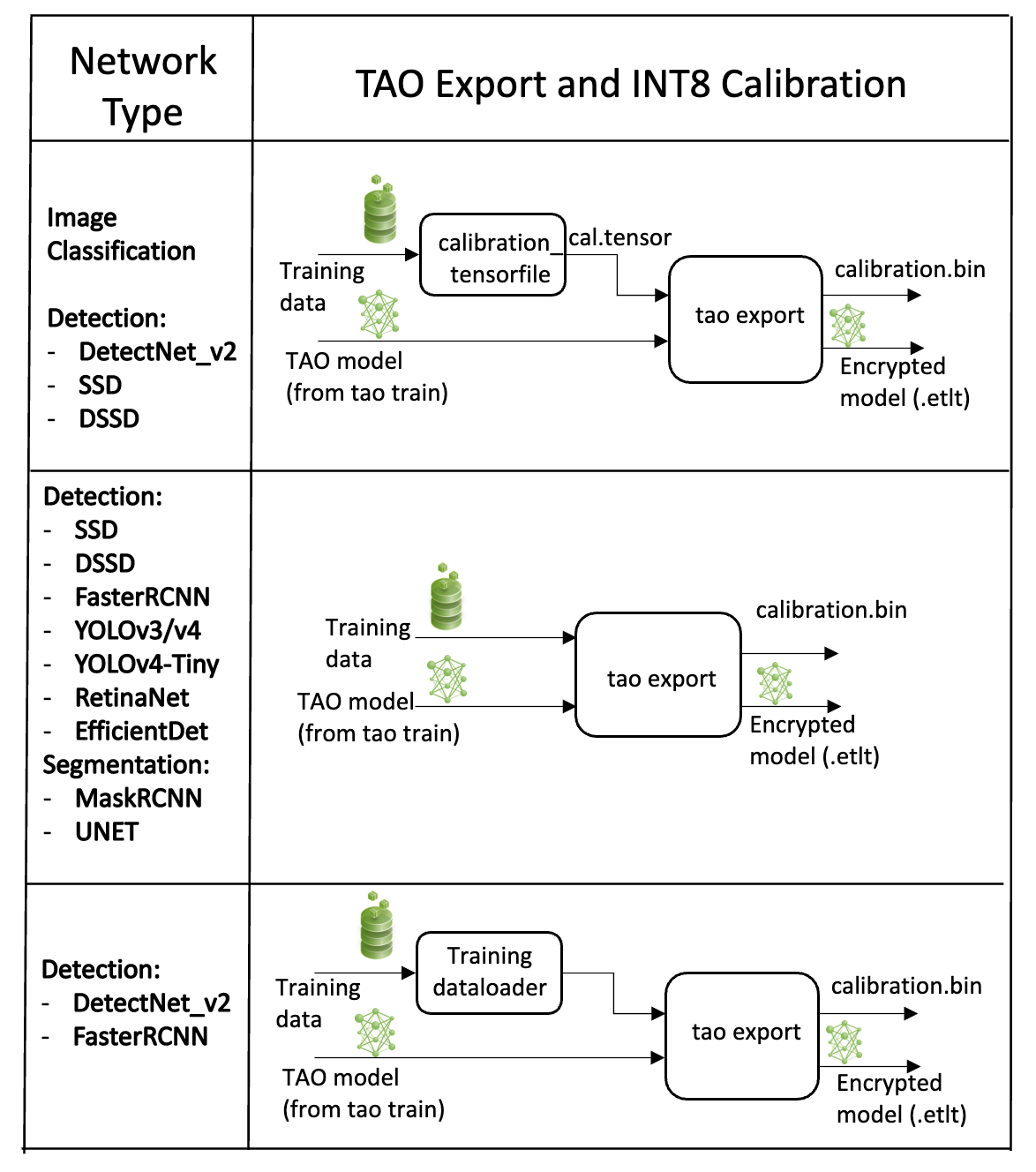
The calibration cache is generated using a calibration tensorfile when export is
run with the --data_type flag set to int8. Pre-generating the calibration
information and caching it removes the need for calibrating the model on the inference machine.
Moving the calibration cache is usually much more convenient than moving the calibration tensorfile
since it is a much smaller file and can be moved with the exported model. Using the calibration
cache also speeds up engine creation as building the cache can take several minutes to generate
depending on the size of the Tensorfile and the model itself.
The export tool can generate an INT8 calibration cache by ingesting training data. You will need to point the tool to a directory of images to use for calibrating the model. You will also need to create a sub-sampled directory of random images that best represent your training dataset.
FP16/FP32 Model#
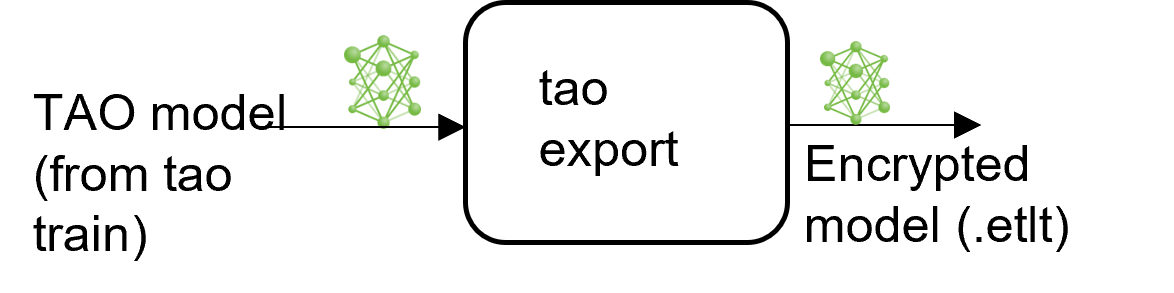
The calibration.bin is only required if you need to run inference at INT8 precision. For
FP16/FP32 based inference, the export step is much simpler. All that is required is to provide
a model from the train step to export to convert into an encrypted TAO
model.
Note
When exporting a model that was trained with QAT enabled, the tensor scale factors for
calibrating the activations are peeled out of the model and serialized to a TensorRT-readable cache
file. However, the current version of QAT doesn’t natively support DLA int8 deployment on Jetson.
To deploy this model on Jetson with DLA int8, use TensorRT post-training quantization
to generate the calibration cache file.
Deploying to DeepStream#
Refer to the Integrating a UNet Model page for more information about deploying a UNet model to DeepStream.