


NVIDIA vGPU for Compute Overview#
Understand fundamental NVIDIA vGPU for Compute concepts, architecture, and configuration modes before installation.
In This Section
Glossary - Key terms and component definitions
Architecture Overview - vGPU system architecture and component relationships
vGPU Configurations - Time-sliced, MIG-backed, and time-sliced MIG-backed modes
Key Features - Advanced capabilities for GPU virtualization optimization
Product Limitations - Known issues and platform-specific limitations
Glossary#
Term |
Definition |
|---|---|
NVIDIA Virtual GPU (vGPU) Manager |
The Virtual GPU (vGPU) Manager enables GPU virtualization by allowing multiple VMs to share a physical GPU, optimizing GPU allocation for different workloads. The NVIDIA Virtual GPU Manager is installed on the hypervisor. |
NVIDIA vGPU for Compute Guest Driver |
The NVIDIA vGPU for Compute Guest Driver is installed on each VM’s operating system, enabling it to use virtualized GPU resources. The Guest Driver provides the interface and support to ensure that applications running within the VMs can use the GPU’s capabilities, similar to how they would on a physical machine with a dedicated GPU. |
NVIDIA Licensing System |
The NVIDIA Licensing System for NVIDIA AI Enterprise manages the software licenses required to use NVIDIA AI tools and infrastructure. This system ensures that organizations are compliant with licensing terms while providing flexibility in managing and deploying NVIDIA AI Enterprise. |
NVIDIA AI Enterprise Infra Collection |
The NVIDIA AI Enterprise Infrastructure (Infra) Collection is a suite of software and tools designed to support the deployment and management of AI workloads in enterprise environments. The NVIDIA AI Enterprise Infra 6 collection provides a scalable foundation for running AI workloads, enabling enterprises to leverage NVIDIA GPUs and software to accelerate their AI initiatives. |
The NVIDIA vGPU for Compute Drivers can be downloaded from the NVIDIA AI Enterprise Infra 6 collection.
NVIDIA vGPU Architecture Overview#
The following diagram shows the high-level architecture of NVIDIA vGPU. Under the control of the NVIDIA Virtual GPU Manager (running on the hypervisor), a single NVIDIA physical GPU can support multiple virtual GPU devices (vGPUs) that can be assigned directly to guest VMs, each functioning like a dedicated GPU.
Guest VMs use NVIDIA vGPUs the same way as a physical GPU that’s passed through by the hypervisor: the NVIDIA vGPU for Compute driver loaded in the guest VM provides direct access to the GPU.
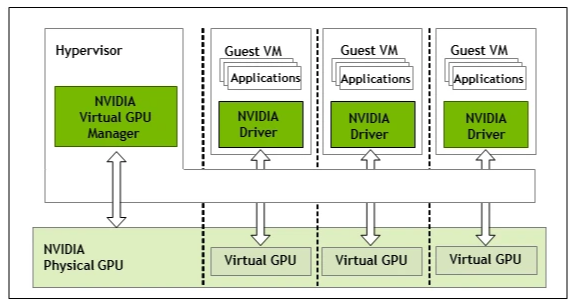
Each NVIDIA vGPU is analogous to a conventional GPU with a fixed amount of GPU framebuffer/memory. The vGPU’s framebuffer is allocated out of the physical GPU’s framebuffer at the time the vGPU is created, and the vGPU retains exclusive use of that framebuffer until it is destroyed.
NVIDIA vGPU for Compute Configurations#
NVIDIA vGPU for Compute supports different vGPU modes depending on the physical GPU:
Time-sliced vGPUs can be created on all NVIDIA AI Enterprise supported GPUs.
On GPUs that support the Multi-Instance GPU (MIG) feature, the following types of MIG-backed vGPU are supported:
MIG-backed vGPUs that occupy an entire GPU instance
Time-sliced, MIG-backed vGPUs
vGPU Mode |
Description |
GPU Partitioning |
Isolation |
Use Cases |
|---|---|---|---|---|
Time Sliced vGPU |
A time-sliced vGPU for Compute VM shares access to all GPU compute resources, including streaming multiprocessors (SMs) and GPU engines with other vGPUs on the same GPU. Processes are scheduled sequentially, with each vGPU for Compute VM gaining exclusive use of GPU engines during its time slice. |
Temporal |
Strong hardware-based memory and fault isolation. Good performance and QoS with round-robin scheduling. |
Deployments with non-strict isolation requirements or environments where MIG-backed vGPU is not available. Suitable for light to moderate AI workloads such as small-scale inferencing, preprocessing pipelines, and development and testing of models in a pre-training phase. |
MIG-backed vGPU |
A MIG-backed vGPU for Compute VM is created from one or more MIG slices and assigned to a VM on a MIG-capable physical GPU. Each MIG-backed vGPU for Compute VM has exclusive access to the compute resources of its GPU instance, including SMs and GPU engines. On a MIG-backed vGPU for Compute VM, processes running on one VM execute in parallel with processes running on other vGPUs on the same physical GPU. Each process runs only on its assigned vGPU, alongside processes on other vGPUs. For more information on configuring MIG-backed vGPU VMs, refer to the Virtual GPU Types for Supported GPUs. |
Spatial |
Strong hardware-based memory and fault isolation. Better performance and QoS with dedicated cache/memory bandwidth and lower scheduling latency. |
Most virtualization deployments require strong isolation, multi-tenancy, and consistent performance. Well-suited for consistent high-performance AI inferencing, multi-tenant fine-tuning jobs, or parallel execution of small to medium training tasks with predictable throughput requirements. |
NVIDIA vGPU for Compute Key Features#
NVIDIA vGPU for Compute provides advanced features to optimize GPU virtualization for AI, machine learning, and high-performance computing workloads. These capabilities enable flexible resource allocation, high-performance networking, live workload management, and enterprise-grade reliability across virtualized GPU environments.
Key Capabilities
MIG-Backed vGPU - Hardware-level GPU partitioning with spatial isolation for multi-tenant workloads.
Device Groups - Automated detection and provisioning of physically connected devices for optimal topology.
GPUDirect RDMA and Storage - Direct memory access and storage I/O bypass for maximum performance.
Heterogeneous vGPU - Mixed vGPU profiles on a single GPU for diverse workload requirements.
Live Migration - Zero-downtime VM migration for maintenance and load balancing.
Multi-vGPU and P2P - Multiple vGPUs per VM with peer-to-peer communication.
NVIDIA NVSwitch - High-bandwidth GPU-to-GPU interconnect fabric through NVLink.
NVLink Multicast - Efficient one-to-many data distribution for distributed training.
Scheduling Policies - Workload-specific GPU scheduling algorithms.
Suspend-Resume - VM state preservation for flexible resource management.
Unified Virtual Memory - Single memory address space across CPU and GPU.
For detailed information about each feature, including platform support, configuration requirements, and GPU compatibility tables, refer to NVIDIA vGPU for Compute Features.
Product Limitations and Known Issues#
Red Hat Enterprise Linux with KVM Limitations and Known Issues#
Refer to the following lists of known Red Hat Enterprise Linux with KVM product limitations.
Ubuntu KVM Limitations and Known Issues#
Refer to the following lists of known Ubuntu KVM product limitations.
VMware vSphere Limitations and Known Issues#
Refer to the following lists of known VMware vSphere product limitations.
Requirements for Using vGPU for Compute on VMware vSphere for GPUs Requiring 64 GB or More of MMIO Space with Large-Memory VMs#
Some GPUs require 64 GB or more of MMIO space. When a vGPU on a GPU that requires 64 GB or more of MMIO space is assigned to a VM with 32 GB or more of memory on ESXi, the VM’s MMIO space must be increased to the amount of MMIO space that the GPU requires.
For detailed information about this limitation, refer to Requirements for Using vGPU on GPUs Requiring 64 GB or More of MMIO Space with Large-Memory VMs.
GPU |
MMIO Space Required |
|---|---|
NVIDIA H200 (all variants) |
512GB |
NVIDIA H100 (all variants) |
256GB |
NVIDIA H800 (all variants) |
256GB |
NVIDIA H20 141GB |
512GB |
NVIDIA H20 96GB |
256GB |
NVIDIA L40 |
128GB |
NVIDIA L20 |
128GB |
NVIDIA L4 |
64GB |
NVIDIA L2 |
64GB |
NVIDIA RTX 6000 Ada |
128GB |
NVIDIA RTX 5000 Ada |
64GB |
NVIDIA A40 |
128GB |
NVIDIA A30 |
64GB |
NVIDIA A10 |
64GB |
NVIDIA A100 80GB (all variants) |
256GB |
NVIDIA A100 40GB (all variants) |
128GB |
NVIDIA RTX A6000 |
128GB |
NVIDIA RTX A5500 |
64GB |
NVIDIA RTX A5000 |
64GB |
Quadro RTX 8000 Passive |
64GB |
Quadro RTX 6000 Passive |
64GB |
Tesla V100 (all variants) |
64GB |
Microsoft Windows Server Limitations and Known Issues#
Refer to the following lists of known Microsoft Windows Server product limitations.
NVIDIA AI Enterprise supports only the Tesla Compute Cluster (TCC) driver model for Windows guest drivers.
Windows guest OS support is limited to running applications natively in Windows VMs without containers. NVIDIA AI Enterprise features that depend on containerization are not supported on Windows guest operating systems.
If you are using a generic Linux supported by the KVM hypervisor, consult the documentation from your hypervisor vendor for information about Windows releases supported as a guest OS.
For more information, refer to the Non-containerized Applications on Hypervisors and Guest Operating Systems Supported with vGPU table.