

Runtime Configuration (Environment Variables and Mounts)
Overview
This reference provides technical specifications for environment variables and mounts in AI Workbench projects.
Use this reference to understand environment variable types, storage locations, mount type requirements, valid directory paths, and how runtime configurations behave across different hosts, container runtimes, and users.
For step-by-step instructions on configuring environment variables and mounts, see Manage Runtime Settings.
Key Concepts
Environment Variable:
A key-value pair passed into the container at runtime, stored either in variables.env or as a sensitive variable.
Sensitive Variable:
An environment variable whose value is not versioned and is stored locally on each host.
Non-Sensitive Variable:
An environment variable whose key and value are both versioned in the project.
Mount Type:
One of four categories (project, host, volume, temp) that determines mount behavior and requirements.
Target Directory:
The absolute path in the container file system where mounted files appear.
Source Directory:
The absolute path on the host file system (only applicable to project and host mounts).
Versioned Configuration:
Runtime settings stored in spec.yaml or variables.env and versioned with the project.
Requirements
Environment variables and mounts in AI Workbench projects have various requirements that must be met.
General Requirements
The general requirements for environment variables and mounts are:
- AI Workbench project.
- Container must be restarted after runtime configuration changes.
Environment Variable Requirements
The environment variable requirements are:
- Variable names cannot contain hyphens.
- Sensitive variables must be re-entered when cloning projects to new hosts.
Mount Requirements
The mount requirements are:
All Mounts
- Target directories must be absolute paths starting with /.
- Target directories must not be subdirectories of versioned directories (e.g., /project/).
Host Mounts
- Source directory must exist on the host before creating the mount.
- Target directory should be created in the container (using postBuild.bash) to avoid permission issues. For more information, see Environments and AI Workbench.
Environment Variables
Environment variables control how software or packages run inside of the project container.
Environment Variable Types
AI Workbench supports two types of environment variables with different versioning and storage behavior:
Storage Locations
The storage locations for environment variables are different for non-sensitive and sensitive variables.
Non-Sensitive Variables
Storage locations for non-sensitive variables are:
- Storage: variables.env file in the project
- Versioning: Both key and value are versioned with the project
- Portability: Values are automatically available when project is cloned
- Usage: Configuration flags, paths, and general settings
Sensitive Variables
Storage locations for sensitive variables are:
- Storage: secrets.env file in .nvwb/project-runtime-info/<project-name>-<project-hash>/
- Versioning: Only the key is versioned in spec.yaml
- Portability: Values do not leave the host where they are created
- Usage: API keys, passwords, authentication tokens, and other secrets
Path Format
The full path to sensitive variable storage is .nvwb/project-runtime-info/<PROJECT-NAME>-<PROJECT-HASH>/secrets.env.
Where <PROJECT-HASH> is a hash of the project’s path on disk.
Versioning Behavior
The versioning behavior for environment variables is dependent on the type of variable.
What is Versioned
The environment variables that are versioned based on sensitive or non-sensitive variable types are as follows:
Non-Sensitive Variables:
- Both key and value stored in variables.env file in the project
- Committed to Git with the project
- Automatically available when project is cloned
Sensitive Variables:
- Only the key stored in spec.yaml file in the project
- Key is committed to Git
- Value stays local to the host
What is NOT Versioned
The environment variables that are not versioned based on sensitive or non-sensitive variable types are as follows:
Non-Sensitive Variable Values:
- Values are never committed to the repository
- Stored only in .nvwb/project-runtime-info/ on the local host
- Must be re-entered when cloning projects to new hosts or users
Behavior When Cloning Projects
The behavior when cloning projects is different for sensitive and non-sensitive variables.
Non-Sensitive Variables:
- Automatically populated with values from the repository
- No action required from user
Sensitive Variables:
- User is prompted to enter values when cloning
- Each user or host can set different values
- This enables security and allows different users to use their own credentials
Mounts
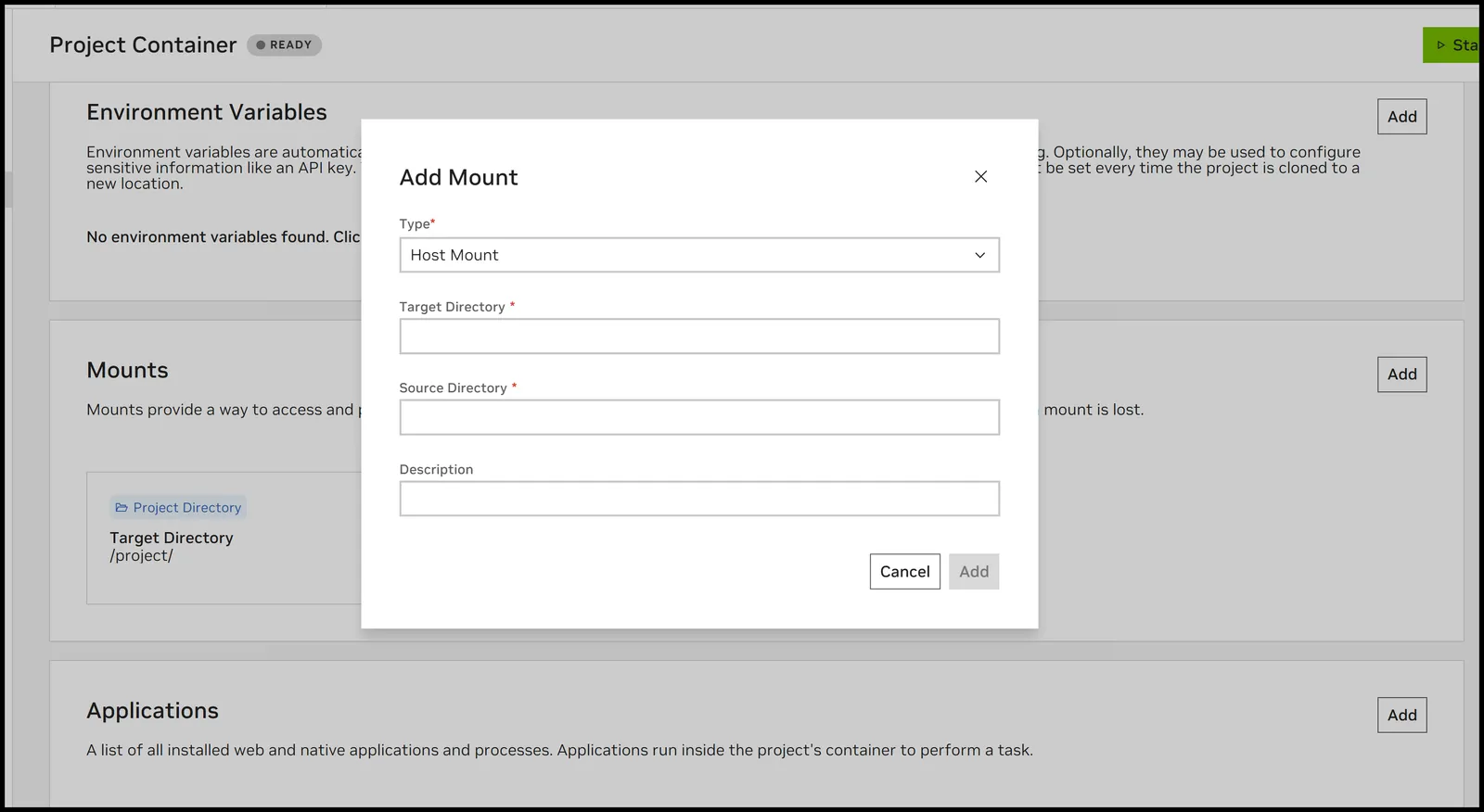
Mounts provide access to external file systems inside of the project container.
Mount Types Reference
AI Workbench uses four mount types based on Docker and Podman mount primitives:
Mount Type Specifications
The mount type specifications are as follows:
Project Mount
Description: The primary mount that connects your project to the container.
Key Characteristics:
- Automatically created by AI Workbench
- Only one allowed per project
- Configuration is versioned with the project
Paths:
- Target Directory: Always /project/
- Source Directory: User-configurable location on host where project exists
Versioning: The project mount is fully versioned (both mount configuration and source path)
Host Mount
Description: Mounts an existing host directory into the container for sharing files.
Key Characteristics:
- Created by user
- Multiple host mounts allowed per project
- Useful for sharing data between projects or accessing local files
Paths:
- Target Directory: User-defined absolute path in container (must not be subdirectory of /project/)
- Source Directory: User-defined absolute path on host (must exist before mount creation)
Versioning: Mount configuration versioned, source directory configurable per host/user.
Important Considerations:
Host mounts can encounter permission issues between the host and container user. To ensure host mounts work across different hosts and runtimes, always create the target directory in the container before creating the mount.
Example (in postBuild.bash):
Adjust the user if your container uses a different user than workbench.
Volume Mount
Description: Creates a persistent Docker/Podman volume for data that survives container restarts and rebuilds.
Key Characteristics:
- Created by user
- Multiple volume mounts allowed per project
- Data persists across container stops and rebuilds
- Useful for caches, databases, or intermediate data products
Paths:
- Target Directory: User-defined absolute path in container (must not be subdirectory of /project/)
- Source: Managed by Docker/Podman, not directly accessible on host
Versioning: Mount configuration versioned, volume name stored in spec.yaml file in the project.
Usage Examples:
- Cache directories (pip cache, conda packages, model downloads)
- Database storage
- Build artifacts that should persist
Temp Mount
Description: Creates a temporary directory that resets every time the container starts.
Key Characteristics:
- Created by user
- Multiple temp mounts allowed per project
- Data is erased when container stops
- Useful for scratch space or temporary processing files
Paths:
- Target Directory: User-defined absolute path in container (must not be subdirectory of /project/)
- Source: Ephemeral tmpfs filesystem
Versioning: Mount configuration versioned
Usage Examples:
- Temporary file processing
- Scratch workspace
- Test data that shouldn’t persist
Target Directories vs Source Directories
Understanding Targets
Target directories are in the container file system where you want the files to appear.
Characteristics:
- Used for all mount types
- Must be absolute paths starting with /
- Must not be subdirectories of versioned directories (e.g., /project/)
- Unique and do not change if the project moves between hosts, runtimes, or users
Valid Examples:
- /mnt/data
- /cache
- /tmp/scratch
Invalid Examples:
- /project/data (subdirectory of versioned directory)
- /data (relative path)
Understanding Sources
Source directories are on the host file system.
Characteristics:
- Only used for
projectandhostmount types. - Must be absolute paths on the host.
- May change if the project moves between hosts, runtimes, or users.
- For host mounts: must exist before mount creation.
Configurability:
- Project mount source: User selects during project creation or clone.
- Host mount source: Configurable per host and per user in mount configuration.
Mount Behavior Across Hosts
Versioning and Portability
What is Versioned:
- Mount type
- Mount name and description
- Target directory path
- Mount options (e.g., read-only flag)
What is NOT Versioned:
- Source directory paths (configurable per host/user)
- Volume contents
- Host directory contents
When Moving Projects
Consistent across hosts:
- Mount names
- Target directories
- Mount types
- Mount options
May change across hosts:
- Source directories for host mounts (must be reconfigured)
- Source directory for project mount (specified during clone)
Automatic behavior:
- Workbench prompts for source directory configuration when needed
- Volume mounts are recreated automatically with the same name
- Temp mounts are recreated automatically
Mount Options
Read-Only Mounts
Description: Prevents the container from writing to the mounted directory.
Valid for: host and volume mounts
Specification: Add ro to the options field in spec.yaml or select read-only option in Desktop App
Volume Name Specification
Description: Explicitly names a Docker/Podman volume for volume mounts.
Valid for: volume mounts only
Specification: Add volumeName=<NAME> to the options field in spec.yaml.
Example:
Related Topics
- Manage Runtime Settings - How to configure environment variables and mounts
- AI Workbench Project Specification - Project specification file reference
- Multi-Container Environments (Docker Compose) - Multi-container environments and shared volumes
- Docker Storage Documentation - Official Docker storage documentation