

User-Centric Timing for KV Cache Benchmarking
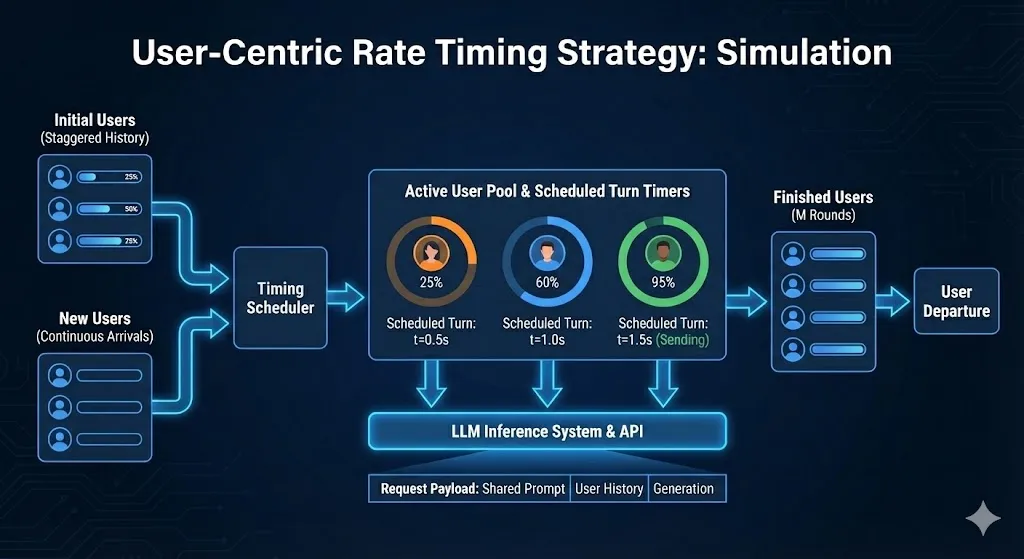
When to Use This Mode
Use user-centric timing when you need to:
- Control per-user turn gaps precisely — Each user waits at least
num_users / QPSseconds between their turns, enabling controlled cache TTL testing - Simulate steady-state from the start — Virtual history creates an immediate mix of new and continuing users (no cold-start transient)
- Per-user timing independence — Each user maintains their own schedule, not affected by other users’ response times
- Measure prefix caching benefits — Quantify TTFT improvements when a shared system prompt is cached across all users
The Real-World Scenario
Imagine a customer support chatbot serving 15 concurrent users. Each user:
- Sends a question
- Reads the response (takes ~15 seconds)
- Sends a follow-up question
- Repeats for ~20 turns until their issue is resolved
User-centric timing recreates this pattern with controlled, consistent timing. You can test whether your KV cache retains entries for exactly 15 seconds, 30 seconds, or any specific gap—something request-rate mode doesn’t guarantee because continuation turns are issued at the next available rate interval rather than after a fixed per-user delay.
Contrast with Other Modes
Quick Start
This configures 15 simulated users with sessions averaging 20 turns:
- Turn gap: 15 users / 1.0 req/s = 15 seconds between each user’s turns
- System throughput: ~1.0 requests/second across all users
- Shared system prompt: 1000 tokens shared across ALL users (KV cache prefix)
- User context: 20000 tokens unique per user (synthetic padding to simulate context length)
- Per-turn input: 26 tokens (the new question each turn)
Key Parameters
Why This Mode Enables Accurate KV Cache Measurement
In request-rate mode, after a turn completes, the next turn is queued and issued at the next rate interval. This means per-user turn gaps vary depending on when the previous turn finished relative to the rate clock—making it hard to test specific cache TTL thresholds.
User-centric timing solves this with fixed per-user turn gaps:
How It Works
Turn Gap Calculation
The gap between each user’s requests is:
Steady-State from the Start
User-centric mode uses “virtual history” to simulate steady-state behavior immediately. Instead of all users starting at turn 0 simultaneously, users are assigned virtual “ages” at startup—creating an immediate mix of new users and continuations that simulates joining an already-running system.
Handling Slow Responses
When a response takes longer than the turn gap, the scheduler:
- Sends the next turn immediately when the response arrives
- Resets the timing baseline to “now” for subsequent turns
- Maintains the turn gap minimum going forward
This avoids burst load from catching up to the original schedule.
Prompt Configuration
For effective KV cache benchmarking, configure prompts to create realistic prefix sharing patterns:
Note: In multi-turn conversations, previous turns (inputs + responses) also accumulate in the request, growing the total prompt size with each turn. The user context prompt is synthetic padding separate from this accumulated history—both contribute to the total context length.
Concurrency
Important: User-centric mode does NOT automatically limit concurrency. While the timing model spaces out requests, slow server responses can cause request buildup.
To prevent overwhelming the server, you can cap concurrency with --concurrency. If you set this, use a value at least equal to --num-users to avoid constraining user sessions.
Examples
Complete KV Cache Benchmark
Sample Output (Successful Run):
- 15-second gaps between each user’s turns (15 / 1.0 = 15s)
- 1000-token shared system prompt (prefix shared across ALL users)
- 20000-token user context (unique per user)
High Throughput Cache Test
Test with higher QPS (shorter per-user gaps):
Sample Output (Successful Run):
Gap = 15 / 4.0 = 3.75 seconds between each user’s requests.
Low QPS Cache TTL Test
Test cache TTL limits with 30-second per-user gaps:
Sample Output (Successful Run):
Gap = 15 / 0.5 = 30 seconds between each user’s requests.
Interpreting Results
Key Metrics for Cache Benchmarking
AIPerf does not emit a built-in per-turn TTFT trend metric. Raw exports retain turn metadata for offline analysis when a turn-by-turn cache study is required.
Expected Raw-Record Patterns
When grouping a raw export by turn index offline, expect these patterns:
With effective caching:
- Turn 0 (first turn): Higher TTFT (cache miss, full prefill)
- Turn 1+: Lower TTFT (cache hit, reduced prefill)
Without caching or cache misses:
- Similar TTFT across all turns
- Higher variance in TTFT
Troubleshooting
Requests Not Following Expected Timing
- Verify
--user-centric-rateis set (not--request-rate) - Confirm
--num-usersis specified - Check if response latencies exceed the turn gap (triggers schedule reset)
Cache Not Being Hit
Possible causes:
- Cache TTL shorter than your gap interval
- Cache not enabled on the server
- No shared system prompt configured
Solutions:
- Reduce gap by increasing
--user-centric-rateor decreasing--num-users - Verify server cache configuration
- Use
--shared-system-prompt-lengthto enable prefix sharing
High Variance in Results
- Use
--random-seedfor reproducible dataset sampling - Increase
--benchmark-durationfor more samples - Ensure server is warmed up before benchmarking
Incompatible Options
References
- Multi-Turn Tutorial — General multi-turn conversation benchmarking