Skip to navigation

Spark On Kubernetes

View as Markdown

Apache Spark is “a lightning-fast unified analytics engine for big data and machine learning”.

Since NVIDIA Base Command Manager version 9.0, the recommended way to run Spark workloads inside BCM is within Kubernetes.

Documentation for Spark is available at https://spark.apache.org/docs/.

10.1 Important Requirements

By default only the root user of the cluster can access Kubernetes. Since that is not very useful, the cluster administrator can grant access to regular users by using cm-kubernetes-setup with the --add-user flag.

The regular user should check that Kubernetes can be accessed via the user’s account (sections 9.2–9.3), or Spark workloads will fail to run. Being able to load the kubernetes module and being able to run the kubectl commands suggests that Kubernetes is properly accessible to the user:

Example

[test@cluster ~]$ module load kubernetes/default
[test@cluster ~]$ kubectl get all
NAME TYPE CLUSTER-IP EXTERNAL-IP PORT(S) AGE
service/kubernetes ClusterIP 10.150.0.1 <none> 443/TCP 8h

10.2 Running Spark Jobs Via The Kubernetes Spark Operator

Spark jobs can be run within Kubernetes if the cluster administrator has installed the cm-kubernetes-spark-operator package. The installation can be done

  • as part of cm-kubernetes-setup (here) or

  • as part of the Base View Kubernetes Wizard using the navigation path:
    Containers > Kubernetes > Kubernetes Wizard.

The following session assumes that the cluster administrator has configured Spark to run as a Kubernetes operator (Chapter 6 of the Containerization Manual). In the session, a user alice carries out a Spark way of calculating pi. This can be regarded as a “Hello world!” type of demonstration for Spark users.

10.2.1 Example Spark Operator Run: Calculating Pi

For alice, a YAML file based on the specification at https://github.com/kubeflow/spark-operator/blob/v1beta2-1.6.2-3.5.0/examples/spark-py-pi.yaml can be used:

Example

[alice@basecm10 ~]$ module load kubernetes
[alice@basecm10 ~]$ cat <<EOF > pi-spark.yaml
apiVersion: "sparkoperator.k8s.io/v1beta2"
kind: SparkApplication
metadata:
name: pyspark-pi
spec:
type: Python
pythonVersion: "3"
mode: cluster
image: "docker.io/apache/spark:3.5.1-python3"
imagePullPolicy: Always
mainApplicationFile: local:///opt/spark/examples/src/main/python/pi.py
sparkVersion: "3.5.1"
restartPolicy:
type: OnFailure
onFailureRetries: 3
onFailureRetryInterval: 10
onSubmissionFailureRetries: 5
onSubmissionFailureRetryInterval: 20
driver:
cores: 1
coreLimit: "1200m"
memory: "512m"
labels:
version: 3.5.1
serviceAccount: spark
executor:
cores: 1
instances: 1
memory: "512m"
labels:
version: 3.5.1
EOF
[alice@basecm10 ~]$ kubectl apply -f pi-spark.yaml
sparkapplication.sparkoperator.k8s.io/pyspark-pi created
[alice@basecm10 ~]$ kubectl get pods
NAME READY STATUS RESTARTS AGE
pyspark-pi-driver 0/1 ContainerCreating 0 1s
[alice@basecm10 ~]$ kubectl get pods
NAME READY STATUS RESTARTS AGE
pyspark-pi-driver 1/1 Running 0 3s
[alice@basecm10 ~]$ kubectl get sparkapplications
NAME AGE
pyspark-pi 7s
[alice@basecm10 ~]$ kubectl get pods
NAME READY STATUS RESTARTS AGE
pyspark-pi-driver 1/1 Running 0 14s
pythonpi-e768128383a881b3-exec-1 0/1 ContainerCreating 0 0s
[alice@basecm10 ~]$ kubectl get pods
NAME READY STATUS RESTARTS AGE
pyspark-pi-driver 0/1 Completed 0 34s
pythonpi-e768128383a881b3-exec-1 0/1 Terminating 0 20s
[alice@basecm10 ~]$ kubectl get pods
NAME READY STATUS RESTARTS AGE
pyspark-pi-driver 0/1 Completed 0 36s

Instead of tracking the pod with:
kubectl get pods
as in the preceding session, or with the more convenient:
watch kubectl get pods
the pod could be tracked with the -f| --follow option to stream the driver logs:

Example

[alice@basecm10 ~]$ kubectl logs pyspark-pi-driver -f

To get intended output of the pi run—the calculated value of pi—it is sufficient to grep the log as follows:

Example

[alice@basecm10 ~]$ kubectl logs pyspark-pi-driver | grep ^Pi
Pi is roughly 3.148800

After the pi run has completed, the resources can be removed from the namespace:

[alice@basecm10 ~]$ kubectl delete -f pi-spark.yaml
sparkapplication.sparkoperator.k8s.io "pyspark-pi" deleted
[alice@basecm10 ~]$ kubectl get pods
No resources found in alice-restricted namespace.
[alice@basecm10 ~]$ kubectl get sparkapplications
No resources found in alice-restricted namespace.

10.3 Running Spark Jobs Directly Via spark-submit

The Spark documentation covers a pi run via spark-submit. However, using the Kubernetes operator submission method (section 10.2) is recommended instead in more recent versions.

10.4 Accessing The Spark User Interface

If a job is run via the Kubernetes Operator or spark-submit, then the Spark User Interface (Spark UI) can be used to monitor the job. The Spark UI is shut down once the job has finished, so it only makes sense to access the Spark UI for longer-running jobs.

The kubectl port-forward command can be used to allow access to the Spark UI:

[test@cluster ~]$ module load kubernetes
[test@cluster ~]$ kubectl get pod
NAME READY STATUS RESTARTS AGE
spark-pi-1540840666830-driver 0/1 Completed 0 4m34s
spark-pi-1540840938874-driver 0/1 Running 0 2s
[test@cluster ~]$ kubectl port-forward spark-pi-1540840938874-driver 3000:4040
Forwarding from 127.0.0.1:3000 -> 4040
Forwarding from [::1]:3000 -> 4040
Handling connection for 3000

The preceding example makes the dashboard available via local port 3000 on the machine where the port-forward command is executed. The Spark UI runs on port 4040 inside the pod, and displays something like in figure 10.1:
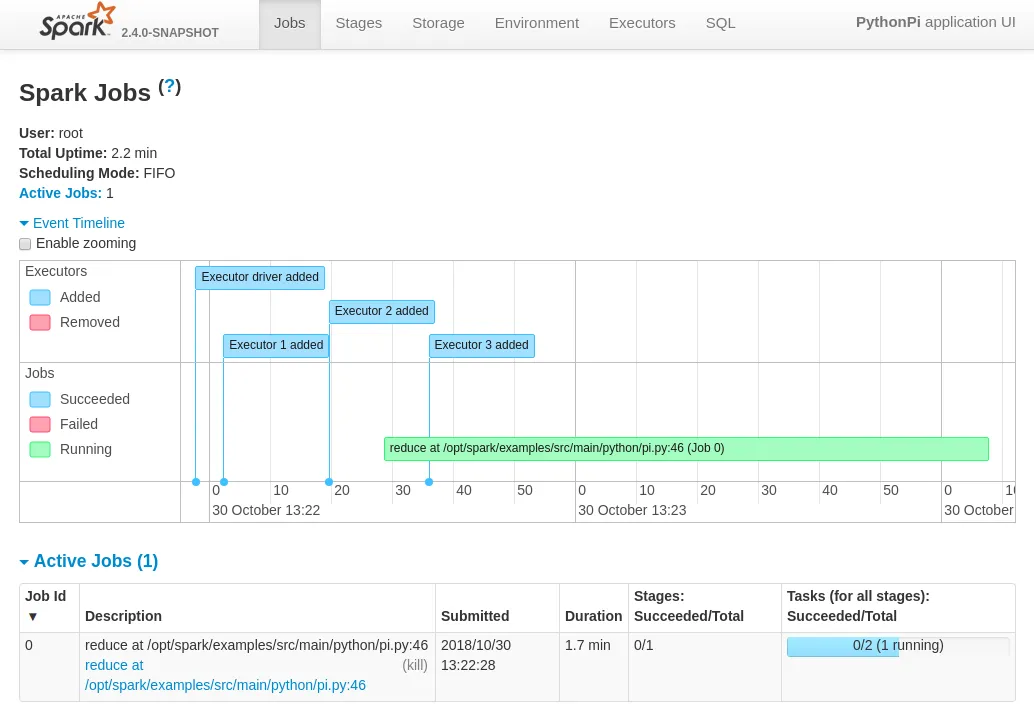
The Spark dashboard, forwarded on port 3000

Figure 10.1: The Spark dashboard, forwarded on port 3000

10.5 Mounting Volumes Into Containers

The official documentation at https://spark.apache.org/docs/latest/running-on-kubernetes.html#using-kubernetes-volumes gives an outline of how volumes can be mounted into containers.

In summary, there are 3 ways a Kubernetes volume (https://kubernetes.io/docs/concepts/storage/volumes) can be mounted:

  1. hostPath: mounts a file or directory from the host node’s filesystem into a pod.

  2. emptyDir: an initially empty volume, created when a pod is assigned to a node.

  3. persistentVolumeClaim: used to mount a PersistentVolume into a pod.

10.5.0.1 Mounting A hostPath

The official documentation mentions adding the following two flags to specify how the volume is mounted inside the container:

--conf spark.kubernetes.driver.volumes.[VolumeType].[VolumeName].mount.path=<mount path>
--conf spark.kubernetes.driver.volumes.[VolumeType].[VolumeName].mount.readOnly=<true|false>

The following flag should also be added, to specify the path on the host:

--conf spark.kubernetes.driver.volumes.[VolumeType].[VolumeName].options.path=<mount path>

The volumes can be specified for each executor as well as for the driver. For an executor, the specification should use spark.kubernetes.executor instead of spark.kubernetes.driver.

For example, the NFS share /cm/shared of a typical BCM setup could be made available on executor pods by adding the following 3 flags to the spark-submit command:

Example

module load kubernetes/default
module load spark
spark-submit \
--master k8s://https://localhost:10443 \
--deploy-mode cluster \
--name spark-pi \
--class org.apache.spark.examples.SparkPi \
--conf spark.kubernetes.namespace=default \
--conf spark.executor.instances=2 \
--conf spark.kubernetes.container.image=docker.io/brightcomputing/spark:2.4.0 \
--conf spark.kubernetes.authenticate.driver.serviceAccountName=spark \
--conf spark.kubernetes.executor.volumes.hostPath.cmshared.options.path=/cm/shared \
--conf spark.kubernetes.executor.volumes.hostPath.cmshared.mount.path=/data \
--conf spark.kubernetes.executor.volumes.hostPath.cmshared.mount.readOnly=false \
local:///opt/spark/examples/jars/spark-examples_2.11-2.4.0.jar 10000

This results in /cm/shared being mounted in read-write mode on the mount path /data:

[root@cluster ~]# kubectl get pod
NAME READY STATUS RESTARTS AGE
spark-pi-1552563523319-driver 0/1 Completed 0 23h
spark-pi-1552648768369-driver 0/1 Completed 0 5m40s
spark-pi-1552648961734-driver 0/1 Completed 0 2m26s
spark-pi-1552649048516-driver 1/1 Running 0 59s
spark-pi-1552649048516-exec-1 1/1 Running 0 53s
spark-pi-1552649048516-exec-2 1/1 Running 0 53s
[root@cluster ~]# kubectl exec -it spark-pi-1552649048516-exec-1 /bin/bash
bash-4.4# mount | grep shared
master:/cm/shared on /data type nfs (rw,relatime,vers=3,...)
bash-4.4# ls -l /data
total 12
drwxr-xr-x 39 root root 4096 Mar 13 10:11 apps
drwxr-xr-x 13 root root 162 Mar 3 21:22 docs
drwxr-xr-x 3 root root 43 Mar 3 21:22 examples
-rw-r--r-- 1 root root 101 Mar 14 11:14 init.sh
drwxr-xr-x 3 root root 16 Mar 3 21:29 licenses
drwxr-xr-x 28 root root 4096 Mar 12 13:31 modulefiles
bash-4.4#

10.5.0.2 Using Persistent Volume Claims

Spark in this case assumes that the Kubernetes cluster being managed by the user has persistent volumes available. A list of persistent volumes types can be found at: https://kubernetes.io/docs/concepts/storage/persistent-volumes/#types-of-persistent-volumes.

Claims to specific types of storage can be created for use with Spark. If spark-submit tries to use a persistent volume claim, then it assumes the claim already exists. It does not initiate a claim by itself.

In the following specification, for demonstration purposes, a claim my-claim is created:

apiVersion: v1
kind: PersistentVolumeClaim
metadata:
name: my-claim
spec:
accessModes:
- ReadWriteOnce
resources:
requests:
storage: 1000Gi

This claim should bind to a persistent volume that meets the criteria. If none are configured, then the user can create a local volume for /cm/shared, for example with:

kind: PersistentVolume
apiVersion: v1
metadata:
name: kube-pv-volume
labels:
type: local
spec:
capacity:
storage: 1000Gi
accessModes:
- ReadWriteOnce
hostPath:
path: /cm/shared

Applying the above two YAML configurations should result in the persistent volume claim object my-claim, and the persistent volume kube-pv-volume in Kubernetes:

[root@cluster ~]# kubectl get pv
NAME CAPACITY ACCESS MODES RECLAIM POLICY STATUS CLAIM STORAGECLASS
kube-pv-volume 1000Gi RWO Retain Bound default/my-claim
[root@cluster ~]# kubectl get pvc
NAME STATUS VOLUME CAPACITY ACCESS MODES STORAGECLASS AGE
my-claim Bound kube-pv-volume 1000Gi RWO 5m35s

Example

Invoking spark-submit as follows will then try to find the claim with name my-claim.

module load kubernetes/default
module load spark
spark-submit \
--master k8s://https://localhost:10443 \
--deploy-mode cluster \
--name spark-pi \
--class org.apache.spark.examples.SparkPi \
--conf spark.kubernetes.namespace=default \
--conf spark.executor.instances=2 \
--conf spark.kubernetes.container.image=docker.io/brightcomputing/spark:2.4.0 \
--conf spark.kubernetes.authenticate.driver.serviceAccountName=spark \
--conf \
spark.kubernetes.executor.volumes.persistentVolumeClaim.cmshared.options.claimName=my-claim \
--conf spark.kubernetes.executor.volumes.persistentVolumeClaim.cmshared.mount.path=/data \
--conf spark.kubernetes.executor.volumes.persistentVolumeClaim.cmshared.mount.readOnly=false \
local:///opt/spark/examples/jars/spark-examples_2.11-2.4.0.jar 10000
[root@cluster ~]# kubectl get pod
NAME READY STATUS RESTARTS AGE
spark-pi-1552563523319-driver 0/1 Completed 0 24h
spark-pi-1552648768369-driver 0/1 Completed 0 22m
spark-pi-1552648961734-driver 0/1 Completed 0 18m
spark-pi-1552649048516-driver 0/1 Completed 0 17m
spark-pi-1552649606812-driver 0/1 Completed 0 8m9s
spark-pi-1552650084516-driver 1/1 Running 0 11s
spark-pi-1552650084516-exec-1 1/1 Running 0 4s
spark-pi-1552650084516-exec-2 1/1 Running 0 3s

The claim that was specified can be found in the pod description:

[root@cluster ~]# kubectl describe pod spark-pi-1552650084516-exec-1 | grep my-claim -C 2
cmshared:
Type: PersistentVolumeClaim (reference to a PersistentVolumeClaim in the same namespace)
ClaimName: my-claim
ReadOnly: false
default-token-rvrf8:

Inside the executor pods /data is then found to be available, and presents the contents of /cm/shared from the host OS.