fq2bam_meth

View as Markdown

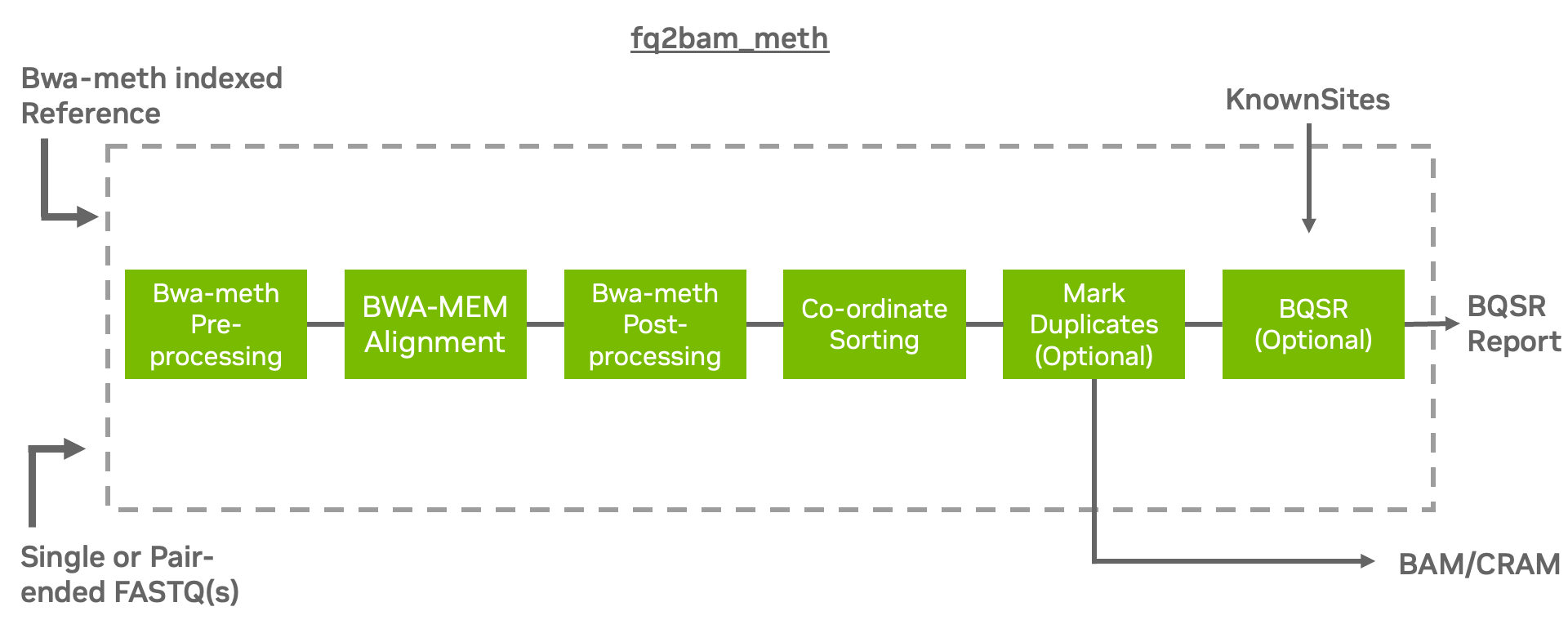
Generate BAM/CRAM output given one or more pairs of FASTQ files from bisulfite sequencing (BS-Seq). Can also optionally generate a BQSR report.

Refer to the fq2bam_meth Reference section for a detailed listing of all available options.

What is fq2bam_meth?

The tool fq2bam_meth is a fast, accurate algorithm for mapping methylated DNA sequence reads to a reference genome, performing local alignment, and producing alignment for different parts of the query sequence. It implements the baseline tool bwa-meth [^note] [^note] in a performant method using fq2bam (BWA-MEM + GATK) as a backend for processing on GPU.

Why fq2bam_meth?

fq2bam_meth is the Parabricks wrapper for bwa-meth, which will sort the output and can mark duplicates and recalibrate base quality scores in line with GATK best practices.

The Parabricks fq2bam_meth tool is capable of handling longer reads and is less sensitive to errors than other alignment algorithms. We enable fast and accurate whole-genome bisulfite sequencing (WGBS) to detect DNA-methylation at the single base pair level [^note].

Some of the advantages of using fq2bam_meth over similar tools include:

  1. It is faster than many other BS-Seq alignment algorithms, making it the ideal choice for high-throughput analysis.
  2. It maintains compatibility with existing CPU-based tools.

How Should I Use fq2bam_meth?

fq2bam_meth uses an accelerated version of BWA-MEM to generate BAM/CRAM output given one or more pairs of FASTQ files from BS-Seq. The user can turn-off marking of duplicates by adding the --no-markdups option. The BQSR step is only performed if the --knownSites input and --out-recal-file output options are provided; doing so will also generate a BQSR report.

Prior to running alignment, the reference genome must be converted using baseline bwa-meth. The bwa-meth indexing step produces a reference fasta file with a name formatted as fasta.bwameth.c2t. The indexing preparation step requires running bwameth.py index $REF.fasta. Baseline bwa-meth requires baseline BWA-MEM to be in the user’s path for indexing functionality. Note that indexing is a time-consuming prerequisite that should only need to be completed once per reference genome. The bwameth.py script can be found here.
Quick Start

1# This command assumes all the inputs are in the current working directory and all the outputs go to the same place.
2docker run --rm --gpus all --volume $(pwd):/workdir --volume $(pwd):/outputdir \
3 --workdir /workdir \
4 nvcr.io/nvidia/clara/clara-parabricks:4.7.1-1 \
5 pbrun fq2bam_meth \
6 --ref /workdir/${REFERENCE_FILE} \
7 --in-fq /workdir/${INPUT_FASTQ_1} /workdir/${INPUT_FASTQ_2} \
8 --knownSites /workdir/${KNOWN_SITES_FILE} \
9 --out-bam /outputdir/${OUTPUT_BAM} \
10 --out-recal-file /outputdir/${OUTPUT_RECAL_FILE}

Useful Options for Performance

Suggested parameters to control host memory use:

  • The parameter --bwa-normalized-queue-capacity controls the amount of batches that will be in memory to be processed. By default, the value normalized to the number of GPUs in the run is 10, corresponding to <number of GPUs> * <normalized capacity> for the total queue size. Multiple queues are used. Lowering this value would be a good strategy to reduce host memory use. However, a value that is too low may hamper performance.

Parabricks automatically uses an optimal number of streams based on the GPU’s device memory specifications (by default --bwa-nstreams auto). The user may experiment further with the --bwa-nstreams and --bwa-cpu-thread-pool parameters to potentially achieve better performance.

Additionally, for advanced performance tuning and additional control the option --bwa-primary-cpus allows for more fine-grained control of CPU threading. Each primary CPU thread drives P CPU thread pool threads as specifed with the option --bwa-cpu-thread-pool. The total number of CPU threads processing the CPU stages of alignment is the product of the --bwa-primary-cpus and --bwa-cpu-thread-pool parameters. This allows the user to control the ratio of “primary” CPU threads, which act indepently, to thread pool threads, which act in unison. Depending on the specific server configuration, input data, and GPUs available, it may be better to switch from more thread pool threads to more primary CPU threads. Changing the number of primary CPU threads may increase the CPU resources required.

  • The parameter --gpuwrite uses the GPU to compress the final BAM or CRAM file for improved performance during the final stage.

    • --gpuwrite-deflate-algo can be used to control the compression ratio. See below for more details.
  • The parameter --gpusort uses the GPU to sort the BAM or CRAM file.

  • The option --cigar-on-gpu offloads CIGAR generation from the CPU (default) to the GPU. Consider enabling it on CPU-constrained systems, or if benchmarking with and without the option indicates the CPU is a bottleneck; it may improve overall runtime.

Compatible CPU-based bwa-meth, GATK4 Commands

The commands below are the bwa-meth-0.2.7, bwa-0.7.15, and GATK4 counterpart of the Parabricks command above. The output from these commands will be identical to the output from the above command. Refer to the Output Comparison page for comparing the results.

Set --bwa-options="-K 10000000" in fq2bam_meth and `-K 10000000 in baseline to produce compatible pair-ended results.

fq2bam_meth will not strip R1 and R2` from read names during preprocessing like baseline bwa-meth.

1# Run bwa-meth and pipe the output to create a sorted BAM.
2$ python bwa-meth.py \
3 --read-group '@RG\tID:sample_rg1\tLB:lib1\tPL:bar\tSM:sample\tPU:sample_rg1' \
4 --reference <INPUT_DIR>/${REFERENCE_FILE} <INPUT_DIR>/${INPUT_FASTQ_1} <INPUT_DIR>/${INPUT_FASTQ_2} \
5 -t 32 -K 10000000 | \
6 gatk SortSam \
7 --java-options -Xmx30g \
8 --MAX_RECORDS_IN_RAM 5000000 \
9 -I /dev/stdin \
10 -O cpu.bam \
11 --SORT_ORDER coordinate
12
13# Mark duplicates.
14$ gatk MarkDuplicates \
15 --java-options -Xmx30g \
16 -I cpu.bam \
17 -O mark_dups_cpu.bam \
18 -M metrics.txt
19
20# Generate a BQSR report.
21$ gatk BaseRecalibrator \
22 --java-options -Xmx30g \
23 --input mark_dups_cpu.bam \
24 --output <OUTPUT_DIR>/${OUTPUT_RECAL_FILE} \
25 --known-sites <INPUT_DIR>/${KNOWN_SITES_FILE} \
26 --reference <INPUT_DIR>/${REFERENCE_FILE}

Source of Mismatches

While Parabricks fq2bam_meth does not lose any accuracy in functionality when compared with BWA-mem and GATK there are several sources that can result in differences in output files.

  • BWA-mem -K argument

In pair-ended mode, the chunk size specified by -K can cause small mismatches in the output BAM file. To get rid of the mismatches here, make sure to pass the same number to both baseline BWA-mem and Parabricks fq2bam_meth, e.g. -K 10000000.

  • PA aux tag

    • Parabricks fq2bam_meth puts the PA tag last while BWA-mem puts it first.
    • BWA-mem rounds PA tag to 3 digits while Parabricks fq2bam_meth does not. The aux tag can be filtered by running samtools view -x <TAG>
  • Unmapped reads

    • Parabricks fq2bam_meth sorts unmapped reads slightly differently than baseline GATK SortSam. Unmapped reads can be filtered with samtools by doing samtools view -F 4.

Options

TypeNameRequired?Description
I/O--ref REFYesPath to the reference file. We will automatically look for <filename>.bwameth.c2t. Converted fasta reference must exist from prior conversion with baseline bwa-meth.
I/O--in-fq [IN_FQ ...]NoPath to the pair-ended FASTQ files followed by optional read groups with quotes (Example: "@RG\\tID:foo\\tLB:lib1\\tPL:bar\\tSM:sample\\tPU:foo"). The files must be in fastq or fastq.gz format. All sets of inputs should have a read group; otherwise, none should have a read group, and it will be automatically added by the pipeline. This option can be repeated multiple times. Example 1: --in-fq sampleX_1_1.fastq.gz sampleX_1_2.fastq.gz --in-fq sampleX_2_1.fastq.gz sampleX_2_2.fastq.gz. Example 2: --in-fq sampleX_1_1.fastq.gz sampleX_1_2.fastq.gz "@RG\\tID:foo\\tLB:lib1\\tPL:bar\\tSM:sample\\tPU:unit1" --in-fq sampleX_2_1.fastq.gz sampleX_2_2.fastq.gz "@RG\\tID:foo2\\tLB:lib1\\tPL:bar\\tSM:sample\\tPU:unit2". For the same sample, Read Groups should have the same sample name (SM) and a different ID and PU.
I/O--in-se-fq [IN_SE_FQ ...]NoPath to the single-ended FASTQ file followed by optional read group with quotes (Example: "@RG\\tID:foo\\tLB:lib1\\tPL:bar\\tSM:sample\\tPU:foo"). The file must be in fastq or fastq.gz format. Either all sets of inputs have a read group, or none should have one, and it will be automatically added by the pipeline. This option can be repeated multiple times. Example 1: --in-se-fq sampleX_1.fastq.gz --in-se-fq sampleX_2.fastq.gz . Example 2: --in-se-fq sampleX_1.fastq.gz "@RG\\tID:foo\\tLB:lib1\\tPL:bar\\tSM:sample\\tPU:unit1" --in-se-fq sampleX_2.fastq.gz "@RG\\tID:foo2\\tLB:lib1\\tPL:bar\\tSM:sample\\tPU:unit2" . For the same sample, Read Groups should have the same sample name (SM) and a different ID and PU.
I/O--in-fq-list IN_FQ_LISTNoPath to a file that contains the locations of pair-ended FASTQ files. Each line must contain the location of two FASTQ files followed by a read group, each separated by a space. Each set of files (and associated read group) must be on a separate line. Files must be in fastq/fastq.gz format. Line syntax: <fastq_1> <fastq_2> <read group>.
I/O--in-se-fq-list IN_SE_FQ_LISTNoPath to a file that contains the locations of single-ended FASTQ files. Each line must contain the location of the FASTQ files followed by a read group, each separated by a space. Each file (and associated read group) must be on a separate line. Files must be in fastq/fastq.gz format. Line syntax: <fastq> <read group>.
I/O--knownSites KNOWNSITESNoPath to a known indels file. The file must be in vcf.gz format. This option can be used multiple times.
I/O--interval-file INTERVAL_FILENoPath to an interval file in one of these formats: Picard-style (.interval_list or .picard), GATK-style (.list or .intervals), or BED file (.bed). This option can be used multiple times.
I/O--out-recal-file OUT_RECAL_FILENoPath of a report file after Base Quality Score Recalibration.
I/O--out-bam OUT_BAMYesPath of a BAM/CRAM file.
I/O--out-duplicate-metrics OUT_DUPLICATE_METRICSNoPath of duplicate metrics file after marking duplicates.
I/O--out-qc-metrics-dir OUT_QC_METRICS_DIRNoPath of the directory where QC metrics will be generated.
Tool--max-read-length MAX_READ_LENGTHNoMaximum read length/size (i.e., sequence length) used for bwa and filtering FASTQ input. (default: 480)
Tool--min-read-length MIN_READ_LENGTHNoMinimum read length/size (i.e., sequence length) used for bwa and filtering FASTQ input. (default: 1)
Tool-L INTERVAL, --interval INTERVALNoInterval within which to call bqsr from the input reads. All intervals will have a padding of 100 to get read records, and overlapping intervals will be combined. Interval files should be passed using the --interval-file option. This option can be used multiple times (e.g. "-L chr1 -L chr2:10000 -L chr3:20000+ -L chr4:10000-20000").
Tool--bwa-options BWA_OPTIONSNoPass supported bwa mem options as one string. The current original bwa mem supported options are: -M, -Y, -C, -T, -B, -U, -L, -I, and -K (e.g. --bwa-options="-M -Y").
Tool--no-warningsNoSuppress warning messages about system thread and memory usage.
Tool--filter-flag FILTER_FLAGNoDon't generate SAM entries in the output if the entry's flag's meet this criteria. Criteria: (flag & filter != 0). (default: 0)
Tool--skip-multiple-hitsNoFilter SAM entries whose length of SA is not 0.
Tool--align-onlyNoGenerate output BAM after bwa-mem. The output will not be co-ordinate sorted or duplicates will not be marked.
Tool--no-markdupsNoDo not perform the Mark Duplicates step. Return BAM after sorting.
Tool--markdups-single-ended-start-endNoMark duplicate on single-ended reads by 5' and 3' end.
Tool--ignore-rg-markdups-single-endedNoIgnore read group info in marking duplicates on single-ended reads. This option must be used with `--markdups-single-ended-start-end`.
Tool--fix-mateNoAdd mate cigar (MC) and mate quality (MQ) tags to the output file.
Tool--markdups-assume-sortorder-querynameNoAssume the reads are sorted by queryname for marking duplicates. This will mark secondary, supplementary, and unmapped reads as duplicates as well. This flag will not impact variant calling while increasing processing times.
Tool--markdups-picard-version-2182NoAssume marking duplicates to be similar to Picard version 2.18.2.
Tool--monitor-usageNoMonitor approximate CPU utilization and host memory usage during execution.
Tool--optical-duplicate-pixel-distance OPTICAL_DUPLICATE_PIXEL_DISTANCENoThe maximum offset between two duplicate clusters in order to consider them optical duplicates. Ignored if --out-duplicate-metrics is not passed.
Tool--read-group-sm READ_GROUP_SMNoSM tag for read groups in this run.
Tool--read-group-lb READ_GROUP_LBNoLB tag for read groups in this run.
Tool--read-group-pl READ_GROUP_PLNoPL tag for read groups in this run.
Tool--read-group-id-prefix READ_GROUP_ID_PREFIXNoPrefix for the ID and PU tags for read groups in this run. This prefix will be used for all pairs of FASTQ files in this run. The ID and PU tags will consist of this prefix and an identifier, that will be unique for a pair of FASTQ files.
Tool-ip INTERVAL_PADDING, --interval-padding INTERVAL_PADDINGNoAmount of padding (in base pairs) to add to each interval you are including.
Tool--standalone-bqsrNoRun standalone BQSR.
Tool--set-as-failed SET_AS_FAILEDNoFlag alignments to strand 'f' or 'r' as failing quality-control (QC) with the failed QC flag 0x200. BS-Seq libraries are often to a single strand; other strands can be flagged as QC failures. Note: f == OT, r == OB. Valid options are 'f' or 'r'.
Tool--do-not-penalize-chimerasNoTurn off the default heuristic which marks alignments as failing QC if the longest match is less than 44% of the original sequence length. Alignments which fail this heuristic are also un-paired.
Performance--bwa-nstreams BWA_NSTREAMSNoNumber of streams per GPU to use; note: more streams increases device memory usage. Default is auto which will try to use an optimal amount of device memory. (default: auto)
Performance--bwa-cpu-thread-pool BWA_CPU_THREAD_POOLNoNumber of threads to devote to CPU thread pool *per GPU*. (default: 16)
Performance--num-cpu-threads-per-stage NUM_CPU_THREADS_PER_STAGENo(Same as above) Number of threads to devote to CPU thread pool *per GPU*.
Performance--bwa-normalized-queue-capacity BWA_NORMALIZED_QUEUE_CAPACITYNoNormalized capacity for alignment work queues, use a lower value if CPU memory is low; final value will be <number of GPUs> * <normalized capacity>. (default: 10)
Performance--bwa-primary-cpus BWA_PRIMARY_CPUSNoNumber of primary CPU threads driving its associated thread pool. Default is auto which will use 1 primary thread with its associated thread pool per GPU. (default: auto)
Performance--cigar-on-gpuNoRun CIGAR generation on GPU. Helpful in CPU bound conditions. (default is on CPU).
Performance--gpuwriteNoUse one GPU to accelerate writing final BAM/CRAM.
Performance--gpuwrite-deflate-algo GPUWRITE_DEFLATE_ALGONoChoose the nvCOMP DEFLATE algorithm to use with --gpuwrite. Note these options do not correspond to CPU DEFLATE options. Valid options are 1, 2, and 4. Option 1 is fastest, while options 2 and 4 have progressively lower throughput but higher compression ratios. The default value is 1 when the user does not provide an input (i.e., None).
Performance--gpusortNoUse GPUs to accelerate sorting and marking.
Performance--use-gdsNoUse GPUDirect Storage (GDS) to enable a direct data path for direct memory access (DMA) transfers between GPU memory and storage. Must be used concurrently with `--gpuwrite`. Please refer to Parabricks Documentation > Best Performance for information on how to set up and use GPUDirect Storage.
Performance--memory-limit MEMORY_LIMITNoSystem memory limit in GBs during sorting and postsorting. By default, the limit is half of the total system memory. (default: 62)
Performance--low-memoryNoUse low memory mode; will lower the number of streams per GPU.
Runtime--verboseNoEnable verbose output.
Runtime--x3NoShow full command line arguments.
Runtime--logfile LOGFILENoPath to the log file. If not specified, messages will only be written to the standard error output.
Runtime--tmp-dir TMP_DIRNoFull path to the directory where temporary files will be stored. (default: .)
Runtime--with-petagene-dir WITH_PETAGENE_DIRNoFull path to the PetaGene installation directory. By default, this should have been installed at /opt/petagene. Use of this option also requires that the PetaLink library has been preloaded by setting the LD_PRELOAD environment variable. Optionally set the PETASUITE_REFPATH and PGCLOUD_CREDPATH environment variables that are used for data and credentials. Optionally set the PetaLinkMode environment variable that is used to further configure PetaLink, notably setting it to "+write" to enable outputting compressed BAM and .fastq files.
Runtime--keep-tmpNoDo not delete the directory storing temporary files after completion.
Runtime--no-seccomp-overrideNoDo not override seccomp options for docker.
Runtime--versionNoView compatible software versions.
Runtime--preserve-file-symlinksNoOverride default behavior to keep file symlinks intact and *not* resolve the symlink.
Runtime--num-gpus NUM_GPUSNoNumber of GPUs to use for a run. (default: 1)

The —in-fq option takes the names of two FASTQ files, optionally followed by a quoted read group. The FASTQ filenames must not start with a hyphen.

When using the —in-fq-list option a read group is required on each line of the input file.