


Kubernetes Updates#
Prerequisites#
Kubernetes upgrade requires “N-2 step upgrades” meaning the upgrade process may require multiple control plane and worker node upgrades. For example, an upgrade to 1.31 from 1.28 would be 1.28 > 1.29 > 1.30 > 1.31.
Upgrade control plane nodes first followed by worker nodes. Worker node upgrades can take advantage of N-2 API compatibility by performing the worker node upgrade once for every 2 control plane upgrades.
Kubernetes operators can be done at any time if they are compatible with Kubernetes version. Service interruption is expected during the updates. Run:ai updates can occur at any time if the Kubernetes version prerequisites are met.
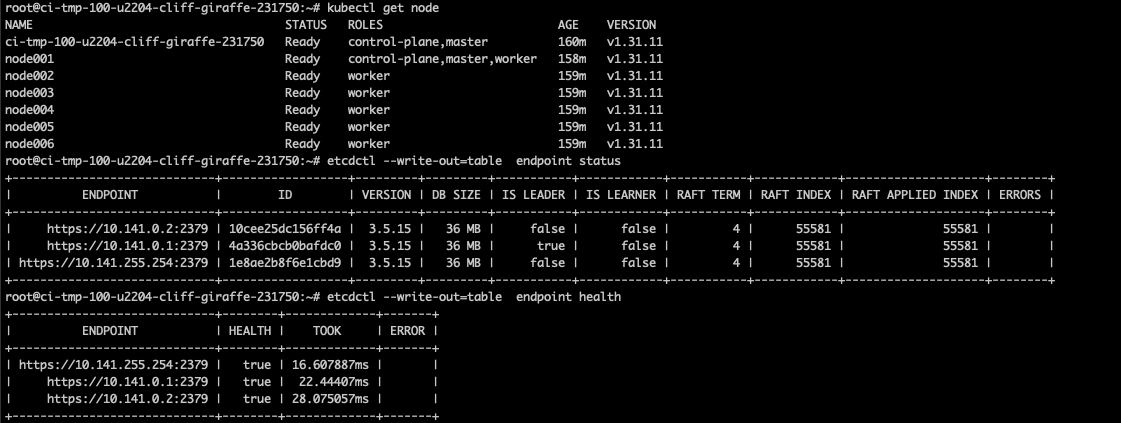
Validate the status of the Kubernetes cluster.
Note
This example demonstrates a single lab etcd master node. The expected result is all master nodes are in sync and there are no warnings in the output.
# Load Kubernetes module which allows etcdctl commands to run
module load kubernetes

# Validate control plane nodes are online
kubectl get node

# Check the databases are in-sync and there are no warnings
etcdctl --write-out=table endpoint status
etcdctl --write-out=table endpoint health
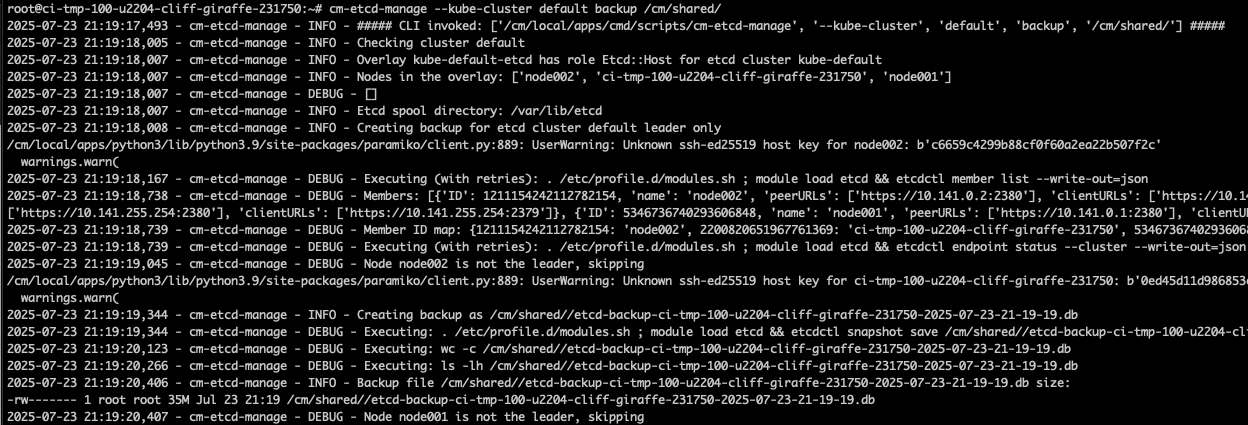
Obtain the latest etcd management scripts (detailed steps found on BCM KB) and take a backup of the control plane leader.
# BCM 10+
# Obtain the scripts
wget -O /cm/local/apps/cmd/scripts/cm-etcd-manage https://support2.brightcomputing.com/etcd/cm-etcd-manage
wget -O /cm/local/apps/cmd/scripts/cm-kubeadm-manage https://support2.brightcomputing.com/etcd/cm-kubeadm-manage

# Change the scripts to be executable
chmod +x /cm/local/apps/cmd/scripts/cm-etcd-manage
chmod +x /cm/local/apps/cmd/scripts/cm-kubeadm-manage

# Create alias for the scripts
alias cm-etcd-manage='/cm/local/apps/cmd/scripts/cm-etcd-manage'
alias cm-kubeadm-manage='/cm/local/apps/cmd/scripts/cm-kubeadm-manage'

# Back up the control plane leader
cm-etcd-manage --kube-cluster default backup /cm/shared/etcd-backups
Validate the current version of Kubernetes.
kubectl version
Control Plane Node Updates#
Validate which current repo will be used.

# From BCM headnode
cat /cm/images/<k8s-image>/etc/apt/sources.list.d/kubernetes.list
Modify the Kubernetes repo to the updated version and validate it was correctly changed. In this case, the version is being migrated from 1.28 to 1.29.
# From BCM headnode
sed -i 's/1\.28/1.29/g' /cm/images/<k8s-image>/etc/apt/sources.list.d/kubernetes.list

Update the control plane nodes image to the Kubernetes version specified in the previous step.
cm-chroot-sw-img /cm/images/<k8s-image>/

apt update; apt-cache madison kubeadm

# Update for a fresh cache to see the versions
# madison option lists versions and origin repos
# The expected results is to have the new version displayed

# By default BCM puts Kubernetes packages on hold to prevent unattended upgrades

apt-mark unhold kubeadm kubelet kubectl

apt update && apt install -y kubeadm kubelet kubectl

# Kubernetes
apt-mark hold kubeadm kubelet kubectl

exit
Update the first control plane node.
export host=knode001
cmsh -c "device use $host; imageupdate -w --wait"

### Verify that Kubeadm has been updated to the desired version
ssh $host kubeadm version

### Review the suggested upgrade plan
ssh $host kubeadm upgrade plan

### Perform the actual upgrade
### This command should only be run once on the first to-be update control plane node
### Do not run this command more than once.
ssh $host kubeadm upgrade apply <VERSION>

### reload kubelet and restart pods
kubectl drain $host --ignore-daemonsets
ssh $host sudo systemctl daemon-reload
ssh $host sudo systemctl restart kubelet
kubectl uncordon $host

### Verify that the control plane node has been updated
kubectl get node

### Verify that there are no failing pods
kubectl get po -A | grep -Ev 'Runn|Comp'
Update the subsequent control plane nodes.
export host=knode002
cmsh -c "device use $host; imageupdate -w --wait"

### Verify that Kubeadm has been updated to the desired version
ssh $host kubeadm version

### Perform the actual upgrade
ssh $host kubeadm upgrade apply <VERSION>

### reload kubelet and restart pods
kubectl drain $host --ignore-daemonsets
ssh $host sudo systemctl daemon-reload
ssh $host sudo systemctl restart kubelet
kubectl uncordon $host

### Verify that the control plane node has been updated
kubectl get node

### Verify that there are no failing pods
kubectl get po -A | grep -Ev 'Runn|Comp'
At this point Kubernetes will be updated to the latest version which was specified in step 2. Repeat the entire process for subsequent upgrades. Keep in mind, the worker nodes need to be within two releases (N-2), so it may be necessary to update the worker nodes prior to any additional updates.
Worker Node Updates#
Similar as the workflow for secondary control nodes outlined in the previous step.
Update the software image(s) used by the Kubernetes workers to the new version of Kubernetes.
# From BCM headnode
sed -i 's/1\.28/1.29/g' /cm/images/<worker-image>/etc/apt/sources.list.d/kubernetes.list
cm-chroot-sw-img /cm/images/<worker-image>/
apt update; apt-cache madison kubeadm

# update for a fresh cache to see the versions
# madison option lists versions and origin repos
# The expected results is to have the new version displayed

# By default BCM puts Kubernetes packages on hold to prevent unattended upgrades

apt-mark unhold kubeadm kubelet kubectl

apt update && apt install -y kubeadm kubelet kubectl

# Kubernetes
apt-mark hold kubeadm kubelet kubectl

exit
Update the worker nodes in batches of up to 16 to maintain the Pod Distribution Budget requirements.
export batch1='dgx-[01-15]'
cmsh -c "device imageupdate -n $batch1 -w --wait"

### Verify that Kubeadm has been updated to the desired version
pdsh -w $batch1 kubeadm version | dshbak -c

### Perform the actual upgrade
pdsh -w $batch1 kubeadm upgrade node

### reload kubelet and restart pods
### Drain each node
for host in dgx{01..15}; do kubectl drain $host --ignore-daemonsets; done

### Restart Kubelet in parallel
pdsh -w $batch1 systemctl daemon-reload
pdsh -w $batch1 systemctl restart kubelet

### Uncordon each drained node
for host in dgx{01..15}; do kubectl uncordon $host; done

### Repeat the above steps for the remaining DGX nodes
Repeat the previous steps until all the worker nodes are updated as well as any other worker image.
Operator Updates#
Kubernetes operators are deployed via BCM with Helm Charts. NVIDIA recommends administrators upgrade Kubernetes operators after all the control plane and worker nodes have been upgraded to the desired version of Kubernetes. Operators are applied system-wide by deleting existing pods and rebuilding them at the new version, outages are expected during this time.
Prerequisites#
Validate the current versions of the operators installed on the cluster and update the charts.
helm list -A
helm repo update

Obtain the customized values inputted of all the helm charts.
mkdir values
cd values
helm list -A --output json | jq -r '.[] | "\(.namespace)\(.name)\(.chart)"' | while read namespace name chart; do   version="${chart##*-}";   filename="${name}_${version}.yaml";   helm get values -n "$namespace" "$name" > "$filename"; done
GPU Operator#
Follow the latest information found in the respective GPU Operator version.
helm upgrade gpu-operator nvidia/gpu-operator -n gpu-operator --disable-openapi-validation --version=<NEW_VERSION> -f /values/gpu-operator_<OLD_VERSION>.yaml
Network Operator#
Follow the latest information found in the respective Network Operator version.
# Validate the NicClusterPolicy status returns ready
kubectl get -n network-operator nicclusterpolicies.mellanox.com nic-cluster-policy -o yaml

# Deactivate the SR-IOV pods
kubectl -n network-operator scale deployment network-operator-sriov-network-operator --replicas=0

# Capture the existing SR-IOV node policies
kubectl get sriovnetworknodepolicies.sriovnetwork.openshift.io -n network-operator -o yaml > sriovnetworknodepolicies.yaml

# Delete the SR-IOV node policies
kubectl -n network-operator delete sriovnetworknodepolicies.sriovnetwork.openshift.io --all

# Download Helm chart
helm fetch https://helm.ngc.nvidia.com/nvidia/charts/network-operator-24.7.0.tgz

# Extract the chart
ls network-operator-*.tgz | xargs -n 1 tar xf

# Deploy the CRDs
kubectl apply -f network-operator/crds -f network-operator/charts/sriov-network-operator/crds

# Update to the desired version
helm upgrade -n network-operator network-operator nvidia/network-operator --version=<VERSION> -f /values/network-operator_<OLD_VERSION>.yaml --force

# Add back the node policies
kubectl apply -f sriovnetworknodepolicies.yaml
MetalLB#
Follow the latest information found in the respective MetalLB version.
helm upgrade metallb metallb/metallb -n metallb-system --version=<NEW-VERSION> -f /values/metallb_<OLD_VERSION>.yaml
Prometheus Stack#
Follow the latest information found in the respective Prometheus version. The instructions require the user to update from each version following their guidance. Most steps require the user to update the CRDs to a supported version prior to updating the helm charts. A sample update is outlined below.
# Update CRDs
kubectl apply --server-side -f https://raw.githubusercontent.com/prometheus-operator/prometheus-operator/<VERSION>/example/prometheus-operator-crd/monitoring.coreos.com_alertmanagerconfigs.yaml
kubectl apply --server-side -f https://raw.githubusercontent.com/prometheus-operator/prometheus-operator/<VERSION>/example/prometheus-operator-crd/monitoring.coreos.com_alertmanagers.yaml
kubectl apply --server-side -f https://raw.githubusercontent.com/prometheus-operator/prometheus-operator/<VERSION>/example/prometheus-operator-crd/monitoring.coreos.com_podmonitors.yaml
kubectl apply --server-side -f https://raw.githubusercontent.com/prometheus-operator/prometheus-operator/<VERSION>/example/prometheus-operator-crd/monitoring.coreos.com_probes.yaml
kubectl apply --server-side -f https://raw.githubusercontent.com/prometheus-operator/prometheus-operator/<VERSION>/example/prometheus-operator-crd/monitoring.coreos.com_prometheusagents.yaml
kubectl apply --server-side -f https://raw.githubusercontent.com/prometheus-operator/prometheus-operator/<VERSION>/example/prometheus-operator-crd/monitoring.coreos.com_prometheuses.yaml
kubectl apply --server-side -f https://raw.githubusercontent.com/prometheus-operator/prometheus-operator/<VERSION>/example/prometheus-operator-crd/monitoring.coreos.com_prometheusrules.yaml
kubectl apply --server-side -f https://raw.githubusercontent.com/prometheus-operator/prometheus-operator/<VERSION>/example/prometheus-operator-crd/monitoring.coreos.com_scrapeconfigs.yaml
kubectl apply --server-side -f https://raw.githubusercontent.com/prometheus-operator/prometheus-operator/<VERSION>/example/prometheus-operator-crd/monitoring.coreos.com_servicemonitors.yaml
kubectl apply --server-side -f https://raw.githubusercontent.com/prometheus-operator/prometheus-operator/<VERSION>/example/prometheus-operator-crd/monitoring.coreos.com_thanosrulers.yaml

# Update helm
helm upgrade kube-prometheus-stack prometheus-community/kube-prometheus-stack -n prometheus --version=<NEW-VERSION>  -f kube-prometheus-stack_<OLD-VERSION>.yaml
Kube State Metrics#
Follow the latest information found in the respective Kube State Metrics version. Unless the system was installed at a version older than v2, it is safe to upgrade using helm directly.
helm upgrade kube-state-metrics prometheus-community/kube-state-metrics -n kube-system --version=<VERSION> -f kube-state-metrics_<OLD-VERSION>.yaml
Kubeflow MPI#
Follow the latest information found in the respective Kubeflow version.
# Uninstall the v1.5.0 version of the training operator:
kubectl delete -f https://raw.githubusercontent.com/kubeflow/mpi-operator/v0.4.0/deploy/v2beta1/mpi-operator.yaml

kubectl delete -k "github.com/kubeflow/training-operator/manifests/overlays/standalone?ref=v1.5.0"

# Install the v1.7.0 version of the training operator:
kubectl apply -k "github.com/kubeflow/training-operator/manifests/overlays/standalone?ref=v1.7.0"

# Delete the mpijobs.kubeflow.org CRD
kubectl delete crd mpijobs.kubeflow.org

# Apply the MPI Operator v2-beta1 manifest
kubectl create -f https://raw.githubusercontent.com/kubeflow/mpi-operator/v0.6.0/deploy/v2beta1/mpi-operator.yaml

kubectl apply -f https://raw.githubusercontent.com/kubeflow/mpi-operator/v0.6.0/deploy/v2beta1/mpi-operator.yaml
Calico#
The Calico system was deployed with BCM and therefore would need to be changed from the BCM menu.
Verify the current version of Calico server on the BCM headnode.
calicoctl version

#Sample Output
Client Version:    v3.26.3
Git commit:        bdb7878af
Cluster Version:   v3.29.2
Cluster Type:      typha,kdd,k8s,bgp,kubeadm
Take a backup of the current Calico configuration.
cmsh

[demeter-headnode-01]% kubernetes
[demeter-headnode-01->kubernetes[default]]% appgroups
[demeter-headnode-01->kubernetes[default]->appgroups]% use system
[demeter-headnode-01->kubernetes[default]->appgroups[system]]% applications
[demeter-headnode-01->kubernetes[default]->appgroups[system]->applications]% use calico
[demeter-headnode-01->kubernetes[default]->appgroups[system]->applications[calico]]% get config > /root/calico_<OLD-VERSION>.yaml
Modify the configuration file to the desired version of Calico by replacing the versions in the file.
# Enter file edit mode.
# VI commands can be used to replace the current version with the desired version
[demeter-headnode-01->kubernetes[default]->appgroups[system]->applications[calico]]% set config

# Replace the current version with the desired version.
# In the example, v3.29.2 will be replaced with v3.29.4 throughout the entire file.
:%s/v3.29.2/v3.29.4/g
# Write to file and exit
:wq

# Commit the changes
[demeter-headnode-01->kubernetes*[default*]->appgroups*[system*]->applications[calico]]% commit

Validate the pods were redeployed and validate the server version is at the expected release.
kubectl get pods -n kube-system | grep calico

# Validate calico server version
calicoctl version
Run:ai Updates#
Validate the suggested update path with the Run:ai SA. Below are the general steps to update a Run:ai workload managed system which can be found on the Run:ai website. Before starting the upgrade process, validate the GUI is accessible with an administrator account.
Obtain the customized values inputted of all the helm charts.
mkdir values
cd values
helm list -A --output json | jq -r '.[] | "\(.namespace)\(.name)\(.chart)"' | while read namespace name chart; do   version="${chart##*-}";   filename="${name}_${version}.yaml";   helm get values -n "$namespace" "$name" > "$filename"; done
Update the Run:ai control plane.
helm repo update

helm upgrade runai-backend -n runai-backend runai-backend/control-plane --version "<NEW-VERSION>" -f values/runai_control_plane_<OLD-VERSION>.yaml --reset-then-reuse-values

# Validate all the pods in the runai-backend namespace are up and running
kubectl get pods -n runai-backend
Update the Run:ai cluster.
Log into the Web Gui as an administrator.
Select Cluster on the left hand side, and select the existing cluster.

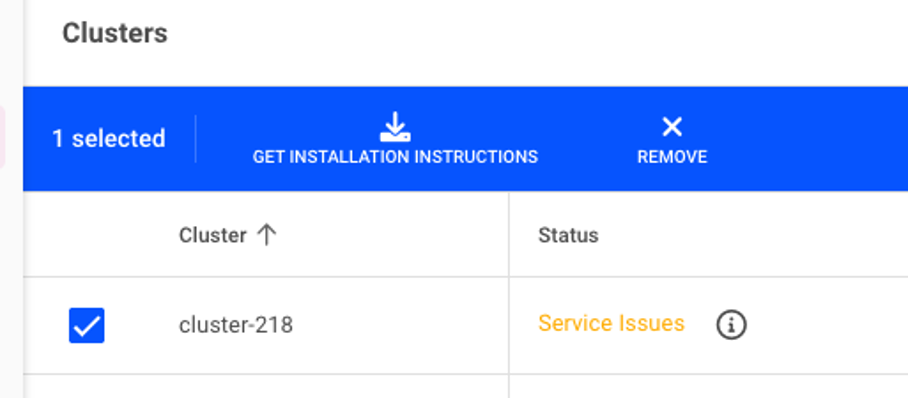
On the new screen, select the Run:ai version which matches the previously deployed control plane version and
Cluster Locationtosame as control planeand then CONTINUE.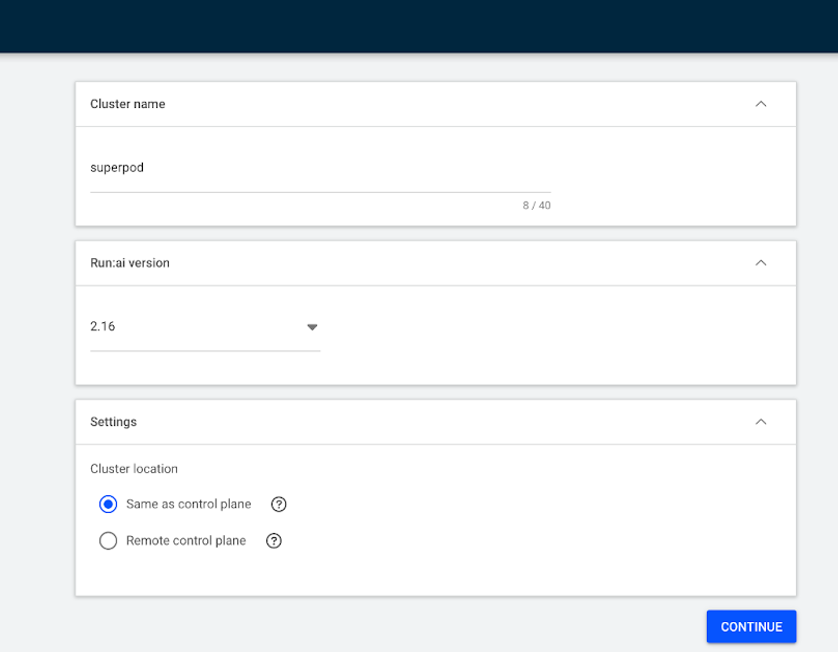
The new screen will have the commands which are necessary to update the cluster from the BCM headnode.
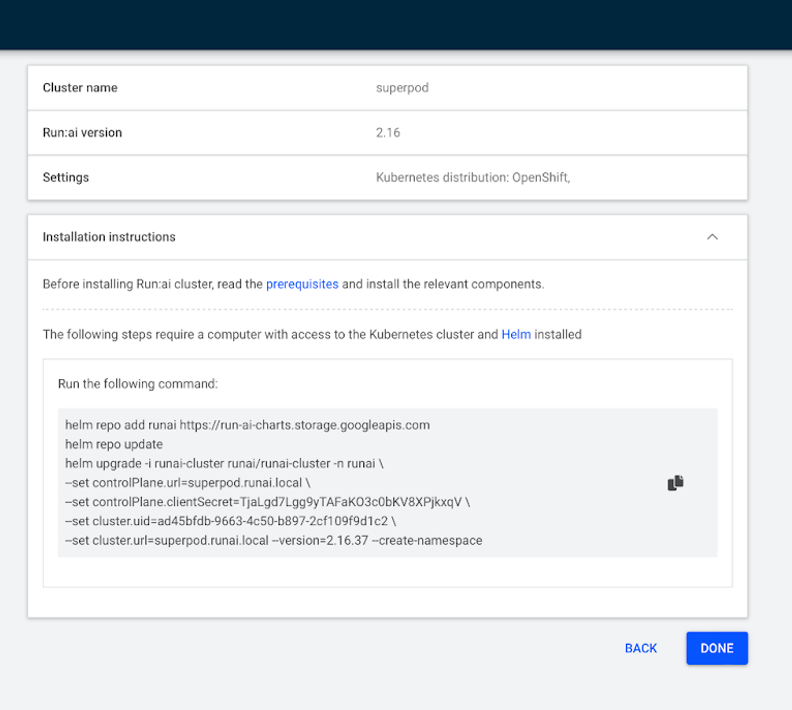
helm repo add runai https://runai.jfrog.io/artifactory/api/helm/op-charts-prod
helm repo update
helm upgrade -i runai-cluster runai/runai-cluster -n runai \
--set controlPlane.url=Automatic FQDN \
--set controlPlane.clientSecret=<YOUR_CLIENT_SECRET> \
--set cluster.uid=<YOUR_CLUSTER_UID> \
--set cluster.url=Automatic FQDN --version=2.19.x --create-namespace