


Slurm Updates#
Please refer to the DGX SuperPOD Release Notes for the latest validated Slurm version supported on DGX BasePOD and SuperPOD.
On the headnode, check the current version of Slurm using
sinfo. If the headnode does not recognize thesinfocommand, try running themodule load slurmcommand and then runsinfo.root@demeter-headnode-01:~# sinfo --version slurm 23.02.6
If there are Slurm jobs running, either wait till they complete or stop them, confirming no running jobs on the DGX nodes.
root@demeter-headnode-01:~# cmsh
[demeter-headnode-01]% device
[demeter-headnode-01->device]% drain -l slurmclient
[demeter-headnode-01->device]% quit
root@demeter-headnode-01:~# squeue -t R,CG
        JOBID PARTITION     NAME     USER ST       TIME  NODES NODELIST(REASON)
Stop the Slurm controller and accounting server services on the headnodes. Confirm the Slurm services are stopped on both headnodes.
root@demeter-headnode-01:~# cmsh
[demeter-headnode-01]% device
[demeter-headnode-01->device]% foreach -l slurmserver ( services; stop slurmctld )
[demeter-headnode-01->device]% foreach -l slurmaccounting ( services; stop slurmdbd )
[demeter-headnode-01->device]% foreach -l slurmclient ( services; stop slurmd )
[demeter-headnode-01->device]% quit

root@demeter-headnode-01:~# systemctl status slurmctld.service
root@demeter-headnode-01:~# systemctl status slurmdbd.service

root@demeter-headnode-02:~# systemctl status slurmctld.service
root@demeter-headnode-02:~# systemctl status slurmdbd.service
Update Slurm packages. First update the local database of available software packages and their versions, then identify currently installed Slurm packages and their versions, followed by identifying the updated Slurm packages to install.
root@demeter-headnode-01:~# apt update
root@demeter-headnode-01:~# apt list --installed | grep slurm

WARNING: apt does not have a stable CLI interface. Use with caution in scripts.

slurm23.02-client/BCM 10.0,now 23.02.6-100806-cm10.0-9c8dc03511 amd64 [installed,upgradable to: 23.02.8-100881-cm10.0-48e305b89c]
slurm23.02-contribs/BCM 10.0,now 23.02.6-100806-cm10.0-9c8dc03511 amd64 [installed,upgradable to: 23.02.8-100881-cm10.0-48e305b89c]
slurm23.02-devel/BCM 10.0,now 23.02.6-100806-cm10.0-9c8dc03511 amd64 [installed,upgradable to: 23.02.8-100881-cm10.0-48e305b89c]
slurm23.02-perlapi/BCM 10.0,now 23.02.6-100806-cm10.0-9c8dc03511 amd64 [installed,upgradable to: 23.02.8-100881-cm10.0-48e305b89c]
slurm23.02-slurmdbd/BCM 10.0,now 23.02.6-100806-cm10.0-9c8dc03511 amd64 [installed,upgradable to: 23.02.8-100881-cm10.0-48e305b89c]
slurm23.02/BCM 10.0,now 23.02.6-100806-cm10.0-9c8dc03511 amd64 [installed,upgradable to: 23.02.8-100881-cm10.0-48e305b89c]
Update the Slurm packages. Select <OK> if prompted to select which services to restart.
root@demeter-headnode-01:~# apt install slurm23.02-client slurm23.02-contribs slurm23.02-devel slurm23.02-perlapi slurm23.02-slurmdbd slurm23.02
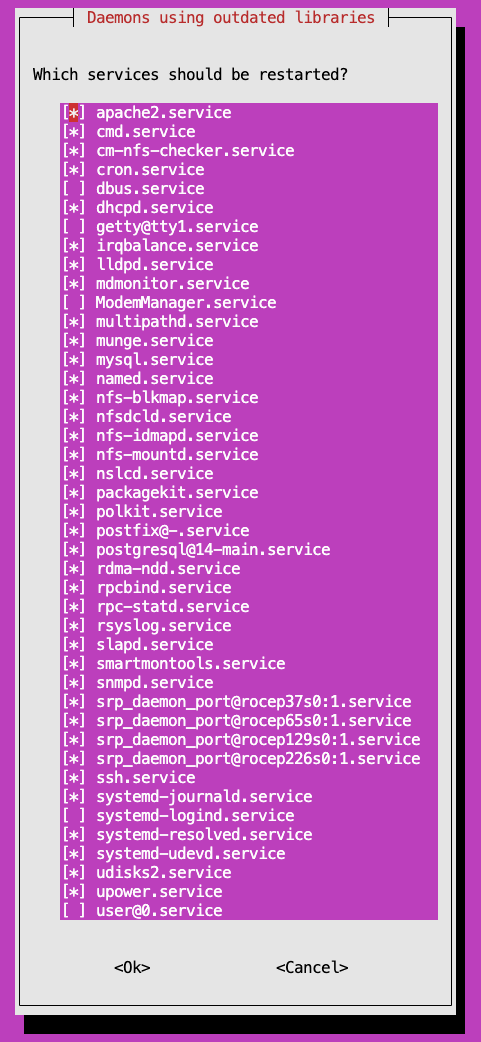
Verify the updated packages are installed.
root@demeter-headnode-01:~# apt list --installed | grep slurm

WARNING: apt does not have a stable CLI interface. Use with caution in scripts.

slurm23.02-client/BCM 10.0,now 23.02.8-100881-cm10.0-48e305b89c amd64 [installed]
slurm23.02-contribs/BCM 10.0,now 23.02.8-100881-cm10.0-48e305b89c amd64 [installed]
slurm23.02-devel/BCM 10.0,now 23.02.8-100881-cm10.0-48e305b89c amd64 [installed]
slurm23.02-perlapi/BCM 10.0,now 23.02.8-100881-cm10.0-48e305b89c amd64 [installed]
slurm23.02-slurmdbd/BCM 10.0,now 23.02.8-100881-cm10.0-48e305b89c amd64 [installed]
slurm23.02/BCM 10.0,now 23.02.8-100881-cm10.0-48e305b89c amd64 [installed]
On the active headnode, perform a
systemctl daemon-reloadto re-read the updated Slurm systemd unit files that point to the new Slurm version directory. After this, start the Slurm services on the headnodes and verify they are ‘active’.root@demeter-headnode-01:~# systemctl daemon-reload root@demeter-headnode-01:~# systemctl restart slurmdbd root@demeter-headnode-01:~# systemctl restart slurmctld
Note
If the
slurmdbd.servicedoes not start (i.e., become active) on the active headnode, review theslurmdbd.servicefile located at/lib/systemd/system/and check theTypesetting and the-Doption in the ExecStart line.If the
Typesetting is set toforking, set it tosimple.If the
-Doption is missing in the ExecStart line, then add the-Doption to the ExecStart line as shown below.
Then run
systemctl daemon-reloadand restart theslurmdbd.serviceandslurmctld.serviceon the active headnode.root@demeter-headnode-01:~# vi /lib/systemd/system/slurmdbd.service [Unit] Description=Slurm DBD accounting daemon After=network-online.target munge.service mysql.service mysqld.service mariadb.service Wants=network-online.target ConditionPathExists=/etc/slurm/slurmdbd.conf [Service] Type=simple EnvironmentFile=-/etc/sysconfig/slurmdbd EnvironmentFile=-/etc/default/slurmdbd ExecStart=cm/shared/apps/slurm/23.02.8/sbin/slurmdbd -D -s $SLURMDBD_OPTIONS ExecReload=/bin/kill -HUP $MAINPID LimitNOFILE=65536 TasksMax=infinity # Uncomment the following lines to disable logging through journald. # NOTE: It may be preferable to set these through an override file instead. #StandardOutput=null #StandardError=null [Install] WantedBy=multi-user.target root@demeter-headnode-01:~# systemctl daemon-reload root@demeter-headnode-01:~# systemctl restart slurmdbd root@demeter-headnode-01:~# systemctl restart slurmctld
Repeat steps 4 to 7 on the passive headnode. You only need to restart the
slurmctld.serviceon the passive headnode. Make sureTypeis set tosimpleand the-Doption is in the ExecStart line in theslurmdbd.servicefile.root@demeter-headnode-02:~# apt update root@demeter-headnode-02:~# apt list --installed | grep slurm root@demeter-headnode-02:~# apt install slurm23.02-client slurm23.02-contribs slurm23.02-devel slurm23.02-perlapi slurm23.02-slurmdbd slurm23.02 root@demeter-headnode-02:~# apt list --installed | grep slurm root@demeter-headnode-02:~# systemctl daemon-reload root@demeter-headnode-02:~# systemctl restart slurmctld
Next update the Slurm client on the software image for the DGX nodes and then apply the updated image to the DGX nodes. Use
cm-chroot-sw-imgto update the DGX nodes image. Press <OK> if prompted for newer kernel is available. When all done, exit chroot.root@demeter-headnode-01:~# cm-chroot-sw-img /cm/images/dgx-os-6.3.2-h100-image/ root@dgx-os-6:/# apt update root@dgx-os-6:/# apt list --installed | grep slurm WARNING: apt does not have a stable CLI interface. Use with caution in scripts. slurm23.02-client/BCM 10.0,now 23.02.6-100806-cm10.0-9c8dc03511 amd64 [installed,upgradable to: 23.02.8-100881-cm10.0-48e305b89c] root@dgx-os-6:/# apt install slurm23.02-client root@dgx-os-6:/# apt list --installed | grep slurm WARNING: apt does not have a stable CLI interface. Use with caution in scripts. slurm23.02-client/BCM 10.0,now 23.02.8-100881-cm10.0-48e305b89c amd64 [installed] root@dgx-os-6:/# exit
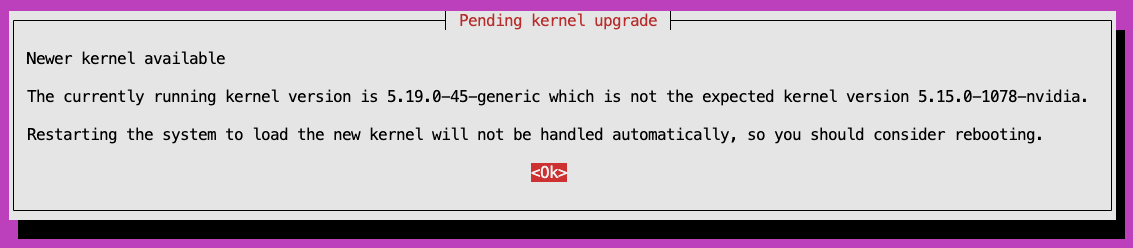
Apply the updated DGX image to the DGX nodes. Exit
cmshuntil you see the imageupdate is completed notification.root@demeter-headnode-01:~# cmsh [demeter-headnode-01]% device [demeter-headnode-01->device]% imageupdate -w -c dgx-h100 [demeter-headnode-01->device]% Fri May 30 00:41:38 2025 [notice] demeter-headnode-01: Provisioning started: sending demeter-headnode-01:/cm/images/dgx-os-6.3.2-h100-image-MOFED to dgx-07:/, mode UPDATE, dry run = no …. #output truncated …. imageupdate -c dgx-h100 -w [ COMPLETED ]
Since the Slurm client package is updated, so
systemctl daemon-reloadis needed on the DGX nodes to re-read the updated Slurm systemd unit files, then restart theslurmd.serviceon the DGX nodes to ensure the updated Slurm client version is active. You can verify Slurm is loaded properly on the DGX nodes by usingsinfoto check the Slurm nodes are in Idle state.root@demeter-headnode-01:~# pdsh -w dgx-[01-31] systemctl daemon-reload && systemctl restart slurmd root@demeter-headnode-01:~# sinfo
Start the Slurm services from
cmshto retain the settings between cm daemon restarts.root@demeter-headnode-01:~# cmsh [demeter-headnode-01]% device [demeter-headnode-01->device]% foreach -l slurmserver ( services; start slurmctld ) [demeter-headnode-01->device]% foreach -l slurmaccounting ( services; start slurmdbd ) [demeter-headnode-01->device]% foreach -l slurmclient ( services; start slurmd ) [demeter-headnode-01->device]% quit root@demeter-headnode-01:~# systemctl status slurmctld.service root@demeter-headnode-01:~# systemctl status slurmdbd.service root@demeter-headnode-02:~# systemctl status slurmctld.service root@demeter-headnode-02:~# systemctl status slurmdbd.service