

Voice Pipelines
Serve speech recognition, LLM, and text-to-speech stages for voice agents
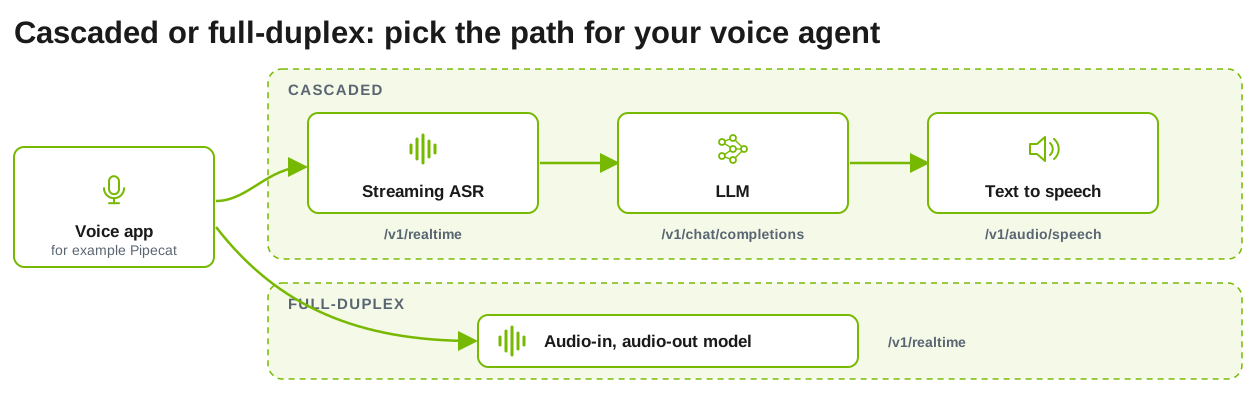
Dynamo serves voice workloads through OpenAI-compatible endpoints. Run separate automatic speech recognition (ASR), LLM, and text-to-speech (TTS) workers for a cascaded pipeline, or one vLLM-Omni model that takes audio in and returns audio out.
Endpoints
For a cascaded voice agent, connect an application such as Pipecat to the three stage endpoints. The application owns conversation history, turn detection, interruptions, and orchestration; Dynamo serves and routes each stage.
Set up the backend
vLLM and vLLM-Omni
Nemotron Speech NIMs (Kubernetes)
The speech pages in this section run on vLLM (speech to text) and vLLM-Omni (TTS and speech-to-speech).
-
Speech to text needs a working vLLM backend setup plus vLLM’s audio dependencies:
-
Text-to-speech and speech-to-speech need vLLM-Omni:
vLLM-Omni generates images, video, and audio through python -m dynamo.vllm.omni.
Prerequisites
- A working vLLM backend setup.
- An
amd64host. Dynamo container builds do not install vLLM-Omni onarm64.
Dynamo container images include vLLM-Omni. A PyPI installation of ai-dynamo[vllm] does not include it. For a source installation, install the vLLM-Omni release that matches your vLLM version:
The agg_omni_*.sh and disagg_omni_glm_image.sh launchers start the frontend and workers directly on one host. They are intended for local development and testing and do not create a DynamoGraphDeployment.
Generated media is written through fsspec storage. The default is file:///tmp/dynamo_media. Set --media-output-fs-url for S3, GCS, or Azure Blob storage, and optionally --media-output-http-url to rewrite the URLs returned in responses.
vLLM-Omni ships built-in stage configurations for supported models. Set --stage-configs-path only to override them.
See the vLLM backend setup and the vLLM-Omni Configuration reference for every flag.
Run a Pipeline Locally
Bring up and test each stage on its own before you connect them:
- Start an ASR worker and stream an audio file to it: Speech to Text.
- Start an LLM with any vLLM, SGLang, or TensorRT-LLM launcher, for example
bash examples/backends/vllm/launch/agg.sh. - Start a TTS worker and synthesize a reply: Text-to-Speech.
Each launcher starts its own frontend on port 8000, so test the stages one at a time on a single host.
Incremental Text Input
Incremental text input lets an orchestrator send ASR text to the LLM while the user is still speaking. The worker starts prefilling the text it has received so far, in full KV cache blocks, so those tokens are already in the prefix cache when the final request arrives. The client sends input_text.append events with the partial text, then input_text.commit with the final text to start generation, or input_text.clear to discard the prefill work.
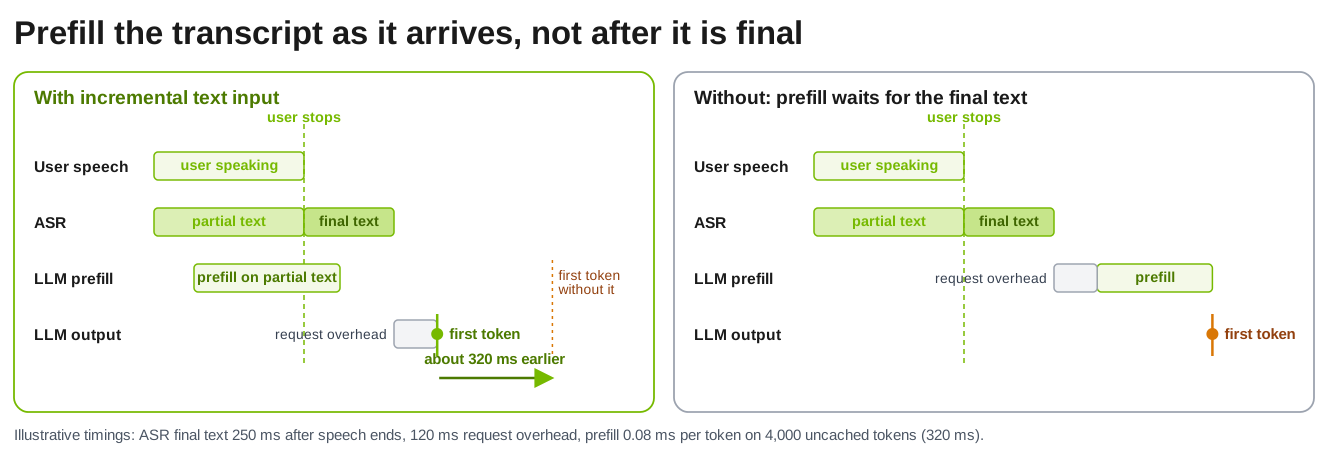
It applies to text-only /v1/realtime sessions on aggregated vLLM workers, without tools or disaggregation, and it needs prefix caching. Short or revised input can yield no benefit. The input events are Dynamo extensions, not standard OpenAI events, and realtime text does not yet apply --dyn-reasoning-parser. ASR and TTS orchestration remain external. Session recovery across worker failures is a further goal and is not provided by the examples above.