

RAG Benchmarking methodology#
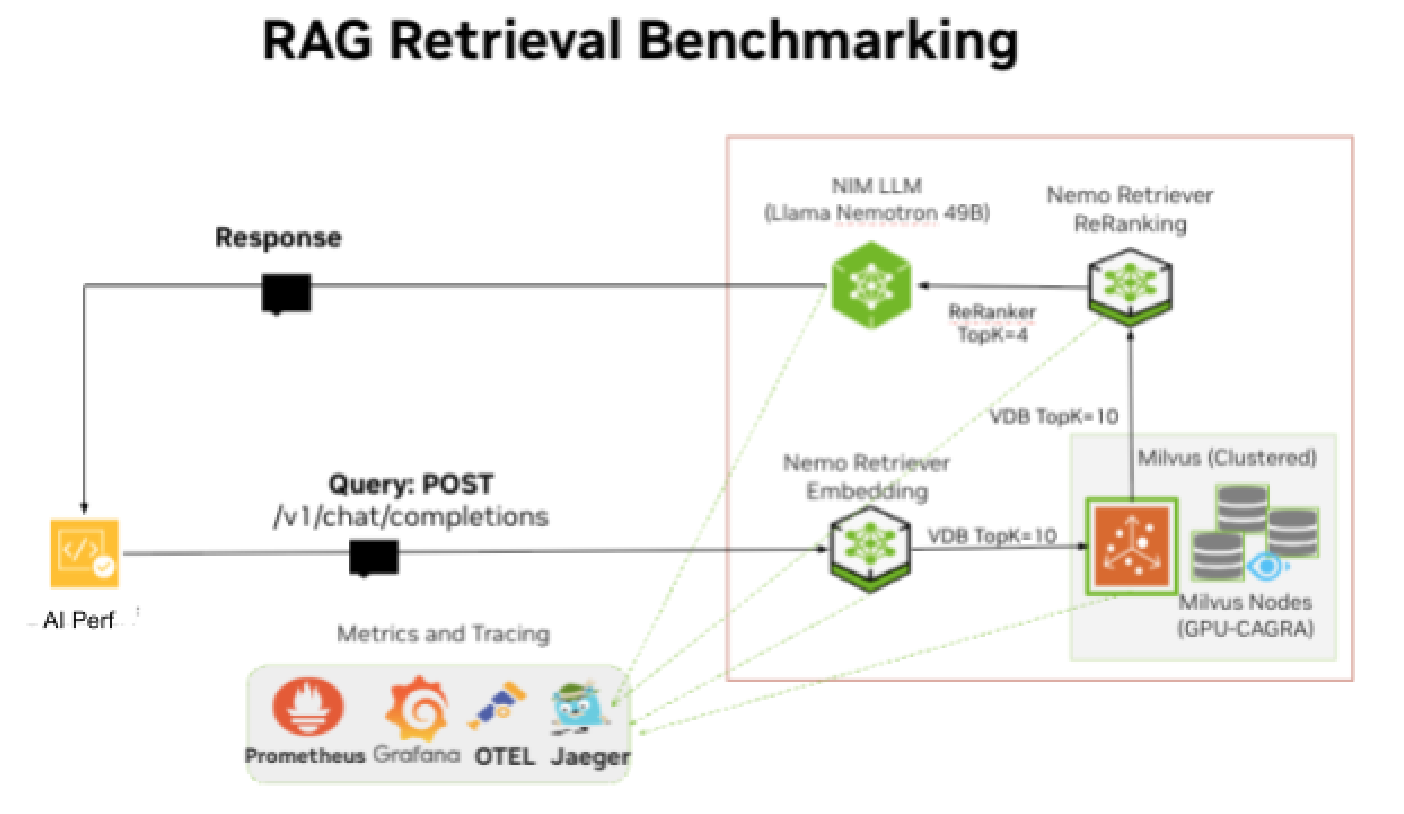
Figure 22 RAG Retrieval Benchmarking topology#
The Retrieval benchmarking methodology defines the following metrics, use cases, performance goals, benchmarks to pursue:
Metrics - What are the metrics and KPI that are significant for RAG Retrieval: First Token Latency p90 (ms), Output throughput (TPS) and User Throughput (TPS)
Usecases (ISL/OSL combinations) - Usecases that are crucial for Enterprise RAG: Chat 128/128, Summarization (4096/512), Analysis (128/2048)
Balanced Performance - Define Balanced Performance for RAG; how to maximize Output Throughput (TPS) X User throughput (TPS)
RAG Benchmarks - Define the Speed of Light (SOL) benchmarks to validate RAG performance: RAG-ON, RAG-OFF and RAG-OFF with RAG-ISL (SOL)
RAG Scaling Guidelines - Define latency thresholds for each RAG Retrieval components: LLM, Retriever (Embedding NIM and Milvus VDB), Reranking NIM. Using tracing data to analyze latency for individual RAG components
Test Plan - define the test cases to run for each Enterprise RA scaling Unit (1SU, 2SU, 3SU, 4SU). Define the key parameters to vary LLM Scale 1X, 2X, 4X, 8X, along with component scale; Reranker ON/OFF, VDB TopK and Reranker TopK. For each test case scale the users or Concurrent requests from 1-100 for each active LLM.
Test tool - Define performance benchmarking test tools GenAI-Perf and create any automation scripts required for benchmarking
RAG Benchmarking Test Plan#
Component scaling#
The NIM LLM is the main component affecting performance. Scale LLM along with other individual components based on the RAG Linear scaling ratios defined above and the RAG Linear Scaling Table defined above.
VDB TopK and Reranker TopK#
Vary the TopK for LLM Scale 1X, 2X, 4X, 8X, 10X, 16X, 20X, 32X, 64X, 96X.
Usecase |
Reranker ON/OFF |
Chunk Size |
TopK |
|---|---|---|---|
Chat 128/128 |
ON |
256/50, 512/150 |
10/4 (single collection), 5/4 (2 collections) |
Summarization (1024/512) |
ON |
256/50, 512/150 |
20/10 (single collection), 10/10 (2 collections) |
Generation (128/2048) |
ON |
256/50, 512/150 |
20/10 (single collection), 10/10 (2 collections) |
VDP TopK/ Reranker TopK:
10/4 (1 collection) - VDB TopK=10, Reranker TopK=4; retrieve 10 chunks from 1 Milvus collection and Reranker filters down to 4 chunks to send to LLM
5/4 (2 collections) - VDB TopK=5, Reranker TopK=4; retrieve 5 chunks from each Milvus collection (10 total chunks) and Reranker filters down to 4 chunks to send to LLM
20/10 - VDB TopK=20, Reranker TopK=10; retrieve 20 chunks from 1 Milvus collection and Reranker filters down to 10 chunks to send to LLM
10/10 (2 collections) - VDB TopK=10, Reranker TopK=10; retrieve 10 chunks from each Milvus collection (20 total chunks) and Reranker filters down to 10 chunks to send to LLM
Usecases: Chat: 128/128; Summarization: 1024/512, Generation: 128/2048
Benchmarks: RAG-ON, RAG-OFF and RAG-OFF with RAG-ISL (SOL)
For each test case scale the users or Concurrent requests from 1-100 for each active LLM.
Milvus VDB Collection Size: 10M+ vector embeddings:
Collection1: ~10M vectors from Wikipedia dataset (Text Chunk Size 256/50)
Collection2: ~100K vectors from Wikipedia partial (Text Chunk Size 512/150)
Collection3: 5K - 9K vectors Shakespeare works PDF (Text Chunk Size 256/50)
Collection4: 77K vectors - Multimodal dataset bo767 digital corpora 767
Chunk Size: 256/50 which is 256 tokens with 50 token overlap. Average chunk size from the tracing data is 243 tokens
Concurrent Requests: Vary concurrent users (CCU) or Concurrent Requests (CR) from 1 to 120 and measure benchmarks for different CR.
LLM Scale 1X Concurrent Requests: [1, 2, 4, 8, 10, 16, 20, 24, 32, 40, 48, 56, 64, 72, 80, 96, 100]
When scaling the LLM, scale the corresponding Concurrent Requests, for example: LLM Scale 2X Concurrent Requests: [2, 4, 8, 20, 32, 40, 48, 64, 80, 96, 112, 128, 144, 160, 192, 200] etc.
Iterations: run 3 iterations for each Concurrency (CR) and weed out any outliers.
Delay between tests: add delay of 30s between tests to clear KV-Cache between runs.
The test plan table below defines the RAG Scale where RAG Scale refers to the LLM scale since the LLM is the key component that accounts for 90% of the Latency and will be scaled out for each testcase. The table below provides a complete list of test cases and test count that will be run along with all component scale and parameter variations.
RAG LLM Scale |
Reranker Embedder Scale |
Milvus Scale |
VDB / RR TopK |
Concurrent Requests |
GPUs Nodes Allocated |
|---|---|---|---|---|---|
Scale 1X: LLM 1X, RAG server 1X |
Reranker 1X (1 GPU), Embedder 1X (0.5 GPU) |
Query 2X, Data 1X (0.25 GPU, ingestion only) |
Chat: 10/4 (1 VDB), 5/4 (2 VDB). Sum/Gen: 20/10 (1), 10/10 (2) |
[1, 2, 4, 8, 10, 16, 20, 24, 32, 40, 48, 56, 64, 72, 80, 96, 100] |
GPUs: 2.75, Nodes: 1 |
Scale 2X: LLM 2X, RAG server 1X |
Rerank 1X, Embed 1X |
Query 2X, Data 1X |
Chat: 10/4, Sum/Gen: 20/10 |
[2, 4, 8, 20, 32, 40, 48, 64, 80, 96, 112, 128, 144, 160, 192, 200] |
GPUs: 3.75, Nodes: 1 |
Scale 4X: LLM 4X, rag-svr 1X |
RR 1X, RR 1X (Sum), Embed 1X |
Query 2X, Data 1X |
Chat: 10/4, Sum/Gen: 20/10 |
[4, 8, 16, 32, 40, 64, 80, 96, 128, 160, 192, 224, 256, 288, 320, 384, 400] |
GPUs: 5.75, Nodes: 1 |
Scale 8X: LLM 8X, rag-svr 1X, 2X (Gen) |
RR 1X, 2X (Sum), Embed 1X |
Query 2X, Data 1X |
Chat: 10/4, Sum/Gen: 20/10 |
[8, 16, 32, 64, 80, 128, 160, 192, 256, 320, 384, 448, 512, 576, 640, 768, 800] |
GPUs: 9.75, 10.75 (Sum), Nodes: 2 |
Scale 10X: LLM 10X, rag-svr 2X, 3X (Gen) |
RR 2X, 3X (Sum), Embed 1X |
Query 2X, Data 1X |
Chat: 10/4, Sum/Gen: 20/10 |
[10, 30, 50, 80, 100, 130, 150, 180, 200, 250, 300, 400, 500, 640, 720, 800, 1000] |
GPUs: 12.75, 13.75 (Sum), Nodes: 2 |
Scale 16X: LLM 16X, rag-svr 2X, 4X (Gen) |
RR 2X, 4X (Sum), Embed 1X |
Query 2X, Data 1X |
Chat: 10/4, Sum/Gen: 20/10 |
[16, 32, 64, 128, 160, 256, 320, 384, 512, 640, 768, 896, 1024, 1152, 1280, 1536, 1600] |
GPUs: 18.75, 20.75 (Sum), Nodes: 3 |
Scale 20X: LLM 20X, rag-svr 3X, 5X (Gen) |
RR 3X, 5X (Sum), Embed 1X |
Query 2X, Data 1X |
Chat: 10/4, Sum/Gen: 20/10 |
[20, 40, 80, 160, 200, 320, 400, 480, 640, 800, 960, 1120, 1280, 1440, 1600, 1920, 2000] |
GPUs: 23.75, 25.75 (Sum), Nodes: 3, 4 (Sum) |
Scale 32X: LLM 32X, rag-svr 4X, 8X (Gen) |
RR 4X, 8X (Sum), Embed 1X |
Query 2X, Data 1X |
Chat: 10/4, Sum/Gen: 20/10 |
[32, 64, 128, 256, 320, 512, 640, 768, 1024, 1280, 1536, 1792, 2048, 2304, 2560, 3072, 3200] |
GPUs: 36.75, 40.75 (Sum), Nodes: 5, 6 (Sum) |
Scale 64X: LLM 64X, rag-svr 8X, 16X (Gen) |
RR 8X, 16X (Sum), Embed 2X |
Query 4X, Data 1X |
Chat: 10/4, Sum/Gen: 20/10 |
[64, 128, 256, 512, 640, 1024, 1280, 1536, 2048, 2560, 3072, 3584, 4096, 4608, 5120, 6144, 6400] |
GPUs: 73.25, 81.25 (Sum), Nodes: 10, 11 (Sum) |
Scale 96X: LLM 96X, rag-svr 12X, 24X (Gen) |
RR 12X, 24X (Sum), Embed 2X |
Query 4X, Data 1X |
Chat: 10/4, Sum/Gen: 20/10 |
[96, 192, 384, 768, 960, 1536, 1920, 2304, 3072, 3840, 4608, 5376, 6144, 6912, 7680, 9216, 9600] |
GPUs: 109.25, 121.25 (Sum), Nodes: 14, 16 (Sum) |
Table 19. RAG Benchmarking Test cases
AIPerf Tool for Benchmarking RAG#
NVIDIA’s AI-Perf is an AI inference benchmarking tool that was used to benchmark Enterprise RAG Retrieval performance. GenAI Perf is deployed on a Linux server outside the Kubernetes cluster and generates load on the RAG server and LLM endpoints. Use either Ingress, Load Balancer or DNS to access the endpoints. GenAI Perf is a client-side tool that generates synthetic user queries (based on specified ISL) and talks to the NVIDIA Triton-server running on the LLM NIM to measure the throughput and latency metrics.
NVIDIA’s AI-Perf will be leveraged to provide these metrics to benchmark Enterprise RAG Retrieval performance.
Metric |
user or service |
Measurement |
Input or Output |
Description |
|---|---|---|---|---|
ISL/OSL |
user |
Input |
- |
The ISL indicates the size in tokens of the User Request or Prompt. OSL is the expected size of Output response from RAG service. Provided as input to GenAI perf tool and varied based on the use case, e.g. Chat 128/128 |
Peak usage or Concurrency |
Service |
Input |
- |
It indicates the maximum number of Active user requests for a given First Token Latency. It is a measure of Peak usage at given Latency. Provided as input to GenAI perf tool and incremented from 1 to 100 with Step=5. With the goal being to benchmark First Token Latency (TTFT) and Throughput for each Concurrency. |
First Token Latency (TTFT) |
User |
Output |
p90, 90th percentile |
How long before I see my first response? Defines user responsiveness. Critical for interactive services (Chatbot, customer service). Highly dependent on the ISL. |
Output Throughput (OT) |
Service |
Output |
Average |
How many total output tokens generated per second by the RAG service across all user requests being processed? It is measured in Tokens per second (TPS). |
Request Throughput (RT) |
Service |
Output |
Average |
How many Requests are being responded to by the RAG service every second across all Active user requests. It is measured in Requests per second (RPS). |
User Throughput (TPS) |
User |
Output |
p90, 90th percentile |
How many total output tokens generated per second for each user? It is measured in Tokens per second (TPS). User Throughput defines user experience (UX). |
Table 20. Gen-AI Perf Key Metrics for RAG Benchmarking
To benchmark the RAG service, GenAI perf will create multiple concurrent user requests using synthetic input prompts and these are sent to RAG server Kubernetes service endpoint. Gen-AI perf will process the responses received to calculate the metrics defined above for each user request.
For generating the user prompts it is important to use the right tokenizer to match the LLM model otherwise the metrics reported by GenAI perf may be incorrect e.g. input ISL sent and OSL received may not match the configured ISL/OSL.
For LLM model nvidia/llama-3.3-nemotron-super-49b-v1.5, use the matching
tokenizer nvidia/Llama-3_3-Nemotron-Super-49B-v1_5 from hugging face.
Download the tokenizer from hugging face and point to local tokenizer to reduce overhead of webcall and improve tokenizing performance.
Follow instructions in the Enterprise RAG Deployment guide to install and then run AIPerf sample script.
Install the AI-perf client in Python venv (3.10+) on Ubuntu 24.04 server using pip. Install AI perf on Ubuntu 24.04 node in python venv and run from outside cluster.
pip install aiperf
Run a sample script below with synthetic data.
Add prompt.jsonl with valid questions to append to synthetic data.
See sample GenAI-perf command below and basic script:
#Sample AI perf command and script

NIM_MODEL_NAME="nvidia/llama-3.3-nemotron-super-49b-v1.5"
# RAG and non RAG services (service:port) to sweep over
RAG_SERVICE="rag-server:8081" # DNS name or rag-server LB IP and port
LLM_SERVICE="nim-llm-nemotron49b:8000" #DNS name for nim-llm or LB IP and port
SERVICE=$RAG_SERVICE
ISL="128" # Input Sequence Length (ISL) inputs to sweep over
OSL="128" # Output Sequence Length (OSL) inputs to sweep over
CR="1"
CONCURRENCY_RANGE="1 5 10 20 50"
TOP_K_RANGE="10" # The number of documents/embeddings chunks to retrieve from the
# Vector Database, only relevant for RAG services
OUTPUT_DIR="./aiperf/results"
COLLECTION="wiki500c256gpu"
EXPORT_FILE=chat_SVC-${SVC}_CR-${CR}_ISL-${ISL}_OSL-${OSL}_TOPK-4-$(date +"%Y-%m-%d-%H_%M_%S").json
PROMPT_FILE=prompt.jsonl
TOKENIZER="nvidia/Llama-3_3-Nemotron-Super-49B-v1_5"
aiperf profile \
  -m $NIM_MODEL_NAME \
  --endpoint-type chat \
  --streaming -url $SERVICE \
  --request-count 50 \
  --num-prompts 100 \
  --synthetic-input-tokens-mean $ISL \
  --synthetic-input-tokens-stddev 0 \
  --num-dataset-entries 150 \
  --input-file $PROMPT_FILE \
  --num-prefix-prompts 150 \
  --prefix-prompt-length 111 \ # 128 - 17 (tokens for questions)
  --concurrency $CR \
  --output-tokens-mean $OSL \
  --extra-inputs max_tokens:$OSL \
  --extra-inputs min_tokens:$OSL \
  --extra-inputs ignore_eos:true \
  --extra-inputs collection_name:$COLLECTION \
  --extra-inputs enable_reranker:true \
  --extra-inputs enable_citations:false \
  --extra-inputs enable_query_rewriting:false \
  --extra-inputs vdb_top_k:10 \
  --extra-inputs reranker_top_k:4 \
  --artifact-dir $OUTPUT_DIR \
  --tokenizer $TOKENIZER \
  --profile-export-file $EXPORT_FILE \
  -- -v --max-threads=$CR

echo USECASE Chat SVC:${SVC} CR:${CR} ISL:${ISL} OSL:${OSL} Retriever-TOPK:4 Scale-1X