


Isaac Sim Configuration#
Configuration files controlling Isaac Sim simulation behavior.
Configuration Files#
Located in /isaac-sim/sil/configs/:
default_config_ros.yaml- Main simulation parameterscameras.yaml- Camera registration for VSTdefault_command.txt- Digital human behavior
default_config_ros.yaml#
Main simulation configuration:
isaacsim.replicator.agent:
  version: 0.7.0

  character:
    asset_path: omniverse://content.ov.nvidia.com/Projects/Teams/Metropolis/Characters/DH_Characters_Extended/
    num: 3
    command_file: /isaac-sim/sil/configs/default_command.txt

  global:
    seed: 123456789
    simulation_length: 3000

  replicator:
    writer: RTSPWriter
    parameters:
      rtsp_stream_url: rtsp://localhost:8553/RTSPWriter
      rtsp_rgb: true

  scene:
    asset_path: /isaac-sim/sil/scenes/indicator_warehouse_20x20_layout_overflow_test.usd

  sensor:
    camera_num: 3
Key Parameters#
Parameter |
Default |
Description |
|---|---|---|
|
3 |
Number of digital humans (IRA agents) |
|
Omniverse URL |
Digital human models location (requires |
|
123456789 |
Random seed for reproducible scenarios |
|
3000 |
Total frames (3000 / 30 FPS = 100 seconds) |
|
RTSPWriter |
Output format for camera feeds |
|
localhost:8553 |
MediaMTX RTSP server address |
|
USD file path |
Warehouse scene to load |
|
3 |
Number of cameras to create |
cameras.yaml#
Camera registration configuration for VST:
cameras:
  - name: Camera
    rtsp_path: RTSPWriter_World_Cameras_Camera_rgb

  - name: Camera_01
    rtsp_path: RTSPWriter_World_Cameras_Camera_01_rgb

  - name: Camera_02
    rtsp_path: RTSPWriter_World_Cameras_Camera_02_rgb

rtsp:
  host: ${HOST_IP}
  port: 8553
Camera registration:
name: Camera identifier in VSTrtsp_path: RTSP stream suffixFull URL:
rtsp://${HOST_IP}:8553/${rtsp_path}
When Isaac Sim starts with --enable-vst, cameras automatically register with VST using these definitions.
Playback Segments#
Forklift movement defined in /isaac-sim/sil/playback/segments.json:
{
  "segments": [
    {"duration": 16.0, "linear_x": 1.0, "angular_z": 0.0, "note": "Forward"},
    {"duration": 5.0, "linear_x": 0.0, "angular_z": 0.0, "note": "Idle"},
    {"duration": 16.0, "linear_x": -1.0, "angular_z": 0.0, "note": "Backward"},
    {"duration": 5.0, "linear_x": 0.0, "angular_z": 0.0, "note": "Idle"}
  ]
}
Segment parameters:
duration: Seconds to execute this segmentlinear_x: Forward (+) / backward (-) velocity in m/sangular_z: Turning rate in rad/s (0 = straight)note: Description (not used by code)
Loaded by playback script node in Action Graph. Segments execute sequentially, loop if LOOP=True in script.
Common Adjustments#
Change Simulation Length#
global:
  simulation_length: 9000  # 5 minutes at 30 FPS
Test Without Humans#
character:
  num: 0  # Forklift-only scenario
Modify Forklift Path#
Edit segments.json:
{
  "segments": [
    {"duration": 10.0, "linear_x": 1.5, "angular_z": 0.0, "note": "Fast entry"},
    {"duration": 3.0, "linear_x": 0.0, "angular_z": 0.0, "note": "Stop"}
  ]
}
Execution Script#
Isaac Sim scenarios are executed using run_sdg.sh.
Command Line Parameters#
Parameter |
Description |
|---|---|
|
Path to IRA config file (required) |
|
Automatically start data generation (no manual UI start needed) |
|
Run without GUI window (for automated testing) |
|
Enable VST sensor registration for camera streams |
|
Path to cameras.yaml for VST integration |
Example execution:
docker exec -d isaac-sim bash -lc 'cd /isaac-sim/sil/scripts && \
  ./run_sdg.sh -c /isaac-sim/sil/configs/default_config_ros.yaml \
  --start --headless --enable-vst \
  --cameras-config /isaac-sim/sil/configs/cameras.yaml'
VST Integration:
--enable-vstregisters cameras with VST automaticallyReads camera definitions from
cameras.yamlConstructs RTSP URLs:
rtsp://${HOST_IP}:8553/${rtsp_path}Requires
HOST_IPandVST_BASE_URLenvironment variables
Example with UI:
Allow X11 connections:
xhost +local:
Stop all SIL docker compose containers, then run cleanup and setup:
cd deployments
../closed-loop-testing/scripts/cleanup_all_datalog.sh sil
../closed-loop-testing/scripts/setup.sh sil
Start SIL docker compose:
docker compose --env-file profiles/sil.env up -d --build
Then start Isaac Sim with UI:
docker exec -it isaac-sim bash -lc 'cd /isaac-sim/sil/scripts && \
  ./run_sdg.sh -c /isaac-sim/sil/configs/default_config_ros.yaml \
  --start --enable-vst \
  --cameras-config /isaac-sim/sil/configs/cameras.yaml'
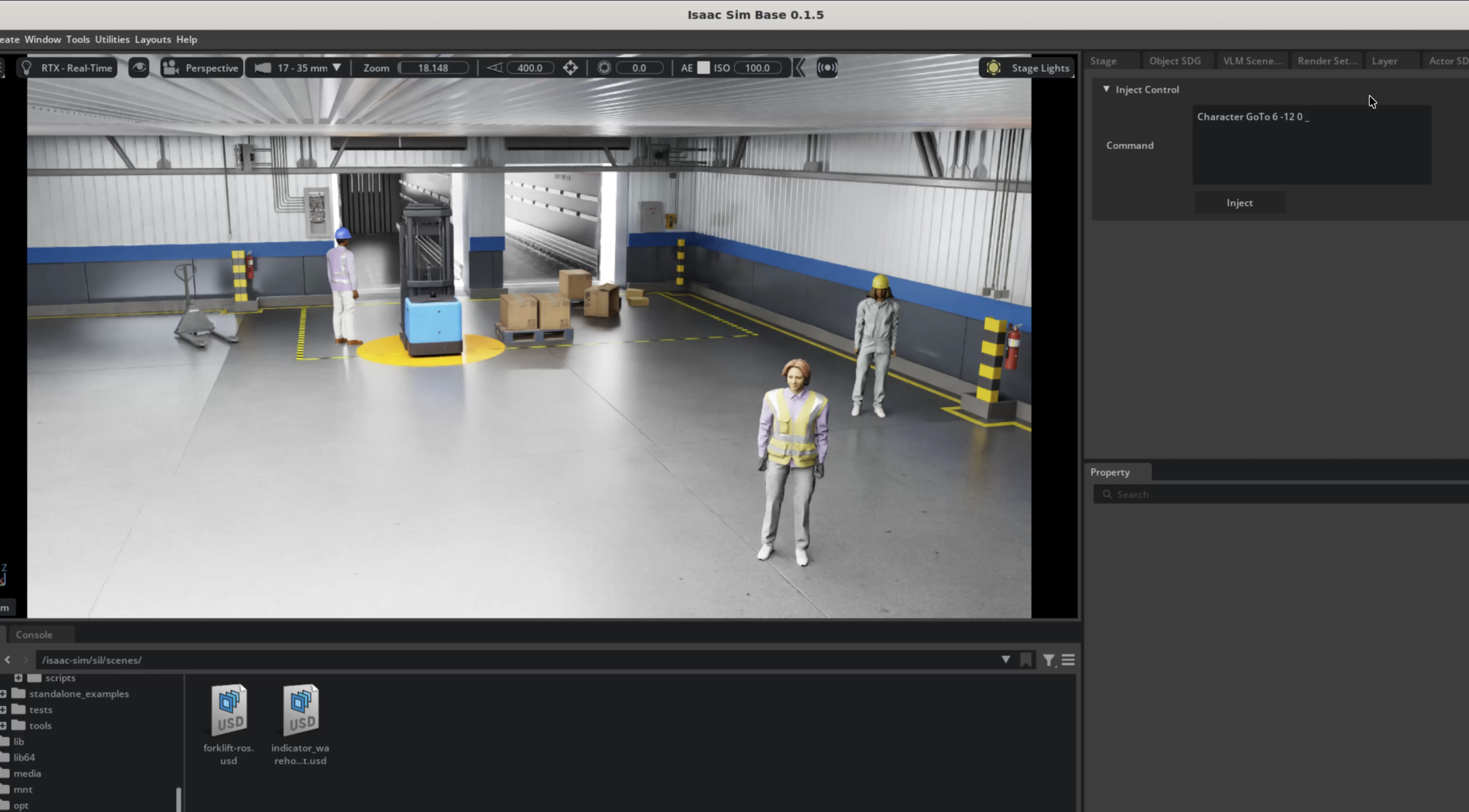
Tip
You can inject commands into a running simulation to control IRA agents in real time — see the official documentation: Actor Control with Replicator Agent.
Next Steps#
Forklift ROS2 Action Graph - Action Graph details
Architecture - System architecture
Quick Start Guide - Deployment guide