


Quick Start Guide — 3D Perception#
Deploy Halos SIL with 3D perception (Sparse4D multi-view fusion).
Warning
The 3D profile is currently a preview. Known issues include perception accuracy gaps, lower and unstable FPS, and intermittent stream drops. For evaluation only — do not use for benchmarking or release validation. The 2D profile is the supported path for v1.2.
Note
Halos SIL 3D requires VSS Warehouse 3.2 with the 3D Vision AI Profile as its perception backend. Deploy VSS Warehouse first using the official VSS Warehouse Blueprint - 3D Vision AI Profile documentation before proceeding with Halos SIL deployment.
For 2D perception (simpler setup, higher FPS), see Quick Start Guide instead.
2D vs 3D#
2D |
3D |
|
|---|---|---|
Perception model |
RT-DETR + NvDCF |
Sparse4D multi-view fusion + MTMC |
Output |
Per-camera 2D bounding boxes |
Bird’s-eye-view (BEV) spatial coordinates |
Kafka topic |
|
|
Camera FPS |
~30 FPS (CFR) |
~12-14 FPS (VFR) |
Isaac Sim RTSP |
|
|
DeepStream SEI |
Disabled |
Enabled (keep defaults) |
Prerequisites#
See Prerequisites for hardware and software requirements.
Additional 3D requirements:
Familiarity with the VSS Warehouse Blueprint - 3D Vision AI Profile
Understanding of Sparse4D 3D multi-camera detection
Step 1: Download Packages#
Follow Step 1 in the 2D Quick Start Guide to clone the Halos Outside-In Safety repository and download the SIL data. The same repo and SIL data are used for both 2D and 3D.
Step 2: Prepare 3D Calibration Dataset#
The 3D perception pipeline requires a calibration dataset with BEV sensor group assignments. Create it from the existing 2D loading dock calibration.
2.1 Copy and Convert calibration.json#
Copy the 2D calibration file and add 3D-specific fields:
# path to your cloned video-search-and-summarization repo's deploy/docker directory
vss_warehouse_dir=/path/to/video-search-and-summarization/deploy/docker
SRC=${vss_warehouse_dir}/industry-profiles/warehouse-operations/warehouse-2d-app/calibration/sample-data/warehouse-loading-dock-3cams-synthetic
DST=${vss_warehouse_dir}/industry-profiles/warehouse-operations/warehouse-3d-app/calibration/sample-data/warehouse-loading-dock-3cams-synthetic-3d

mkdir -p $DST/images
cp $SRC/calibration.json $DST/calibration.json
Edit $DST/calibration.json and add these fields:
For each sensor — add a group object:
"group": {
  "name": "bev-sensor-1",
  "alias": "area-1",
  "type": "bev",
  "origin": [<from translationToGlobalCoordinates x, y>],
  "dimensions": [<computed from globalCoordinates bounding box>]
}
For each sensor — add region to the place array:
{"name": "region", "value": "Region-1"}
Top-level — add rois array. These use the same world coordinates as the
2D calibration (the loading dock scene is identical — copy from the 2D source):
"rois": [
  {
    "id": "roi-id-1",
    "roiCoordinates": [
      {"x": 4.87747667, "y": -18.9756077},
      {"x": 4.87747667, "y": -11.2385153},
      {"x": 9.57440535, "y": -11.2385153},
      {"x": 9.57440535, "y": -18.9756077}
    ],
    "restrictedObjectTypes": ["Person"],
    "confinedObjectTypes": ["Forklift"],
    "sensors": ["Camera", "Camera_01", "Camera_02"],
    "groups": ["bev-sensor-1"]
  }
]
Top-level — add tripwires array (same world coordinates as 2D):
"tripwires": [
  {
    "id": "tripwire-id-1",
    "wire": {
      "p1": {"x": 9.57440535, "y": -18.9756077},
      "p2": {"x": 9.57440535, "y": -11.2385153}
    },
    "direction": {
      "p1": {"x": 8.0, "y": -15.1070615},
      "p2": {"x": 11.0, "y": -15.1070615}
    },
    "sensors": ["Camera", "Camera_01", "Camera_02"],
    "groups": ["bev-sensor-1"]
  }
]
For details on calibration schema, see the Calibration documentation.
2.2 Copy Floorplan Image#
Copy the floorplan image from the 2D source dataset (same scene):
cp $SRC/images/Top.png $DST/images/
cp $SRC/images/imageMetadata.json $DST/images/
2.3 Verify#
python3 -c "
import json
d = json.load(open('$DST/calibration.json'))
for s in d['sensors']:
    assert 'group' in s, f'{s[\"id\"]} missing group'
assert len(d.get('rois', [])) > 0, 'No ROIs'
assert len(d.get('tripwires', [])) > 0, 'No tripwires'
print(f'OK: {len(d[\"sensors\"])} sensors, {len(d[\"rois\"])} ROIs, {len(d[\"tripwires\"])} tripwires')
"
Step 3: Patch Isaac Sim for VFR#
The default Isaac Sim RTSP writer uses constant frame rate (CFR) which duplicates frames to maintain 30 FPS. Duplicate timestamps break Sparse4D 3D multi-view fusion. Patch it to use variable frame rate (VFR).
Edit closed-loop-testing/isaac-sim/patches/patch_rtsp.py and add
this patch between the existing preset fix and GOP size patches:
# Remove frame duplication: change cfr to vfr and remove forced -r fps
content = content.replace(
    '            "-vsync",\n            "cfr",\n            "-r",\n            str(self.fps),',
    '            "-vsync",\n            "vfr",'
)
The file already contains two patches. Add this as patch 2 — after the
# 1. Fix preset for FFmpeg 6.x block and before the # 3. Add GOP size
block (around line 39 in the unpatched file).
Step 4: Deploy VSS Warehouse (3D Profile)#
Deploy VSS Warehouse 3.2 following the official VSS Warehouse Blueprint - 3D Vision AI Profile documentation.
Before deploying, update the VSS Warehouse .env with the following settings:
BP_PROFILE=bp_wh_kafka
HOST_IP='${HOST_IP}'  # Get with: hostname -I | awk '{print $1}'
LLM_MODE=none
MDX_DATA_DIR="/path/to/vss-warehouse-app-data"
MDX_SAMPLE_APPS_DIR="/path/to/vss-warehouse/deployments"
MODE=3d
NUM_STREAMS=3
SAMPLE_VIDEO_DATASET="warehouse-loading-dock-3cams-synthetic-3d"
VLM_MODE=none
Important
3D DeepStream config changes — these are the opposite of 2D. Apply in
industry-profiles/warehouse-operations/warehouse-3d-app/deepstream/configs/ds-main-config.txt:
In the [source-list] and [streammux] sections:
[source-list]
low-latency-mode=0           # Prioritize throughput

[streammux]
sync-inputs-ntp=0            # MUST be 0 for 3D (not 33333333)
batched-push-timeout=75000   # Wider timeout for lower FPS
drop-backward-sei=0          # Allow backward-timestamp VFR frames
Do NOT disable SEI — keep these as-is (unlike 2D where SEI is disabled):
[source-list]
extract-sei-type5-data=1
sei-uuid=NVDS_CUSTOMMETA

[streammux]
attach-sys-ts-as-ntp=0
extract-sei-sim-time=1
sync-inputs-ntp controls multi-stream NTP timestamp synchronization in the
streammux. The value is in nanoseconds — formula: 1000000000 / target_fps
(e.g. 33333333 = ~33ms = 30 FPS window, 66666666 = ~67ms = 15 FPS window).
The streammux waits for all camera frames to arrive within this window before
batching. With VFR, Isaac Sim renders at a variable rate (~12-14 FPS) — frame
arrival times are irregular, not evenly spaced. Even 66666666 (~15 FPS window)
will intermittently drop frames when a camera delivers late. Setting to 0
disables NTP sync entirely — the streammux batches whatever frames are available
immediately, which is the only reliable option for VFR streams.
Without sync-inputs-ntp=0, the Kafka mdx-bev topic will receive zero or
intermittent data.
4.1 DeepStream Auxiliary Configs#
Update config.yaml (Sparse4D model config):
num_sensors: 3 # Must match NUM_STREAMS
Update ds-mtmc-preprocess-config.txt:
network-input-shape=3;3;540;960 # First dimension = NUM_STREAMS
For details on Sparse4D configuration, see 3D Multi Camera Detection and Tracking.
4.2 Behavior Analytics#
In industry-profiles/warehouse-operations/warehouse-3d-app/vss-behavior-analytics/configs/vss-behavior-analytics-config.json,
add inSimulationMode to the app array:
{
  "name": "inSimulationMode",
  "value": "true"
}
Without this, behavior analytics silently drops synthetic data timestamps from Isaac Sim instead of generating ROI/tripwire events.
4.3 VST Config#
In industry-profiles/warehouse-operations/warehouse-3d-app/vst/configs/vst_config.json, increase bbox tolerance:
"bbox_tolerance_ms": 100
This reduces bounding box flickering at the lower 3D FPS.
4.4 Wait for TensorRT Engine Build#
Start VSS Warehouse and wait for the Sparse4D TensorRT engine to build.
Note
First startup takes 15-20 minutes for TensorRT engine build. Monitor build progress:
docker logs -f vss-rtvi-cv
Expected output when ready:
Active sources : 3
**PERF:
14.00000 (14.51159)     source_id : 2 stream_name Camera_02
14.40000 (14.58911)     source_id : 1 stream_name Camera_01
14.40000 (14.38423)     source_id : 0 stream_name Camera
Expected FPS: ~12-14 FPS per camera (lower than 2D’s 30 FPS because Sparse4D 3D inference is heavier).
Verify Kafka has data:
docker exec kafka kafka-console-consumer \
  --bootstrap-server localhost:9092 \
  --topic mdx-bev \
  --from-beginning --max-messages 1 --timeout-ms 5000
3D perception writes to the mdx-bev topic (not mdx-raw like 2D).
Step 5: Configure Halos SIL Environment#
nano deployments/profiles/sil.env
Required settings:
MDX_SAMPLE_APPS_DIR="/path/to/halos-outside-in-safety"  # this repo checkout root
MDX_DATA_DIR="/path/to/sil-data"                        # the extracted sil-data dir from Step 1
HOST_IP='${HOST_IP}'                                     # same value as the VSS Warehouse .env
ISAAC_GPU_DEVICE=0                                       # Use GPU 1 if available, else 0
ROS_DOMAIN_ID=0                                          # MUST be unique per host (0-232); see Troubleshooting
DOCKER_GID=999                                           # run: getent group docker | cut -d: -f3
PSF_IMAGE and ISAAC_SIM_IMAGE are pre-set in sil.env — leave them.
Step 6: Deploy Halos SIL#
cd deployments
../closed-loop-testing/scripts/setup.sh sil              # Create required directories and set permissions
../closed-loop-testing/scripts/cleanup_all_datalog.sh sil # Clean previous data logs
docker compose --env-file profiles/sil.env up -d --build  # --build required for Isaac Sim VFR patch
Services started: safety-core, comm-layer, isaac-sim, mediamtx
Note
The --build flag is required because Isaac Sim and comm-layer are built
from local Dockerfiles (the VFR patch is applied during the Isaac Sim build).
Step 7: Run Test Scenario#
docker exec -d isaac-sim bash -lc 'cd /isaac-sim/sil/scripts && \
  ./run_sdg.sh -c /isaac-sim/sil/configs/default_config_ros.yaml \
  --start --headless --enable-vst \
  --cameras-config /isaac-sim/sil/configs/cameras.yaml'
For script usage details and additional options, see Execution Script.
What happens:
Loads warehouse scene (20x20m)
Spawns forklift and 3 digital humans from USD
Initializes ROS2 Action Graph for forklift
Runs forklift playback sequence
Starts RTSP streaming with VFR (unique timestamps per frame)
Registers 3 cameras with VST
Important
First-run note: After launching, Isaac Sim stdout will go silent for ~5-7 minutes while RT shaders compile. This is normal. Confirm progress:
GPU utilization:
nvidia-smi(should show high GPU usage)Kit log:
docker exec isaac-sim tail -5 /isaac-sim/kit/logs/Kit/isaacsim.exp.action_and_event_data_generation.base/0.1/kit_*.log
Subsequent runs use cached shaders and skip this wait.
Startup time:
First run: 10-15 min (scene load + RT shader compilation + GPU init)
Subsequent runs: 5-10 min (shaders cached)
Simulation: ~5 min (3500 frames @ ~12 FPS). Rerun the script to repeat.
Step 8: Monitor Safety Commands#
The log paths below use MDX_DATA_DIR from your sil.env. From the deployments/ directory, load it into your shell first (re-run it in each terminal you monitor from):
set -a; source profiles/sil.env; set +a
Monitor OPC server log:
tail -f $MDX_DATA_DIR/comm-layer/opc_server.log
Expected output:
INFO:udp_receiver.safety_receiver:Received: Seq#0 | HEARTBEAT | 💓 Heartbeat | ts=2026-04-29T13:33:28.055302+00:00
INFO:udp_receiver.safety_receiver:Received: Seq#3 | MUTE (ALLOW OPERATION) | 🟢 Safety muted - Loading allowed | ts=2026-04-29T13:33:38.946800+00:00
INFO:udp_receiver.safety_receiver:Received: Seq#9 | UNMUTE (PREVENT OPERATION) | 🟡 Safety active + Alarm on | ts=2026-04-29T13:34:06.987138+00:00
🟢 MUTE (ALLOW OPERATION): Forklift in trailer, no humans detected (allow loading)
🟡 UNMUTE (PREVENT OPERATION): Human detected or forklift exiting (alarm active)
💓 HEARTBEAT: Periodic keep-alive (every 5s) — confirms PSF→comm-layer link is healthy
Monitor PSF:
tail -f $MDX_DATA_DIR/psf-log/pss.log
Expected output:
2026-04-29T13:33:38.770555+00:00 host nv_mdx_client[59]:  Timestamp: 2026-04-29 13:33:38:770421 Endpoint: NVPSB_PSS_SOURCE Data: Safety event reported: EVENT_0 (rule: Forklift tripwire OUT)
2026-04-29T13:34:06.823078+00:00 host nv_mdx_client[59]:  Timestamp: 2026-04-29 13:34:06:822968 Endpoint: NVPSB_PSS_SOURCE Data: Safety event reported: EVENT_1 (rule: Forklift tripwire IN)
2026-04-29T13:34:06.986286+00:00 host NVPSB_PSD_CLIENT[34]:  Timestamp: 2026-04-29 13:34:06:986216 Endpoint: NVPSB_PSD_CLIENT  Data: PSD-Gateway: received DecisionRequest id=1 with 1 events
EVENT_0 / EVENT_1: Tripwire crossings reported by perception (forklift OUT/IN trailer).
DecisionRequest: PSF decision-maker invoked — produces the corresponding MUTE/UNMUTE command on the OPC log above.
Verify behavior analytics events:
docker logs vss-behavior-analytics 2>&1 | grep "event" | grep -v "0 event"
Should show batches with >0 event(s) when objects interact with the ROI.
Step 9: View Camera Streams#
VST UI — http://<HOST_IP>:30888/vst/
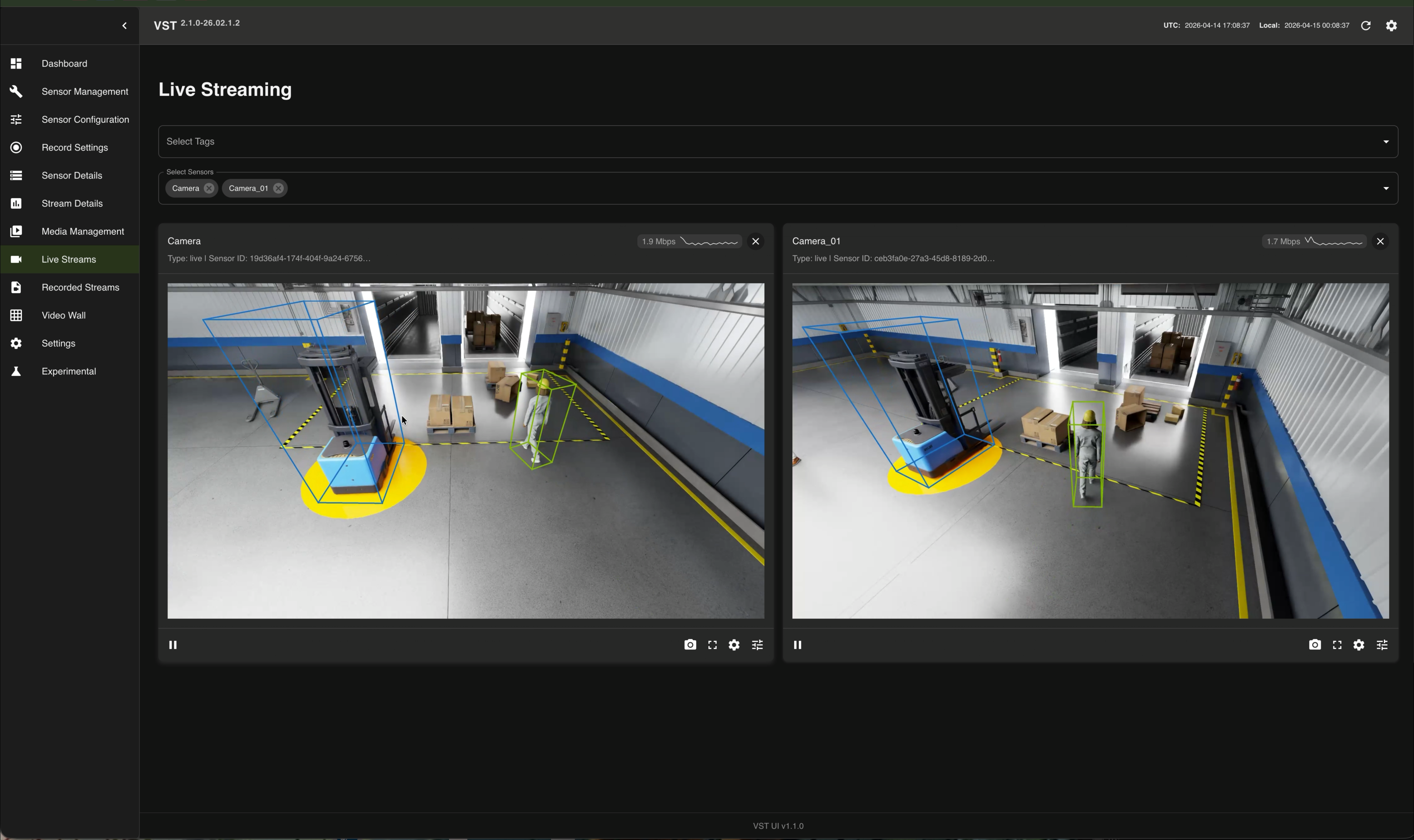
Navigate to Live Streams to view camera feeds with 3D detection overlays:
Navigate to Video Wall, enable overlay, and check Include Floor Plan in Analytics Overlay Settings to view the top-down BEV visualization with detected objects on the warehouse floorplan:
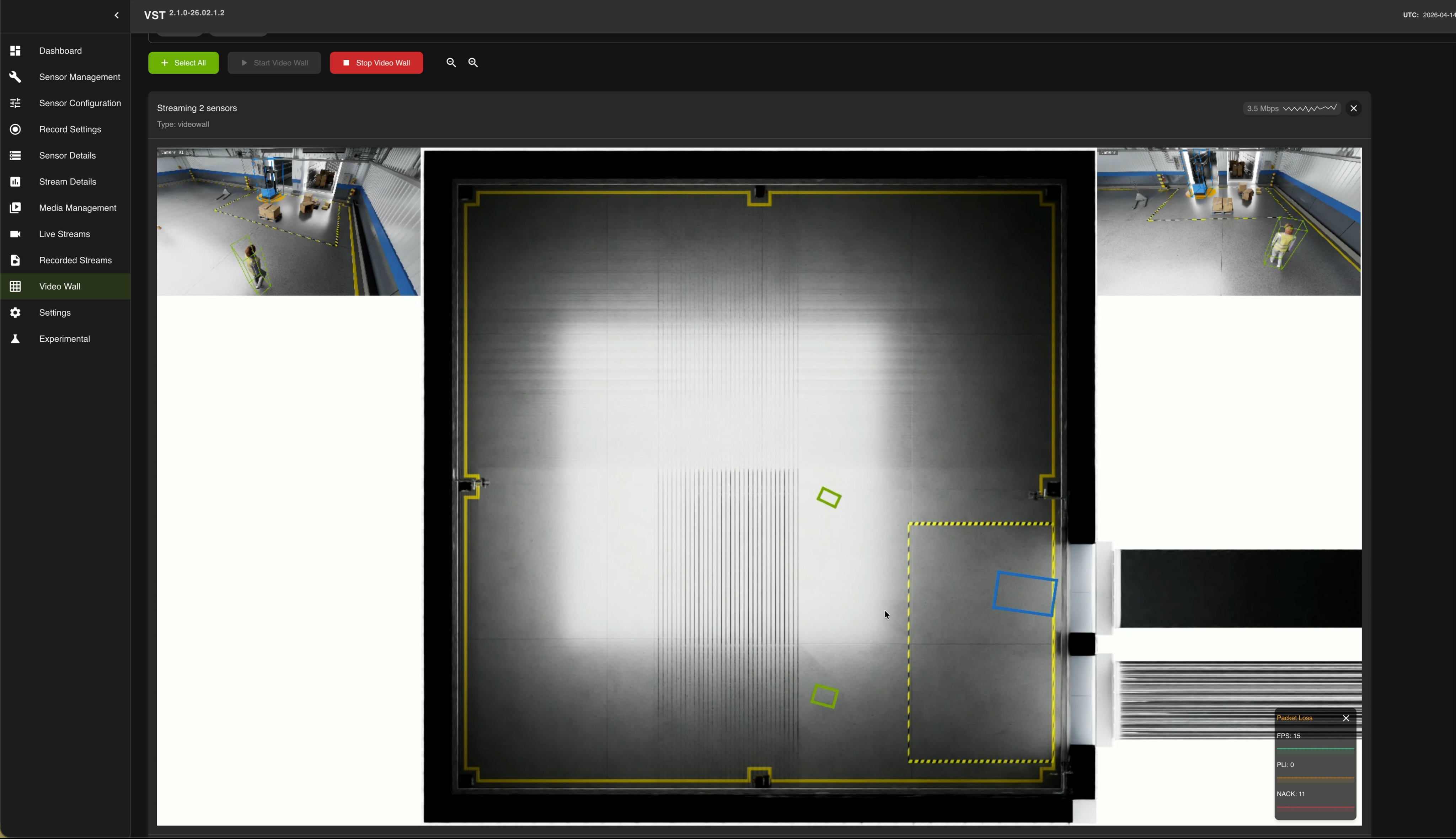
For details on configuring the Video Wall overlay and Floor Plan, see Playback overlay on Video Wall.
Cleanup and Restart#
# Stop Halos SIL
cd deployments
docker compose --env-file profiles/sil.env down
bash ../closed-loop-testing/scripts/cleanup_all_datalog.sh sil
docker volume prune -f

# Stop VSS Warehouse (refer to VSS Warehouse docs for full cleanup)
# https://docs.nvidia.com/vss/3.2.0/warehouse-docs/Quickstart-Guide.html#teardown-the-deployment
Important
Switching between 2D and 3D requires full teardown of both stacks. Do not just restart containers — port conflicts and CUDA errors will occur.
Troubleshooting#
Kafka mdx-bev Topic Empty#
The most common 3D issue. Verify sync-inputs-ntp=0 in the [streammux]
section of ds-main-config.txt. Without this, the perception pipeline
stalls and produces zero Kafka output.
docker exec kafka kafka-console-consumer \
  --bootstrap-server localhost:9092 \
  --topic mdx-bev \
  --from-beginning --max-messages 1 --timeout-ms 5000
0 FPS on vss-rtvi-cv#
Ensure SEI extraction is enabled (not disabled like in 2D):
[source-list]
extract-sei-type5-data=1
sei-uuid=NVDS_CUSTOMMETA
Also verify drop-backward-sei=0 in [streammux].
0 Events from Behavior Analytics#
Check that inSimulationMode=true is set in the behavior analytics config.
Also verify the calibration has top-level rois array:
docker logs vss-behavior-analytics 2>&1 | grep "global ROIs"
Expected: Loaded 1 global ROIs in total: ['roi-id-1']
If ROIs show as 0, the calibration.json is missing the top-level rois
array, or the container needs to be recreated (not just restarted).
Bounding Box Flickering on VST#
Increase bbox_tolerance_ms to 100 in vst_config.json.
3D runs at ~12-14 FPS (vs 30 FPS for 2D), so the default tolerance of 0 ms
causes metadata-to-frame matching misses.
Safety Indicator Flickering (Multi-Machine)#
If multiple SIL systems run on the same network, each must use a unique
ROS_DOMAIN_ID (0-232) in deployments/profiles/sil.env. Without this, ROS2 nodes
from different machines publish to the same /safety/is_muted topic.
# Verify isolation
docker exec comm-layer bash -c \
  "source /opt/ros/jazzy/setup.bash && ros2 topic info /safety/is_muted -v"
Should show Publisher count: 1.
Safety Core (PSF) Cannot Connect to Kafka#
VSS Warehouse (Kafka) must be running before Halos SIL. Check status:
docker ps | grep kafka
Next Steps#
Architecture – System architecture and data flow
Isaac Sim Configuration – Isaac Sim configuration
Forklift ROS2 Action Graph – Forklift control details
VSS Warehouse 3D Profile Customization – Adding cameras, custom scenes
Sparse4D Configuration – Tuning 3D perception
VSS Configurator – Sensor source configuration