


Overview#
What is Closed-Loop Testing?#
Closed-Loop testing validates the Halos Outside-In Safety system using simulation before hardware deployment.
It swaps physical components (warehouse, forklift, cameras) with virtual equivalents while running the actual production software (AI Perception (VSS), Safety Core, Comm Layer).
Key Components#
The system simulates:
Warehouse Environment: Virtual 20x20m warehouse with loading dock and trailer
Forklift Operations: Autonomous forklift with ROS2 control for loading/unloading
Human Workers: AI-controlled digital humans moving through the workspace
Camera Feeds: Multiple RTSP camera streams from simulation
Perception Pipeline: Real VSS Warehouse Blueprint with RT-DETR detection
Safety Logic: Safety Core for event correlation and decision making
What is NOT Simulated#
These components run as production software:
Safety Event Integrator: Multi-camera sensor fusion
Safety Decision Maker: MUTE/UNMUTE logic for Automated Trailer Loading (ATL)
Communication Layer: UDP, OPC UA, and ROS2 protocol translation
VSS Warehouse Blueprint: RT-DETR perception pipeline
This hybrid approach ensures the safety-critical software is validated under realistic conditions.
Why Use Closed-Loop Testing?#
Test Before Hardware Available#
Validating safety logic before IGX Thor or physical robots arrive eliminates hardware dependency for software development.
Faster Iteration#
No physical setup required
Instant simulation reset
Quick parameter changes
Parallel testing scenarios
Key benefits:
Modify forklift paths in minutes vs. hours of physical setup
Test 100+ scenarios per day vs. 5-10 with hardware
No risk of hardware damage during development
Reproducible Scenarios#
The same simulation produces identical results every time, enabling:
Regression testing: Verify software updates don’t break existing functionality
Performance benchmarking: Measure latency improvements across versions
Bug reproduction: Replay exact conditions that triggered issues
Automated testing: Run scenarios in CI/CD pipelines
Dangerous Scenario Testing#
Test scenarios that are unsafe or impractical with real equipment:
Near-collision events: Human enters ROI while forklift is moving at full speed
System failure modes: What happens if perception briefly loses tracking?
Edge cases: Multiple humans entering simultaneously, occlusion scenarios
Stress testing: Maximum forklift speed, minimum reaction times
Cost-Effective Development#
Eliminate expenses associated with hardware testing:
No robot shipping costs
No facility rental
No insurance for physical testing
No specialized test personnel
Scale development team without scaling hardware
Automated Trailer Loading (ATL) Use Case#
Current testing harness specifically validates the Automated Trailer Loading scenario.
Scenario Description#
Warehouse → Loading Dock → Trailer
    ↓
Autonomous forklift loads/unloads pallets
Human workers supervise operations
Overhead cameras monitor safety zones
Safety Logic (MUTE/UNMUTE)#
- MUTE (disable safety features):
Forklift fully inside trailer
NO humans detected in Region of Interest (ROI)
Safe to operate at higher speed for efficiency
- UNMUTE (enable safety features):
Human detected in ROI (≥1 person)
Forklift exiting trailer
Return to safe speed and alertness
Why This Matters#
Productivity: Faster movement inside trailers when no humans present. Safety: Only when cameras confirm no humans. Outside-in cameras: “Guardian angel” view forklift sensors cannot provide.
Architecture Overview#
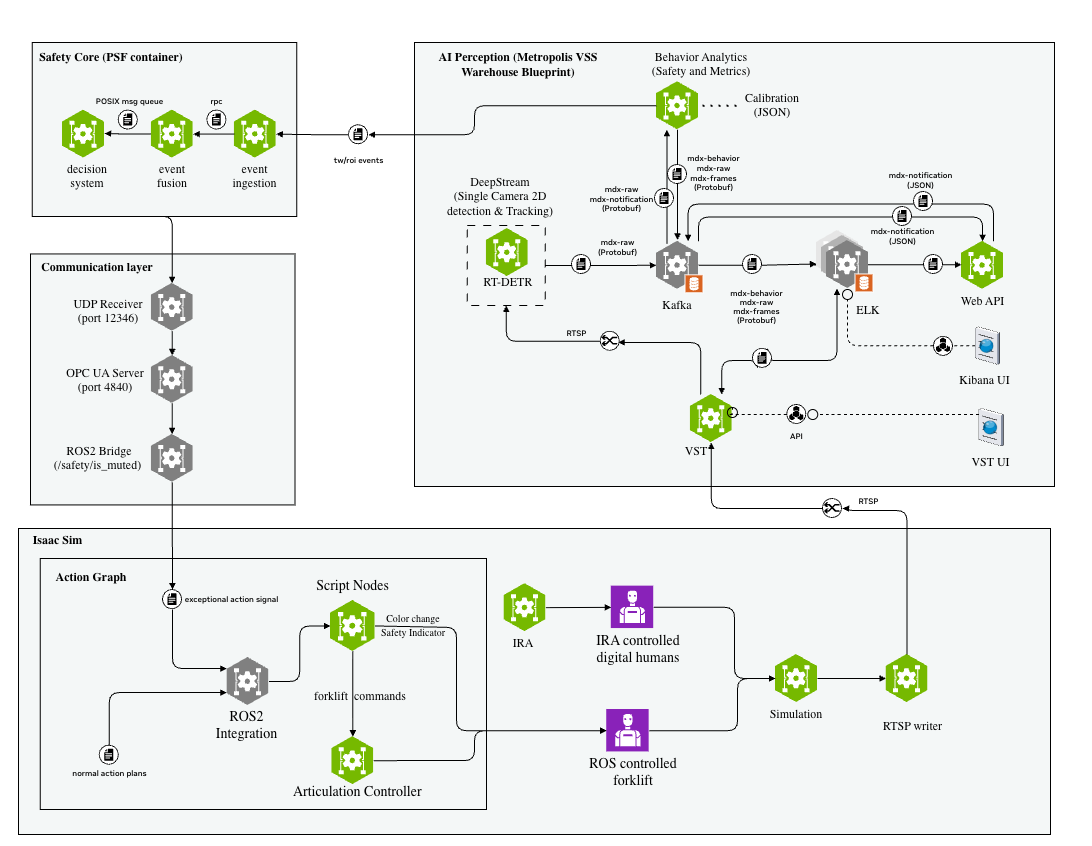
SIL harness Architecture#
The SIL harness consists of five main components:
AI Perception (VSS Warehouse Blueprint) - RT-DETR perception for person and forklift detection - ROI (Region of Interest) and Tripwire monitoring - Kafka event streaming - Must be deployed separately before the core testing harness
Safety Core (PSF) - Safety Event Integrator: Correlates events from multiple cameras - Safety Decision Maker: ATL logic (MUTE/UNMUTE commands) - Event validation and fusion
Communication Layer - UDP Receiver: Receives commands from Safety Core - OPC UA Server: Industrial protocol interface - ROS2 Bridge: Publishes to Isaac Sim
Isaac Sim - Warehouse environment simulation - Forklift with Action Graph for ROS2 control - IRA (Isaacsim.Replicator.Agent) extension for digital human movement - Multiple cameras with RTSP output
MediaMTX - RTSP server for camera stream distribution - HLS endpoints for browser viewing - Low-latency streaming
Data Flow#
Isaac Sim Cameras (30 FPS RTSP)
     ↓
AI Perception (VSS Warehouse Blueprint)
     ├─ RT-DETR inference
     ├─ Object tracking
     └─ ROI/Tripwire checks
     ↓ Kafka events
Safety Event Integrator
     ├─ Multi-camera fusion
     └─ Event validation
     ↓ Validated events
Safety Decision Maker
     ├─ ATL logic
     └─ MUTE/UNMUTE decision
     ↓ UDP packet (64 bytes)
Communication Layer
     ├─ Protocol translation
     └─ ROS2 publish
     ↓ /safety/is_muted topic
Isaac Sim Action Graph
     ├─ Forklift speed control
     └─ Safety indicator (orange/green light)
System Requirements#
Component |
Minimum |
Recommended |
|---|---|---|
CPU |
8 cores |
16+ cores |
RAM |
32 GB |
64 GB |
GPU |
5090 |
Pro 6000 Blackwell |
Storage |
200 GB |
200 GB |
OS |
Ubuntu 22.04/24.04 LTS |
Ubuntu 22.04/24.04 LTS |
Network |
0.5 Gbps |
1 Gbps |
Next Steps#
Ready to get started? Follow these guides:
Prerequisites - Verify hardware and software requirements
Quick Start Guide - Deploy testing harness in 30 minutes
Architecture - Deep dive into system design
Isaac Sim Configuration - Customize Isaac Sim scenes