

Inference
Overview
A Holoscan application that needs to run inference will use an inference operator. The built-in Inference operator (InferenceOp) can be used, and several related use cases are documented in the Inference operator section below. The use cases are created using the parameter set that must be defined in the configuration file of the Holoscan application. If the built-in InferenceOp doesn’t cover a specific use case, users can create their own custom inference operator as documented in the Creating an Inference Operator section.
The core inference functionality in the Holoscan SDK is provided by the Inference Module, which is a framework that facilitates designing and executing inference and processing applications through its APIs. It is used by the built-in InferenceOp which supports the same parameters as the Inference Module. All parameters required by the Holoscan Inference Module are passed through a parameter set in the configuration file of an application.
Parameters and Related Features
Required parameters and related features available with the Holoscan Inference Module are listed below.
-
Data Buffer Parameters: Parameters are provided in the inference settings to enable data buffer locations at several stages of the inference. As shown in the figure below, three parameters
input_on_cuda,output_on_cudaandtransmit_on_cudacan be set by the user.input_on_cudarefers to the location of the data going into the inference.- If value is
true, it means the input data is on the device. - If value is
false, it means the input data is on the host. - Default value:
true
- If value is
output_on_cudarefers to the data location of the inferred data.- If value is
true, it means the inferred data is on the device. - If value is
false, it means the inferred data is on the host. - Default value:
true
- If value is
transmit_on_cudarefers to the data transmission.- If value is
true, it means the data transmission from the inference extension will be on Device. - If value is
false, it means the data transmission from the inference extension will be on Host. - Default value:
true
- If value is
-
Inference Parameters
-
backendparameter is set to eithertrtfor TensorRT,onnxrtfor ONNX Runtime, ortorchfor libtorch. If there are multiple models in the inference application, all models will use the same backend. If it is desired to use different backends for different models, specify thebackend_mapparameter instead.- TensorRT:
- CUDA-based inference supported both on x86_64 and aarch64.
- End-to-end CUDA-based data buffer parameters supported.
input_on_cuda,output_on_cudaandtransmit_on_cudawill all be true for end-to-end CUDA-based data movement. input_on_cuda,output_on_cudaandtransmit_on_cudacan be eithertrueorfalse.- TensorRT backend expects input models to be in
tensorrt engine fileformat oronnxformat.- if models are in
tensorrt engine fileformat, parameteris_engine_pathmust be set totrue. - if models are in
onnxformat, it will be automatically converted intotensorrt engine fileby the Holoscan inference module.
- if models are in
- TensorRT is the recommended backend for ONNX models when GPU inference is desired.
- Torch:
- CUDA and CPU based inference supported both on x86_64 and aarch64.
- End-to-end CUDA-based data buffer parameters supported.
input_on_cuda,output_on_cudaandtransmit_on_cudawill all be true for end-to-end CUDA-based data movement. input_on_cuda,output_on_cudaandtransmit_on_cudacan be eithertrueorfalse.- Torch backend expects input models to be in
torchscriptformat.- It is recommended to use the same version of torch for
torchscriptmodel generation, as used in the HOLOSCAN SDK on the respective architectures. - Additionally, it is recommended to generate the
torchscriptmodel on the same architecture on which it will be executed. For example,torchscriptmodel must be generated onx86_64to be executed in an application running onx86_64only.
- It is recommended to use the same version of torch for
- Model Configuration Requirement: The torch backend requires a companion
model.yamlconfiguration file alongside each torchscript model file.- The YAML file must have the same name as the model file but with a
.yamlextension (e.g., if the model ismy_model.pt, the configuration file should bemy_model.yaml). - The configuration file defines the input and output tensor formats, dimensions, and data types, enabling support for complex tensor structures beyond simple tensors.
- The system automatically validates that the YAML configuration matches the actual model schema extracted from the torchscript model.
- See Torch Backend Model Configuration for detailed configuration examples and supported formats.
- The YAML file must have the same name as the model file but with a
- ONNX Runtime:
- ONNX Runtime runtime libraries are not included in the Holoscan NGC container, Debian packages, or Python wheels. Install ONNX Runtime separately before using
backend: "onnxrt". - CUDA and CPU based inference supported both on x86_64 and aarch64.
- End-to-end CUDA-based data buffer parameters supported.
input_on_cuda,output_on_cudaandtransmit_on_cudawill all be true for end-to-end CUDA-based data movement. input_on_cuda,output_on_cudaandtransmit_on_cudacan be eithertrueorfalse.
- ONNX Runtime runtime libraries are not included in the Holoscan NGC container, Debian packages, or Python wheels. Install ONNX Runtime separately before using
- TensorRT:
-
infer_on_cpuparameter is set totrueif CPU based inference is desired.The tables below demonstrate the supported features related to the data buffer and the inference with
trt,torchandonnxrtbased backend. -
model_path_map: User can design single or multi AI inference pipeline by populatingmodel_path_mapin the config file.- With a single entry, it is single inference; with more than one entry, multi AI inference is enabled.
- Each entry in
model_path_maphas a unique keyword as key (used as an identifier by the Holoscan Inference Module), and the path to the model as value. - All model entries must have the models either in onnx or tensorrt engine file or torchscript format.
-
pre_processor_map: input tensor to the respective model is specified inpre_processor_mapin the config file.- The Holoscan Inference Module supports same input for multiple models or unique input per model.
- Each entry in
pre_processor_maphas a unique keyword representing the model (same as used inmodel_path_map), and a vector of tensor names as the value. - The Holoscan Inference Module supports multiple input tensors per model.
-
inference_map: output tensors per model after inference is specified ininference_mapin the config file.- Each entry in
inference_maphas a unique keyword representing the model (same as used inmodel_path_mapandpre_processor_map), and a vector of the output tensor names as the value. - The Holoscan Inference Module supports multiple output tensors per model.
- Each entry in
-
parallel_inference: Parallel or Sequential execution of inferences.- If multiple models are input, you can execute models in parallel.
- Parameter
parallel_inferencecan be eithertrueorfalse. Default value istrue. - Inferences are launched in parallel without any check of the available GPU resources. You must ensure that there is enough memory and compute available to run all the inferences in parallel.
-
enable_fp16: Generation of the TensorRT engine files with FP16 option- If
backendis set toonnxortrtif the input models are in onnx format, then you can generate the engine file with fp16 option to accelerate inferencing. - It takes few minutes to generate the engine files for the first time.
- It can be either
trueorfalse. Default value isfalse.
- If
-
enable_cuda_graphs: Enable usage of CUDA Graphs for backends which support it.- Enabled by default for the TensorRT backend.
- Using CUDA Graphs reduces CPU launch costs and enables optimizations which might not be possible with the piecewise work submission mechanism of streams.
- Models including loops or conditions are not supported with CUDA Graphs. For these models usage of CUDA Graphs needs to be disabled.
- It can be either
trueorfalse. Default value istrue.
-
dla_core: The DLA core index to execute the engine on, starts at0.- It can be either
-1or the DLA core index. Default value is-1.
- It can be either
-
dla_gpu_fallback: Enable DLA GPU fallback- If DLA is enabled, use the GPU if a layer cannot be executed on DLA. If the fallback is disabled, engine creation will fail if a layer cannot executed on DLA.
- It can be either
trueorfalse. Default value istrue.
-
is_engine_path: if the input models are specified in trt engine format inmodel_path_map, this flag must be set totrue. Default value isfalse. -
in_tensor_names: Input tensor names to be used bypre_processor_map. This parameter is optional. If absent in the parameter map, values are derived frompre_processor_map. -
out_tensor_names: Output tensor names to be used byinference_map. This parameter is optional. If absent in the parameter map, values are derived frominference_map. -
device_map: Multi-GPU inferencing is enabled ifdevice_mapis populated in the parameter set.- Each entry in
device_maphas a unique keyword representing the model (same as used inmodel_path_mapandpre_processor_map), and GPU identifier as the value. This GPU ID is used to execute the inference for the specified model. - GPUs specified in the
device_mapmust have P2P (peer to peer) access and they must be connected to the same PCIE configuration. If P2P access is not possible among GPUs, the host (CPU memory) will be used to transfer the data. - Multi-GPU inferencing is supported for all backends.
- Each entry in
-
dla_core_map: DLA cores are used for inferencing ifdla_core_mapis populated in the parameter set.- Each entry in
dla_core_maphas a unique keyword representing the model (same as used inmodel_path_mapandpre_processor_map), and a DLA core index as the value. This DLA core index is used to execute the inference for the specified model.
- Each entry in
-
temporal_map: Temporal inferencing is enabled iftemporal_mapis populated in the parameter set.- Each entry in
temporal_maphas a unique keyword representing the model (same as used inmodel_path_mapandpre_processor_map), and frame delay as the value. Frame delay represents the frame count that are skipped by the operator in doing the inference for that particular model. A model with the value of 1, is inferred per frame. A model with a value of 10 is inferred for every 10th frame coming into the operator, which is the 1st frame, 11th frame, 21st frame and so on. Additionally, the operator will transmit the last inferred result for all the frames that are not inferred. For example, a model with a value of 10 will be inferred at 11th frame and from 12th to 20th frame, the result from 11th frame is transmitted. - If the
temporal_mapis absent in the parameter set, all models are inferred for all the frames. - All models are not mandatory in the
temporal_map. The missing models are inferred per frame. - Temporal map based inferencing is supported for all backends.
- Each entry in
-
activation_map: Dynamic inferencing can be enabled with this parameter. It is populated in the parameter set and is updated at runtime.- Each entry in
activation_maphas a unique keyword representing the model (same as used inmodel_path_mapandpre_processor_map), and activation state as the value. Activation state represents whether the model will be used for inferencing or not on a given frame. Any model(s) with a value of 1 will be active and will be used for inference, and any model(s) with a value of 0 will not run. The activation map must be initialized in the parameter set for all the models that need to be activated or deactivated dynamically. - When the activation state is 0 for a particular model in the
activation_map, the inference operator will not launch the inference for the model and will emits the last inferred result for the model. - If the
activation_mapis absent in the parameter set, all of the models are inferred for all frames. - All models are not mandatory in the
activation_map. The missing models are active on every frame. - Dynamic inferenceing based on
activation_mapalong with themodel_activation_specsinput port is supported for all backends.
- Each entry in
-
backend_map: Multiple backends can be used in the same application with this parameter.-
Each entry in
backend_maphas a unique keyword representing the model (same as used inmodel_path_map), and thebackendas the value. -
A sample backend_map is shown below. In the example, model_1 uses the
tensorRTbackend, and model 2 and model 3 uses thetorchbackend for inference.
-
-
trt_opt_profile: This parameter is optional and is activated with TensorRT backend. This parameter is applicable on models with dynamic input shapes.-
Parameter is specified as a map of vector of strings. For every model, optimization profiles for input dimensions are specified as a vector of strings. Each string represents optimization profile for each input.
-
For example, if the model (
model_1) has one input with shape of[c, h, w]andcis dynamic, then the optimization profile is specified as:"model_1": ["i, j, k"]. The first value in the string is the minimum batch size for dimension c, the second is the optimum batch size and the third value is the maximum batch size. Each dynamic dimension must be accompanied by these three values (minimum, optimum and maximum). In the same example, if dimensioncandhare both dynamic, then the three values for the second dimension must follow the three values of the first dimension in the same string. The optimization profile in this case will look like"model_1": ["i, j, k, p, q, r"], wherei, j, kare the optimization profile for dimensioncandp, q, rare the optimization profiles for dimensionh. -
If there are multiple dynamic inputs, we must use another string in the optimization profile. For example, if a model (
model_1) has two inputs and both are dynamic, then the optimization profile must be specified as"model_1": ["profile_for_first_input", "profile_for_second_input"] -
TensorRT optimization profiles are supported for multiple models. For example if there are two models (
model_1andmodel_2) with single input and in both the models the inputs are dynamic, the optimization profiles are specified as shown below. -
This profile is then used in engine creation. User must clear the cache to apply the updated optimization profile.
-
-
dynamic_input_dims: This parameter is optional and if activated, allows the Inference Operator to ingest dynamic inputs. The parameter is supported for all the backends. It must be set totruein the inference parameter set.- With
onnxandtorchbackend, the dynamic inputs are automatically ingested. - For
onnxandtorchbackend, maximum allowed buffer size in bytes for each input is 2GB. - With
tensorRTbackend, user must specifytrt_opt_profilealong with this parameter. Iftrt_opt_profileis not specified or is incorrect, the default optimization profile"1,1,1"will be used. - Maximum allowed batch size for
tensorRTbackend is 256
- With
-
-
Model dependencies: If one model consumes the output of another, you no longer need separate
InferenceOpinstances. The operator derives a dependency graph frompre_processor_mapandinference_map, builds a topological execution plan, and runs all dependent models inside a singleInferenceOp.- Inputs: only external tensors (consumed but not produced by any model) are ingested and allocated.
- Outputs: by default, only external outputs (produced but not consumed by any other model) are transmitted. If you set
out_tensor_names, internal outputs will also be transmitted. - Execution order: models are run respecting dependencies; models in the same level still run in parallel if
parallel_inference=true. - No extra parameters are required; the dependency map is derived automatically from the existing maps.
-
Other features: The table below illustrates other features and supported values in the current release.
-
Multi Receiver and Single Transmitter support
- The Holoscan Inference Module provides an API to extract the data from multiple receivers.
- The Holoscan Inference Module provides an API to transmit multiple tensors via a single transmitter.
- The Holoscan Inference Module provides an API to allow selecting the set of active models for inference at runtime (see example under the directory
examples/activation_map).
Parameter Specification
All required inference parameters of the inference application must be specified. Below is a sample parameter set for an application that uses three models for inferencing. You must populate all required fields with appropriate values.
Libtorch Installation
The torch backend ingests torchscript models using the C++ API in PyTorch (libtorch).
Libtorch is included in the Holoscan build container and the NGC dev container, within the PyTorch wheel (sourced here for JP6/IGX OS 1.x iGPU).
To use the Holoscan SDK torch backend outside of these containers, install the torch wheel in your environment (refer to our source Dockerfile for compatible versions) and append the path to its libraries to LD_LIBRARY_PATH:
PyTorch wheels pull their own dependencies for CUDA and other libraries which might conflict with system libraries versions you prefer to use. Inspect the Holoscan SDK source Dockerfile if you run into issues setting up your environment to use both the Holoscan SDK and PyTorch.
Torch Backend Model Configuration
When using the torch backend, a companion model.yaml configuration file is required alongside each torchscript model. This file defines the model’s input and output tensor specifications and supports complex tensor structures required for Pythonic I/O.
On the operator side, each tensor is still specified individually in pre_processor_map and inference_map, but during inference the torch backend will reconstruct them into the defined Pythonic structure.
YAML Configuration Structure
The configuration file must contain an inference section with the following components:
input_nodes: Defines the input tensor specifications including names, dimensions, and data typesoutput_nodes: Defines the output tensor specifications including names, dimensions, and data typesinput_format(optional): Specifies how input tensors are structured and organized (defaults to passing each tensor individually).output_format(optional): Specifies how output tensors are structured and organized (defaults to expecting individual tensors returned)
Basic Example
For a simple model with single tensor input and output:
Complex Structure Examples
Dictionary Input
This corresponds to calling the model with a dictionary:
List Input
This corresponds to calling the model with a list:
Nested Structures
The system supports complex nested combinations of lists and dictionaries for both inputs and outputs: This corresponds to the following function call where detections is a dictionary.
Ignoring outputs
There may be cases where some outputs of a model should not be forwarded. In these cases, enter a null value in the YAML to ignore an entire subtree on the output.
Supported Input/Output Formats
The torch backend supports the following tensor structure types:
Tensor: Single tensorTensor[]: List of tensorsDict(str, Tensor): Dictionary mapping strings to tensorsDict(str, Tensor[]): Dictionary mapping strings to lists of tensorsDict(str, Dict(str, Tensor)): Nested dictionary structuresDict(str, Tensor)[]: List of dictionariesTensor[][]: Nested lists of tensors
Inference Operator
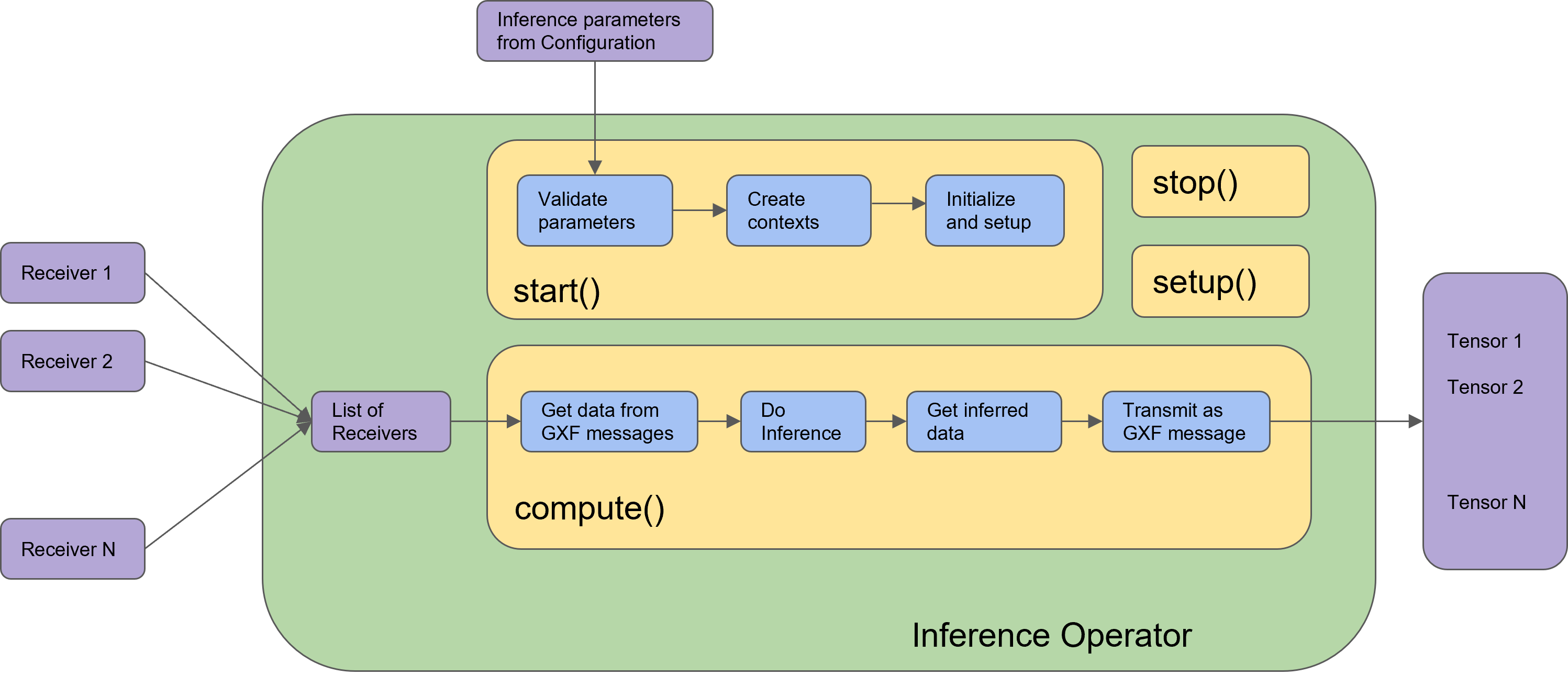
In Holoscan SDK, the built-in Inference operator (InferenceOp) is designed using the Holoscan Inference Module APIs. The Inference operator ingests the inference parameter set (from the configuration file) and the data receivers (from previous connected operators in the application), executes the inference and transmits the inferred results to the next connected operators in the application.
InferenceOp is a generic operator that serves multiple use cases via the parameter set. Parameter sets for some key use cases are listed below:
Some parameters have default values set for them in the InferenceOp. For any parameters not mentioned in the example parameter sets below, their default is used by the InferenceOp. These parameters are used to enable several use cases.
-
Single model inference using
TensorRTbackend.The value of
backendcan be modified for other supported backends, and other parameters related to each backend. You must ensure the correct model type and model path are provided into the parameter set, along with supported values of all parameters for the respective backend.In this example,
path_to_model_1must be anonnxfile, which will be converted to atensorRTengine file at first execution. During subsequent executions, the Holoscan inference module will automatically find the tensorRT engine file (ifpath_to_model_1has not changed). Additionally, if you have a pre-builttensorRTengine file,path_to_model_1must be path to the engine file and the parameteris_engine_pathmust be set totruein the parameter set.
When using the torch backend, ensure that a corresponding model.yaml configuration file exists alongside your torchscript model file. The YAML file must define the input and output tensor specifications as described in the Torch Backend Model Configuration section.
-
Single model inference using
TensorRTbackend with multiple outputs.As shown in example above, the Holoscan Inference module automatically maps the model outputs to the named tensors in the parameter set. You must be sure to use the named tensors in the same sequence in which the model generates the output. Similar logic holds for multiple inputs.
-
Single model inference using fp16 precision.
If a
tensorRTengine file is not available for fp16 precision, it will be automatically generated by the Holoscan Inference module on the first execution. The file is cached for future executions. -
Single model inference on CPU.
Note that the backend can only be
onnxrtortorchfor CPU-based inference. -
Single model inference with input/output data on Host.
Data in the core inference engine is passed through the host and is received on the host. Inference can happen on the GPU. Parameters
input_on_cudaandoutput_on_cudadefine the location of the data before and after inference respectively. -
Single model inference with data transmission via Host.
Data from inference operator to the next connected operator in the application is transmitted via the host.
-
Multi model inference with a single backend.
By default, multiple model inferences are launched in parallel. The backend specified via parameter
backendis used for all models in the application. -
Multi model inference with sequential inference.
parallel_inferenceis set totrueby default. To launch model inferences in sequence,parallel_inferencemust be set tofalse. -
Multi model inference with multiple backends.
In the above sample parameter set, the first model will do inference using the
tensorRTbackend, and model 2 and 3 will do inference using thetorchbackend.
The combination of backends in backend_map must support all other parameters that will be used during the inference. For example, onnxrt and tensorRT combination with CPU-based inference is not supported.
-
Multi model inference with a single backend on multi-GPU.
In the sample above, model 1 and model 3 will do inference on the GPU with ID 1 and model 2 will do inference on the GPU with ID 0. GPUs must have P2P (peer to peer) access among them. If it is not enabled, the Holoscan inference module enables it by default. If P2P access is not possible between GPUs, then the data transfer will happen via the Host.
-
Multi model inference with multiple backends on multiple GPUs.
In the sample above, three models are used during the inference. Model 1 uses the trt backend and runs on the GPU with ID 1, model 2 uses the torch backend and runs on the GPU with ID 0, and model 3 uses the torch backend and runs on the GPU with ID 1.
-
Single
InferenceOpwith model dependenciesDependent models no longer require separate
InferenceOpinstances. Dependencies are derived automatically frompre_processor_mapandinference_map, a topological execution plan is built, and all models run inside one operator. Only external inputs are ingested; internal tensors are passed through in-operator.
model_path_map: encoder: “path/to/encoder.onnx” decoder: “path/to/decoder.onnx” pre_processor_map: encoder: [“input_image”] decoder: [“enc_out”] # consumes encoder output inference_map: encoder: [“enc_out”] # produced by encoder decoder: [“dec_out”] # produced by decoder
Optional: if provided, internal outputs will also be transmitted
out_tensor_names: [“dec_out”, “enc_out”]
-
Inference specification creation: For a single AI, only one entry is passed into the required entries in the parameter set. There is no change in the API calls below. Single AI or multi AI is enabled based on the number of entries in the parameter specifications from the configuration (in step 1).
// Creation of inference specification structure inference_specs_ = std::make_shared<HoloInfer::InferenceSpecs>(…);
-
Parameter setup with inference context: All required parameters of the Holoscan Inference Module are transferred in this step, and relevant memory allocations are initiated in the inference specification.
-
Data extraction and allocation: The following API is used from the Holoinfer utility to extract and allocate data for the specified tensor.
-
Inference execution
-
Transmit inferred data:
The figure below demonstrates the Inference operator in the Holoscan SDK. All blocks with blue color are the API calls from the Holoscan Inference Module.
Common Inference Patterns (Cookbook)
This section provides recipes and patterns for common inference use cases.
Using Multiple Models
You can use multiple models simultaneously with the Inference Operator by specifying them in the model_path_map parameter. Each model is identified by a unique key that is used across the parameter maps.
Parallel vs Sequential Inference
Parallel inference is enabled by default when using multiple models. This launches all model inferences simultaneously, which can improve throughput if you have sufficient GPU resources.
To disable parallel inference and run models sequentially, set parallel_inference: false:
Note: When using parallel inference, ensure you have enough GPU memory and compute resources to run all models simultaneously.
Using Different Backends
You can use different inference backends for different models in the same application using the backend_map parameter:
Important: Ensure that the combination of backends supports all other parameters you plan to use. For example, the combination of onnxrt and trt backends with CPU-based inference is not supported.
CPU-Based Inference
You can perform inference on the CPU using the PyTorch backend, or the ONNX Runtime backend if ONNX Runtime is installed separately:
Note: The TensorRT backend (trt) does not support CPU-based inference. You must use torch or the onnxrt backend for CPU inference.
Recipe: Running a PyTorch Model
To use a PyTorch model with the Holoscan Inference Operator, follow these steps:
1. Convert Your Model to TorchScript
The Holoscan SDK’s torch backend uses libtorch and requires models in TorchScript format. You cannot use .pth files directly.
Convert your PyTorch model to TorchScript:
Best practices:
- Use the same PyTorch version for model conversion as used in the Holoscan SDK container
- Generate the TorchScript model on the same architecture where it will be executed (e.g., x86_64 to x86_64, aarch64 to aarch64)
2. Create a Model Configuration File
The torch backend requires a companion model.yaml configuration file alongside each torchscript model. This YAML file must have the same base name as the model file.
For example, if your model is named my_model.pt, create my_model.yaml:
For models with complex input/output structures (dictionaries, lists, nested structures), see the Torch Backend Model Configuration section for detailed examples.
3. Configure the Inference Operator
Add the model to your inference configuration:
Alternative: Use TensorRT for Better Performance
For optimal performance, consider converting your model to ONNX and using the TensorRT backend:
Then configure with TensorRT backend:
The TensorRT backend will automatically convert the ONNX model to a TensorRT engine on first execution, optimizing it for your GPU.
Controlling Data Location
You can control where input and output data resides (CPU vs GPU memory) using these parameters:
input_on_cuda: Location of data going into inference (true= GPU,false= CPU)output_on_cuda: Location of inferred data after inference (true= GPU,false= CPU)transmit_on_cuda: Location of data transmitted from inference operator (true= GPU,false= CPU)
Example configuration for host-based data flow:
Troubleshooting
This section addresses common issues and errors encountered when using the Inference Module and Inference Operator.
Input Tensor Rank Limitations
Problem: The Inference Operator rejects input shapes for models with 5-dimensional tensors (e.g., CNN-LSTM models with shape [batch, temporal_dim, channels, width, height]).
Cause: In Holoscan SDK v2.4 and earlier, the InferenceOp supports tensor ranks only between 2 and 4 dimensions.
Solution:
- Reshape your input tensor to fit within the 2-4 dimension constraint
- For temporal models, consider flattening the temporal dimension into the batch dimension or channels
- Alternative: Create a custom preprocessing operator that handles the 5D tensor and converts it to a supported format
Supported tensor dimensions:
- ONNX and TensorRT model formats: Maximum 8 dimensions
- PyTorch (torch) backend: 3 dimensions (CHW) or 4 dimensions (NCHW)
- InferenceOp input tensors (SDK v2.4 and earlier): 2-4 dimensions only
PyTorch Model Format Issues
Problem: Attempting to use a .pth PyTorch model file directly results in errors or the model is not loaded.
Cause: The Holoscan SDK torch backend is based on libtorch and requires models in TorchScript format (.pt). The .pth format contains Python-specific state dictionaries that cannot be loaded by libtorch.
Solution: Convert your .pth model to TorchScript format. See the Recipe: Running a PyTorch Model section above for detailed instructions.
Quick conversion example:
For best performance, consider converting to ONNX and using the TensorRT backend instead.
Missing model.yaml Configuration
Problem: When using the torch backend, you encounter errors about missing input/output specifications or tensor format mismatches.
Cause: The torch backend requires a companion model.yaml configuration file alongside each TorchScript model file.
Solution: Create a YAML configuration file with the same base name as your model file. For example, if your model is my_model.pt, create my_model.yaml:
The system automatically validates that the YAML configuration matches the actual model schema. See Torch Backend Model Configuration for detailed examples including complex tensor structures.
Triton Backend Support
Problem: Attempting to use models written as Triton Python backends (like NVIDIA’s FoundationPose) with the Inference Operator.
Cause: Triton backends are not currently supported by the Holoscan SDK Inference Operator.
Solution: The Inference Operator supports only three backends:
- TensorRT (
trt) - ONNX Runtime (
onnxrt) - PyTorch/libtorch (
torch)
To use models designed for Triton:
- Export the model to one of the supported formats (ONNX, TorchScript, or TensorRT engine)
- If the model includes complex preprocessing or postprocessing, implement custom operators to handle these steps
- For TensorRT, you can create engine files with specific optimizations using the
trtexectool
PyTorch CUDA Linear Algebra Errors (Jetson/JetPack 6)
Problem: When using PyTorch from the Jetson AI Labs registry on bare metal JetPack 6 (IGX Orin or AGX Orin), you encounter errors like:
Cause: The PyTorch distribution requires libcusolver version 11.7.1.2, which is newer than what’s available in the default L4T 36.4 repository (11.6.4.69).
Solution: Install the required libcusolver version manually:
After installing the updated libcusolver package, PyTorch CUDA operations (such as torch.linalg.inv()) should work correctly.
Note: This is a known compatibility issue when using PyTorch from the Jetson AI Labs registry on bare metal JetPack 6. The Holoscan SDK container images already include this fix.
PyTorch 2.9.x Segmentation Faults (Holoscan SDK v3.10 CUDA 12)
Problem: When running Holoscan SDK v3.10 with CUDA 12 and PyTorch 2.9.x, you encounter segmentation faults during application teardown:
Cause: Holoscan SDK v3.10 CUDA 12 binaries are built with libtorch 2.8.0, and there is a compatibility issue with PyTorch 2.9.x that affects application deactivation.
Solution: Downgrade to PyTorch 2.8.x, which maintains full compatibility:
Note: This issue specifically affects the CUDA 12 variant of Holoscan SDK v3.10 when used with PyTorch 2.9.x. Future releases of Holoscan SDK are expected to include updated libtorch binaries to restore PyTorch 2.9.x compatibility.