Download this tutorial as a Jupyter notebook
Optimize for Tokens/GPU Throughput#
About#
Learn how to use NeMo Microservices Customizer to create a LoRA (Low-Rank Adaptation) customization job optimized for higher tokens/GPU throughput and lower runtime.
In this tutorial, you will:
Fine-tune meta-llama/Llama-3.2-1B-Instruct on the SQuAD dataset using LoRA, with sequence packing enabled for one run and disabled for another.
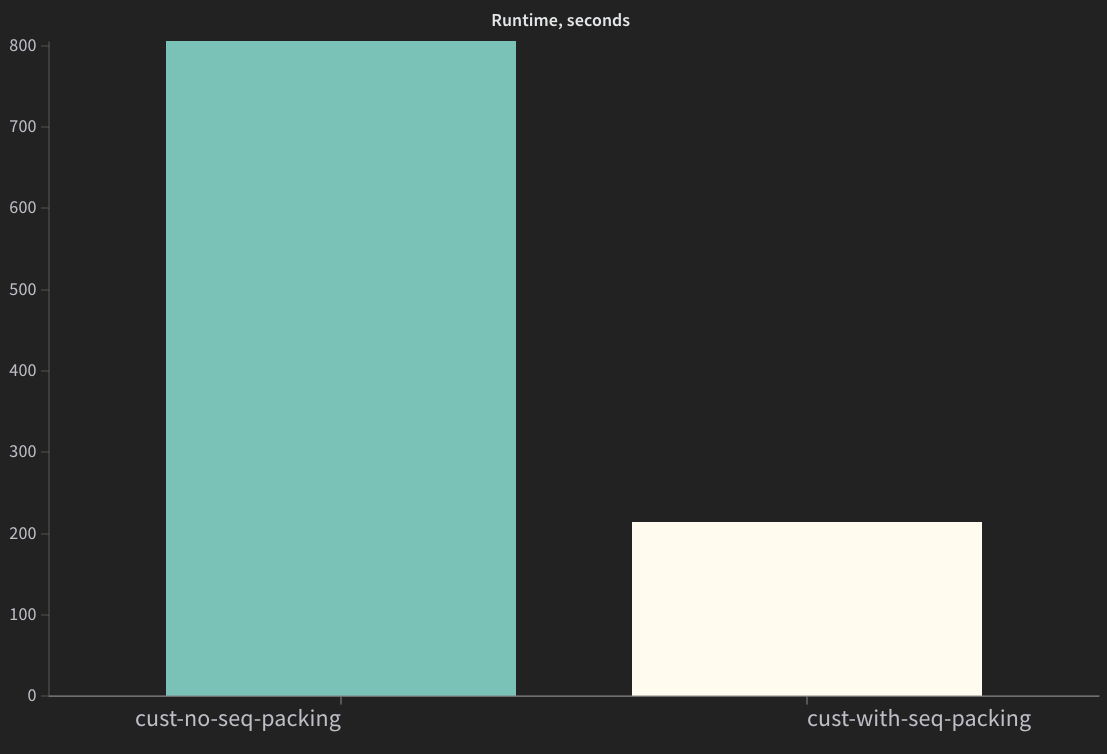
Compare training runtime, GPU utilization, and memory allocation between the two runs.
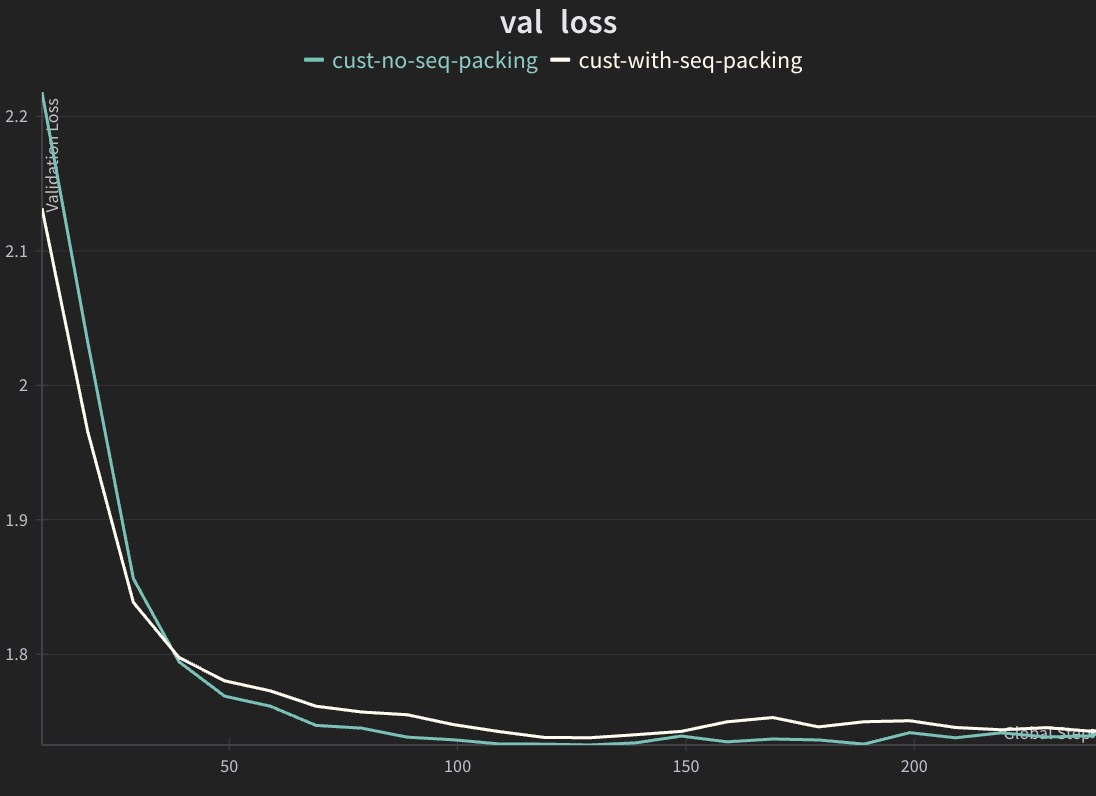
Verify that validation loss remains comparable, confirming that sequence packing improves throughput without sacrificing model quality.
Note: While this tutorial demonstrates sequence packing with LoRA, the optimization is also available for all_weights (full) SFT customization jobs.
Prerequisites#
Before starting this tutorial, ensure you have:
Completed the Quickstart to install and deploy NeMo Microservices locally
Installed the Python SDK (included with
pip install nemo-platform)
Quick Start#
1. Initialize SDK#
The SDK needs to know your NMP server URL. By default, http://localhost:8080 is used in accordance with the Quickstart guide. If NMP is running at a custom location, you can override the URL by setting the NMP_BASE_URL environment variable:
export NMP_BASE_URL=<YOUR_NMP_BASE_URL>
import json
import os
from nemo_platform import NeMoPlatform, ConflictError

NMP_BASE_URL = os.environ.get("NMP_BASE_URL", "http://localhost:8080")
sdk = NeMoPlatform(
    base_url=NMP_BASE_URL,
    workspace="default"
)
2. Create Dataset FileSet and Upload Training Data#
Install additional dependencies if they are not installed in your Python environment.
The cell below automatically detects your environment and uses:
uv pip installif you’re in a uv-managed virtual environmentpip installotherwise
Required packages:
datasets- Download the public rajpurkar/squad datasetpandas- Compare job results in table formatmatplotlib- Plot live training metrics (loss curves, GPU utilization)nvidia-ml-py- Collect GPU VRAM and compute utilization metrics during training
%%bash
if command -v uv >/dev/null 2>&1 && [ -n "$VIRTUAL_ENV" ]; then
    uv pip install datasets pandas matplotlib nvidia-ml-py
else
    pip install datasets pandas matplotlib nvidia-ml-py
fi
Download rajpurkar/squad Dataset#
SQuAD (Stanford Question Answering Dataset) is a reading comprehension dataset consisting of questions posed on Wikipedia articles, where the answer is a segment of text from the corresponding passage.
import json
import os
from pathlib import Path
from datasets import load_dataset, Dataset, DatasetDict

# Configuration
SEED = 1234
DATASET_NAME = "sft-dataset"

# Convert SQuAD format to prompt/completion format and save to JSONL
def convert_squad_to_sft_format(example):
    """Convert SQuAD format to prompt/completion format for SFT training."""
    prompt = f"Context: {example['context']} Question: {example['question']} Answer:"
    completion = example["answers"]["text"][0]  # Take the first answer
    return {"prompt": prompt, "completion": completion}

# Load the SQuAD dataset from Hugging Face
print("Loading dataset rajpurkar/squad")
ds = load_dataset("rajpurkar/squad")
if not isinstance(ds, DatasetDict):
    raise ValueError("Dataset does not contain expected splits")

print("Loaded dataset")

# For the purpose of this tutorial, we'll use a subset of the dataset
# We use a reduced dataset size (3000 training/300 validation samples) to keep tutorial runtime manageable
# while still demonstrating the performance benefits of sequence packing. The larger the dataset,
# the better the model will perform but the longer the training will take.
training_size = 3000
validation_size = 300
DATASET_PATH = Path(DATASET_NAME).absolute()

# Get training split and verify it's a Dataset (not IterableDataset)
train_dataset = ds["train"]
validation_dataset = ds["validation"]
assert isinstance(train_dataset, Dataset), "Expected Dataset type"
assert isinstance(validation_dataset, Dataset), "Expected Dataset type"

# Select subsets and save to JSONL files
training_ds = train_dataset.select(range(training_size))
validation_ds = validation_dataset.select(range(validation_size))

# Transform to SFT format (prompt/completion)
training_ds = training_ds.map(convert_squad_to_sft_format, remove_columns=training_ds.column_names)
validation_ds = validation_ds.map(convert_squad_to_sft_format, remove_columns=validation_ds.column_names)

# Create directory if it doesn't exist
# Note: This will create a local 'sft-dataset/' directory with training.jsonl and validation.jsonl files
os.makedirs(DATASET_PATH, exist_ok=True)

# Save subsets to JSONL files
training_ds.to_json(f"{DATASET_PATH}/training.jsonl")
validation_ds.to_json(f"{DATASET_PATH}/validation.jsonl")

print(f"Saved training.jsonl with {len(training_ds)} rows")
print(f"Saved validation.jsonl with {len(validation_ds)} rows")
# Create fileset to store SFT training data

try:
    sdk.files.filesets.create(
        workspace="default",
        name=DATASET_NAME,
        description="SFT training data"
    )
    print(f"Created fileset: {DATASET_NAME}")
except ConflictError:
    print(f"Fileset '{DATASET_NAME}' already exists, continuing...")

# Upload training data files individually to ensure correct structure
sdk.files.upload(
    local_path=DATASET_PATH,  # Local directory with your JSONL files
    remote_path="",
    fileset=DATASET_NAME,
    workspace="default"
)

# Validate training data is uploaded correctly
print("Training data:")
print(json.dumps([f.model_dump() for f in sdk.files.list(fileset=DATASET_NAME, workspace="default").data], indent=2))
3. Secrets Setup#
If you plan to use NGC or HuggingFace models, you will need to configure authentication:
NGC models (
ngc://URIs): Requires NGC API keyHuggingFace models (
hf://URIs): Requires HF token for gated/private models
Configure these as secrets in your platform. Refer to Managing Secrets for detailed instructions.
Get your credentials to access base models:
NGC API Key (Setup → Generate API Key)
HuggingFace Token (Create token with Read access)
Quick Setup Example#
This tutorial uses the meta-llama/Llama-3.2-1B-Instruct model from HuggingFace. Ensure that you have sufficient permissions to download the model. If you cannot access the files on the meta-llama/Llama-3.2-1B-Instruct Hugging Face page, request access.
HuggingFace Authentication:
For gated models (Llama, Gemma), you must provide a HuggingFace token via the
token_secretparameterGet your token from HuggingFace Settings (requires Read access)
Accept the model’s terms on the HuggingFace model page before using it. Example: meta-llama/Llama-3.2-1B-Instruct
For public models, you can omit the
token_secretparameter when creating a fileset for the model in the next step.
# Export the HF_TOKEN and NGC_API_KEY environment variables if they are not already set
HF_TOKEN = os.getenv("HF_TOKEN")
NGC_API_KEY = os.getenv("NGC_API_KEY")


def create_or_get_secret(name: str, value: str | None, label: str):
    if not value:
        raise ValueError(f"{label} environment variable is not set. Set it and try again.")
    try:
        secret = sdk.secrets.create(
            name=name,
            workspace="default",
            data=value,
        )
        print(f"Created secret: {name}")
        return secret
    except ConflictError:
        print(f"Secret '{name}' already exists, continuing...")
        return sdk.secrets.retrieve(name=name, workspace="default")


# Create HuggingFace token secret
hf_secret = create_or_get_secret("hf-token", HF_TOKEN, "HF_TOKEN")
print("HF_TOKEN secret:")
print(hf_secret.model_dump_json(indent=2))

# Create NGC API key secret
# Uncomment the line below if you have NGC API Key and want to finetune NGC models
# ngc_api_key = create_or_get_secret("ngc-api-key", NGC_API_KEY, "NGC_API_KEY")
4. Create Base Model FileSet#
Create a fileset pointing to the meta-llama/Llama-3.2-1B-Instruct model on HuggingFace. This step creates a pointer to the model on Hugging Face and does not download it. The model is downloaded at job creation time.
Note: for public models, you can omit the token_secret parameter when creating a model fileset.
import time
from nemo_platform.types.files import HuggingfaceStorageConfigParam

HF_REPO_ID = "meta-llama/Llama-3.2-1B-Instruct"
MODEL_NAME = "llama-3-2-1b-base"

# Ensure you have a HuggingFace token secret created
# Create a fileset pointing to the desired HuggingFace model
try:
    base_model_fs = sdk.files.filesets.create(
        workspace="default",
        name=MODEL_NAME,
        description="Llama 3.2 1B base model from HuggingFace",
        storage=HuggingfaceStorageConfigParam(
            type="huggingface",
            # repo_id is the full model name from Hugging Face
            repo_id=HF_REPO_ID,
            repo_type="model",
            # we use the secret created in the previous step
            token_secret=hf_secret.name
        )
    )
    print(f"Created base model fileset: {MODEL_NAME}")
except ConflictError:
    print(f"Base model fileset already exists. Skipping creation.")
    base_model_fs = sdk.files.filesets.retrieve(
        workspace="default",
        name=MODEL_NAME,
    )

# Create the Model Entity representation.
try:
    base_model = sdk.models.create(
        workspace="default",
        name=MODEL_NAME,
        fileset=f"default/{MODEL_NAME}",
    )
    print(f"Created Model Entity: {MODEL_NAME}")
except ConflictError:
    print(f"Base model already exists. Updating fileset if different.")
    base_model = sdk.models.update(
        workspace="default",
        name=MODEL_NAME,
        fileset=f"default/{MODEL_NAME}",
    )

print(f"\nBase model fileset: fileset://default/{base_model.name}")
print("Base model fileset files list:")
print(json.dumps([f.model_dump() for f in sdk.files.list(fileset=MODEL_NAME, workspace="default").data], indent=2))

# Wait for ModelSpec to be populated from the checkpoint
print("\nWaiting for ModelSpec to be populated...")
SPEC_TIMEOUT_SECONDS = 120
spec_start = time.time()
while not base_model.spec:
    if time.time() - spec_start > SPEC_TIMEOUT_SECONDS:
        raise TimeoutError(f"ModelSpec not populated within {SPEC_TIMEOUT_SECONDS} seconds")
    time.sleep(2)
    base_model = sdk.models.retrieve(
        workspace="default",
        name=MODEL_NAME,
    )

print(f"ModelSpec populated: {base_model.spec}")
5. Create LoRA Job with Sequence Packing#
Create a customization job with an inline target referencing the base model and dataset filesets created in previous steps.
import uuid
from nemo_platform.types.customization import (
    CustomizationJobInputParam,
    SftTrainingParam,
    ParallelismParamsParam,
    LoRaParamsParam,
)

# Enable sequence packing to improve throughput and GPU utilization
SEQUENCE_PACKING_ENABLED = True

job_suffix = uuid.uuid4().hex[:4]

JOB_NAME = f"my-sft-job-{job_suffix}"
job_spec = CustomizationJobInputParam(
    model=f"default/{base_model.name}",
    dataset=f"fileset://default/{DATASET_NAME}",
    training=SftTrainingParam(
        type="sft",
        epochs=1,
        batch_size=64,
        learning_rate=0.00005,
        max_seq_length=4096,
        val_check_interval=0.1,
        micro_batch_size=1,
        sequence_packing=SEQUENCE_PACKING_ENABLED,
        peft=LoRaParamsParam(),
        parallelism=ParallelismParamsParam(
            num_gpus_per_node=1,
            num_nodes=1,
            tensor_parallel_size=1,
            pipeline_parallel_size=1,
        ),
    )
)

job_with_sequence_packing = sdk.customization.jobs.create(
    name=JOB_NAME,
    workspace="default",
    spec=job_spec
)

print(f"Job ID: {job_with_sequence_packing.name}")
print(f"Output model: {job_with_sequence_packing.spec.output.name}")
6. Track Finetuning Progress#
A training job contains multiple steps:
Model and dataset downloading
Finetuning where LoRA adapter weights are trained
Creating a fileset entry for the finetuned model
Finetuned weights uploading
The elapsed time printed below reflects progress of the entire job. We compare the time taken by the finetuning step for both jobs in the last section of this tutorial.
Define Helper Functions#
# Helpers to draw GPU VRAM Utilization and Validation Loss
import matplotlib.pyplot as plt
try:
    import pynvml
    _PYNVML_AVAILABLE = True
except ImportError:
    _PYNVML_AVAILABLE = False
    print("Note: Install nvidia-ml-py ('pip install nvidia-ml-py' or 'uv pip install nvidia-ml-py') to enable live GPU metrics.")

# ---------------------------------------------------------------------------
# GPU metrics collection (nvidia-ml-py; import name is pynvml)
# ---------------------------------------------------------------------------

def _get_gpu_snapshot() -> tuple[list[float], list[float]]:
    """Return (vram_usage_pcts, compute_util_pcts) for each GPU."""
    if not _PYNVML_AVAILABLE:
        return [], []
    pynvml.nvmlInit()
    try:
        vram, util = [], []
        for i in range(pynvml.nvmlDeviceGetCount()):
            h = pynvml.nvmlDeviceGetHandleByIndex(i)
            mem = pynvml.nvmlDeviceGetMemoryInfo(h)
            rates = pynvml.nvmlDeviceGetUtilizationRates(h)
            vram.append(int(mem.used) / int(mem.total) * 100)
            util.append(float(rates.gpu))
        return vram, util
    finally:
        pynvml.nvmlShutdown()


# ---------------------------------------------------------------------------
# Dashboard drawing helpers
# ---------------------------------------------------------------------------

_PALETTE = {
    "val_loss":   "#E74C3C",
    "train_loss": "#F39C12",
    "vram":       ["#3498DB", "#9B59B6", "#1ABC9C", "#E67E22"],
    "util":       ["#2ECC71", "#E74C3C", "#3498DB", "#F1C40F"],
    "grid":       "#ECECEC",
    "title":      "#2C3E50",
    "subtitle":   "#7F8C8D",
    "spine":      "#CCCCCC",
    "tick":       "#666666",
}


def _style_axis(ax):
    """Apply shared cosmetic styling to a subplot axis."""
    ax.set_facecolor("white")
    ax.grid(True, alpha=0.4, color=_PALETTE["grid"], linewidth=0.8)
    for spine in ("top", "right"):
        ax.spines[spine].set_visible(False)
    ax.spines["left"].set_color(_PALETTE["spine"])
    ax.spines["bottom"].set_color(_PALETTE["spine"])
    ax.tick_params(colors=_PALETTE["tick"], labelsize=9)


def _plot_line(ax, xs, ys, color, label, fill=True):
    """Plot a time series, gracefully skipping None values."""
    pts = [(x, y) for x, y in zip(xs, ys) if y is not None]
    if not pts:
        return
    px, py = zip(*pts)
    ax.plot(
        px, py, color=color, linewidth=2.2,
        marker="o", markersize=4,
        markerfacecolor="white", markeredgewidth=1.8, markeredgecolor=color,
        label=label, zorder=3,
    )
    if fill:
        ax.fill_between(px, py, alpha=0.08, color=color)


def _plot_gpu_panel(ax, xs, history, colors, fallback_label):
    """Plot per-GPU time series with area fill."""
    if not history or not history[0]:
        ax.text(
            0.5, 0.5, "No GPU data", transform=ax.transAxes,
            ha="center", va="center", fontsize=11, color="#AAAAAA",
        )
        return
    n_gpus = max(len(snap) for snap in history)
    for g in range(n_gpus):
        vals = [snap[g] if g < len(snap) else 0 for snap in history]
        c = colors[g % len(colors)]
        label = f"GPU {g}" if n_gpus > 1 else fallback_label
        ax.plot(xs[: len(vals)], vals, color=c, linewidth=2, label=label)
        ax.fill_between(xs[: len(vals)], vals, alpha=0.08, color=c)
    if n_gpus > 1:
        ax.legend(fontsize=9, framealpha=0.9, edgecolor="#DDD")


def _draw_dashboard(
    elapsed_mins, val_losses, train_losses,
    vram_history, util_history,
    job_name, status_str, step_str, elapsed_str,
):
    """Render a live 1x3 training dashboard."""
    fig, axes = plt.subplots(1, 3, figsize=(20, 5.5))
    fig.patch.set_facecolor("#FAFBFC")

    fig.suptitle(
        job_name, fontsize=15, fontweight="bold",
        color=_PALETTE["title"], y=1.10,
    )
    fig.text(
        0.5, 1.01,
        f"{status_str}   |   {step_str}   |   {elapsed_str}",
        ha="center", fontsize=13, color=_PALETTE["subtitle"],
    )

    for ax in axes:
        _style_axis(ax)

    # -- Panel 1: Loss curves --
    _plot_line(axes[0], elapsed_mins, val_losses, _PALETTE["val_loss"], "Val Loss", fill=True)
    _plot_line(axes[0], elapsed_mins, train_losses, _PALETTE["train_loss"], "Train Loss", fill=False)
    axes[0].set_title("Train/Validation Loss", fontsize=13, fontweight="bold", color=_PALETTE["title"], pad=12)
    axes[0].set_xlabel("Time (min)", fontsize=10, color="#666")
    axes[0].set_ylabel("Loss", fontsize=10, color="#666")
    if any(v is not None for v in val_losses + train_losses):
        axes[0].legend(fontsize=9, framealpha=0.9, edgecolor="#DDD")

    # -- Panel 2: GPU VRAM usage --
    _plot_gpu_panel(axes[1], elapsed_mins, vram_history, _PALETTE["vram"], "VRAM")
    axes[1].set_title("GPU VRAM Usage", fontsize=13, fontweight="bold", color=_PALETTE["title"], pad=12)
    axes[1].set_xlabel("Time (min)", fontsize=10, color="#666")
    axes[1].set_ylabel("Usage (%)", fontsize=10, color="#666")
    axes[1].set_ylim(-2, 105)

    # -- Panel 3: GPU utilization --
    _plot_gpu_panel(axes[2], elapsed_mins, util_history, _PALETTE["util"], "Utilization")
    axes[2].set_title("GPU Utilization", fontsize=13, fontweight="bold", color=_PALETTE["title"], pad=12)
    axes[2].set_xlabel("Time (min)", fontsize=10, color="#666")
    axes[2].set_ylabel("Utilization (%)", fontsize=10, color="#666")
    axes[2].set_ylim(-2, 105)

    plt.tight_layout(rect=[0, 0, 1, 0.98])
    plt.show()
Monitor the Job Until Completion#
The cell below polls the job status every 10 seconds and renders a live dashboard with validation loss, GPU VRAM usage, and GPU utilization charts. The charts appear empty at first while the model and dataset download; training metrics and GPU activity populate after the finetuning step begins.
Note: This is additional code. You can also use the Weights & Biases or MLflow integrations.
import time
from typing import cast
from IPython.display import clear_output
from nemo_platform.types.shared import PlatformJobStatusResponse

# Timeout set to 30 minutes to accommodate typical LoRA training duration for this dataset size.
# Actual training time will vary based on hardware, model size, and dataset complexity.
TIMEOUT_SECONDS = 30 * 60  # 30 minutes
VAL_LOSS_KEY = "val_loss"
TRAIN_LOSS_KEY = "loss"

# ---------------------------------------------------------------------------
# Job polling with live dashboard
# ---------------------------------------------------------------------------

def wait_for_job(
    workspace: str,
    job_name: str,
    timeout: int = TIMEOUT_SECONDS,
    poll_interval: int = 10,
    val_loss_key: str = VAL_LOSS_KEY,
    train_loss_key: str = TRAIN_LOSS_KEY,
) -> PlatformJobStatusResponse:
    """
    Poll job status until completed, failed, cancelled, or timeout.
    Displays a live dashboard with loss curves and GPU metrics.

    Args:
        workspace: The workspace where the job is running.
        job_name: The name of the job to monitor.
        timeout: Maximum time to wait in seconds (default: 30 minutes).
        poll_interval: Time between status checks in seconds (default: 10).

    Returns:
        The final job status response.
    """
    start_time = time.time()

    # Time-series accumulators required for plotting
    elapsed_mins: list[float] = []
    val_losses: list[float | None] = []
    train_losses: list[float | None] = []
    vram_history: list[list[float]] = []
    util_history: list[list[float]] = []

    while True:
        elapsed = time.time() - start_time
        elapsed_min = elapsed / 60

        # Check for timeout
        if elapsed > timeout:
            error_message = f"Timeout reached after {elapsed_min:.1f} minutes"
            print(f"\n{error_message}")
            print("Job did not complete within the timeout period.")
            raise Exception(error_message)

        status = sdk.jobs.get_status(name=job_name, workspace=workspace)

        # -- Extract training progress from nested steps structure --
        step: int | None = None
        max_steps: int | None = None
        training_phase: str | None = None
        val_loss: float | None = None
        train_loss: float | None = None
        current_step_name: str | None = None
        current_step_phase: str | None = None

        for job_step in status.steps or []:
            # Track the current active step name and phase for progress display
            if job_step.tasks:
                task = job_step.tasks[0]
                td = task.status_details or {}
                phase = cast(str, td.get("phase", ""))
                # Update current step if it's active or pending (not completed)
                if job_step.status in ("active", "pending"):
                    current_step_name = job_step.name
                    current_step_phase = phase or "started"

            if job_step.name == "customization-training-job":
                for task in job_step.tasks or []:
                    td = task.status_details or {}
                    step = cast(int, td["step"]) if "step" in td else None
                    max_steps = cast(int, td["max_steps"]) if "max_steps" in td else None
                    training_phase = cast(str, td["phase"]) if "phase" in td else None
                    val_loss = float(td[val_loss_key]) if val_loss_key in td else None
                    train_loss = float(td[train_loss_key]) if train_loss_key in td else None
                    break
                break

        # Fall back to top-level status_details
        if status.status_details:
            if val_loss is None and val_loss_key in status.status_details:
                val_loss = float(status.status_details[val_loss_key])
            if train_loss is None and train_loss_key in status.status_details:
                train_loss = float(status.status_details[train_loss_key])

        # -- Collect GPU snapshot --
        vram_pcts, util_pcts = _get_gpu_snapshot()

        # -- Append to accumulators used for the plots --
        elapsed_mins.append(elapsed_min)
        val_losses.append(val_loss)
        train_losses.append(train_loss)
        vram_history.append(vram_pcts)
        util_history.append(util_pcts)

        # -- Build status strings --
        status_str = f"Status: {status.status}"
        if step is not None and max_steps is not None:
            pct = step / max_steps * 100
            step_str = f"Step {step}/{max_steps} ({pct:.0f}%)"
            if training_phase:
                step_str += f" - {training_phase}"
        else:
            if current_step_name and current_step_phase:
                step_str = f"{current_step_name} - {current_step_phase}"
            elif current_step_name:
                step_str = f"{current_step_name}"
            else:
                step_str = "Waiting for training to start..."
        elapsed_str = f"Elapsed: {elapsed_min:.1f} min"

        # -- Redraw dashboard --
        clear_output(wait=True)
        _draw_dashboard(
            elapsed_mins, val_losses, train_losses,
            vram_history, util_history,
            job_name, status_str, step_str, elapsed_str,
        )

        # -- Check terminal conditions --
        if status.status.lower() == "completed":
            # Redraw dashboard one final time with "completed" status
            status_str = f"Status: {status.status}"
            if step is not None and max_steps is not None:
                step_str = f"Step {max_steps}/{max_steps} (100%)"
            clear_output(wait=True)
            _draw_dashboard(
                elapsed_mins, val_losses, train_losses,
                vram_history, util_history,
                job_name, status_str, step_str, elapsed_str,
            )
            print(f"\nJob completed in {elapsed_min:.1f} minutes ({elapsed:.0f}s)")
            return status
        elif status.status.lower() in ("failed", "cancelled", "error"):
            print(f"\nJob finished with status: {status.status}")
            print(f"Total time elapsed: {elapsed_min:.1f} minutes ({elapsed:.0f}s)")

            # Print error details from the job level
            if status.error_details:
                error_msg = status.error_details.get("message", "")
                if error_msg:
                    print(f"\nError: {error_msg}")

            # Find and print error details from the failed step/task
            for job_step in status.steps or []:
                if job_step.status == "error":
                    print(f"\nFailed step: {job_step.name}")
                    if job_step.error_details:
                        step_error = job_step.error_details.get("message", "")
                        if step_error:
                            print(f"Step error: {step_error}")
                    # Get error_stack from the failed task
                    for task in job_step.tasks or []:
                        if task.status == "error" and hasattr(task, "error_stack") and task.error_stack:
                            print(f"\nError stack trace:\n{task.error_stack}")
                        elif task.status == "error" and task.error_details:
                            task_error = task.error_details.get("message", "")
                            if task_error:
                                print(f"Task error: {task_error}")
                    break

            raise Exception(f"Job finished with status: {status.status}")

        time.sleep(poll_interval)


# Wait for the job to complete
job_with_sequence_packing_status = wait_for_job(
    workspace="default",
    job_name=job_with_sequence_packing.name,
    timeout=TIMEOUT_SECONDS,
)

print(f"Validation loss: {job_with_sequence_packing_status.status_details['val_loss']:.2f}")
7. Create LoRA Job without Sequence Packing#
Create a customization job with sequence packing disabled. It’s expected to take longer to complete.
import uuid

job_suffix = uuid.uuid4().hex[:4]
JOB_NAME = f"my-sft-job-{job_suffix}"

job_spec_no_packing = CustomizationJobInputParam(
    model=f"default/{base_model.name}",
    dataset=f"fileset://default/{DATASET_NAME}",
    training=SftTrainingParam(
        type="sft",
        epochs=1,
        batch_size=64,
        learning_rate=0.00005,
        max_seq_length=4096,
        val_check_interval=0.1,
        micro_batch_size=1,
        sequence_packing=False,
        peft=LoRaParamsParam(),
        parallelism=ParallelismParamsParam(
            num_gpus_per_node=1,
            num_nodes=1,
            tensor_parallel_size=1,
            pipeline_parallel_size=1,
        ),
    )
)

job_without_sequence_packing = sdk.customization.jobs.create(
    name=JOB_NAME,
    workspace="default",
    spec=job_spec_no_packing
)

print(f"Job ID: {job_without_sequence_packing.name}")
print(f"Output model: {job_without_sequence_packing.spec.output.name}")
8. Track Finetuning Progress for Job without Sequence Packing#
# Wait for the training step to complete
job_without_sequence_packing_status = wait_for_job(
    workspace="default",
    job_name=job_without_sequence_packing.name,
    timeout=TIMEOUT_SECONDS
)

print(f"Validation loss: {job_without_sequence_packing_status.status_details['val_loss']:.2f}")
9. Compare Results#
Time to complete training should be significantly lower for the job that used sequence packing.
The expected validation loss for both jobs should be similar.
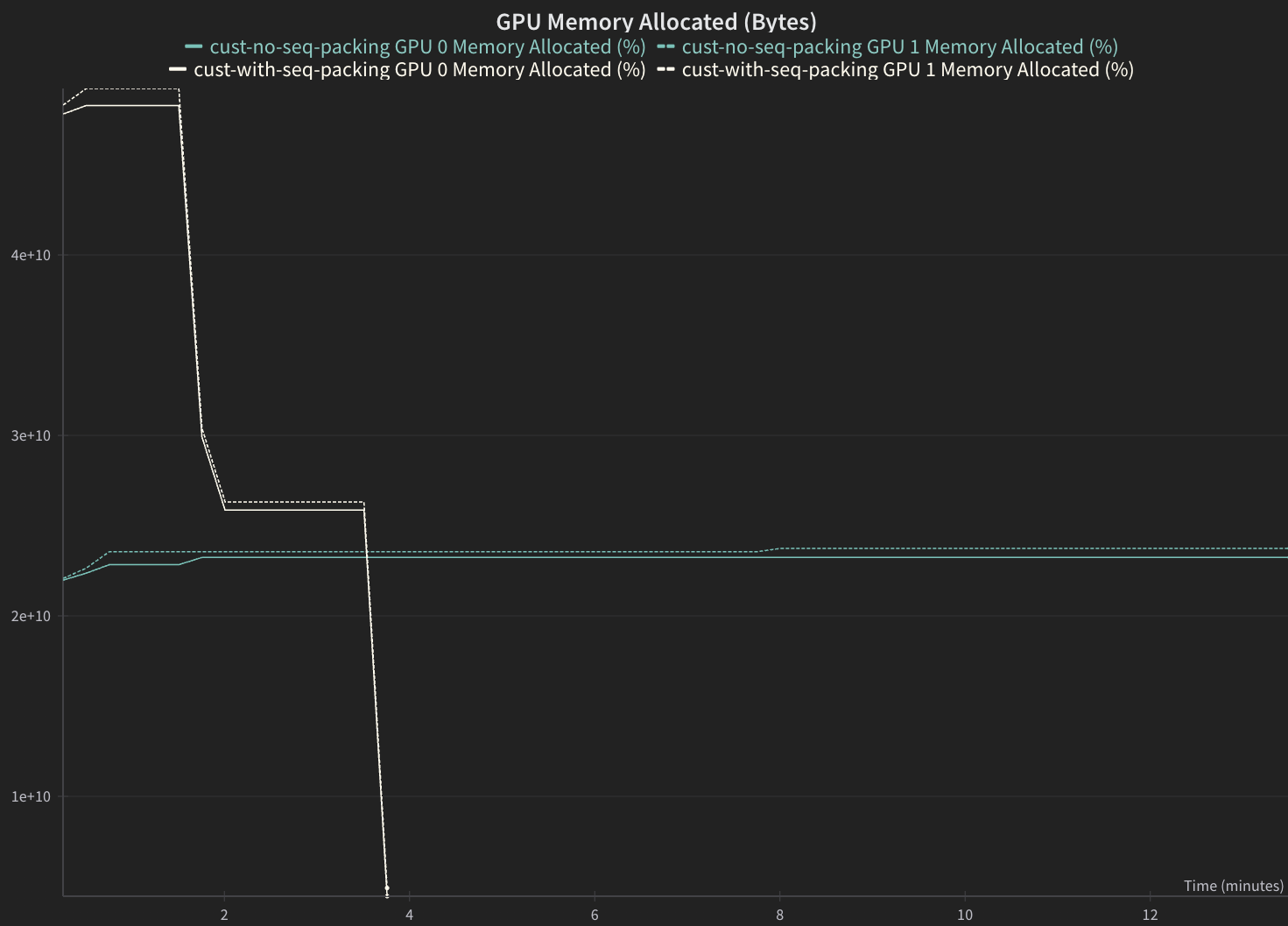
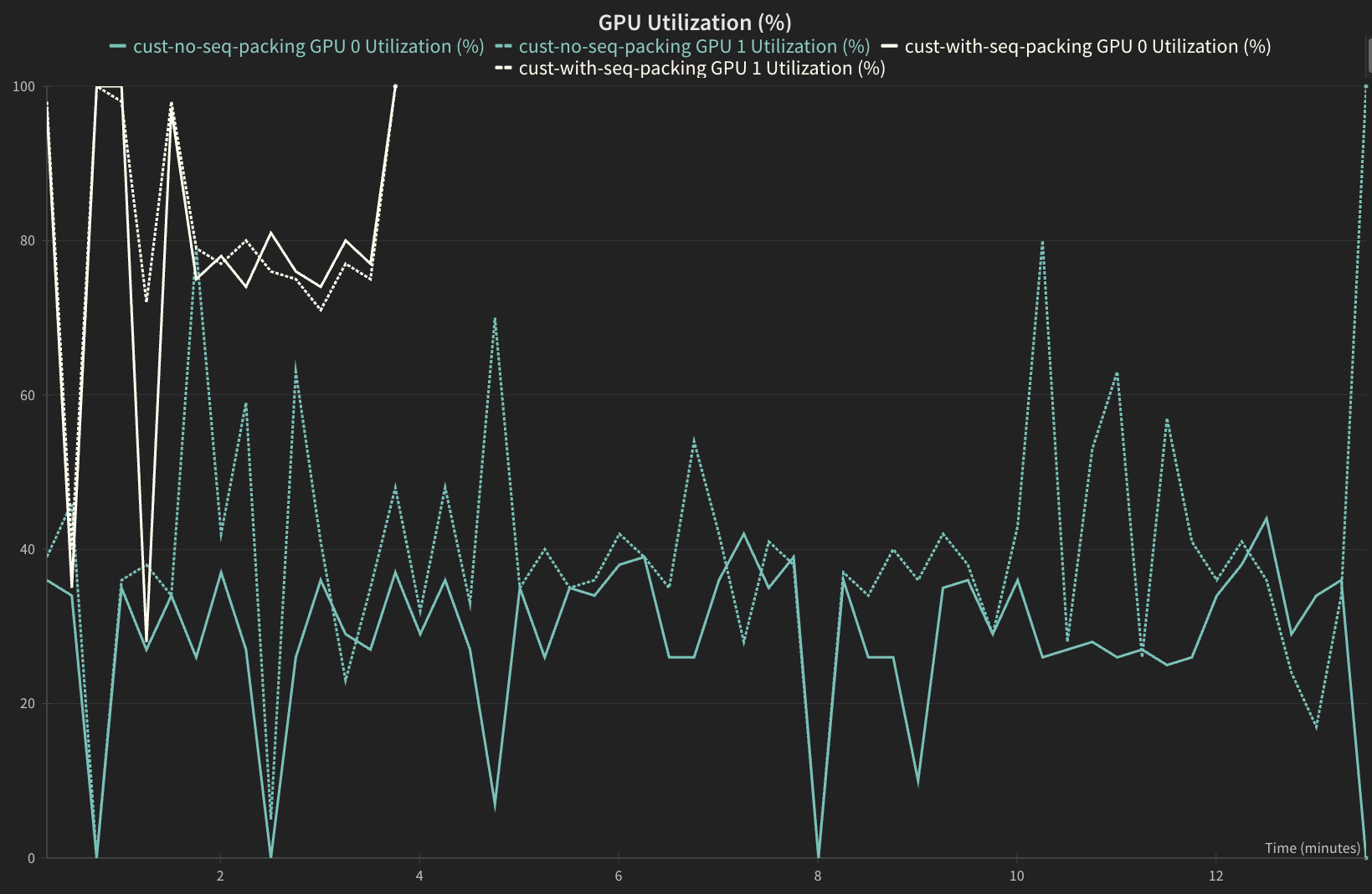
Sequence packed version should have a higher GPU utilization and higher GPU Memory Allocation.
from nemo_platform.types.jobs import PlatformJobStep
from datetime import datetime
import pandas as pd

STEP_NAME = "customization-training-job"

def get_elapsed_time(step: PlatformJobStep) -> float:
    """Calculate elapsed time in seconds from step's created_at to updated_at."""
    created_at = datetime.fromisoformat(step.created_at.replace("Z", "+00:00"))
    updated_at = datetime.fromisoformat(step.updated_at.replace("Z", "+00:00"))
    return (updated_at - created_at).total_seconds()

step_with_sequence_packing = sdk.jobs.steps.retrieve(
            name=STEP_NAME,
            workspace="default",
            job=job_with_sequence_packing.name,
)

step_without_sequence_packing = sdk.jobs.steps.retrieve(
            name=STEP_NAME,
            workspace="default",
            job=job_without_sequence_packing.name,
)

time_to_complete_with_sequence_packing = get_elapsed_time(step_with_sequence_packing)
time_to_complete_without_sequence_packing = get_elapsed_time(step_without_sequence_packing)

# Display results as a table
results_df = pd.DataFrame({
    "Seq Packing Enabled": [True, False],
    "Val Loss": [
        job_with_sequence_packing_status.status_details['val_loss'],
        job_without_sequence_packing_status.status_details['val_loss']
    ],
    "Training Step Time, sec": [
        time_to_complete_with_sequence_packing,
        time_to_complete_without_sequence_packing
    ]
})

results_df.style.format({"Val Loss": "{:.2f}", "Training Step Time, sec": "{:.0f}"}).hide(axis='index')
Examples of Validation Loss#
The expected validation loss curves should match closely for both jobs.
Sequence packed version should complete significantly faster.
GPU Utilization#
Sequence packed version should have a higher GPU utilization.
GPU Memory Allocation#
Sequence packed version should have a higher GPU Memory Allocation.