

Download this tutorial as a Jupyter notebook
Evaluate Response Quality with LLM-as-a-Judge#
LLM-as-a-Judge is a technique where you use a large language model to evaluate the outputs of another model. Instead of relying solely on automated metrics or manual review, you prompt a capable LLM to score responses based on criteria you define—like helpfulness, accuracy, or tone.
This tutorial shows you how to build, validate, and iterate on LLM judge metrics using HelpSteer2, NVIDIA’s human-annotated dataset. By comparing your judge’s scores against human annotations, you can measure how well your judge aligns with human judgment and improve it through prompt iteration.
What you will learn:
Create and test LLM judge metrics
Validate judge accuracy against human annotations
Iterate on prompts to improve correlation with humans
Visualize score distributions with histograms and percentiles
Combine metrics into a reusable benchmark
Quality dimensions evaluated:
Dimension |
Description |
Scale |
|---|---|---|
Helpfulness |
How well the response addresses the user’s need |
0-4 |
Correctness |
Factual accuracy of the information |
0-4 |
Coherence |
Logical flow and structure |
0-4 |
Complexity |
Sophistication and depth of the response |
0-4 |
Verbosity |
Appropriate level of detail |
0-4 |
Tip
This tutorial takes approximately 20 minutes to complete.
Prerequisites#
Install and start NeMo Microservices using the Quickstart.
! pip install nemo-platform
! nmp quickstart up
Install the Python libraries used in this tutorial:
! pip install pandas scipy matplotlib
Key Concepts#
Before you begin, here is a quick overview of the resources you will create:
Metric: A reusable evaluation component that defines how to score model outputs. In this tutorial, we create LLM judge metrics that prompt a model to rate responses.
Benchmark: A collection of metrics paired with a dataset. Benchmarks let you run the same evaluation suite consistently across different models and/or prompts.
Fileset: A reference to a dataset stored in NeMo Microservices or remotely (like Hugging Face).
Workspace: A workspace that isolates your resources. All metrics, benchmarks, jobs, secrets, and filesets belong to a workspace.
Job: An asynchronous evaluation task that processes a dataset and produces scores.
Evaluation: The process of scoring model outputs using one or more metrics. Can run synchronously (live evaluation for quick testing with a few rows) or asynchronously (jobs for larger datasets).
1. Initialize the SDK and Create a Workspace#
Create a dedicated workspace for this tutorial to keep your resources isolated from other projects:
import os
from nemo_platform import ConflictError, NeMoPlatform

# Create a client to interact with NeMo Microservices
client = NeMoPlatform(
    base_url=os.environ.get("NMP_BASE_URL", "http://localhost:8080"),
    workspace="default",
)

# Create a workspace for this tutorial
WORKSPACE = "my-workspace"
try:
    client.workspaces.create(name=WORKSPACE)
except ConflictError:
    print(f"Workspace '{WORKSPACE}' already exists, continuing...")

# Reinitialize the client to use this workspace by default
client = NeMoPlatform(
    base_url=os.environ.get("NMP_BASE_URL", "http://localhost:8080"),
    workspace=WORKSPACE,
)

# Verify connectivity - should return an empty list
print(client.evaluation.metrics.list().data)
Expected output:
[]
2. Create Secrets#
Create a secret for your hosted judge API key before configuring the judge model.
For a locally hosted judge model that does not require authentication, you can skip this secret setup.
Get your NVIDIA_API_KEY to access the models on Nvidia Build Hub:
-
Steps: click “Generate API Key”
# Export NVIDIA_API_KEY before running this tutorial.
# For quick local testing only:
# os.environ["NVIDIA_API_KEY"] = "<your-nvidia-api-key>"
nvidia_api_key = os.getenv("NVIDIA_API_KEY")
if not nvidia_api_key:
    raise ValueError("NVIDIA_API_KEY is not set")

try:
    nvidia_api_key_secret = client.secrets.create(name="nvidia-api-key", workspace=WORKSPACE, data=nvidia_api_key)
    print("Created secret: nvidia-api-key")
except ConflictError:
    print("Secret 'nvidia-api-key' already exists, retrieving...")
    nvidia_api_key_secret = client.secrets.retrieve(name="nvidia-api-key", workspace=WORKSPACE)
    print("Retrieved existing secret: nvidia-api-key.")

print(f"NVIDIA_API_KEY secret reference: {nvidia_api_key_secret.workspace}/{nvidia_api_key_secret.name}")
3. Configure the Judge Model#
Import the SDK types for type hints and configure the judge model. The judge is the LLM that will evaluate responses.
This tutorial uses nvidia/llama-3.3-nemotron-super-49b-v1.5 for both hosted and local examples to keep configuration consistent.
For judge model configuration, use ModelParam fields: url (model endpoint), name (model identifier), and api_key_secret (secret name for API auth for hosted providers).
If you want to use NVIDIA Build for a hosted judge, find the desired model on Nvidia Build Hub and reference it along with the secret name created in the Create Secrets step above. In this tutorial, we are going to use nvidia/llama-3.3-nemotron-super-49b-v1.5.
import os

from nemo_platform.types.evaluation import (
    ModelParam,
    LLMJudgeMetricParam,
    RangeScoreParam,
    JsonScoreParserParam,
)

# Configure the judge model
JUDGE_MODEL = ModelParam(
    url="https://integrate.api.nvidia.com/v1/chat/completions",
    name="nvidia/llama-3.3-nemotron-super-49b-v1.5",
    api_key_secret=nvidia_api_key_secret.name,  # Secret created in step 2
)
If you want to use a locally hosted judge model, deploy one first (refer to the Models tutorial), then reference its endpoint:
from nemo_platform.types.evaluation import (
    ModelParam,
    LLMJudgeMetricParam,
    RangeScoreParam,
    JsonScoreParserParam,
)

# Configure the judge model
JUDGE_MODEL = ModelParam(
    url="<your-local-deployment-endpoint>/v1", # Replace this value
    name="nvidia/llama-3.3-nemotron-super-49b-v1.5",
)
4. Register the Dataset#
Register HelpSteer2 as a fileset. The platform fetches data directly from Hugging Face when needed—no manual download required.
from nemo_platform.types.files import HuggingfaceStorageConfigParam

DATASET_NAME = "helpsteer2-eval"

try:
    fileset = client.files.filesets.create(
        name=DATASET_NAME,
        description="NVIDIA HelpSteer2 dataset for quality evaluation",
        storage=HuggingfaceStorageConfigParam(
            type="huggingface",
            repo_id="nvidia/HelpSteer2",
            repo_type="dataset",
        ),
    )
    print(f"Registered HelpSteer2 fileset: {fileset} ")
except ConflictError:
    fileset = client.files.filesets.retrieve(name=DATASET_NAME)
    print(f"{fileset.workspace}/{fileset.name} dataset already registered")
Note
HelpSteer2 contains ~10,000 prompt-response pairs with human ratings for helpfulness, correctness, coherence, complexity, and verbosity. Each rating is on a 0-4 scale. We’ll use these human scores as ground truth to validate our LLM judge.
The dataset contains multiple files (train.jsonl.gz, validation.jsonl.gz, disagreements/, preference/). When running evaluations, we’ll specify #validation.jsonl.gz to use a held-out split (and to avoid schema conflicts with other files). You can use #train.jsonl.gz for faster prompt iteration, but prefer validation when reporting judge quality to reduce the chance of dataset contamination bias.
5. Create an Initial Helpfulness Metric#
Now let’s create our first LLM judge metric. We’ll start with a simple prompt for the helpfulness dimension, then improve it based on validation results.
A metric definition includes:
Model: Which LLM to use as the judge
Prompt template: Instructions for the judge, with
{{variables}}that get filled from your datasetScore definition: The name, scale, and how to parse the judge’s output
def create_helpfulness_metric(prompt_template: str) -> LLMJudgeMetricParam:
    """Create a helpfulness metric with the given system prompt."""

    # Define the score: name, range, and how to extract it from JSON output
    score = RangeScoreParam(
        name="helpfulness",
        description="How well does the response help the user?",
        minimum=0,
        maximum=4,
        parser=JsonScoreParserParam(type="json", json_path="helpfulness"),
    )

    return LLMJudgeMetricParam(
        type="llm-judge",
        model=JUDGE_MODEL,
        scores=[score],
        prompt_template={
            "messages": [
                {"role": "system", "content": prompt_template},
                {
                    "role": "user",
                    # {{prompt}} and {{response}} are replaced with values from each dataset row
                    "content": "User prompt: {{prompt}}\n\nAssistant response: {{response}}\n\nRate this response.",
                },
            ],
            "temperature": 0.0,  # use a low temperature for consistent scoring
            "max_tokens": 32768,
        },
    )


# Version 1: A basic, minimal prompt
PROMPT_V1 = """You are an evaluator. Rate the response's helpfulness from 0-4."""

metric_v1_params = create_helpfulness_metric(PROMPT_V1)

# Create and store the metric
try:
    metric_v1 = client.evaluation.metrics.create(name="helpfulness-v1", **metric_v1_params)
    print(f"Created metric: {metric_v1.workspace}/{metric_v1.name}")
except ConflictError:
    metric_v1 = client.evaluation.metrics.retrieve(name="helpfulness-v1")
    print(f"Metric already exists: {metric_v1.workspace}/{metric_v1.name}")

# If you'd like to overwrite previously created metric, first delete the existing one:
# client.evaluation.metrics.delete(name="helpfulness-v1", workspace=WORKSPACE)
Tip
Use temperature 0 for evaluation tasks. Low or zero temperature produces outputs with less variability, which is critical for reproducible scoring. This ensures the same response gets the same score across runs, making it easier to validate your judge and compare prompt versions.
6. Test with Live Evaluation#
Before running a full evaluation, test your metric with a few examples using live evaluation. This runs synchronously and returns results immediately—perfect for quick iteration.
from nemo_platform.types.evaluation import EvaluateDatasetRowsParam

result = client.evaluation.metrics.evaluate(
    dataset=EvaluateDatasetRowsParam(
        rows=[
            {
                "prompt": "What is the capital of France?",
                "response": "The capital of France is Paris. It serves as France's political, economic, and cultural center.",
            },
            {
                "prompt": "How do I make scrambled eggs?",
                "response": "Eggs.",
            },
        ]
    ),
    metric=f"{metric_v1.workspace}/{metric_v1.name}",  # Reference the stored metric by name
)

print("Quick test results:")
for row in result.row_scores:
    helpfulness = row.scores["helpfulness"] if row.scores is not None else None
    print(f"  Row {row.index}: helpfulness = {helpfulness}")
Expected output:
Quick test results:
  Row 0: helpfulness = 4.0
  Row 1: helpfulness = 0.0
The first response is comprehensive and helpful (score 4), while the second is unhelpfully brief (score 0). If your judge produces reasonable scores here, you’re ready to run a larger evaluation.
Tip
Live evaluation is limited to 10 rows. Use it for testing and debugging, then run jobs for larger datasets.
7. Run Evaluation and Validate Against Ground Truth#
Now let’s evaluate a larger sample and compare the judge’s predictions against human annotations. This tells us how well our judge aligns with human judgment.
from nemo_platform.types.evaluation import MetricOfflineJobParam, EvaluationJobParamsParam

# Submit an evaluation job
# Use #validation.jsonl.gz to evaluate on a held-out split (avoids schema conflicts with other files)
job_v1 = client.evaluation.metric_jobs.create(
    spec=MetricOfflineJobParam(
        metric=f"{metric_v1.workspace}/{metric_v1.name}",
        dataset=f"{fileset.workspace}/{fileset.name}#validation.jsonl.gz",
        params=EvaluationJobParamsParam(
            parallelism=1,  # Keep low to avoid rate limits with hosted APIs
            max_retries=3,  # Retry transient endpoint errors
            ignore_inference_failure=True,  # Continue and mark failed rows as NaN
            limit_samples=50,  # Use a small subset for faster iteration
        ),
    )
)

print(f"Job submitted: {job_v1.name}")
Tip
When using hosted APIs like NVIDIA Build, keep parallelism low (1-2) to avoid rate limit errors. You can increase this for locally deployed models.
Monitor the job until it completes:
import time

while True:
    status = client.evaluation.metric_jobs.get_status(job_v1.name)
    print(f"Status: {status.status}")

    if status.status == "completed":
        print("Job finished successfully!")
        break
    elif status.status in ["error", "cancelled"]:
        print(f"Job failed: {status.error_details if hasattr(status, 'error_details') else 'Unknown error'}")
        break

    time.sleep(10)
Download and Parse Results#
Row-level results contain the original dataset item (with ground truth), the judge’s requests/responses, and extracted scores:
import json
import numpy as np

# Download row-level scores (returns an iterator)
row_scores_v1 = list(
    client.evaluation.metric_jobs.results.row_scores.download(
        job=job_v1.name,
    )
)


def extract_helpfulness_scores(row_scores):
    judge_scores = []
    human_scores = []
    failed_requests = 0

    for row in row_scores:
        # Judge's score is in the response content (JSON string)
        if not len(row.requests) > 0:
            failed_requests += 1
            continue
        judge_response = row.requests[0]["response"]["choices"][0]["message"]["content"]
        judge_data = json.loads(judge_response)
        judge_scores.append(judge_data["helpfulness"])

        # Ground truth is in the original dataset item
        human_scores.append(row.item["helpfulness"])

    judge_scores = np.array(judge_scores)
    human_scores = np.array(human_scores)

    print(f"Total errors: {failed_requests}")
    return judge_scores, human_scores


judge_scores, human_scores = extract_helpfulness_scores(row_scores_v1)
print(f"Evaluated: {len(judge_scores)} samples")
Calculate Correlation with Human Annotations#
To measure judge quality, we compare its scores against human annotations using three metrics:
Metric |
What it measures |
Interpretation |
|---|---|---|
Pearson r |
Linear correlation |
Higher = scores move together proportionally |
Spearman ρ |
Rank correlation |
Higher = judge ranks responses similarly to humans |
MAE |
Mean Absolute Error |
Lower = predictions closer to ground truth |
from scipy import stats

pearson_v1, _ = stats.pearsonr(human_scores, judge_scores)
spearman_v1, _ = stats.spearmanr(human_scores, judge_scores)
mae_v1 = abs(human_scores - judge_scores).mean()

print(f"\n=== Prompt V1 Results ===")
print(f"Pearson r:  {pearson_v1:.3f}  (>0.6 is good)")
print(f"Spearman ρ: {spearman_v1:.3f}  (>0.6 is good)")
print(f"MAE:        {mae_v1:.2f}   (<0.5 is good)")
If your V1 results show low correlation (for example, Pearson < 0.5), that is expected. The basic prompt often produces scores that don’t align well with human judgment. We’ll improve this in the next step.
8. Improve the Prompt and Compare#
The basic prompt may lack specificity. Let’s create an improved version that aligns with HelpSteer2’s annotation guidelines, which define helpfulness as “the overall helpfulness of the response to the prompt.”
# Version 2: Prompt aligned with HelpSteer2 annotation guidelines
PROMPT_V2 = """You are evaluating the HELPFULNESS of an AI assistant's response.

Helpfulness measures the overall utility of the response in addressing the user's needs.
Rate on a 0-4 integer scale:

0 - The response fails to address the user's request, provides irrelevant information, or could cause harm.
1 - The response partially addresses the request but has significant gaps, errors, or misunderstandings.
2 - The response addresses the core request adequately but may lack detail, clarity, or completeness.
3 - The response fully addresses the request with appropriate detail and is genuinely useful.
4 - The response excellently addresses the request, providing comprehensive and well-structured information that fully satisfies the user's needs.

Focus on whether the response helps the user accomplish their goal, not on style or verbosity.
A shorter response that directly solves the problem can score higher than a longer one that misses the point.
"""

# Create the improved metric
metric_v2_params = create_helpfulness_metric(PROMPT_V2)

try:
    metric_v2 = client.evaluation.metrics.create(name="helpfulness-v2", **metric_v2_params)
    print(f"Created metric: {metric_v2.workspace}/{metric_v2.name}")
except ConflictError:
    metric_v2 = client.evaluation.metrics.retrieve(name="helpfulness-v2")
    print(f"Metric already exists: {metric_v2.workspace}/{metric_v2.name}")
Run evaluation with the improved prompt:
import json
import numpy as np
from nemo_platform.types.evaluation import MetricOfflineJobParam, EvaluationJobParamsParam

job_v2 = client.evaluation.metric_jobs.create(
    spec=MetricOfflineJobParam(
        metric=f"{metric_v2.workspace}/{metric_v2.name}",
        dataset=f"{fileset.workspace}/{fileset.name}#validation.jsonl.gz",
        params=EvaluationJobParamsParam(
            parallelism=1,
            max_retries=3,
            ignore_inference_failure=True,
            limit_samples=50,
        ),
    )
)

# Wait for completion
while True:
    status = client.evaluation.metric_jobs.get_status(job_v2.name)
    print(f"Status: {status.status}")
    if status.status in ["completed", "error", "cancelled"]:
        break
    time.sleep(10)

# Download and parse results
row_scores_v2 = list(client.evaluation.metric_jobs.results.row_scores.download(job=job_v2.name))

judge_scores_v2, human_scores_v2 = extract_helpfulness_scores(row_scores_v2)
print(f"Evaluated: {len(judge_scores_v2)} samples")

judge_scores_v2 = np.array(judge_scores_v2)
human_scores_v2 = np.array(human_scores_v2)
Compare Both Versions#
# Calculate metrics for V2
pearson_v2, _ = stats.pearsonr(human_scores_v2, judge_scores_v2)
spearman_v2, _ = stats.spearmanr(human_scores_v2, judge_scores_v2)
mae_v2 = abs(human_scores_v2 - judge_scores_v2).mean()

# Side-by-side comparison
print("\n=== Prompt Comparison ===")
print(f"{'Metric':<12} {'Pearson':<12} {'Spearman':<12} {'MAE':<8}")
print("-" * 44)
print(f"{'Prompt V1':<12} {pearson_v1:<12.3f} {spearman_v1:<12.3f} {mae_v1:<8.2f}")
print(f"{'Prompt V2':<12} {pearson_v2:<12.3f} {spearman_v2:<12.3f} {mae_v2:<8.2f}")

# Determine winner and save the better metric for later use
if pearson_v2 > pearson_v1:
    BEST_HELPFULNESS_METRIC = "helpfulness-v2"
    print("\n✓ Prompt V2 shows better correlation with human judgments!")
else:
    BEST_HELPFULNESS_METRIC = "helpfulness-v1"
    print("\n✓ Prompt V1 performs better—simpler prompts can work well!")

print(f"Using '{BEST_HELPFULNESS_METRIC}' for the benchmark.")
Note
More complex prompts do not always perform better. The best prompt depends on the model, task, and how well it aligns with the original annotation guidelines. If your V1 prompt outperforms V2, that’s a valid result. Use what works best for your use case.
9. Visualize Score Distributions#
Visualizations help you understand how your judge differs from humans. Does it tend to score higher? Lower? Cluster around certain values?
import matplotlib.pyplot as plt

fig, axes = plt.subplots(1, 3, figsize=(14, 4))

# Human scores distribution
axes[0].hist(human_scores, bins=range(6), align='left', alpha=0.7, color='green', edgecolor='black')
axes[0].set_xlabel('Score')
axes[0].set_ylabel('Count')
axes[0].set_title('Human Annotations')
axes[0].set_xticks(range(5))

# Judge V1 distribution
axes[1].hist(judge_scores, bins=range(6), align='left', alpha=0.7, color='blue', edgecolor='black')
axes[1].set_xlabel('Score')
axes[1].set_title(f'Judge V1 (r={pearson_v1:.2f})')
axes[1].set_xticks(range(5))

# Judge V2 distribution
axes[2].hist(judge_scores_v2, bins=range(6), align='left', alpha=0.7, color='orange', edgecolor='black')
axes[2].set_xlabel('Score')
axes[2].set_title(f'Judge V2 (r={pearson_v2:.2f})')
axes[2].set_xticks(range(5))

plt.suptitle('Helpfulness Score Distributions')
plt.tight_layout()
plt.savefig('score_distributions.png', dpi=150)
plt.show()

print("Saved visualization to score_distributions.png")
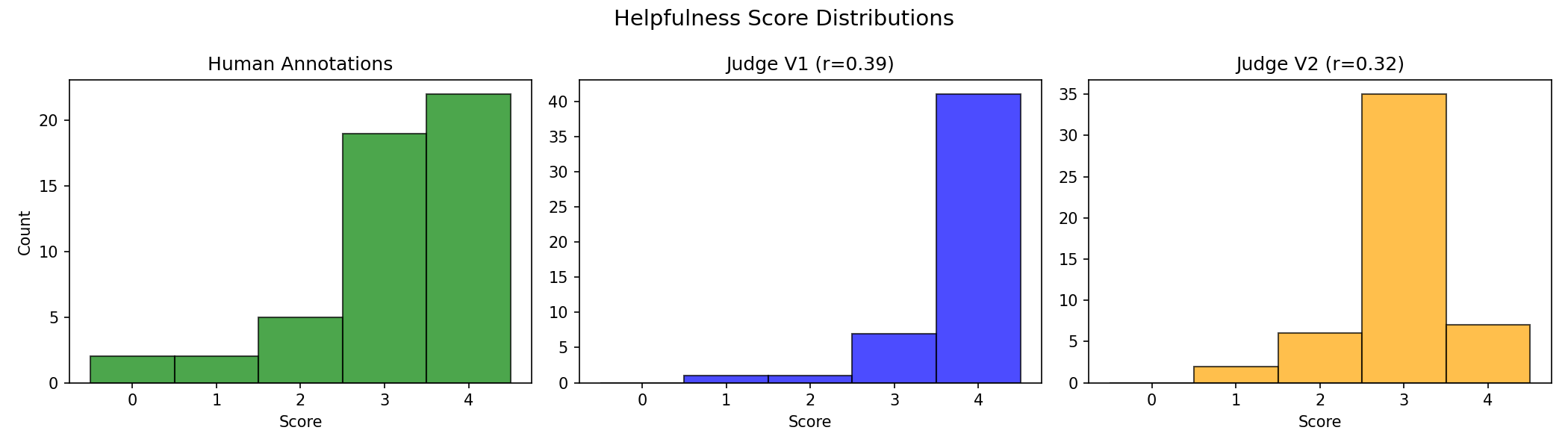
Figure 2 Example output showing score distributions. Your results will vary depending on the model used and the specific samples evaluated.#
Percentile Analysis#
Percentiles reveal how scores are distributed across the range:
import pandas as pd

for name, scores in [("Human", human_scores), ("Judge V1", judge_scores), ("Judge V2", judge_scores_v2)]:
    p25 = pd.Series(scores).quantile(0.25)
    p50 = pd.Series(scores).quantile(0.50)  # Median
    p75 = pd.Series(scores).quantile(0.75)
    p90 = pd.Series(scores).quantile(0.90)

    print(f"\n{name} percentiles:")
    print(f"  25th: {p25:.1f}  |  50th (median): {p50:.1f}  |  75th: {p75:.1f}  |  90th: {p90:.1f}")
Tip
If your judge’s distribution looks very different from humans (e.g., always scoring 3-4 while humans use the full range), adjust your prompt to calibrate the scoring criteria.
10. Create the Remaining Quality Metrics#
We now have a validated helpfulness metric (stored in BEST_HELPFULNESS_METRIC). Now create metrics for the other four HelpSteer2 dimensions using a similar approach:
from textwrap import dedent

def create_metric(name: str, description: str) -> LLMJudgeMetricParam:
    """Create a quality metric for the given dimension."""
    score = RangeScoreParam(
        name=name,
        description=description,
        minimum=0,
        maximum=4,
        parser=JsonScoreParserParam(type="json", json_path=name),
    )

    system_prompt = dedent(f"""
        You are an expert evaluator assessing AI assistant responses.

        Rate the response on {name} using a 0-4 scale:
        - 0: Poor
        - 1: Below average
        - 2: Average
        - 3: Good
        - 4: Excellent

        Criterion: {description}

        Respond with JSON only: {{"{name}": <0-4>}}
    """).strip()

    return LLMJudgeMetricParam(
        type="llm-judge",
        model=JUDGE_MODEL,
        scores=[score],
        prompt_template={
            "messages": [
                {"role": "system", "content": system_prompt},
                {
                    "role": "user",
                    "content": "User prompt: {{prompt}}\n\nAssistant response: {{response}}\n\nRate this response.",
                },
            ],
            "temperature": 0.0,
            "max_tokens": 32768,
        },
    )


# Create metrics for the remaining dimensions
OTHER_DIMENSIONS = [
    ("correctness", "Is the information factually accurate and free of errors?"),
    ("coherence", "Is the response logically consistent and well-structured?"),
    ("complexity", "How sophisticated and thorough is the response?"),
    ("verbosity", "Is the response appropriately detailed (not too brief, not too long)?"),
]

for name, description in OTHER_DIMENSIONS:
    try:
        metric_config = create_metric(name, description)
        metric = client.evaluation.metrics.create(name=name, **metric_config)
        print(f"Created metric: {metric.workspace}/{metric.name}")
    except ConflictError:
        print(f"Metric {WORKSPACE}/{name} already exists, skipping...")
Tip
In a real project, you’d iterate on each metric’s prompt just like we did for helpfulness. For this tutorial, we use simpler prompts for the other dimensions to keep things concise.
11. Create and Run the Benchmark#
A benchmark combines multiple metrics with a dataset into a reusable evaluation suite. Once created, you can run it against different model outputs or dataset versions.
# Use the best-performing helpfulness metric plus the other four dimensions
try:
    benchmark = client.evaluation.benchmarks.create(
        name="helpsteer2-quality",
        description="Evaluates response quality across five HelpSteer2 dimensions",
        metrics=[
            f"{WORKSPACE}/{BEST_HELPFULNESS_METRIC}",  # The winner from our comparison
            f"{WORKSPACE}/correctness",
            f"{WORKSPACE}/coherence",
            f"{WORKSPACE}/complexity",
            f"{WORKSPACE}/verbosity",
        ],
        dataset=f"{fileset.workspace}/{fileset.name}#validation.jsonl.gz",
    )

    print(f"Created benchmark: {benchmark.name}")
    print(f"Metrics included: {benchmark.metrics}")
except ConflictError:
    benchmark = client.evaluation.benchmarks.retrieve(name="helpsteer2-quality")
    print(f"Benchmark already exists: {benchmark.workspace}/{benchmark.name}, skipping...")
Run the benchmark job:
from nemo_platform.types.evaluation import BenchmarkOfflineJobParam

job = client.evaluation.benchmark_jobs.create(
    spec=BenchmarkOfflineJobParam(
        benchmark=f"{benchmark.workspace}/{benchmark.name}",
        params=EvaluationJobParamsParam(
            parallelism=1,
            max_retries=3,
            ignore_inference_failure=True,
            limit_samples=20,  # Keep low for hosted APIs
        ),
    ),
)

print(f"Benchmark job submitted: {job.name}")

# Monitor progress
while True:
    status = client.evaluation.benchmark_jobs.get_status(name=job.name)
    print(f"Status: {status.status}")

    if status.status == "completed":
        print("Benchmark completed!")
        break
    elif status.status in ["error", "cancelled"]:
        print(f"Job failed")
        break

    time.sleep(15)
12. Analyze Final Results#
Retrieve and analyze the benchmark results:
# Get aggregate scores for each metric
aggregate = client.evaluation.benchmark_jobs.results.aggregate_scores.download(job=job.name)

print("=== Final Benchmark Results ===\n")
for metric_result in aggregate.results:
    metric_name = metric_result.metric
    print(f"{metric_name}:")
    for score in metric_result.scores:
        print(f"  {score.name}:")
        print(f"    Mean: {score.mean:.2f} ± {score.std_dev:.2f}")
        print(f"    Range: [{score.min}, {score.max}]")
        print(f"    Samples: {score.count}")
    print()
Validate All Dimensions Against Human Annotations#
import numpy as np

# Download row-level scores
row_scores = list(client.evaluation.benchmark_jobs.results.row_scores.download(job=job.name))

# Benchmark row scores have a cleaner structure:
# - row.item contains ground truth from the dataset
# - row.metrics['workspace/metric-name'][0].value contains the judge score

dimensions = ["helpfulness", "correctness", "coherence", "complexity", "verbosity"]
metric_map = {
    "helpfulness": f"{WORKSPACE}/{BEST_HELPFULNESS_METRIC}",
    "correctness": f"{WORKSPACE}/correctness",
    "coherence": f"{WORKSPACE}/coherence",
    "complexity": f"{WORKSPACE}/complexity",
    "verbosity": f"{WORKSPACE}/verbosity",
}

print("=== Correlation with Human Annotations ===\n")
print(f"{'Dimension':<15} {'Pearson r':<12} {'Interpretation'}")
print("-" * 50)

for dim in dimensions:
    human = []
    judge = []

    for row in row_scores:
        # Ground truth from dataset
        human.append(row.item[dim])
        # Judge score from the metric
        metric_ref = metric_map[dim]
        score_value = row.metrics[metric_ref][0].value
        try:
            judge_score = float(score_value)
        except (TypeError, ValueError):
            judge_score = np.nan
        judge.append(judge_score)

    human = np.array(human)
    judge = np.array(judge)

    r, _ = stats.pearsonr(human, judge)
    interpretation = "Strong" if r > 0.6 else "Moderate" if r > 0.4 else "Weak"
    print(f"{dim:<15} {r:<12.3f} {interpretation}")
13. Clean Up#
To delete the workspace, you must first delete all resources within it. Delete in this order: jobs, benchmarks, metrics, filesets, then secrets.
from nemo_platform import NotFoundError
# Delete evaluation jobs (metric + benchmark).
# These are also platform jobs, so we delete them via the Jobs API.
for job_name in [job_v1.name, job_v2.name, job.name]:
    try:
        client.jobs.delete(name=job_name)
    except Exception:
        pass  # Job may not exist

# Delete the benchmark definition
client.evaluation.benchmarks.delete(name="helpsteer2-quality")

# Delete metrics
for metric_name in ["helpfulness-v1", "helpfulness-v2", "correctness", "coherence", "complexity", "verbosity"]:
    try:
        client.evaluation.metrics.delete(name=metric_name)
    except Exception:
        pass  # Metric may not exist

# Delete fileset and secret
client.files.filesets.delete(name="helpsteer2-eval")

# Delete secret - may not exist if Local Deployment was used
try:
    client.secrets.delete(name="nvidia-api-key")
except NotFoundError:
    pass

# Now delete the workspace
client.workspaces.delete(name=WORKSPACE)
print("Cleanup complete!")
Note
Workspaces cannot be deleted while they contain resources. The code above deletes resources in dependency order (jobs depend on benchmarks/metrics, so they must be deleted first).
Troubleshooting#
Connection refused or “Cannot connect to host”#
The platform isn’t running. Start it with:
nmp quickstart up
Wait for all services to be healthy before running the tutorial. Check health status with:
nmp quickstart status
Workspace already exists#
If you’re re-running the tutorial, delete the existing workspace first:
client.workspaces.delete(name=WORKSPACE)
If multiple users share the same platform, use a unique workspace name to avoid conflicts:
import getpass
WORKSPACE = f"{getpass.getuser()}-llm-judge-tutorial"
Job stuck in “pending” or “running” for too long#
First, check if samples are being processed by looking at progress:
status = client.evaluation.metric_jobs.get_status(job.name)
print(f"Status: {status.status}")
print(f"Progress: {status.progress}%") if hasattr(status, 'progress') else None
If progress isn’t advancing, check the job logs for errors:
logs = client.evaluation.metric_jobs.get_logs(job.name)
for entry in logs:
    print(f"{entry.timestamp} {entry.message}")
Common causes:
Judge model not deployed or unreachable
Invalid API key for external providers
Rate limiting from external APIs
Low correlation with human annotations#
If your Pearson r is below 0.4:
Refine your prompt: Add more specific scoring criteria and examples
Check score distribution: If the judge clusters around one value (e.g., all 3s), the prompt may be too vague
Try a different model: Larger judge models often correlate better with humans
Verify data alignment: Ensure ground truth rows match evaluation results
JSON parsing errors in scores#
If scores show None or the job fails with parsing errors:
Verify the prompt explicitly asks for JSON output
Check that
json_pathin the parser matches the key in your expected JSONLower the temperature to reduce malformed outputs
Add “Respond with JSON only” to your system prompt
Hugging Face dataset access issues#
For gated or private datasets, create a secret with your Hugging Face token:
client.secrets.create(name="hf-token", data="hf_your_token_here")
Then reference it in the fileset:
client.files.filesets.create(
    name="my-dataset",
    storage=HuggingfaceStorageConfigParam(
        type="huggingface",
        repo_id="org/dataset",
        repo_type="dataset",
        token_secret="hf-token",
    ),
)
Summary#
In this tutorial, you learned how to:
Create LLM judge metrics that prompt a model to score responses
Test quickly with live evaluation before running full jobs
Validate against ground truth by comparing with human annotations
Iterate on prompts to improve correlation (V1 vs V2 comparison)
Visualize distributions to understand scoring patterns
Build reusable benchmarks combining multiple quality dimensions
Key takeaway: Prompt engineering matters for judge accuracy. Always validate your judge against human-labeled data when available, and iterate on your prompts to maximize alignment with human judgment.
Next Steps#
Experiment with rubric scores: Use categorical rubrics instead of numeric ranges for more interpretable criteria
Try different judge models: Larger models often correlate better with human judgment
Explore other evaluation types: RAG evaluation or agentic evaluation
See also
Custom Benchmarks - Full benchmark reference
LLM-as-a-Judge Reference - Complete guide to judge configuration
Manage Metrics - Creating and managing stored metrics