


NVIDIA vGPU for Compute Features#
NVIDIA vGPU for Compute provides advanced features to optimize GPU virtualization for AI, machine learning, and high-performance computing workloads. These capabilities enable flexible resource allocation, high-performance networking, live workload management, and enterprise-grade reliability.
This section covers
MIG-Backed vGPU - Hardware-level GPU partitioning with spatial isolation
Device Groups - Automated topology-aware device provisioning
GPUDirect RDMA and Storage - Direct memory access and storage I/O bypass
Heterogeneous vGPU - Mixed vGPU profiles on a single GPU
Live Migration - Zero-downtime VM migration
Multi-vGPU and P2P - Multiple vGPUs per VM with peer-to-peer communication
NVIDIA NVSwitch - High-bandwidth GPU-to-GPU interconnect fabric
NVLink Multicast - Efficient one-to-many data distribution
Scheduling Policies - Workload-specific GPU scheduling algorithms
Suspend-Resume - VM state preservation
Unified Virtual Memory - Single memory address space across CPU and GPU
MIG Backed vGPU#
A Multi-Instance GPU (MIG)-backed vGPU combines MIG hardware partitioning with vGPU virtualization. Instead of sharing a full physical GPU, each vGPU runs on a dedicated GPU instance—a hardware-isolated slice of a MIG-capable GPU.
Multi-Instance GPU (MIG) technology divides a physical GPU into multiple GPU instances, each with dedicated compute cores, memory, and video engines. A MIG-backed vGPU is then created from one of these instances and assigned to a virtual machine.
This architecture provides:
Hardware-level isolation - Each vGPU has exclusive access to its GPU instance’s resources, including compute and video decode engines
True parallel execution - Workloads on different vGPUs run simultaneously on the same physical GPU without competing for shared resources
Note
NVIDIA vGPU for Compute supports MIG-Backed vGPUs on all the GPU boards that support Multi Instance GPU (MIG).
Ideal Use Cases
MIG-backed vGPUs are ideal for running multiple high-priority workloads that require guaranteed, consistent performance and strong isolation:
Multi-tenant environments - MLOps platforms, shared research clusters
Simultaneous workloads - Training, inference, video analytics, and data processing running concurrently
SLA requirements - Workloads requiring consistent performance and maximum GPU utilization
Supported MIG-Backed vGPU Configurations on a Single GPU#
NVIDIA vGPU supports both homogeneous and mixed MIG-backed virtual GPU configurations, and on GPUs with MIG time-slicing support, each MIG instance supports multiple time-sliced vGPU VMs.
Note
You can determine whether time-sliced, MIG-backed vGPUs are supported with your GPU on your chosen hypervisor by running the nvidia-smi -q command.
$ nvidia-smi -q
vGPU Device Capability
    MIG Time-Slicing                  : Supported
    MIG Time-Slicing Mode             : Enabled
If
MIG Time-Slicingis shown asSupported, the GPU supports time-sliced, MIG-backed vGPUs.If
MIG Time-Slicing Modeis shown asEnabled, your chosen hypervisor supports time-sliced, MIG-backed vGPUs on GPUs that also support this feature.
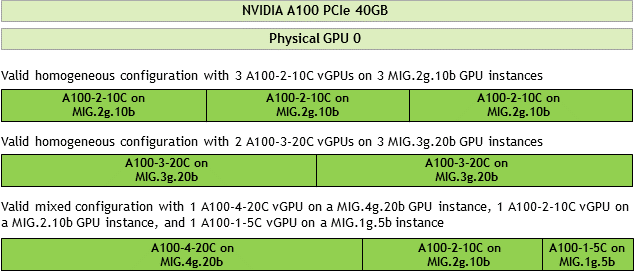
The following figure shows examples of valid homogeneous and mixed MIG-backed virtual GPU configurations on NVIDIA A100 PCIe 40 GB.
A valid homogeneous configuration with 3 A100-2-10C vGPUs on 3 MIG.2g.10b GPU instances
A valid homogeneous configuration with 2 A100-3-20C vGPUs on 3 MIG.3g.20b GPU instances
A valid mixed configuration with 1 A100-4-20C vGPU on a MIG.4g.20b GPU instance, 1 A100-2-10C vGPU on a MIG.2.10b GPU instance, and 1 A100-1-5C vGPU on a MIG.1g.5b instance
Device Groups#
Device Groups provide an abstraction layer for multi-device virtual hardware provisioning. They enable platforms to automatically detect sets of physically connected devices (such as GPUs linked through NVLink or GPU-NIC pairs) at the hardware level and present them as a single logical unit to VMs. This abstraction ensures that AI workloads that depend on low-latency, high-bandwidth communication, such as distributed model training, inference, and large-scale data processing, maximize utilization of the underlying hardware topology.
Device groups consist of two or more hardware devices that share a common PCIe switch or a direct interconnect. This simplifies virtual hardware assignment and enables:
Optimized Multi-GPU and GPU-NIC communication - NVLink-connected GPUs can be provisioned together to maximize peer-to-peer bandwidth and minimize latency, ideal for large-batch training and NCCL all-reduce-heavy workloads. Similarly, GPU-NIC pairs located under the same PCIe switch or capable of delivering optimal GPUDirect RDMA performance are grouped together, enabling high-throughput data ingestion directly into GPU memory for training or inference workloads. Adjacent NICs that do not meet the required performance thresholds are automatically excluded to avoid bottlenecks.
Topology consistency - Unlike manual device assignment, Device Groups guarantee correct placement across PCIe switches and interconnects, even after reboots or events like live migration.
Simplified and reliable provisioning - By abstracting the PCIe and NVLink topology into logical units, device groups eliminate the need for scripting or topology mapping, reducing the risk of misconfiguration and enabling faster deployment of AI clusters.
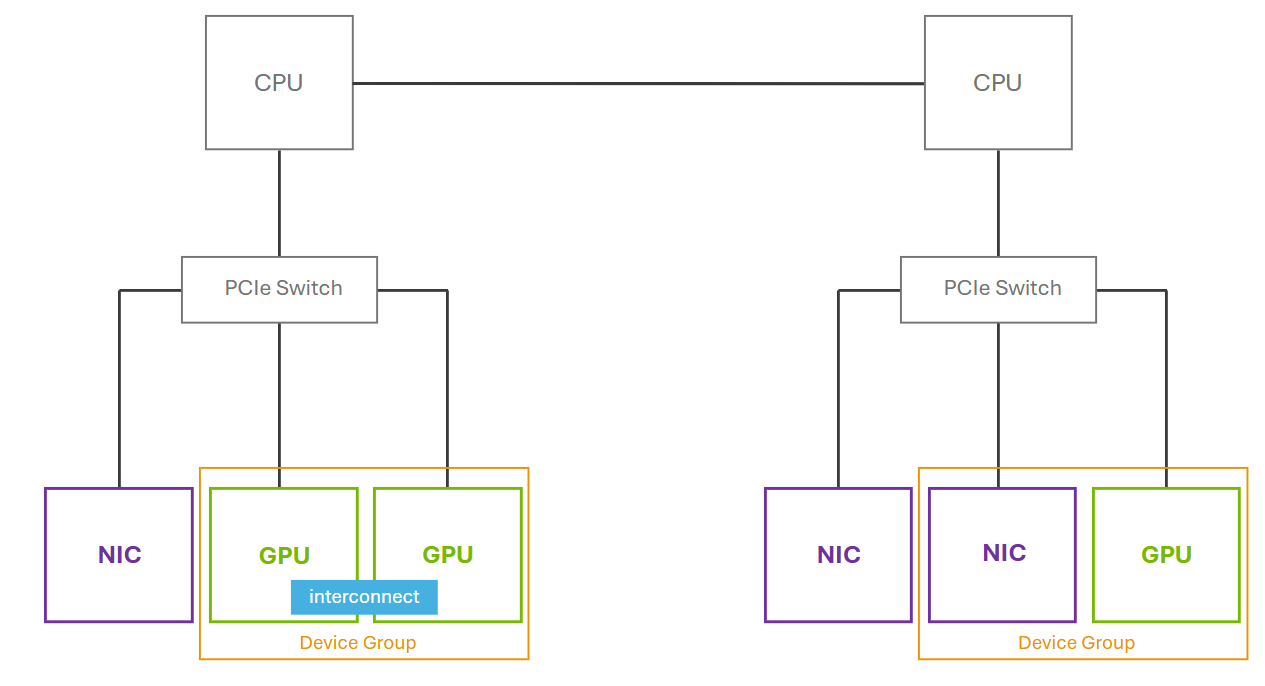
This figure shows how devices (GPUs and NICs) that share a common PCIe switch or a direct GPU interconnect can be presented as a device group. On the right side, although two NICs are connected to the same PCIe switch as the GPU, only one NIC is included in the device group. This is because the NVIDIA driver identifies and exposes only the GPU-NIC pairings that meet the necessary criteria like GPUDirect RDMA. Adjacent NICs that do not satisfy these requirements are excluded.
For more information regarding Hypervisor Platform support for Device Groups, refer to the vGPU Device Groups documentation.
GPUDirect RDMA and GPUDirect Storage#
NVIDIA GPUDirect Remote Direct Memory Access (RDMA) is a technology that enables direct data exchange between NVIDIA GPUs and third-party PCIe peer devices. GPUDirect RDMA enables network devices to access the vGPU frame buffer directly, bypassing CPU host memory. The third-party devices can be network interfaces such as NVIDIA ConnectX SmartNICs or BlueField DPUs, or video acquisition adapters.
GPUDirect Storage (GDS) enables a direct data path between local or remote storage, such as NFS servers or NVMe/NVMe over Fabric (NVMe-oF), and GPU memory. GDS performs direct memory access (DMA) transfers between GPU memory and storage. DMA avoids a bounce buffer through the CPU. This direct path increases system bandwidth and decreases the latency and utilization load on the CPU.
GPUDirect technology is supported only on a subset of vGPUs and guest OS releases.
GPUDirect RDMA and GPUDirect Storage Known Issues and Limitations#
Starting with GPUDirect Storage technology release 1.7.2, the following limitations apply:
GPUDirect Storage technology is not supported on GPUs based on the NVIDIA Ampere GPU architecture.
On GPUs based on the NVIDIA Ada Lovelace, and Hopper GPU architectures, GPUDirect Storage technology is supported only with the guest driver for Linux based on NVIDIA Linux open GPU kernel modules.
GPUDirect Storage technology releases before 1.7.2 are supported only with guest drivers with Linux kernel versions earlier than 6.6.
GPUDirect Storage technology is supported only on the following guest OS releases:
Red Hat Enterprise Linux 8.8+
Ubuntu 22.04 LTS
Ubuntu 24.04 LTS
Hypervisor Platform Support for GPUDirect RDMA and GPUDirect Storage#
Hypervisor Platform |
Version |
|---|---|
Red Hat Enterprise Linux with KVM |
8.8+ |
Ubuntu |
|
VMware vSphere |
|
vGPU Support for GPUDirect RDMA and GPUDirect Storage#
GPUDirect RDMA and GPUDirect Storage technology are supported on all time-sliced and MIG-backed NVIDIA vGPU for Compute on physical GPUs that support single root I/O virtualization (SR-IOV).
For a list of supported GPUs, refer to the Supported NVIDIA GPUs and Networking section in the NVIDIA AI Enterprise Infra Support Matrix.
Guest OS Releases Support for GPUDirect RDMA and GPUDirect Storage#
Linux only. GPUDirect technology is not supported on Windows.
Network Interface Cards Support for GPUDirect RDMA and GPUDirect Storage#
GPUDirect technology is supported on the following network interface cards:
NVIDIA ConnectX- 7 SmartNIC
Mellanox Connect-X 6 SmartNIC
Mellanox Connect-X 5 Ethernet adapter card
Heterogeneous vGPU#
Heterogeneous vGPU allows a single physical GPU to simultaneously support multiple vGPU profiles with different memory allocations (framebuffer sizes). This configuration is beneficial for environments where VMs have diverse GPU resource requirements. By enabling the same physical GPU to host vGPUs of varying sizes, heterogeneous vGPU optimizes overall resource usage, ensuring VMs access only the necessary GPU resources and preventing underutilization.
When a GPU is configured for heterogeneous vGPU, its behavior during events like a host reboot, NVIDIA Virtual GPU Manager reload, or GPU reset varies by hypervisor.
Note
Heterogeneous vGPU configuration only supports the Best Effort and Equal Share schedulers.
Heterogeneous vGPU is supported on Volta and later GPUs. For additional information and operational instructions across different hypervisors, refer to the Heterogeneous vGPU documentation.
Platform Support for Heterogeneous vGPUs#
Hypervisor Platform |
NVIDIA AI Enterprise Infra Release |
Documentation |
|---|---|---|
Red Hat Enterprise Linux with KVM |
|
|
Canonical Ubuntu with KVM |
|
|
VMware vSphere |
|
Live Migration#
Live migration enables the transfer of VMs configured with NVIDIA vGPUs from one physical host to another without downtime. This capability enables enterprises to maintain continuous operations during infrastructure changes, balancing workloads, or reallocating resources with minimal disruption. Live migration offers operational benefits, including enhanced business continuity, scalability, and agility.
For additional information about this feature and instructions on how to perform the operation across different hypervisors, refer to the vGPU Live Migration documentation.
Live Migration Known Issues and Limitations#
Hypervisor Platform |
Documentation |
|---|---|
Red Hat Enterprise Linux with KVM |
Known Issues and Limitations with NVIDIA vGPU for Compute Migration on RHEL KVM |
Ubuntu with KVM |
Known Issues and Limitations with NVIDIA vGPU for Compute Migration on Ubuntu KVM |
VMware vSphere |
Known Issues and Limitations with NVIDIA vGPU for Compute Migration on VMware vSphere |
Platform Support for Live Migration#
Hypervisor Platform |
Version |
NVIDIA AI Enterprise Infra Release |
Documentation |
|---|---|---|---|
Red Hat Enterprise Linux with KVM |
|
|
Migrating a VM Configured with NVIDIA vGPU for Compute on RHEL KVM |
Ubuntu with KVM |
24.04 LTS |
|
Migrating a VM Configured with NVIDIA vGPU for Compute on Linux KVM |
VMware vSphere |
|
All active NVIDIA AI Enterprise Infra Releases |
Migrating a VM Configured with NVIDIA vGPU for Compute on VMware vSphere |
Note
Live Migration is not supported between RHEL 10 and RHEL 9.4.
vGPU Support for Live Migration#
For a list of supported GPUs, refer to the Supported NVIDIA GPUs and Networking section in the NVIDIA AI Enterprise Infra Support Matrix.
Note
Live Migration is not supported between 80GB PCIe and 94GB NVL variants of GPU Boards
Live Migration is not supported between H200 / H800 / H100 GPU Boards
Multi-vGPU and P2P#
Multi vGPU#
Multi-vGPU technology allows a single VM to simultaneously use multiple vGPUs, enhancing its computational capabilities. Unlike standard vGPU configurations that virtualize a single physical GPU for sharing across multiple VMs, Multi-vGPU presents resources from several vGPU devices into a single VM. These vGPUs can be time-sliced or MIG-backed. These vGPU devices are not required to reside on the same physical GPU and can be distributed across separate physical GPUs, pooling their collective power to meet the demands of high-performance workloads.
This technology is advantageous for AI training and inference workloads that require extensive computational power. It optimizes resource allocation by enabling applications within a VM to access dedicated GPU resources. For instance, a VM configured with two NVIDIA A100 GPUs using Multi-vGPU can run large-scale AI models more efficiently than with a single GPU. This dedicated assignment eliminates resource contention between different AI processes within the same VM, ensuring optimal and predictable performance for critical tasks. The ability to aggregate computational power from multiple vGPUs makes Multi-vGPU a solution for scaling complex AI model development and deployment.
vGPU Support for Multi-vGPU#
You can assign multiple vGPUs with differing amounts of frame buffer to a single VM, provided the board type and the series of all the vGPUs are the same. For example, you can assign an A40-48C vGPU and an A40-16C timesliced vGPUs to the same VM. You can also assign an A100-4-20C vGPU and one A100-2-10C vGPU to a VM, both on MIG instances from an A100 board. However, you cannot assign an A30-8C vGPU and an A16-8C vGPU to the same VM.
Board |
vGPU [1] |
|---|---|
NVIDIA H800 PCIe 94GB (H800 NVL) |
All NVIDIA vGPU for Compute |
NVIDIA H800 PCIe 80GB |
All NVIDIA vGPU for Compute |
NVIDIA H800 SXM5 80GB |
NVIDIA vGPU for Compute [3] |
NVIDIA H200 PCIe 141GB (H200 NVL) |
All NVIDIA vGPU for Compute |
NVIDIA H200 SXM5 141GB |
NVIDIA vGPU for Compute [3] |
NVIDIA H100 PCIe 94GB (H100 NVL) |
All NVIDIA vGPU for Compute |
NVIDIA H100 SXM5 94GB |
NVIDIA vGPU for Compute [3] |
NVIDIA H100 PCIe 80GB |
All NVIDIA vGPU for Compute |
NVIDIA H100 SXM5 80GB |
NVIDIA vGPU for Compute [3] |
NVIDIA H100 SXM5 64GB |
NVIDIA vGPU for Compute [3] |
NVIDIA H20 SXM5 141GB |
NVIDIA vGPU for Compute [3] |
NVIDIA H20 SXM5 96GB |
NVIDIA vGPU for Compute [3] |
Board |
vGPU |
|---|---|
NVIDIA L40 |
|
NVIDIA L40S |
|
NVIDIA L20 |
|
NVIDIA L4 |
|
NVIDIA L2 |
|
NVIDIA RTX 6000 Ada |
|
NVIDIA RTX 5880 Ada |
|
NVIDIA RTX 5000 Ada |
|
Board |
vGPU [1] |
|---|---|
|
|
NVIDIA A800 PCIe 40GB active-cooled |
|
NVIDIA A800 HGX 80GB |
|
|
|
NVIDIA A100 HGX 80GB |
|
NVIDIA A100 PCIe 40GB |
|
NVIDIA A100 HGX 40GB |
|
NVIDIA A40 |
|
|
|
NVIDIA A16 |
|
NVIDIA A10 |
|
NVIDIA RTX A6000 |
|
NVIDIA RTX A5500 |
|
NVIDIA RTX A5000 |
|
Board |
vGPU |
|---|---|
Tesla T4 |
|
Quadro RTX 6000 passive |
|
Quadro RTX 8000 passive |
|
Board |
vGPU |
|---|---|
Tesla V100 SXM2 |
|
Tesla V100 SXM2 32GB |
|
Tesla V100 PCIe |
|
Tesla V100 PCIe 32GB |
|
Tesla V100S PCIe 32GB |
|
Tesla V100 FHHL |
|
Peer-To-Peer (P2P) CUDA Transfers#
Peer-to-Peer (P2P) CUDA transfers enable device memory between vGPUs on different GPUs that are assigned to the same VM to be accessed from within CUDA kernels. NVLink is a high-bandwidth interconnect that enables fast communication between such vGPUs.
P2P CUDA transfers over NVLink are supported only on a subset of vGPUs, hypervisor releases, and guest OS releases.
Peer-to-Peer CUDA Transfers Known Issues and Limitations#
Only time-sliced vGPUs are supported. MIG-backed vGPUs are not supported.
P2P transfers over PCIe are not supported.
vGPU Support for P2P#
Only NVIDIA vGPU for Compute time-sliced vGPUs allocated all of the physical GPU framebuffer on physical GPUs supporting NVLink are supported.
Board |
vGPU |
|---|---|
NVIDIA H800 PCIe 94GB (H800 NVL) |
H800L-94C |
NVIDIA H800 PCIe 80GB |
H800-80C |
NVIDIA H200 PCIe 141GB (H200 NVL) |
H200-141C |
NVIDIA H200 SXM5 141GB |
H200X-141C |
NVIDIA H100 PCIe 94GB (H100 NVL) |
H100L-94C |
NVIDIA H100 SXM5 94GB |
H100XL-94C |
NVIDIA H100 PCIe 80GB |
H100-80C |
NVIDIA H100 SXM5 80GB |
H100XM-80C |
NVIDIA H100 SXM5 64GB |
H100XS-64C |
NVIDIA H20 SXM5 141GB |
H20X-141C |
NVIDIA H20 SXM5 96GB |
H20-96C |
Board |
vGPU |
|---|---|
|
A800D-80C |
NVIDIA A800 PCIe 40GB active-cooled |
A800-40C |
NVIDIA A800 HGX 80GB |
A800DX-80C [2] |
|
A100D-80C |
NVIDIA A100 HGX 80GB |
A100DX-80C [2] |
NVIDIA A100 PCIe 40GB |
A100-40C |
NVIDIA A100 HGX 40GB |
A100X-40C [2] |
NVIDIA A40 |
A40-48C |
|
A30-24C |
NVIDIA A16 |
A16-16C |
NVIDIA A10 |
A10-24C |
NVIDIA RTX A6000 |
A6000-48C |
NVIDIA RTX A5500 |
A5500-24C |
NVIDIA RTX A5000 |
A5000-24C |
Board |
vGPU |
|---|---|
Quadro RTX 8000 passive |
RTX8000P-48C |
Quadro RTX 6000 passive |
RTX6000P-24C |
Board |
vGPU |
|---|---|
Tesla V100 SXM2 |
V100X-16C |
Tesla V100 SXM2 32GB |
V100DX-32C |
Hypervisor Platform Support for Multi-vGPU and P2P#
Hypervisor Platform |
NVIDIA AI Enterprise Infra Release |
Supported vGPU Types |
Documentation |
|---|---|---|---|
Red Hat Enterprise Linux with KVM |
All active NVIDIA AI Enterprise Infra Releases |
All NVIDIA vGPU for Compute with PCIe GPUs; on supported GPUs, both time-sliced and MIG-backed vGPUs are supported. |
|
Ubuntu with KVM |
All active NVIDIA AI Enterprise Infra Releases |
All NVIDIA vGPU for Compute with PCIe GPUs; on supported GPUs, both time-sliced and MIG-backed vGPUs are supported. |
|
VMware vSphere |
All active NVIDIA AI Enterprise Infra Releases |
All NVIDIA vGPU for Compute, on supported GPUs, both time-sliced and MIG-backed vGPUs are supported. |
Note
P2P CUDA transfers are not supported on Windows. Only Linux OS distros as outlined in NVIDIA AI Enterprise Infrastructure Support Matrix are supported.
NVIDIA NVSwitch#
NVIDIA NVSwitch provides a high-bandwidth, low-latency interconnect fabric that enables direct communication between multiple GPUs within a system. NVIDIA NVSwitch enables peer-to-peer vGPU communication within a single node over the NVLink fabric. The NVSwitch acts as a high-speed crossbar, allowing any GPU to communicate with any other GPU at full NVLink speed, improving communication efficiency and bandwidth compared to traditional PCIe-based interconnections. It facilitates the creation of large GPU clusters, enabling AI and deep learning applications to efficiently utilize pooled GPU memory and compute resources for complex, computationally intensive tasks. It is supported only on a subset of hardware platforms, vGPUs, hypervisor software releases, and guest OS releases.
For information about using the NVSwitch, refer to the NVIDIA Fabric Manager documentation.
Platform Support for NVIDIA NVSwitch#
NVIDIA HGX H200 8-GPU baseboard
NVIDIA HGX H100 8-GPU baseboard
NVIDIA HGX H800 8-GPU baseboard
NVIDIA HGX A100 8-GPU baseboard
NVIDIA NVSwitch Limitations#
Only time-sliced vGPUs are supported. MIG-backed vGPUs are not supported.
GPU passthrough is not supported on NVIDIA Systems that include NVSwitch when using VMware vSphere.
All vGPUs communicating peer-to-peer must be assigned to the same VM.
On GPUs based on the NVIDIA Hopper GPU architecture, multicast is supported when unified memory (UVM) is enabled.
Hypervisor Platform Support for NVSwitch#
Consult the documentation from your hypervisor vendor for information about which generic Linux with KVM hypervisor software releases supports NVIDIA NVSwitch.
All supported Red Hat Enterprise Linux KVM and Ubuntu KVM releases support NVIDIA NVSwitch.
The earliest VMware vSphere Hypervisor (ESXi) release that supports NVIDIA NVSwitch depends on the GPU architecture.
GPU Architecture |
Earliest Supported VMware vSphere Hypervisor (ESXi) Release |
|---|---|
NVIDIA Hopper |
VMware vSphere Hypervisor (ESXi) 8 update 2 |
NVIDIA Ampere |
VMware vSphere Hypervisor (ESXi) 8 update 1 |
vGPU Support for NVSwitch#
Only the following vGPU for Compute time-sliced vGPUs allocated all of the physical GPU’s framebuffer are supported:
NVIDIA A800
NVIDIA A100 HGX
NVIDIA H800
NVIDIA H200 HGX
NVIDIA H100 SXM5
NVIDIA H20
Board |
vGPU |
|---|---|
NVIDIA H800 SXM5 80GB |
H800XM-80C |
NVIDIA H200 SXM5 141GB |
H200X-141C |
NVIDIA H100 SXM5 80GB |
H100XM-80C |
NVIDIA H20 SXM5 141GB |
H20X-141C |
NVIDIA H20 SXM5 96GB |
H20-96C |
Board |
vGPU |
|---|---|
NVIDIA A800 HGX 80GB |
A800DX-80C |
NVIDIA A100 HGX 80GB |
A100DX-80C |
NVIDIA A100 HGX 40GB |
A100X-40C |
Guest OS Releases Support for NVSwitch#
Linux only. NVIDIA NVSwitch is not supported on Windows.
NVLink Multicast#
NVLink multicast support requires that unified memory is enabled. For more information about enabling unified memory, refer to the Enabling Unified Memory for a vGPU documentation.
vGPU Support for NVLink Multicast#
Only full-sized, time-sliced NVIDIA vGPU for Compute support NVLink multicast.
Board |
vGPU |
|---|---|
NVIDIA HGX H800 |
NVIDIA H800XM-80C |
NVIDIA HGX H200 |
NVIDIA H200X-141C |
NVIDIA HGX H100 |
NVIDIA H100XM-80C |
NVIDIA H20 HGX 141GB |
H20X-141C |
HGX H20 96GB |
NVIDIA H20-96C |
Scheduling Policies#
NVIDIA vGPU for Compute offers a range of scheduling policies that allow administrators to customize resource allocation based on workload intensity and organizational priorities, ensuring optimal resource utilization and alignment with business needs. These policies determine how GPU resources are shared across multiple VMs and directly impact factors like latency, throughput, and performance stability in multi-tenant environments.
For workloads with varying demands, time slicing plays a critical role in determining scheduling efficiency. The vGPU scheduler time slice represents the duration a VM’s work is allowed to run on the GPU before preemption. A longer time slice maximizes throughput for compute-heavy workloads, such as CUDA applications, by minimizing context switching. In contrast, a shorter time slice reduces latency, making it ideal for latency-sensitive tasks like graphics applications.
NVIDIA provides three scheduling modes: Best Effort, Equal Share, and Fixed Share, each designed to different workload requirements and environments. For more information, refer to the vGPU Schedulers documentation.
Refer to the Changing Scheduling Behavior for Time-Sliced vGPUs documentation for how to configure and adjust scheduling policies to meet specific resource distribution needs.
Suspend-Resume#
The suspend-resume feature allows NVIDIA vGPU-configured VMs to be temporarily paused and later resumed without losing their operational state. During suspension, the entire VM state, including GPU and compute resources, is saved to disk, freeing these resources on the host. Upon resumption, the state is restored, enabling workload continuation.
This capability provides operational flexibility and optimizes resource utilization. It is valuable for planned host maintenance, freeing resources by pausing non-critical workloads, and ensuring consistent environments for development and testing.
Unlike live migration, suspend-resume involves downtime during both suspension and resumption. Cross-host operations require strict compatibility across hosts, encompassing GPU type, Virtual GPU manager version, memory configuration, and NVLink topology.
Suspend-resume is supported on all GPUs that enable vGPU functionality; however, compatibility varies by hypervisor, NVIDIA vGPU software release, and guest operating system.
For additional information and operational instructions across different hypervisors, refer to the vGPU Suspend-Resume documentation.
Suspend-Resume Known Issues and Limitations#
Hypervisor Platform |
Documentation |
|---|---|
VMware vSphere |
Known Issues and Limitations with Suspend Resume on VMware vSphere |
Note
While live migration generally allows resuming a suspended VM on any compatible vGPU host manager, a current bug in Red Hat Enterprise Linux 9.4 and Ubuntu 24.04 LTS limits suspend, resume, and migration to hosts with an identical vGPU manager version. The issue has been resolved in Red Hat Enterprise Linux 9.6 and later.
Platform Support for Suspend-Resume#
Suspend-resume is supported on all GPUs that support NVIDIA vGPU for Compute, but compatibility varies by hypervisor, release version, and guest operating system.
Hypervisor Platform |
Version |
NVIDIA AI Enterprise Infra Release |
Documentation |
|---|---|---|---|
Red Hat Enterprise Linux with KVM |
|
|
Suspending and Resuming a VM Configured with NVIDIA vGPU for Compute on RHEL KVM |
Ubuntu with KVM |
24.04 LTS |
|
Suspending and Resuming a VM Configured with NVIDIA vGPU for Compute on Ubuntu KVM |
VMware vSphere |
|
All active NVIDIA AI Enterprise Infra Releases |
Suspending and Resuming a VM Configured with NVIDIA vGPU for Compute on VMware vSphere |
vGPU Support for Suspend-Resume#
For a list of supported GPUs, refer to the Supported NVIDIA GPUs and Networking section in the NVIDIA AI Enterprise Infra Support Matrix.
Unified Virtual Memory (UVM)#
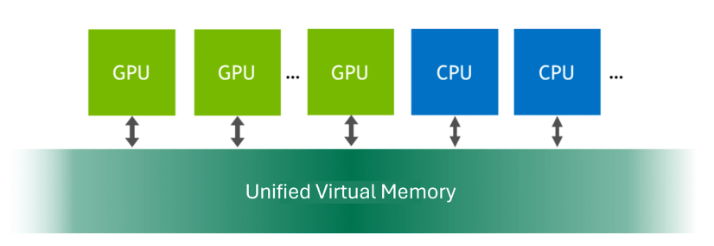
Unified Virtual Memory (UVM) provides a single, cohesive memory address space accessible by both CPUs and GPUs within a system. This feature creates a managed memory pool, allowing data to be allocated and accessed by code executing on either processor. The primary benefit is simplified programming and enhanced performance for GPU-accelerated workloads, as it eliminates the need for applications to explicitly manage data transfers between CPU and GPU memory. For additional information about this feature, refer to the Unified Virtual Memory documentation.
UVM Known Issues and Limitations#
Unified Virtual Memory (UVM) is restricted to 1:1 time-sliced and MIG vGPU for Compute profiles that allocate the entire framebuffer of a compatible physical GPU or GPU Instance. Fractional time-sliced vGPUs do not support UVM.
UVM is only supported on Linux Guest OS distros. Windows Guest OS is not supported.
Enabling UVM disables vGPU migration for the VM, which may reduce operational flexibility in environments reliant on live migration.
UVM is disabled by default and must be explicitly enabled for each vGPU that requires it by setting a specific vGPU plugin parameter for the VM.
When deploying NVIDIA NIM, if UVM is enabled and an optimized engine is available, the model will run on the TensorRT-LLM (TRT-LLM) backend. Otherwise, it will typically run on the vLLM backend.
Hypervisor Platform Support for UVM#
Unified Virtual Memory (UVM) is disabled by default. If used, you must enable unified memory individually for each vGPU for Compute VM that requires it by setting a vGPU plugin parameter. How to enable UVM for a vGPU VM depends on the hypervisor that you are using.
Hypervisor Platform |
Documentation |
|---|---|
Red Hat Enterprise Linux with KVM |
Enabling Unified Memory for NVIDIA vGPU for Compute VM on Red Hat Enterprise Linux KVM |
Ubuntu with KVM |
Enabling Unified Memory for NVIDIA vGPU for Compute VM on Ubuntu KVM |
VMware vSphere |
Enabling Unified Memory for NVIDIA vGPU for Compute VM on VMware vSphere |
vGPU Support for UVM#
UVM is supported on 1:1 MIG-backed and time sliced vGPUs. These vGPUs have the entire framebuffer of a MIG GPU Instance or physical GPU assigned to a single vGPU.
Board |
vGPU |
|---|---|
NVIDIA H800 PCIe 94GB (H800 NVL) |
|
NVIDIA H800 PCIe 80GB |
|
NVIDIA H800 SXM5 80GB |
|
NVIDIA H200 SXM5 |
|
NVIDIA H200 NVL |
|
NVIDIA H100 PCIe 94GB (H100 NVL) |
|
NVIDIA H100 SXM5 94GB |
|
NVIDIA H100 PCIe 80GB |
|
NVIDIA H100 SXM5 80GB |
|
NVIDIA H100 SXM5 64GB |
|
NVIDIA H20 SXM5 141GB |
|
NVIDIA H20 SXM5 96GB |
|
Board |
vGPU |
|---|---|
NVIDIA L40 |
L40-48C |
NVIDIA L40S |
L40S-48C |
|
L20-48C |
NVIDIA L4 |
L4-24C |
NVIDIA L2 |
L2-24C |
NVIDIA RTX 6000 Ada |
RTX 6000 Ada-48C |
NVIDIA RTX 5880 Ada |
RTX 5880 Ada-48C |
NVIDIA RTX 5000 Ada |
RTX 6000 Ada-32C |
Board |
vGPU |
|---|---|
|
|
NVIDIA A800 PCIe 40GB active-cooled |
|
NVIDIA A800 HGX 80GB |
|
|
|
NVIDIA A100 HGX 80GB |
|
NVIDIA A100 PCIe 40GB |
|
NVIDIA A100 HGX 40GB |
|
NVIDIA A40 |
A40-48C |
|
|
NVIDIA A16 |
A16-16C |
NVIDIA A10 |
A10-24C |
NVIDIA RTX A6000 |
A6000-48C |
NVIDIA RTX A5500 |
A5500-24C |
NVIDIA RTX A5000 |
A5000-24C |
Footnotes