

Introduction
This chapter introduces some features of NVIDIA Base Command Manager and describes a basic cluster in terms of its hardware.
2.1 What Is NVIDIA Base Command Manager?
NVIDIA Base Command Manager 11 is a cluster management application built on top of major Linux distributions.
2.1.1 What OS Platforms Is It Available For?
BCM is available for the following OS platforms:
-
Red Hat Enterprise Linux Server and some derivatives, such as Rocky Linux
-
Versions 8.x
-
Versions 9.x.
-
-
SLES versions:
- SUSE Enterprise Server 15
-
Ubuntu versions:
-
Jammy Jellyfish 22.04
-
Noble Numbat 24.04
-
Resolute Raccoon 26.04
-
DGX OS 7 (described at https://docs.nvidia.com/dgx/dgx-os-7-user-guide/introduction.html)
-
DGX OS 8 (as of 8.0, x86_64 systems only; described at https://docs.nvidia.com/dgx/dgx-os-8-user-guide/introduction.html)
-
Typically BCM is installed either on a head node, or on a pair of head nodes in a high availability configuration. Images are provisioned to the non-head nodes from the head node(s). The OS for the images is by default the same as that of the head node(s), but the OS used for the images can be changed later on (section 9.6 of the Administrator Manual).
At the time of writing of this section in September 2023, the OS platforms listed all support NVIDIA AI Enterprise (https://docs.nvidia.com/ai-enterprise/index.html), with the exception for now of RHEL9 and derivatives.
2.1.2 What Architectures Does It Run On?
Within the distributions listed in section 2.1.1, the BCM application runs on the following architectures:
-
on the
x86_64architecture that is supported by Intel and AMD 64-bit CPUs -
on the
arm64(AArch64) architecture that is supported by ARMv8 CPUs
2.1.3 What Features Are Supported Per OS And Architecture?
BCM aims to run so that it is independent of the chosen OS and architecture. That is, it aims to work the same way for each OS or architecture. There are necessarily some limitations to this, and these are documented in a feature matrix at https://service.bcm.nvidia.com/feature-matrix/.
2.1.4 What OS Platforms Can It Be Managed From?
While BCM runs directly on the OS platforms listed in section 2.1.1, BCM can be managed from many more OS platforms, when controlled by these front ends:
-
Base View (section 2.4 of the Administrator Manual): a GUI which conveniently runs on modern desktop web browsers, and therefore on all operating system versions that support a modern browser. This includes Microsoft Windows, MacOS and iOS, and Linux.
-
cmsh(section 2.5 of the Administrator Manual): an interactive shell front end that can be accessed from any computing device with a secured SSH terminal access.
2.2 Cluster Structure
In its most basic form, a cluster running BCM contains:
-
One machine designated as the head node
-
Several machines designated as compute nodes
-
One or more (possibly managed) Ethernet switches
-
One or more power distribution units (Optional)
The head node is the most important machine within a cluster because it controls all other devices, such as compute nodes, switches and power distribution units. Furthermore, the head node is also the host that all users (including the administrator) log in to in a default cluster. The head node is typically the only machine that is connected directly to the external network and is usually the only machine in a cluster that is equipped with a monitor and keyboard. The head node provides several vital services to the rest of the cluster, such as central data storage, workload management, user management, DNS and DHCP service. The head node in a cluster is also frequently referred to as the master node.
Often, the head node is replicated to a second head node, frequently called a passive head node. If the active head node fails, the passive head node can become active and take over. This is known as a high availability setup, and is a typical configuration (Chapter 15 of the Administrator Manual) in BCM.
A cluster normally contains a considerable number of non-head, or regular nodes, also referred to simply as nodes. The head node, not surprisingly, manages these regular nodes over the network.
Most of the regular nodes are compute nodes. Compute nodes are the machines that will do the heavy work when a cluster is being used for large computations. In addition to compute nodes, larger clusters may have other types of nodes as well (e.g. storage nodes and login nodes). Nodes typically install automatically through the (network bootable) node provisioning system that is included with BCM. Every time a compute node is started, the software installed on its local hard drive is synchronized automatically against a software image which resides on the head node. This ensures that a node can always be brought back to a “known state”. The node provisioning system greatly eases compute node administration and makes it trivial to replace an entire node in the event of hardware failure. Software changes need to be carried out only once (in the software image), and can easily be undone. In general, there will rarely be a need to log on to a compute node directly.
In most cases, a cluster has a private internal network, which is usually built from one or multiple managed Gigabit Ethernet switches, or made up of an InfiniBand or Omni-Path fabric. The internal network connects all nodes to the head node and to each other. Compute nodes use the internal network for booting, data storage and interprocess communication. In more advanced cluster setups, there may be several dedicated networks. It should be noted that the external network—which could be a university campus network, company network or the Internet—is not normally directly connected to the internal network. Instead, only the head node is connected to the external network.
Figure 2.1 illustrates a typical cluster network setup.
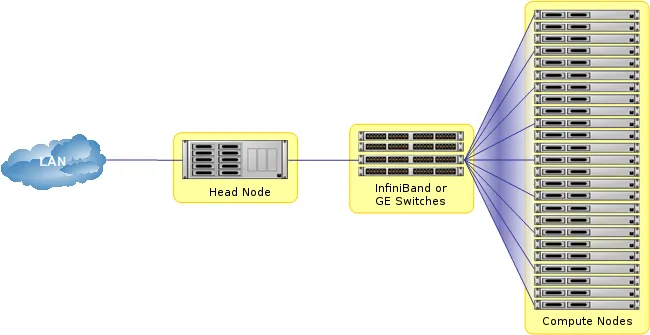
Figure 2.1: Cluster network
Most clusters are equipped with one or more power distribution units. These units supply power to all compute nodes and are also connected to the internal cluster network. The head node in a cluster can use the power control units to switch compute nodes on or off. From the head node, it is straightforward to power on/off a large number of compute nodes with a single command.