

Maintain Session Affinity
By the end of this guide, the frontend keeps every turn of an agent session on the same worker, so each turn reuses the KV cache that the earlier turns built.
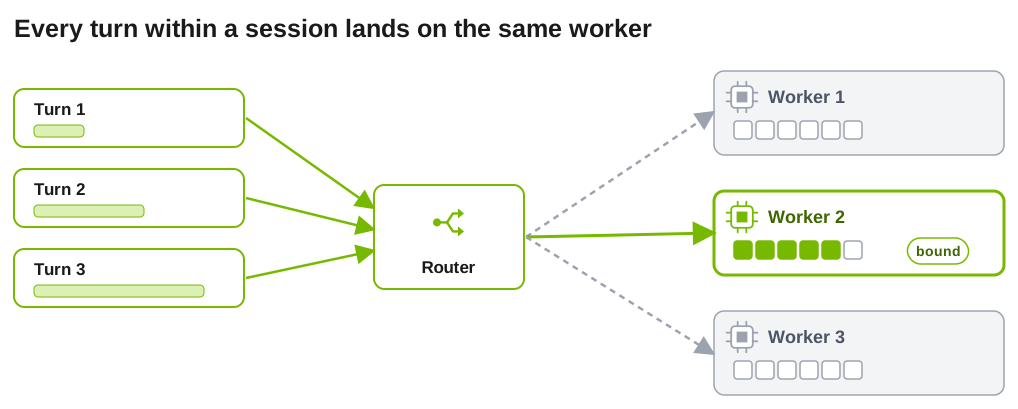
An agent turn repeats the whole conversation so far. If the turn lands on the worker that already holds that prefix, it skips most of the prefill. KV-aware routing (--router-mode kv) already prefers workers with cache overlap. Session affinity goes further: it binds a session to one worker for a while, so reuse does not depend on the router’s scoring on every turn.
Use it when your agents run many turns on a growing context and you have more than one worker. Pinning can unbalance load. soft mode does not fix that on its own: with the default selector it keeps the bound worker while that worker is eligible. Use it with a custom or ThunderAgent policy that can choose another worker.
Before You Start
- The frontend runs with
--router-mode kv. - Requests carry a session ID. Packaged harnesses send one automatically, and custom clients send
x-dynamo-session-id. See Identify agent sessions.
A session ID alone does not change placement. Affinity is off until you set a TTL.
Enable Session Affinity
Set an idle TTL on the frontend:
The same setting is available as DYN_ROUTER_SESSION_AFFINITY_TTL_SECS. If you started the endpoint with agg_agent.sh in Run an agent on Dynamo, stop it and start it again with the TTL in its environment:
The value is the idle timeout in seconds, from 1 through 31536000. A binding expires when the session has had no active requests for that long, so choose a value longer than the pauses between your agent’s turns (tool runs, human review).
The first successfully dispatched request binds the session to its selected worker and, when available, its data-parallel rank. Later requests from the same session follow that binding.
Choose Hard or Soft Binding
Set --router-session-affinity-mode (or DYN_ROUTER_SESSION_AFFINITY_MODE):
Check That It Works
Enable tracing and list the worker for each request in a session. The default trace sink writes gzip segments, which is also what agg_agent.sh produces:
This check needs at least two eligible workers. With one worker, every row shows that worker whether or not affinity is on, and KV routing alone can raise cached_tokens. To confirm affinity, run the same multi-turn session once without the TTL and once with it. The trace writer appends new segments after the existing ones, so clear the old segments before each run to keep the two runs apart:
Then run the filter above. With hard affinity, every row for the session shows the same worker. Without it, rows can spread across workers.
Subagents
A request that carries a parent session ID binds under a key derived from that parent, so the subagents of one parent share a binding while the parent keeps its own. This behavior is experimental. Dynamo reads the parent ID from X-Dynamo-Parent-Session-ID and from the native parent headers listed in Identify agent sessions.
- Under
hardmode, the group stays on its first worker and does not move because of load. The binding resets only when the worker becomes unusable or dispatch fails. - Siblings share one binding, so when several subagents start at once, the others wait for the first sibling’s dispatch to finish before they are placed.
- With TensorRT-LLM attention data parallelism and
kv_cache_routing_conversation_affinityenabled, set--conversation-affinity-dp-rank-source dynamoso the rank Dynamo selects is the one the engine records.
SGLang Session Control
On SGLang, session control (nvext.session_control) also keeps a subagent’s KV cache isolated from other sessions. See Agents on SGLang.
Notes
- Affinity state is local to each router and synchronizes across router replicas on a best-effort basis.
- The TTL is independent of
--router-ttl-secsand--router-predicted-ttl-secs. - An explicit worker target on a request always wins over a binding, in both modes.
For the full binding rules, including how soft rebinding commits and LoRA behavior, see Session Affinity in Router Configuration and Tuning.
Next
Prioritize requests lets interactive requests go ahead of background work on the same workers.