

Backup Defaults: Softwareimage and Category#
At this stage, it is recommended to create a backup of the default software image and category included with the BCM installation. This serves as a precaution so that if changes are made that negatively affect future deployments, these backups can be used to restore the original “out-of-the-box” configuration.
Backup the default-image softwareimage.
a. Enter cmsh.
root@nvidia-era-bcm-01:~# cmshb. Enter the softwareimage mode.
[nvidia-era-bcm-01]% softwareimage
c. List the current software images.
[nvidia-era-bcm-01->softwareimage]% list

Figure 74 Output of the list command showing current software images in softwareimage mode#
d. Clone the default image, naming the new image
backup-default-image.[nvidia-era-bcm-01->softwareimage]% clone default-image backup-default-image
e. Commit the changes to start the cloning process, and wait for it to complete.
[nvidia-era-bcm-01->softwareimage*[backup-default-image*]]% commit
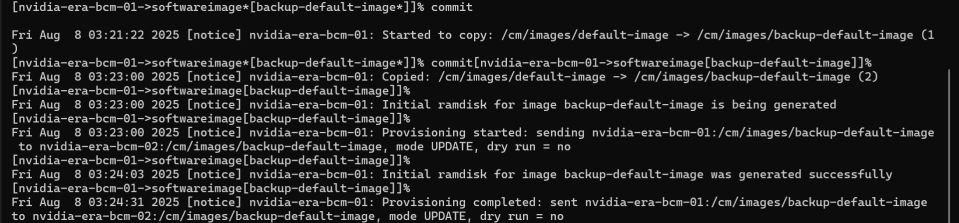
Figure 75 Output of the commit command showing the cloning process for the backup-default-image softwareimage#
f. Exit to return to the softwareimage mode and list the softwareimages to confirm creation.
[nvidia-era-bcm-01->softwareimage*[backup-default-image]]% exit
[nvidia-era-bcm-01->softwareimage]% list

Figure 76 Output of the softwareimage list command confirming creation of backup-default-image#
Backup the default category and set the softwareimage.
a. Enter the category mode.
[nvidia-era-bcm-01->softwareimage]% category
b. List the current categories.
[nvidia-era-bcm-01->category]% list

Figure 77 Output of the list command showing current categories in category mode#
c. Clone the default category, setting the new category name to
backup-default.[nvidia-era-bcm-01->category]% clone default backup-default
d. Set the softwareimage to point to the
backup-default-imagecreated in the previous steps.[nvidia-era-bcm-01->category*[backup-default*]]% set softwareimage backup-default-image
e. Commit the changes.
[nvidia-era-bcm-01->category*[backup-default*]]% commit
f. Exit to return to the category mode and list the categories to creation.
[nvidia-era-bcm-01->category*[backup-default]]% exit
[nvidia-era-bcm-01->category]% list

Figure 78 Output of the category list command confirming creation of the backup-default category#