

Licensing#
A license will now be requested and installed to enable the full features of BCM.
Details required to complete this section, with example values used in this guide:
Field |
Example Value |
|---|---|
Product Key |
000354-515786-112224-207440-186713 |
Country |
US |
State or Province Name |
California |
Locality Name |
Santa Clara |
Organization Name |
NVIDIA |
Organizational Unit Name |
nvidia-era |
Cluster Name |
nvidia-era-bcm-cluster |
MAC Address of primary head node |
00:50:56:04:34:00 |
MAC Address of secondary head node |
00:50:56:04:34:10 |
Note
Where applicable these values will be displayed in red. Be sure to replace all example values with actual information relevant to the target environment.
Note
It is recommended to use the MAC address of the first integrated network interface (eth0) for licensing, as opposed to a PCIe or other peripheral interface as it is less likely to be replaced.
There are several ways to obtain the MAC address, which are beyond the scope of this guide. Possible methods include referencing the IPMI BMC, or from an operating system running on the host.
Enter cmsh (if not already within it).
root@nvidia-era-bcm-01:~# cmshEnter the main mode
[nvidia-era-bcm-01]% main
Get the current license information.
[nvidia-era-bcm-01->main]% licenseinfo
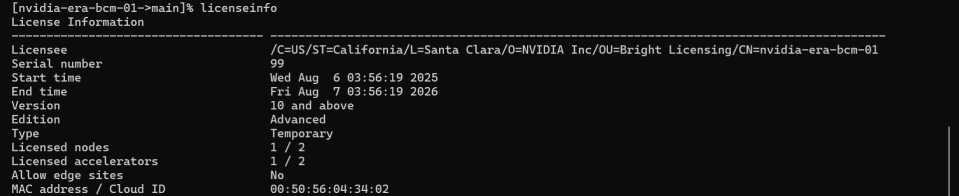
Figure 27 Output of the licenseinfo command showing current license status#
Identify the MAC address of both primary and secondary head nodes.
Note
It is recommended to use a MAC address that will not change if peripheral components (such as PCIe NICs) are replaced. Therefore, obtain the MAC address of an integrated NIC (eth0) for licensing. There are several ways to obtain this information, which are beyond the scope of this guide. Possible methods include using IPMI BMC or checking directly from the operating system running on the host.
Request a license.
a. Exit cmsh and return to the OS root.
[nvidia-era-bcm-01]% quit

Figure 28 Output after exiting cmsh before running the request-license command#
b. Run the request-license command.
root@nvidia-era-bcm-01:~# request-licensec. Follow the prompts, entering information specific to the target environment.
> Product Key
> Country Name
> State or Province Name
> Locality Name
> Organization Name
> Organizational Unit Name
> Cluster Name
> MAC Address of primary head node
> "y" to the question "Submit certificate request…?"
> "y" to the question "Will this cluster use a high-availability setup with 2 head nodes?"
> MAC Address of secondary head node
> "y" to the question "Install license?"
> "y" to the question "Is the license information correct?"
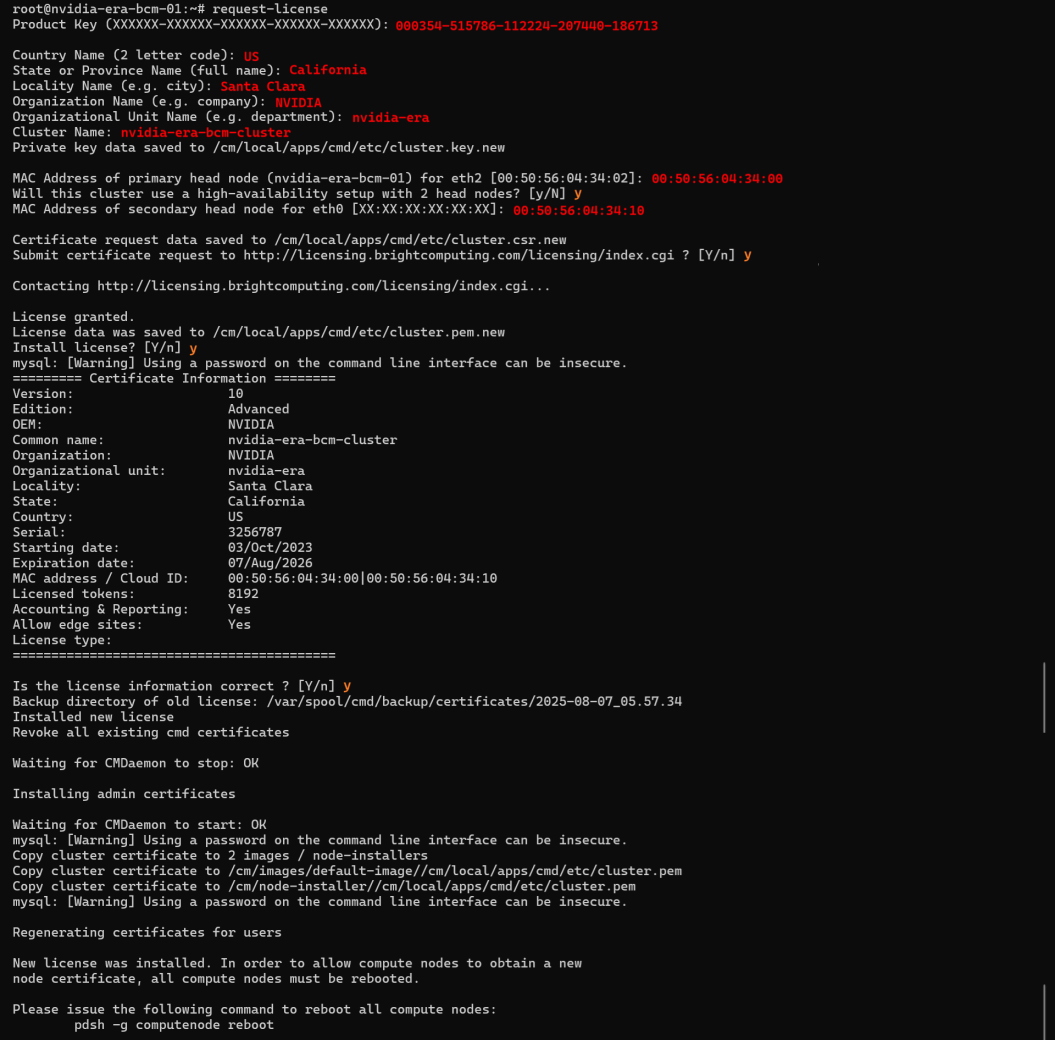
Figure 29 Completed license installation confirmation screen#