

Configure the Head Node Network Interfaces#
In this section, the primary head node is configured with a bonded LACP interface on the N-S internal network. This interface is used for node image deployment as well as BCM management.
The head node is also configured to use the Pre-RHEL7 naming convention. This is a convenience option, as referring to traditional interface names (eth0, eth1) instead of the Post-RHEL7 scheme (ens192, enp0s3) can be easier when managing a large number of nodes with varying interfaces.
In this example, eth0 and eth1 are the integrated device interfaces on the out-of-band network, and eth1 and eth2 are the DPU interfaces on the N-S internal network.
Details required to complete this section, with example values used in this guide:
Parameter |
Example Value |
|---|---|
Existing interface name |
ens224 |
IP address |
192.168.100.253 |
Bond interfaces |
eth2 eth3 |
Note
Where applicable these values will be displayed in red. Be sure to replace all example values with actual information relevant to the target environment.
Configure GRUB#
The first stage is to update the interfaces in the base operating system. This is typically handled by GRUB (Grand Unified Bootloader) and can be edited and updated using the commands below.
As a precaution, back up the existing grub configuration.
root@nvidia-era-bcm-01:# cp /etc/default/grub /etc/default/grub.BAK
Edit the grub configuration by amending the line
GRUB_CMDLINE_LINUX_DEFAULTto includenet.ifnames=0.In this example nano is used as the editor, but the administrator should use the editor they are most comfortable with.
root@nvidia-era-bcm-01:~# nano /etc/default/grub
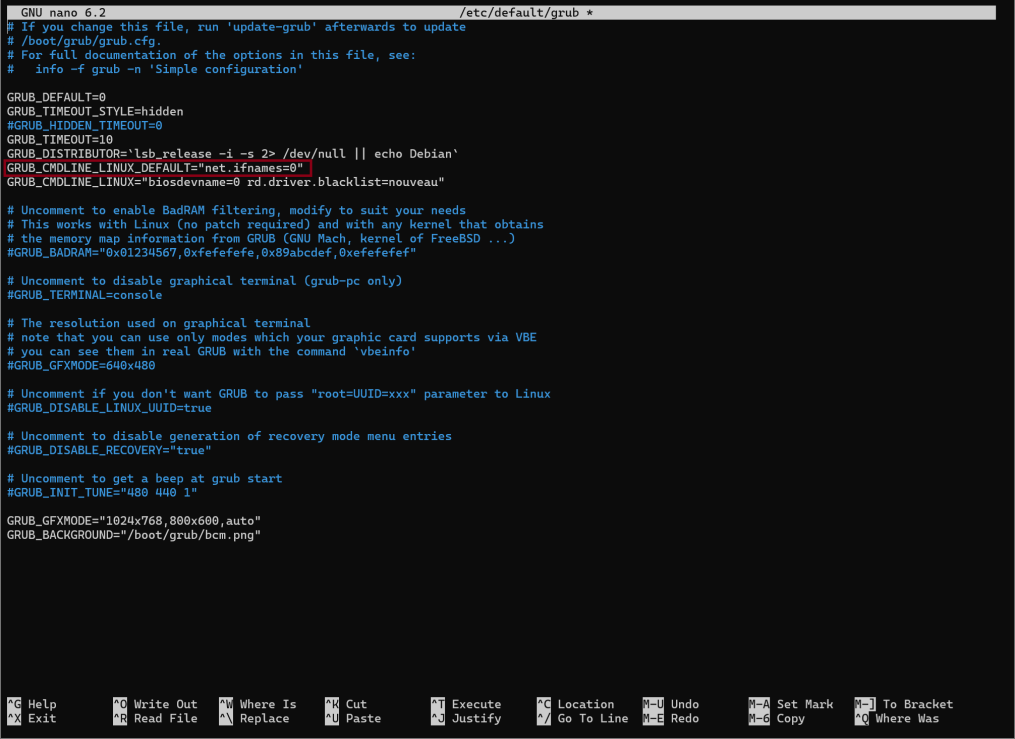
Figure 22 The /etc/default/grub file open in the nano editor, showing the GRUB_CMDLINE_LINUX_DEFAULT line amended to include net.ifnames=0#
Save (ctrl+s) and exit (ctrl+x).
Run the command
update-grubfor the changes to take effect on subsequent reboots. However, do not reboot the system yet.root@nvidia-era-bcm-01:~# update-grubThe resulting output should be similar as below.
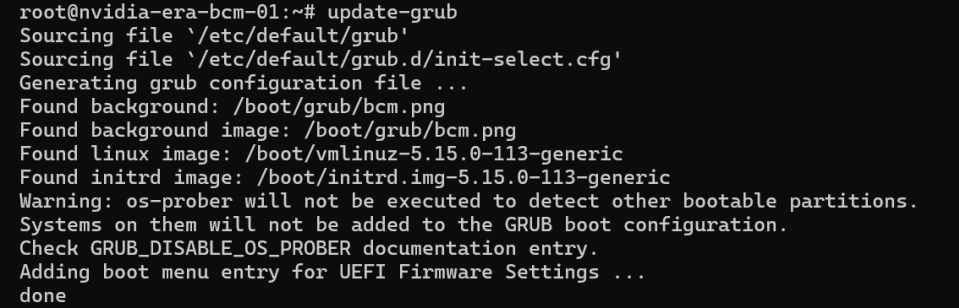
Figure 23 Terminal output from the update-grub command showing the grub configuration being updated#
Configure the Head Node Interfaces in cmsh#
Next, configure BCM to also use the traditional interface names.
Enter cmsh.
root@nvidia-era-bcm-01:~# cmshEnter the device mode.
[nvidia-era-bcm-01]% device
Select the active head node (in this example, using the “master” alias).
[nvidia-era-bcm-01->device]% use master
Enter the interfaces submenu.
[nvidia-era-bcm-01->device[nvidia-era-bcm-01]]% interfaces
List the current interfaces, noting the network device name and IP.
[nvidia-era-bcm-01->device[nvidia-era-bcm-01]->interfaces]% list

Figure 24 Output of the list command showing the existing ens224 interface on internalnet.#
Remove the existing interface(s). In this case, the interface is called ens224.
[nvidia-era-bcm-01->device[nvidia-era-bcm-01]->interfaces]% remove ens224
Add the physical interface eth2.
[nvidia-era-bcm-01->device*[nvidia-era-bcm-01*]->interfaces*]% add physical eth2
After adding the interface, the context changes to the new interface. Exit to return to the interfaces submenu.
[nvidia-era-bcm-01->device*[nvidia-era-bcm-01*]->interfaces*[eth2*]]% exit
Add the physical interface eth3.
[nvidia-era-bcm-01->device*[nvidia-era-bcm-01*]->interfaces*]% add physical eth3
Exit to return to the interfaces submenu.
[nvidia-era-bcm-01->device*[nvidia-era-bcm-01*]->interfaces*[eth3*]]% exit
Add and configure the bond interface bond0.
a. Add the bond interface.
[nvidia-era-bcm-01->device*[nvidia-era-bcm-01*]->interfaces*]% add bond bond0
b. Disable the use of DHCP to acquire an IP address.
[nvidia-era-bcm-01->device*[nvidia-era-bcm-01*]->interfaces*[bond0*]]% set dhcp no
c. Set the IP address to the one used during installation.
[nvidia-era-bcm-01->device*[nvidia-era-bcm-01*]->interfaces*[bond0*]]% set ip 192.168.100.253
d. Set the network to internalnet.
[nvidia-era-bcm-01->device*[nvidia-era-bcm-01*]->interfaces*[bond0*]]% set network internalnet
e. Set the interfaces (members) of the bond to use the newly created physical interfaces.
[nvidia-era-bcm-01->device*[nvidia-era-bcm-01*]->interfaces*[bond0*]]% set interfaces eth2 eth3
f. Set the bonding mode to 4 (802.3ad).
[nvidia-era-bcm-01->device*[nvidia-era-bcm-01*]->interfaces*[bond0*]]% set mode 4
g. Set the bonding options to
miimon=100(media independent interface monitoring at 100 milliseconds.) andxmit_hash_policy=layer3+4(transmit hash policy).[nvidia-era-bcm-01->device*[nvidia-era-bcm-01*]->interfaces*[bond0*]]% set options "miimon=100 xmit_hash_policy=layer3+4"
Exit to return to the interfaces submenu.
[nvidia-era-bcm-01->device*[nvidia-era-bcm-01*]->interfaces*[bond0*]]% exit
List and verify the interfaces.
[nvidia-era-bcm-01->device*[nvidia-era-bcm-01*]->interfaces*]% list

Figure 25 Output of the list command showing the configured interfaces including eth2, eth3, and bond0#
Exit to return to the device [head node] submenu.
[nvidia-era-bcm-01->device*[nvidia-era-bcm-01*]->interfaces*]% exit
Set the provisioning interface to bond0.
[nvidia-era-bcm-01->device[nvidia-era-bcm-01]]% set provisioninginterface bond0
Warning
Caution: The next two commands should be executed in quick succession. After committing the changes to the head node interface in cmsh, a reboot is required immediately. Otherwise, remote access will be lost and recovery will require the server’s remote console/KVM or other intervention.
Commit the changes.
[nvidia-era-bcm-01->device*[nvidia-era-bcm-01*]]% commit

Figure 26 Output of the commit command showing the head node interface change with a restart required for bond0.#
Reboot immediately.
[nvidia-era-bcm-01->device*[nvidia-era-bcm-01*]]% reboot