

CUDA Setup#
JetPack includes the NVIDIA driver stack and CUDA-enabled software support for Jetson Orin Nano Developer Kit. You can use CUDA from containers or install JetPack components directly on the host system.
CUDA Setup Options#
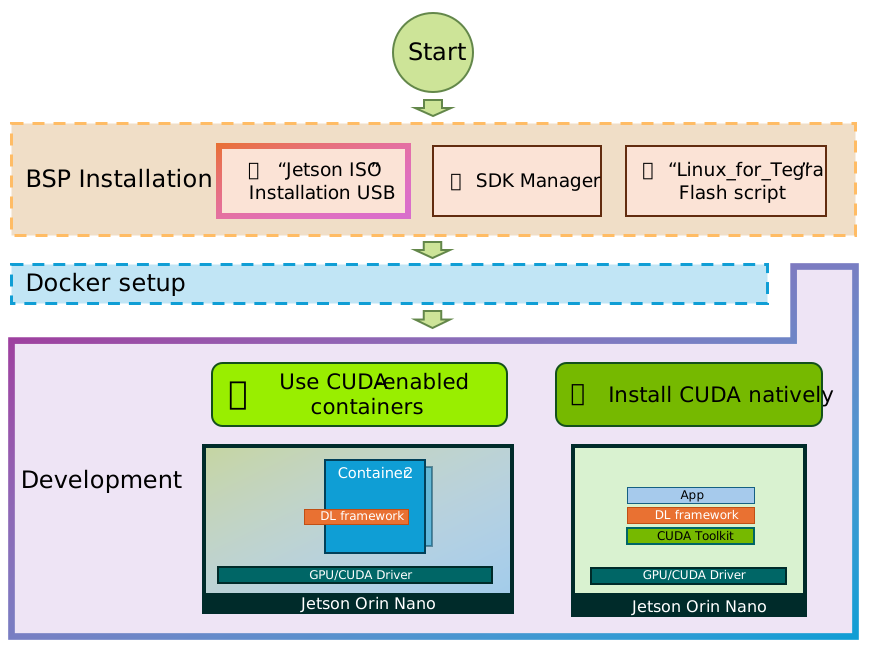
Container-Based CUDA#
Container-based development is recommended when you want a reproducible userspace with prebuilt NVIDIA AI and CUDA packages.
Complete Docker Setup.
Pull a Jetson-compatible CUDA or framework container from NGC.
Run the container with GPU access.
Example:
docker run --rm -it nvcr.io/nvidia/cuda:13.0.0-devel-ubuntu24.04
Native CUDA Packages#
Use native packages if your project needs CUDA tools installed directly on the Jetson Linux root file system.
Install or update JetPack components from the JetPack package repositories:
sudo apt update
sudo apt install nvidia-jetpack
See JetPack SDK Setup for JetPack component guidance.
Verify CUDA#
Confirm CUDA tools and GPU access using a CUDA sample, a framework container, or your project workload.
For a Python framework test inside a PyTorch container:
python3 <<'EOF'
import torch
print("CUDA available:", torch.cuda.is_available())
if torch.cuda.is_available():
    print("GPU name:", torch.cuda.get_device_name(0))
EOF