

Docker Setup#
Docker provides a reproducible way to run AI, robotics, and CUDA-enabled software on Jetson Orin Nano Developer Kit.
Use Docker when:
You want to run NVIDIA NGC containers or Jetson containers.
You want a repeatable development environment for models, applications, and dependencies.
You want to keep project software separate from the base Jetson Linux installation.
Docker Setup Flow#
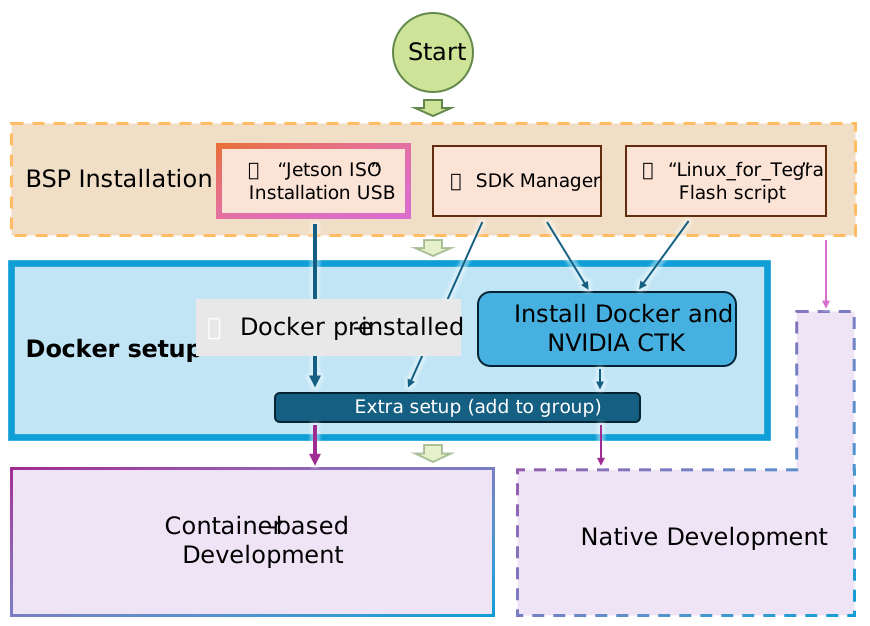
Install Docker and NVIDIA Container Toolkit#
If Docker or the NVIDIA Container Toolkit is not already installed, install them from the JetPack package repositories and Docker installation script.
sudo apt update
sudo apt install -y nvidia-container curl
curl https://get.docker.com | sh
sudo nvidia-ctk runtime configure --runtime=docker
sudo systemctl daemon-reload
sudo systemctl restart docker
Configure Docker Runtime#
Set the NVIDIA runtime as the default Docker runtime:
sudo apt install -y jq
sudo jq '. + {"default-runtime": "nvidia"}' /etc/docker/daemon.json | \
    sudo tee /etc/docker/daemon.json.tmp
sudo mv /etc/docker/daemon.json.tmp /etc/docker/daemon.json
sudo systemctl restart docker
Add your user to the docker group:
sudo usermod -aG docker $USER
newgrp docker
Test Docker#
Run a Jetson-compatible NVIDIA container and confirm that GPU access works.
docker run --rm -it \
    -v "$PWD":/workspace \
    -w /workspace \
    nvcr.io/nvidia/pytorch:25.08-py3
Inside the container:
python3 <<'EOF'
import torch
print("PyTorch version:", torch.__version__)
print("CUDA available:", torch.cuda.is_available())
if torch.cuda.is_available():
    print("GPU name:", torch.cuda.get_device_name(0))
EOF
Troubleshooting#
If Docker returns a socket permission error, your user is likely not in the docker group.
sudo usermod -aG docker $USER
newgrp docker
You can also run Docker commands with sudo until the group change is active.