

Deploying DPS#
This guide takes you from a Kubernetes cluster to DPS enforcing power policies against your hardware.
Tip
Evaluating DPS rather than deploying it? The DPS SDK and simulator runs the complete system with no data center hardware required.
Tip
Running the NVL72 MaxLPS power pilot? Start with MaxLPS Power Pilot. It links the pilot preparation, baseline, managed run, and results steps without making you search through the deployment guide first.
Before you start#
You need:
A Kubernetes cluster to host the DPS services
Network access to the BMCs of every node you intend to manage
An understanding of your data center’s power distribution architecture, from the utility feed down to individual compute nodes
Key concepts#
Four concepts carry most of the deployment:
Topology — a representation of your data center’s power distribution network, from utility feeds down to individual compute nodes
Power policies — rules that define power limits and management strategies for different workload scenarios
Resource groups — collections of compute resources that share power budgets and policies
dpsctl — the command-line interface for managing DPS
Refer to Concepts for the complete set.
Architecture#
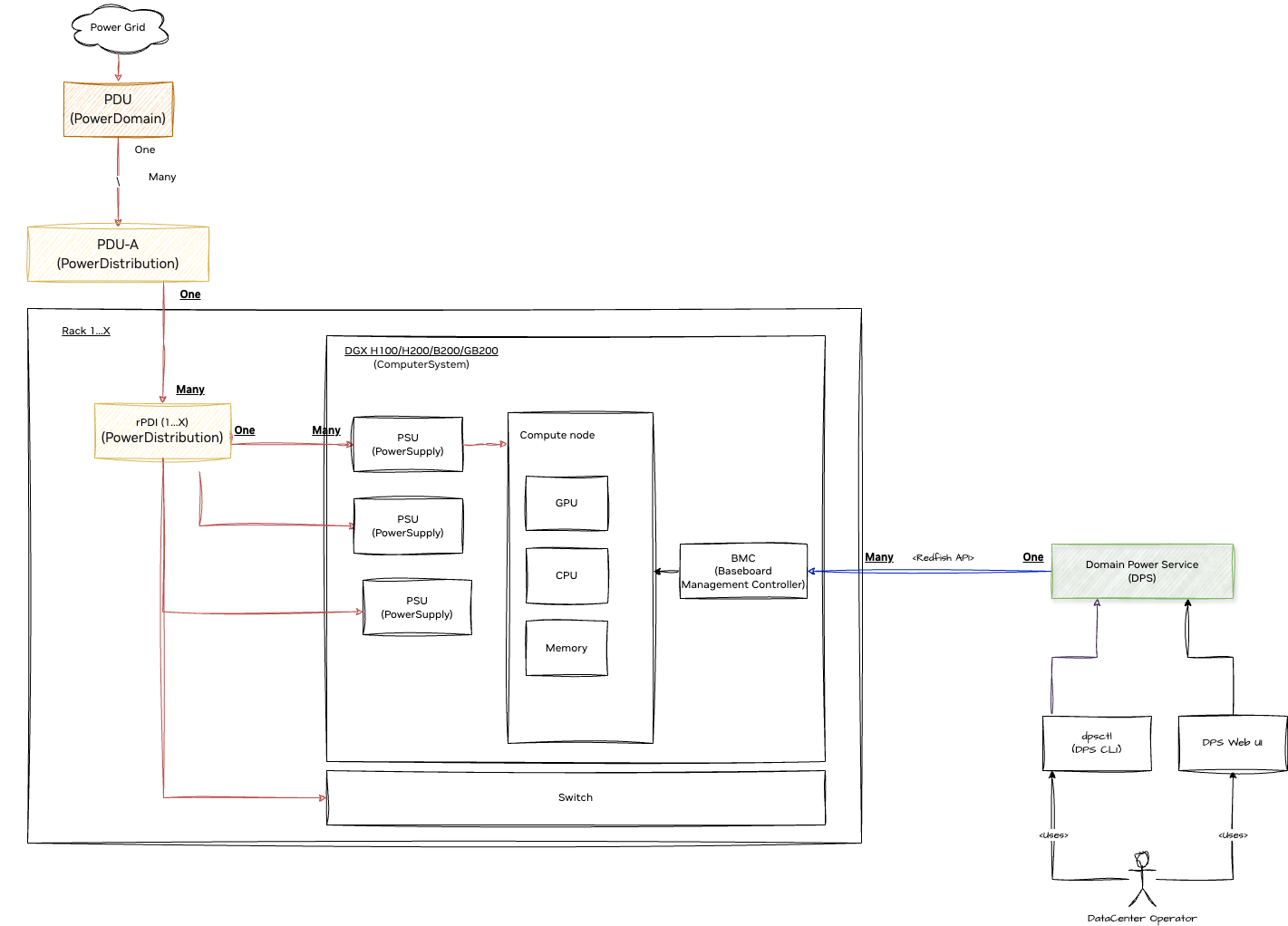
Deployment steps#
Deploy DPS — set up the server infrastructure using Helm charts.
Install dpsctl — install the command-line client used for every step that follows.
Model your topology — describe your power distribution network as a topology file.
Import the topology — validate that file and load it into DPS. Imported topologies stay inactive. Activate the topology after import.
Configure power policies — inspect the built-in bundles or create a custom bundle, then select the default to use for the topology import.
Note
Step 3 is the one that cannot be templated. Every deployment needs a custom topology that accurately represents its own power distribution network. Refer to Managing Topologies for the full procedure.
After deployment#
If a deployment or operations step fails, use Troubleshooting for diagnosis steps and escalation criteria.
Operating DPS — day-to-day procedures: managing devices, resource groups, and topologies
Integrating DPS — connect DPS to schedulers, inventory systems, BMCs, and the grid
MaxLPS Power Pilot Runbooks — the MaxLPS power pilot overview, detailed procedure, telemetry collection, and troubleshooting
Troubleshooting — operator diagnosis and escalation criteria
Reference — the gRPC API, the
dpsctlcommand reference, and the topology schemaPrometheus monitoring — collect and visualize power metrics