


How TensorRT-RTX Works#
NVIDIA TensorRT-RTX takes a trained deep learning model and turns it into a fast program for running inference on end-user RTX GPUs. Unlike TensorRT, which selects most kernels during an ahead-of-time build on the target GPU, TensorRT-RTX splits work across two phases:
An AOT build phase in which a builder compiles your network into a portable serialized engine that can run on supported RTX GPUs without a GPU present on the build machine.
A JIT runtime phase in which a runtime loads the engine on the end-user GPU, compiles hardware-specific kernels for that device, and executes inference. A runtime cache can persist JIT-compiled kernels across runs.
This page explains the runtime-side concepts you need to build a correct, reliable application on top of TensorRT-RTX: what each object is for, how long each one must live, how memory is allocated, what is and is not thread-safe, and how engine compatibility is enforced.
What you’ll learn
Which TensorRT-RTX object owns which, and which ones must outlive the others.
Where TensorRT-RTX allocates host versus device memory during AOT build and JIT inference.
Which operations are thread-safe versus require one execution context per thread.
How to treat serialized engines as executable artifacts and check compatibility before deserialization.
If you have not verified TensorRT-RTX end to end yet, start with the Quick Start Guide, then Build Your First Engine for deployment notes. Return here when you are ready to embed TensorRT-RTX into a production application. For product positioning, model input paths, and ecosystem context, refer to the Architecture Overview.
Object Lifetimes#
TensorRT-RTX uses a factory pattern where some objects create and own other objects. Understanding which object must outlive which is critical to avoiding crashes and undefined behavior, especially when you destroy a builder or runtime after the build phase completes.
The API is class-based, with some classes acting as factories for other classes. For objects owned by the user, the lifetime of a factory object must span the lifetime of objects it creates. For example, NetworkDefinition and BuilderConfig are created from Builder and should be destroyed before the builder.
An important exception is creating an engine from a builder. After you serialize an engine with buildSerializedNetwork(), you can destroy the builder, network, parser, and build config and continue using the serialized engine bytes or a deserialized ICudaEngine.
At runtime, IExecutionContext objects are created from an engine. Each context holds an activation state for inference and must not be used concurrently from multiple threads. Refer to Thread Safety.
Engine Deserialization and the Trust Boundary#
TensorRT-RTX engine files are executable artifacts. A serialized engine contains data that IRuntime::deserializeCudaEngine instantiates inside your process, including JIT-compiled kernel metadata. Deserializing an engine from an untrusted source is equivalent to executing untrusted native code on the GPU and host. The file format has no sandbox.
Treat engine files like binaries:
Deserialize only engines you built yourself, or engines received over a trusted, authenticated channel.
Never deserialize an engine file from a third party, the public internet, user uploads, or any source you do not control end-to-end.
For multi-tenant deployments, build engines on a trusted host and ship the serialized engine over a signed, integrity-checked transport.
Before loading the full engine payload, you can call IRuntime::getEngineValidity() to inspect the engine header. Refer to Compatibility Checks for the decision workflow and diagnostic flags.
Error Handling and Logging#
When creating TensorRT-RTX top-level interfaces (builder, runtime, or refitter), you must provide an implementation of the Logger interface (C++, Python). The logger emits diagnostics and informational messages. Its verbosity level is configurable. Because the logger can pass back information at any point in the TensorRT-RTX lifetime, it must span any use of that interface in your application. The implementation must also be thread-safe because TensorRT-RTX can use worker threads internally.
An API call to an object uses the logger associated with the corresponding top-level interface. For example, in a call to ExecutionContext::enqueueV3(), the execution context was created from an engine created from a runtime, so TensorRT-RTX uses the logger associated with that runtime.
The primary method of error handling is the ErrorRecorder interface (C++, Python). Implement this interface and attach it to an API object to receive errors associated with it. The recorder for an object is also passed to any objects it creates. If an error is generated but no error recorder is found, it is emitted through the associated logger.
Caution
CUDA errors are generally asynchronous. When performing multiple inferences or other streams of CUDA work asynchronously in a single CUDA context, an asynchronous GPU error can be observed in a different execution context than the one that generated it.
Memory#
TensorRT-RTX uses considerable device memory (memory directly accessible by the GPU) as well as host memory during build and inference. Because device memory is often constrained, especially for RTX-class GPUs that share the VRAM with the operating system, the display, and other applications, it is important to understand how TensorRT-RTX uses it.
The Build Phase#
During the AOT build, TensorRT-RTX can run on CPU-only hosts by default. The builder still allocates host memory for network weights and intermediate structures, and may query a GPU if certain APIs (such as deprecated timing-cache APIs) force GPU access.
You can control workspace limits through IBuilderConfig::setMemoryPoolLimit() / set_memory_pool_limit(). If the builder cannot find applicable kernels within the workspace budget, it emits a logging message.
During build, at least two copies of the weights are typically in host memory: those from the original network and those included in the serialized engine as it is built. Building for several GPU architectures at once (IBuilderConfig::setComputeCapability() / --computeCapabilities=75,80,86,89,120) produces a single engine that carries data for each target, which may increase both host memory during build and the size of the serialized engine.
Monitor build-phase host memory with tensorrt_rtx --monitorMemory and ensure sufficient host RAM is available for large builds.
The Runtime Phase#
At runtime, TensorRT-RTX deserializes the engine, JIT-compiles kernels for the end-user GPU on first use, and allocates device memory for weights and activations.
Engine Weights Memory#
An engine allocates device memory to store model weights upon deserialization. The serialized engine size approximates the weight memory required.
Use ICudaEngine::getEngineStat() with the EngineStat enum to query precise weight sizes:
kTOTAL_WEIGHTS_SIZEreturns the total size, in bytes, of all weights used by the engine.kSTRIPPED_WEIGHTS_SIZEreturns the size, in bytes, of stripped weights for engines built withBuilderFlag::kSTRIP_PLAN(tensorrt_rtx --stripWeightsortensorrt_rtx --stripAllWeights).
When weight streaming is enabled, not all weights reside on the device at once. In that case, getEngineStat(kTOTAL_WEIGHTS_SIZE) reports the sum of all weights used by the engine, not the amount of GPU memory currently allocated for weights.
Execution Context Memory#
An IExecutionContext uses two kinds of device memory:
Persistent memory for layer state that cannot be shared across contexts. This memory is allocated when the execution context is created and remains allocated for the context’s lifetime.
Enqueue memory for intermediate activations and scratch space (temporary storage required by layer implementations) during
enqueueV3()/execute_async_v3().
TensorRT-RTX reduces enqueue-memory requirements by sharing device-memory blocks across activation tensors with disjoint lifetimes. Where possible, scratch tensors also use activation memory that is temporarily idle. The required enqueue memory is therefore between the total activation memory and the total activation memory plus the maximum scratch memory. ICudaEngine::getDeviceMemorySizeV2() returns this requirement, which an application can use to check available device capacity before creating another execution context.
Monitoring Memory Usage#
At kINFO severity, the builder logs the persistent, scratch, activation, and weight memory required by the network. The messages resemble the following:
[I] [TRT] Total Host Persistent Memory: 80 bytes
[I] [TRT] Total Device Persistent Memory: 0 bytes
[I] [TRT] Max Scratch Memory: 8392704 bytes
[I] [TRT] Total Activation Memory: 8392704 bytes
[I] [TRT] Total Weights Memory: 1180928 bytes
TensorRT-RTX also logs changes in memory use before and after critical builder and runtime operations. For example, when an execution context allocates device memory:
[I] [TRT] [MemUsageChange] TensorRT-managed allocation in IExecutionContext creation: CPU +0, GPU +8, now: CPU 0, GPU 9 (MiB)
CPU +0, GPU +8 is the change in memory use for the operation. The values after now: are the CPU and GPU memory-use snapshot after the operation. The builder also reports its peak allocator usage.
CUDA infrastructure and TensorRT-RTX device code also consume device memory. The amount varies by platform, device, and TensorRT-RTX version. Use cudaMemGetInfo() from the CUDA Runtime API to query free and total device memory.
Note
In a multi-tenant environment, values reported by cudaMemGetInfo() and TensorRT-RTX can become stale immediately if another process or thread allocates or frees memory.
TensorRT-RTX also provides controls for sizing and owning execution-context memory, keeping large weights within a VRAM budget, and trading memory use against JIT compilation cost.
Execution Context Allocation Strategy#
IRuntimeConfig::setExecutionContextAllocationStrategy() controls how enqueue memory is sized and allocated:
Strategy |
Who allocates |
When to use |
|---|---|---|
|
TensorRT-RTX |
One buffer sized for the maximum requirement across all optimization profiles |
|
TensorRT-RTX |
Reallocate when the selected profile changes so the context holds memory only for the active profile |
|
Application |
Share one scratch buffer across non-concurrent contexts, or allocate from a pre-reserved CUDA pool with a fixed limit |
The tensorrt_rtx --allocationStrategy option accepts static, profile, or runtime. The profile and runtime options use the kUSER_MANAGED APIs. Use ICudaEngine::getDeviceMemorySizeV2() to allocate for the worst case across all optimization profiles. For a dynamic-shape network, use IExecutionContext::updateDeviceMemorySizeForShapes() to calculate the requirement for the current profile and input shapes, then provide the buffer with IExecutionContext::setDeviceMemoryV2():
IRuntimeConfig* runtimeConfig = engine->createRuntimeConfig();
runtimeConfig->setExecutionContextAllocationStrategy(
    ExecutionContextAllocationStrategy::kUSER_MANAGED);
IExecutionContext* context = engine->createExecutionContext(runtimeConfig);

// Select the optimization profile and set all input shapes first.
size_t sizeToAlloc = context->updateDeviceMemorySizeForShapes();
void* ptr = nullptr;
cudaMalloc(&ptr, sizeToAlloc);
context->setDeviceMemoryV2(ptr, sizeToAlloc);
import tensorrt_rtx as trt

runtime_config = engine.create_runtime_config()
runtime_config.set_execution_context_allocation_strategy(
    trt.ExecutionContextAllocationStrategy.USER_MANAGED)
context = engine.create_execution_context(runtime_config)

# Select the optimization profile and set all input shapes first.
size_to_alloc = context.update_device_memory_size_for_shapes()
ptr = ...  # allocate size_to_alloc device bytes
context.set_device_memory(ptr, size_to_alloc)
For smaller input shapes, this approach can reserve substantially less device memory than the profile maximum. Select the optimization profile and set all input shapes before calling updateDeviceMemorySizeForShapes(); otherwise, it returns 0. Call the method again and resize the buffer whenever the input shapes change. For shape configuration details, refer to Working with Dynamic Shapes.
Custom GPU Allocator#
By default, TensorRT-RTX allocates device memory directly from CUDA. To manage these allocations, attach an IGpuAllocator implementation to the builder with IBuilder::setGpuAllocator() or to the runtime with IRuntime::setGpuAllocator(). A custom allocator can enforce a per-process memory limit, suballocate from a pre-reserved pool, record allocation telemetry, and reject allocations above a configured threshold.
Weight Streaming#
Weight streaming keeps some or all engine weights in host memory and transfers them to the device on demand. This behavior enables models whose weights do not fit entirely in VRAM to run on RTX-class GPUs. For configuration and budget APIs, refer to Weight Streaming.
JIT Compilation and the Runtime Cache#
TensorRT-RTX compiles the final GPU-specific kernels during the runtime phase. The first inference on a GPU therefore incurs a one-time compilation cost. For dynamic shapes, the first inference on a new shape also incurs this cost. Compiled kernels remain in host memory for the execution context’s lifetime, and compilation temporarily uses host and device memory. To persist compiled kernels across process runs, refer to Working with Runtime Cache.
Other Runtime Memory Controls#
IBuilderConfig::setMaxAuxStreams()andtensorrt_rtx --maxAuxStreams=Nlimit the auxiliary CUDA streams that TensorRT-RTX can use for parallel layer execution. Additional streams can increase memory use; set the value to0to minimize it. Refer to Within-Inference Multi-Streaming.tensorrt_rtx --useManagedMemoryallocates application input and output buffers with CUDA managed memory instead of separate host and device allocations. This is an application-level allocation choice, not an equivalent TensorRT-RTX API toggle.IRuntimeConfig::setDynamicShapesKernelSpecializationStrategy()controls when TensorRT-RTX compiles shape-specialized kernels. Skipping specialized kernels avoids their compilation and memory costs but can reduce steady-state performance. Refer to Working with Dynamic Shapes.IRuntimeConfig::setCudaGraphStrategy()controls capture of kernel launches in a CUDA graph. Captured graphs consume device memory, and weight streaming imposes capture constraints. Refer to Working with RTX CUDA Graphs.
Threading#
The TensorRT-RTX runtime supports concurrent inference across multiple threads and GPUs, with specific contracts on which objects are safe to share.
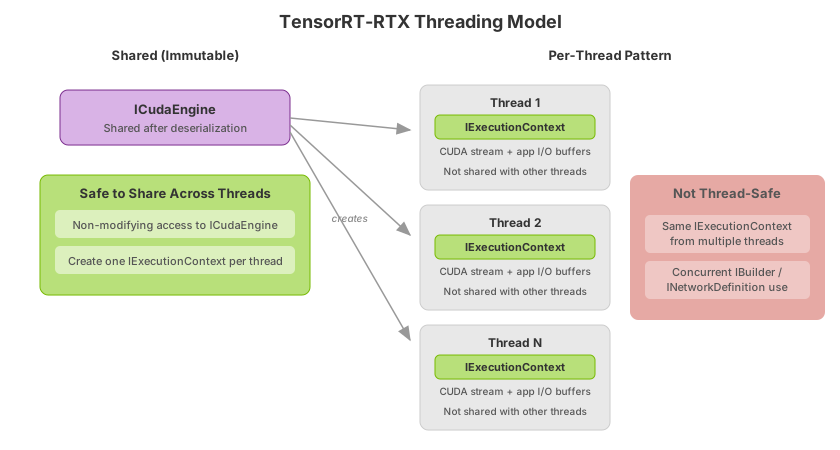
TensorRT-RTX supports thread-safe execution across multiple GPUs with different compute capabilities, with up to one network per thread. The thread-safety contract differs by object type:
ICudaEngine(engine): Engines are immutable after deserialization and can be safely shared across multiple threads. A single engine can back many execution contexts running concurrently on the same or different GPUs.IExecutionContext(execution context): An execution context is not safe to use concurrently from multiple threads. Create one execution context per thread.ILogger(logger): Logger implementations should be thread-safe if the same logger is shared across builders, runtimes, or contexts.IBuilderandINetworkDefinition(build phase): Not safe for concurrent use from multiple threads.
The recommended pattern for multi-threaded inference is one execution context per thread, sharing a single deserialized engine:
// Single shared engine, deserialized once on the main thread
auto engine = runtime->deserializeCudaEngine(buf, nbBytes);

// Each worker thread creates its own execution context
std::thread worker([engine, &inputData]() {
    auto ctx = engine->createExecutionContext();
    // ... bind tensors with setTensorAddress, then enqueueV3 on this thread's stream ...
});
# Single shared engine, deserialized once on the main thread
engine = runtime.deserialize_cuda_engine(buf)

# Each worker thread creates its own execution context
def worker(engine, input_data):
    ctx = engine.create_execution_context()
    # ... bind tensors with set_tensor_address, then execute_async_v3 on this thread's stream ...
For multi-GPU inference, set the active CUDA device on each thread (cudaSetDevice in C++, torch.cuda.set_device or equivalent in Python) before creating the execution context so that auxiliary streams and runtime-cache state are placed on the intended device.
For CUDA-in-Graphics context setup when running inference alongside graphics workloads, refer to Simultaneous Compute and Graphics.
Buffer Lifetime#
The application owns the input and output device buffers passed to TensorRT-RTX through setTensorAddress (C++) / set_tensor_address (Python). TensorRT-RTX never allocates or frees these buffers; it only reads from input addresses and writes to output addresses during enqueueV3 / execute_async_v3.
Buffers must remain allocated and unchanged for the full lifetime of the inference call:
After
enqueueV3/execute_async_v3returns, the inference is scheduled on the stream but has not yet completed.Input buffers must remain valid until any preceding
cudaMemcpyAsync(host-to-device) and the inference itself have completed on the stream.Output buffers must remain valid until the inference has completed and any subsequent
cudaMemcpyAsync(device-to-host) has completed.Reusing the same input/output buffers across consecutive inference calls in the same execution context is safe as long as each
enqueueV3completes on the stream before the next call modifies those buffers.
Stream-ordered allocation (cudaMallocAsync / cudaFreeAsync) composes naturally with enqueueV3 / execute_async_v3. Allocate, setTensorAddress / set_tensor_address, enqueue, and free on the same stream; stream-ordered semantics keep the buffer alive until inference completes:
cudaMallocAsync(&d_input, inputBytes, stream);
cudaMemcpyAsync(d_input, hostInput, inputBytes, cudaMemcpyHostToDevice, stream);
execContext->setTensorAddress(inputName, d_input);
execContext->enqueueV3(stream);
cudaFreeAsync(d_input, stream);
# Bind an application-owned device buffer and enqueue on the same stream.
# Keep the buffer valid until the stream completes (including any later D2H copy).
# Stream-ordered CUDA allocation (cudaMallocAsync / cudaFreeAsync) composes the same way.
exec_context.set_tensor_address(input_name, d_input)
exec_context.execute_async_v3(stream)
For multi-context patterns where contexts share input or output buffers, use stream events or explicit synchronization to order writes and reads.
Determinism#
After JIT compilation completes for a given engine, input shape, and GPU, inference is deterministic under fixed runtime conditions: providing the same input in the same environment produces the same output.
Sources of variation include:
First-run JIT compilation: The first inference on a new GPU or shape compiles specialized kernels in the background; latency and timing differ from steady-state runs. Warm up before benchmarking or load a runtime cache.
Dynamic shapes: Different input shapes can select different kernel specializations. Refer to Working with Dynamic Shapes.
Floating GPU clocks: Clock frequency changes can affect timing measurements. Refer to Hardware/Software Environment for Performance Measurements.
Runtime Library#
TensorRT-RTX ships as a single compact runtime library (libtensorrt_rtx.so on Linux or tensorrt_rtx_*.dll on Windows) plus the tensorrt_rtx Python package. Link against libtensorrt_rtx for C++ applications and import tensorrt_rtx for Python.
Unlike TensorRT Enterprise, TensorRT-RTX does not provide separate lean or dispatch runtime libraries. Engines are tied to the TensorRT-RTX version that built them; refer to Version Compatibility and Compatibility Checks.
Compatibility#
By default, serialized TensorRT-RTX engines work only with the TensorRT-RTX version and supported NVIDIA RTX GPU compute capabilities used at build time. Portable AOT engines target the NVIDIA Ampere architecture and later NVIDIA RTX GPUs by default; Turing requires an explicit compute-capability setting. Refer to Engine Compatibility and the Support Matrix.