


Engine Compatibility#
This page covers TensorRT-RTX engine compatibility across releases and target hardware, including release compatibility requirements and lightweight validity checks before deserialization.
Version Compatibility#
Warning
TensorRT-RTX engines are not compatible between different releases of TensorRT-RTX. If you deploy a new version of the TensorRT-RTX runtime library, you must also provide a new engine compiled with the same version. Refer to Compatibility Checks for instructions on determining engine compatibility using the IRuntime::getEngineValidity() API.
If you choose on-device AOT compilation, ensure that your application rebuilds the engine when you update the TensorRT-RTX runtime library or when the end user upgrades to a newer NVIDIA GPU. Refer to Porting Guide for TensorRT Applications for deployment strategies.
Compatibility Checks#
Serialized TensorRT-RTX engine files can be incompatible with the current installation of TensorRT-RTX for the reasons below.
Cause |
Typical diagnostic flag / symptom |
Remedy |
|---|---|---|
TensorRT-RTX version mismatch |
Version mismatch in validity check |
Rebuild the engine for the installed TensorRT-RTX version |
Compute capability mismatch |
Target compute capability not supported on device |
Rebuild with appropriate |
CUDA driver or runtime too old |
|
Update CUDA on the system, or rebuild the engine for the older stack |
Insufficient GPU memory for weights |
|
Consider rebuilding with Weight Streaming to reduce GPU memory usage |
Malformed or wrong product engine file |
Generic invalid result |
Rebuild with TensorRT-RTX; verify file integrity (for example SHA-256) |
To be usable for inference on the current system, most of these situations require a rebuilt serialized engine:
programmatically using
IBuilder::buildSerializedNetwork()(refer to thebuildEngine()function in Using the Native Runtime API for an example), oron the command line with
tensorrt_rtx --saveEngine(refer to the Quick Start Guide for the command flow and Build Your First Engine for deployment timing),
An exception is kCUDA_ERROR: repair the CUDA installation first. Rebuilding the engine does not fix an incorrect CUDA driver or runtime.
To understand whether a rebuild is necessary, one option is trying to deserialize the engine with IRuntime::deserializeCudaEngine() and noting whether the call fails by returning a null pointer. However, this requires loading the entire serialized engine into a memory buffer, which can be resource intensive or slow. Therefore use getEngineValidity() prior to deserializeCudaEngine().
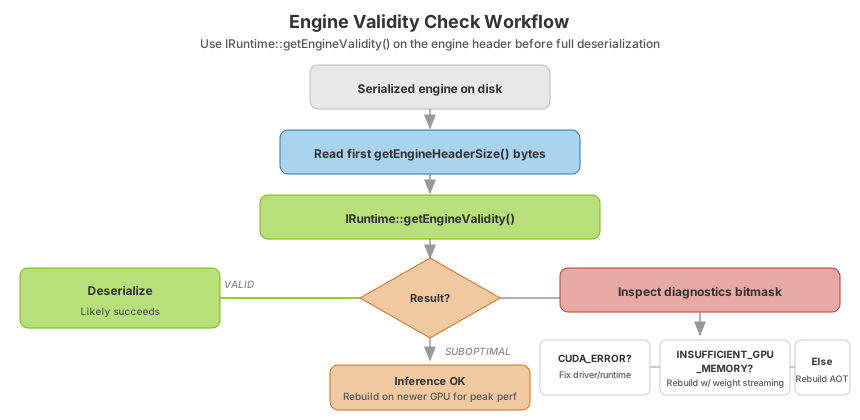
Use the decision tree below to choose between a lightweight header check and a full rebuild, then call IRuntime::getEngineValidity() to inspect only the engine header.
Important
getEngineValidity() only inspects a short header. Query the header size with getEngineHeaderSize() rather than assuming a fixed byte count. The call does not fully validate the engine. A result of EngineValidity::kVALID means deserialization is likely to succeed, not guaranteed.
Instead, call the IRuntime::getEngineValidity() API to only inspect the engine header for metadata indicating whether deserialization is likely to succeed or fail. This only requires loading a small number of bytes from the start of the engine file into main memory, which can be queried with IRuntime::getEngineHeaderSize(). If the header indicates that the engine is not compatible with the current system, IRuntime::getEngineValidity() will return EngineValidity::kINVALID and the reasons for the failure will be flagged using a bitmask output argument. The typical use is as follows:
 1auto nbBytes = runtime->getEngineHeaderSize();
 2const char* engineFilePath = "/path/to/engine";
 3std::vector<char> headerData(nbBytes);
 4std::ifstream file(engineFilePath, std::ios_base::binary);
 5if (!file.read(&headerData[0], nbBytes)){
 6    throw "File too short";
 7}
 8uint64_t diagnostics;
 9auto validity = runtime->getEngineValidity(&headerData[0], nbBytes, &diagnostics);
10if (validity == EngineValidity::kINVALID){
11    bool const insufficientGpuMemory = diagnostics & uint64_t(EngineInvalidityDiagnostics::kINSUFFICIENT_GPU_MEMORY);
12    bool const incorrectCuda = diagnostics & uint64_t(EngineInvalidityDiagnostics::kCUDA_ERROR);
13    if (incorrectCuda){
14        // Signal to user to fix their CUDA installation
15    } else if (insufficientGpuMemory){
16        // Consider rebuilding the engine with weight streaming to reduce GPU memory usage.
17    } else {
18        // rebuild the engine
19    }
20}
 1import tensorrt_rtx as trt
 2
 3nb_bytes = runtime.engine_header_size
 4file_path = "/path/to/engine"
 5with open(file_path, "rb") as f:
 6    file_bytes = f.read(nb_bytes)
 7buffer = memoryview(file_bytes)
 8valid, diagnostics = runtime.get_engine_validity(buffer)
 9if valid == trt.EngineValidity.INVALID:
10    insufficient_gpu_memory = bool(diagnostics & trt.EngineInvalidityDiagnostics.INSUFFICIENT_GPU_MEMORY.value)
11    incorrect_cuda = bool(diagnostics & trt.EngineInvalidityDiagnostics.CUDA_ERROR.value)
12    if incorrect_cuda:
13        # Signal to user to fix their CUDA installation
14        pass
15    elif insufficient_gpu_memory:
16        # Consider rebuilding the engine with weight streaming to reduce GPU memory usage.
17        pass
18    else:
19        # Rebuild the engine
20        pass
Engine invalidity diagnostics reference
Multiple error conditions can occur (CUDA runtime too old, CUDA driver too old, mismatching TensorRT-RTX version, and more), but most share the same remedy: rebuild the TensorRT-RTX AOT engine for the current system. The granular information helps application developers debug.
Diagnostic flag |
Typical remedy |
|---|---|
|
Fix the CUDA installation (restart, reinstall driver/runtime); do not rebuild the engine first. |
|
Update the CUDA driver, or rebuild the engine for the installed driver version. |
|
Update the CUDA runtime bundled with your app, or rebuild the engine. |
|
Consider rebuilding with Weight Streaming to reduce GPU memory usage. |
Version / compute-capability mismatch |
Rebuild the engine for the current TensorRT-RTX version and target GPU. |
Treat diagnostics as a bit mask; multiple error conditions can be simultaneously true (corresponding to multiple bits set to 1).
Apart from EngineValidity::kVALID and EngineValidity::kINVALID, the IRuntime::getEngineValidity() API can also return EngineValidity::kSUBOPTIMAL to indicate that the engine can be used for inference but with suboptimal performance. This can happen when the installed GPU belongs to a newer architecture than was available when TensorRT-RTX was built (in this release, a compute capability greater than 12.1). Unless the engine has been built for a specific (older) compute capability, it can still support inference on these newer architectures using forward-compatible PTX assembly but the performance is likely not going to be on par with native Cubin code. Reaching the performance available on the newer architecture requires updating TensorRT-RTX in addition to rebuilding the engines.
Finally, keep in mind that IRuntime::getEngineValidity() only inspects a short header and therefore cannot guarantee that engine deserialization will succeed even if the return value is EngineValidity::kVALID. (However, returning EngineValidity::kINVALID guarantees that the deserialization will fail.) The reason is that later segments in the serialized engine file may have become corrupted. However, if users can verify that the engine file has been produced by TensorRT-RTX without corruption (for example, by checking a SHA-256 hash), they can expect that a successful validity check will result in successful deserialization.
For weight-stripped engines that need runtime refit, refer to Refitting Engines and CPU-Only AOT and TensorRT-RTX Engines. For runtime-cache persistence (JIT kernel reuse), refer to Working with Runtime Cache.