


Dynamic Shapes: Advanced Topics#
This page goes deeper than Dynamic Shapes: Core Concepts when your network computes shapes inside the graph, exposes shape information at I/O boundaries, or needs predictable JIT behavior across changing input sizes.
Read Working with Dynamic Shapes first for the standard workflow (-1 dimensions, optimization profiles, and setInputShape()). Return here when you need to:
Use layers that read or produce shape information (
IShapeLayer,IShuffleLayer,ISliceLayer, and related APIs)Understand build-time restrictions and how TensorRT-RTX classifies execution tensors versus shape tensors
Feed shape tensors through network inputs or outputs, including optimization-profile shape values
Choose kernel specialization strategies and runtime-cache behavior for dynamic-shape engines on TensorRT-RTX
The later sections also describe TensorRT-RTX-specific JIT and caching behavior that differs from classic TensorRT ahead-of-time kernel selection.
Layer Extensions For Dynamic Shapes#
Some layers have optional inputs that allow specifying dynamic shape information; IShapeLayer can access a tensor’s shape at runtime. Some layers also allow for calculating new shapes. The next section goes into semantic details and restrictions. Here is a summary of what you might find useful in conjunction with dynamic shapes.
IShapeLayer outputs a 1D tensor containing the dimensions of the input tensor. For example, if the input tensor has dimensions [2,3,5,7], the output tensor is a four-element 1D tensor containing {2,3,5,7}. If the input tensor is a scalar, it has dimensions [], and the output tensor is a zero-element 1D tensor containing {}.
IResizeLayer accepts an optional second input containing the desired dimensions of the output.
IShuffleLayer accepts an optional second input containing the reshaped dimensions before the second transpose is applied. For example, the following network reshapes a tensor Y to have the same dimensions as X:
auto* reshape = networkDefinition->addShuffle(*Y);
reshape->setInput(1, networkDefinition->addShape(*X)->getOutput(0));
reshape = network_definition.add_shuffle(Y)
reshape.set_input(1, network_definition.add_shape(X).get_output(0))
ISliceLayer accepts an optional second, third, and fourth input containing the start, size, and stride.
IConcatenationLayer, IElementWiseLayer, IGatherLayer, IIdentityLayer, and IReduceLayer can calculate shapes and create new shape tensors.
Restrictions for Dynamic Shapes#
The following layer restrictions arise because the layer’s weights have a fixed size:
IConvolutionLayerandIDeconvolutionLayerrequire that the channel dimension be a build time constant.Int8requires that the channel dimension be a build time constant.Layers accepting additional shape inputs (
IResizeLayer,IShuffleLayer,ISliceLayer) require that the additional shape inputs be compatible with the dimensions of the minimum and maximum optimization profiles as well as with the dimensions of the runtime data input; otherwise, it can lead to either a build time or runtime error.
Not all required build-time constants need to be set manually. TensorRT-RTX will infer shapes through the network layers, and only those that cannot be inferred to be build-time constants must be set manually.
Layer or feature |
Constraint |
Enforced at |
|---|---|---|
|
Channel dimension must be a build-time constant (weights have fixed channel extent). |
Build time |
|
Channel dimension must be a build-time constant. |
Build time |
|
Shape inputs must be compatible with min/max optimization profile bounds and with the runtime data input dimensions. |
Build or runtime |
Shape inference (general) |
Dimensions that cannot be inferred as build-time constants must be set manually. |
Build time |
For more information regarding layers, refer to the TensorRT-RTX Operator documentation.
Execution Tensors vs Shape Tensors#
Execution tensors and shape tensors are mostly similar. However, when designing a network or analyzing performance, it can be helpful to understand the internals and where internal synchronization occurs.
Engines using dynamic shapes employ a ping-pong execution strategy:
Compute the shapes of tensors on the CPU until a shape requiring GPU results is reached.
Stream work to the GPU until you run out of work or reach an unknown shape. If the latter, synchronize and return to step 1.
An execution tensor is a TensorRT-RTX data tensor, while a shape tensor is related to shape calculations. A shape tensor must be of type Int32, Int64, Float, or Bool, its shape must be determinable at build time, and it must have no more than 64 elements. Refer to Shape Tensor I/O (Advanced) for additional restrictions on shape tensors at network I/O boundaries. For example, there is an IShapeLayer whose output is a 1D tensor containing the dimensions of the input tensor, making the output a shape tensor. IShuffleLayer accepts an optional second input that can specify reshaping dimensions, which must be a shape tensor.
When TensorRT-RTX needs a shape tensor, but the tensor has been classified as an execution tensor, the runtime copies the tensor from the GPU to the CPU, incurring synchronization overhead.
Some layers are polymorphic regarding the kinds of tensors they handle. For example, IElementWiseLayer can sum two INT32 execution tensors or two INT32 shape tensors. The type of tensor depends on its ultimate use. If the sum is used to reshape another tensor, it is a shape tensor.
Formal Inference Rules#
The formal inference rules used by TensorRT-RTX for classifying tensors are based on a type-inference algebra. Let E denote an execution tensor, and S denote a shape tensor.
IActivationLayer has the signature:
IActivationLayer: E → E
since it takes an execution tensor as an input and an execution tensor as an output. IElementWiseLayer is polymorphic in this respect, with two signatures:
IElementWiseLayer: S × S → S, E × E → E
For brevity, let us adopt the convention that t is a variable denoting either class of tensor, and all t in a signature refers to the same class of tensor. Then, the two previous signatures can be written as a single polymorphic signature:
IElementWiseLayer: t × t → t
The two-input IShuffleLayer has a shape tensor as the second input and is polymorphic concerning the first input:
IShuffleLayer (two inputs): t × S → t
IConstantLayer has no inputs but can produce a tensor of either kind, so its signature is:
IConstantLayer: → t
The signature for IShapeLayer allows all four possible combinations E→E, E→S, S→E, and S→S, so it can be written with two independent variables:
IShapeLayer: t1 → t2
Here is the complete set of rules, which also serves as a reference for which layers can be used to manipulate shape tensors:
Shape-tensor layer rules reference
IAssertionLayer: S →
IConcatenationLayer: t × t × ...→ t
ICumulativeLayer: t × t → t
IIfConditionalInputLayer: t → t
IIfConditionalOutputLayer: t → t
IConstantLayer: → t
IActivationLayer: t → t
IElementWiseLayer: t × t → t
IFillLayer: S → t
IFillLayer: S × t × t → t
IGatherLayer: t × t → t
IIdentityLayer: t → t
IReduceLayer: t → t
IResizeLayer (one input): E → E
IResizeLayer (two inputs): E × S → E
ISelectLayer: t × t × t → t
IShapeLayer: t1 → t2
IShuffleLayer (one input): t → t
IShuffleLayer (two inputs): t × S → t
ISliceLayer (one input): t → t
ISliceLayer (two inputs): t × S → t
ISliceLayer (three inputs): t × S × S → t
ISliceLayer (four inputs): t × S × S × S → t
IUnaryLayer: t → t
all other layers: E × ... → E × ...
The inferred types are not exclusive because the output can be the input of more than one subsequent layer. For example, an IConstantLayer might feed into one use that requires an execution tensor and another use that requires a shape tensor. The output of IConstantLayer is classified as both and can be used in both phase 1 and phase 2 of the two-phase execution.
The requirement that the size of a shape tensor be known at build time limits how ISliceLayer can be used to manipulate a shape tensor. Specifically, suppose the third parameter specifies the result’s size and is not a build-time constant. In that case, the length of the resulting tensor is unknown at build time, breaking the restriction that shape tensors have constant shapes. The slice will still work but will incur synchronization overhead at runtime because the tensor is considered an execution tensor that has to be copied back to the CPU to do further shape calculations.
The rank of any tensor has to be known at build time. For example, if the output of ISliceLayer is a 1D tensor of unknown length that is used as the reshape dimensions for IShuffleLayer, the output of the shuffle would have an unknown rank at build time, and hence such a composition is prohibited.
TensorRT-RTX inferences can be inspected using methods ITensor::isShapeTensor(), which returns true for a shape tensor, and ITensor::isExecutionTensor(), which returns true for an execution tensor. Build the entire network first before calling these methods because their answer can change depending on what uses of the tensor have been added.
For example, if a partially built network sums two tensors, T1 and T2, to create tensor T3, and none are yet needed as shape tensors, isShapeTensor() returns false for all three tensors. Setting the second input of IShuffleLayer to T3 would cause all three tensors to become shape tensors because IShuffleLayer requires its second optional input to be a shape tensor. If the output of IElementWiseLayer is a shape tensor, its inputs are, too.
Shape Tensor I/O (Advanced)#
Sometimes, you need to use a shape tensor as a network I/O tensor. For example, consider a network consisting solely of an IShuffleLayer. TensorRT-RTX infers that the second input is a shape tensor, and ITensor::isShapeTensor returns true for it. As an input shape tensor, TensorRT-RTX requires two things:
At build time: the optimization profile values of the shape tensor.
At run time: the values of the shape tensor.
The shape of an input shape tensor is always known at build time. The values must be described since they can be used to specify the dimensions of execution tensors.
The optimization profile values can be set using IOptimizationProfile::setShapeValues. Similar to providing min, max, and optimization dimensions for execution tensors with runtime dimensions, you must provide min, max, and optimization values for shape tensors at build time.
The corresponding runtime method is IExecutionContext::setTensorAddress, which informs TensorRT-RTX where to find the shape tensor values.
Since the inference of execution tensor versus shape tensor is based on ultimate use, TensorRT-RTX cannot infer whether a network output is a shape tensor. You must explicitly indicate this using the method INetworkDefinition::markOutputForShapes.
This feature is useful for debugging shape information and for composing engines. For example, when building three engines for sub-networks A, B, and C, where connections between A to B or B to C might involve a shape tensor, you should build the networks in reverse order: C, B, and then A. After constructing network C, use ITensor::isShapeTensor to determine if an input is a shape tensor and use INetworkDefinition::markOutputForShapes to mark the corresponding output tensor in network B. Then check which inputs of B are shape tensors and mark the corresponding output tensor in network A.
Shape tensors at network boundaries must have the type Int32 or Int64; they cannot be of type Float or Bool. A workaround for Bool is to use Int32 for the I/O tensor, with zeros and ones, and convert to/from Bool using IIdentityLayer.
At runtime, whether a tensor is an I/O shape tensor can be determined using ICudaEngine::isShapeInferenceIO().
Static vs Dynamic Shapes from a JIT Perspective#
This section and the following sections describe the enhancements of TensorRT-RTX over standard TensorRT.
A major difference between TensorRT-RTX and standard TensorRT is that kernels are selected for optimal performance based on layer/tensor information and compiled in a separate JIT phase. For networks without dynamic shapes, since all layers and shapes are known in advance, this compilation occurs one time during the creation of an execution context, allowing multiple inferences to run without triggering re-compilations. However, for dynamic shape networks, kernel selection cannot occur at context creation time because shapes are not known in advance. Instead, kernel selection must wait until inference time when input shapes are known.
Important
If the input tensor shape changes, new kernels may need to be selected and compiled, leading to inference latencies up to 10–100 times the normal inference latency. Use warmup runs or the eager specialization strategy, and enable runtime caching to minimize this cost.
A naive JIT implementation would struggle to handle dynamic inference workloads efficiently.
TensorRT-RTX reduces or even eliminates these overheads with its smart caching and selection of necessary kernels to run the network (refer to the Advanced caching and compilation details section). TensorRT-RTX compiles two types of kernels: fallback and shape-specialized (at inference time). Fallback kernels for any layer are compiled one time at context creation time, are guaranteed to be functional for any shapes, but might not achieve peak inference performance. Shape-specialized kernels can only be compiled at inference time once the runtime shape is known and offer the best performance for that layer and shape combination.
By default, TensorRT-RTX combines these two types of kernels to balance compilation costs against inference performance for new shapes, swapping in shape-specialized kernels when they are compiled and available. To control CPU-only compilation costs, you can compile shape-specialized kernels in the background or avoid it altogether. This is determined by setting the kernel specialization strategy using the TensorRT-RTX API.
The kernels used by TensorRT-RTX can be cached to disk and loaded in another inference session using the runtime cache. Refer to the Working with Runtime Cache section for more information and API usage.
Setting the Kernel Specialization Strategy#
The strategy for selecting shape-specialized kernels is introduced in the API during the TensorRT-RTX context creation stage.
Create the
runtimeConfigobject from the engine.IRuntimeConfig* runtimeConfig = engine->createRuntimeConfig();
runtime_config = engine.create_runtime_config()
Set the strategy for compiling shape-specialized kernels. The strategies are found in the
DynamicShapesKernelSpecializationStrategyenum.runtimeConfig->setDynamicShapesKernelSpecializationStrategy(nvinfer1::DynamicShapesKernelSpecializationStrategy::kLAZY);
runtime_config.dynamic_shapes_kernel_specialization_strategy = trt.DynamicShapesKernelSpecializationStrategy.LAZY
Choose one of three valid strategies
kLAZY,kEAGER,kNONE.Strategy
Compilation timing
Use case
Trade-off
kLAZY(default)Asynchronous background compilation after each new shape
Production workloads with varying input shapes
First inferences use fallback kernels until specialization completes
kEAGERBlocking compilation before inference proceeds
Benchmarking or latency-sensitive paths where warmup is acceptable
Higher CPU cost at shape changes; best GPU performance once compiled
kNONENo shape-specialized compilation
Reducing CPU compilation overhead when peak GPU performance is not required
Inference always uses fallback kernels
Optionally, query the
DynamicShapesKernelSpecializationStrategyenum.auto strategy = runtimeConfig->getDynamicShapesKernelSpecializationStrategy();
strategy = runtime_config.dynamic_shapes_kernel_specialization_strategy
Create the execution context with the configured
runtimeConfigobject.IExecutionContext *context = engine->createExecutionContext(runtimeConfig);
context = engine.create_execution_context(runtime_config)
During execution, TensorRT-RTX compiles the necessary kernels for inference and follows the specified specialization strategy.
Dynamic Shape Options Using tensorrt_rtx#
The kernel specialization strategy is set in tensorrt_rtx using the --specializeStrategyDS flag, which accepts values lazy, eager, or none, corresponding to the enum values in DynamicShapesKernelSpecializationStrategy.
# sample command on Windows
tensorrt_rtx --onnx=sample_dynamic_shapes.onnx --specializeStrategyDS=lazy
Advanced#
Advanced caching and compilation details
Caching Details
As mentioned in Static vs Dynamic Shapes from a JIT Perspective, TensorRT-RTX reduces and, based on the workloads, can even eliminate recompilation overhead with its smart caching and selection of necessary kernels to run the network. TensorRT-RTX performs caching on multiple levels: layer-level, kernel-level, and selection-level.
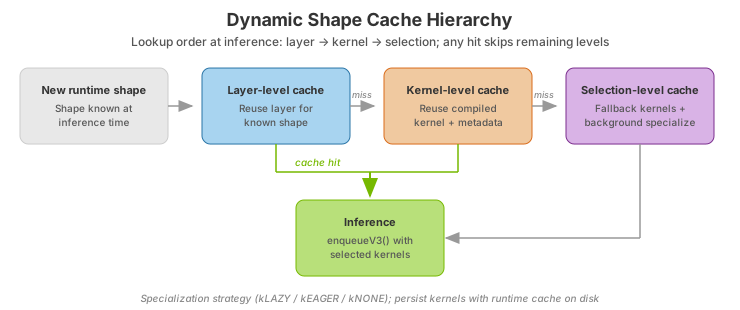
Layer-level Cache: The simplest form of caching, the layer-level cache, works for shapes previously encountered. TensorRT-RTX caches an in-memory representation of the layer that can be loaded on demand and executed.
Kernel-level Cache: This level of caching eliminates compilation hazards for previously unseen shapes. TensorRT-RTX implements a kernel-level cache, if a previously compiled kernel for a different shape (but the same layer) can run the current shape efficiently, it is loaded from the cache, injected with metadata for inference, stored in the layer-level cache, and then used to run inference.
Selection-level Cache: This cache is used when encountering new shapes and when previously compiled kernels cannot run the subgraph efficiently. It works in conjunction with the TensorRT-RTX kernel selection mechanism. At context creation time, TensorRT-RTX selects and compiles subgraph-specific fallback kernels capable of running any shape. These kernels are functional but may not achieve peak inference performance. At inference time, when the shape is known, TensorRT-RTX constructs metadata for the fallback kernels, launches inference, and simultaneously compiles more efficient kernels in the background. Once these specialized kernels are compiled, they replace the fallback kernels. This approach, determined by the user using the kernel specialization strategy, balances compilation costs for new shapes against inference performance.
All caches work together, and if kernels, metadata, or layers are found in any cache level, TensorRT-RTX uses this information and exits early, minimizing CPU overheads.
However, caching may be imperfect, meaning certain combinations of layers and layer parameters are not suitable for kernel-level and selection-level caching in the current implementation. In these cases, only the layer-level cache will be used, which means a new kernel may get compiled for each new shape passed into the layer. These layers include:
Non-grouped deconvolutions across all data types.
Average pooling layers of filter sizes < 8 across all data types.
1D convolutions across all data types (2D and 3D convolutions are fully supported).
Matmuls with INT4, INT8, and FP4 are not supported. FP8 has limited support. FP16, BF16, and FP32 are fully supported.
Convolutions with large filter sizes.
Turing architecture support (corresponding to CUDA compute capability of 75) is limited.
Compilation Considerations with Lazy Specialization
Lazy specialization relies on background, asynchronous compilation, and kernel swapping without blocking inference. For specific inference workloads, such as those with low latencies or frequent shape changes, TensorRT-RTX may finish execution or context-switch before all background compilation is completed. In such cases, TensorRT-RTX guarantees a constant-time compilation shutdown operation by completing already-enqueued jobs, deleting jobs that are yet to be enqueued, and then returning.
For these workloads, you may not fully benefit from the inference performance improvements of lazy specialization and may prefer to use eager-mode compilation (that is, using kEAGER for DynamicShapesKernelSpecializationStrategy), which offers the best inference performance. If compilation times are a concern with eager-mode, consider enabling the runtime cache as well.