

Run SWE-bench Verified with Harbor, Pi, and Substrate
Run one SWE-bench Verified task with Harbor and Pi inside an Agent Substrate sandbox, then inspect its agent logs and verification results. Use NVIDIA Dynamo to serve the model, or connect to a compatible external API from a cluster without GPUs. Optional steps add traces, sandbox metrics, golden snapshots, and concurrent trials. The final section outlines a planned full-dataset workflow using published SWE-bench images.
The runnable files are in the Harbor Substrate example. This tutorial uses pinned dependencies. Keep those pins together when reproducing it. The model recipes own model installation and hardware requirements.
This integration is experimental. It includes compatibility patches for the pinned Pi adapter. Check the installation requirements before allocating model-serving resources.
What you build
For each trial, Harbor creates a sandbox actor, runs Pi and the task verifier inside it, collects the results, and deletes the actor. Pi calls the model endpoint and executes tools against the task workspace. The verifier grades the resulting solution.
Check prerequisites
Prepare these resources:
- A local clone of the Dynamo repository.
- A Kubernetes cluster with Substrate installed and verified,
the pinned
kubectl-ateCLI onPATH, and administrative access. - Linux x86-64 (
amd64) or ARM64 (arm64) sandbox nodes with capacity for a worker requesting 2 CPUs and 6 GiB of memory. - A StorageClass for a 10-GiB results PVC. Set
storageClassNameinharbor-results.yamlif the cluster has no suitable default. - An image registry for publishing runner, guest, and task images. The tutorial assumes anonymous image pulls; for private registries, follow Configure image-pull authentication.
- Git,
kubectl,curl,sha256sum, OpenSSL, Python 3.12 or newer, Docker with BuildKit, Go 1.27 or newer, andkoon the preparation workstation.
The ARM64 task base image is published, but this tutorial’s ARM64 oracle and Pi runs have not been validated. SWE-bench describes ARM64 support as experimental.
Follow Install Substrate to install and verify the platform.
From the root of your Dynamo clone, enter the tutorial directory:
The steps below use the configuration files in this directory. Edit them as directed.
Configuration files
Choose an inference endpoint
Use the GLM-5.3-Flash recipe
or another model recipe, and complete
its smoke test. The supplied Harbor configuration defaults to the SGLang
aggregated GB200 recipe in namespace inference.
For an external endpoint, no GPU is required in the sandbox cluster. The
endpoint must list the selected model through GET /models under its API
base URL and support streaming Chat Completions with tool calls, tool-result
continuation, max_tokens, and streaming usage.
Record the API base URL and served model ID for the
job configuration. Use an
address reachable from the sandbox; your workstation’s localhost
port-forward address will not work. For Dynamo recipes, the frontend address is
http://<dgd-name>-frontend.<namespace>.svc.cluster.local:8000/v1.
Choose a model with reliable tool calling and enough context for repository files and tool results. The first Pi trial checks tool calls and continuation. Harbor results and sandbox metrics work with either endpoint; the inference trace walkthrough requires a Dynamo endpoint you control.
Configure Harbor access to Substrate
The Harbor runner runs outside the sandboxes. Through the Substrate adapter, it creates and deletes actors, executes guest commands inside them, and transfers task files and results. It needs access to both the Substrate API and the router:
Create the namespace and access policy
This tutorial uses ate-env for both the Kubernetes namespace and the Substrate
atespace. These are separate objects. Run the Substrate commands as an
administrator with global ownership.
Use an existing atespace
Inspect and reuse an existing namespace, atespace, or access policy instead of
creating it again. When updating an access policy, preserve its current
bindings and supply its uid and version.
The policy grants the harbor-runner ServiceAccount the editor role in
ate-env. You will create this ServiceAccount when setting up the Harbor runner.
Authorize the Harbor runner at the router
Substrate’s default Envoy router blocks ingress to actors until a client identity is explicitly allowed. Add the Harbor runner so it can execute guest commands and transfer files.
The Harbor runner’s certificate identifies it with this SPIFFE ID, a workload identity derived from its namespace and ServiceAccount:
Use your installation’s trust domain if it differs from cluster.local.
In this release, the router allowlist grants access to all actors reachable through that router.
Update the atenet-router Deployment’s container arguments:
The default route timeout is five minutes per request, including streamed command output. A 12-minute test command would lose its output stream after five minutes. This timeout does not limit the actor’s lifetime.
Preserve existing identities and other arguments. On a shared installation, have its operator make these changes:
To preserve these settings across deployments, save the allowlist in
substrate-install.yaml and the timeout in your managed router manifest,
deps/substrate/manifests/ate-install/atenet-router.yaml. The installer accepts
the allowlist as a comma-separated string. For an initially empty allowlist:
Check the router arguments:
The allowlist may contain additional identities. If you change the task deadlines, keep the route timeout longer than the longest command.
Create the worker pool
Select a node that runs atelet and has matching gVisor runtime assets.
Check its architecture:
Edit the labels and placement in
workerpool.yaml.
Replace the hostname with your node’s name. For ARM64, change both amd64
values to arm64:
Keep the other fields, including the multi-architecture worker image and
gvisor-default SandboxConfig reference. The supplied capacity settings are:
Each task actor uses 1 CPU and 4 GiB, allowing one such actor per worker with capacity headroom. Reserve additional node capacity for the Harbor runner and any Substrate control-plane Pods placed there.
Wait for the Deployment to roll out successfully. For port-binding failures, follow the installation guide’s low-port permission fix.
Prepare the images for the first task
Each SWE-bench task has its own instance image containing the repository checkout and task environment. This tutorial adds Pi, the Dynamo provider, and dependencies needed by the task verifier. The guest daemon uses a separate image shared across tasks. An ActorTemplate references both images. Each trial creates a fresh actor from the template.
For the first task, prepare the additional tools and dependencies ahead of time to reduce trial startup latency. The planned full-dataset workflow uses the published instance images and installs these additions during trial setup:
The single-task path needs no package-download egress during the trial. Pi still needs access to the inference endpoint. See Run the full dataset for the planned extension and its remaining implementation and validation work.
Build the guest and task images for the worker pool’s architecture. The supplied
configuration defaults to amd64; use the arm64 instructions for ARM64 nodes.
Use a native builder or configure
Docker cross-platform builds.
Prepared task images can be large. Reserve node image-cache space before adding tasks.
Build the guest image
ate-env-guest runs commands and moves files inside the actor. Clone its
pinned source, then build and publish it for the worker architecture. Replace
registry.example.com/harbor-substrate with a repository you can push to and
the workers can pull from:
Build the guest image for your node architecture:
x86-64 (amd64)
ARM64 (arm64)
Record the digest reference printed by ko build for task registration.
The actor mounts this image at /ate. The runner Dockerfile installs the
Python client from the same pinned revision.
Build the prepared task image
The Astropy base image contains the repository checkout and Conda test
environment. Dockerfile.pi adds Pi 0.72.1, the Dynamo provider, and cached
verifier dependencies. Fetch the pinned sources, apply the compatibility
patches, and prepare the build context:
Select the sandbox architecture and replace registry.example.com/harbor-substrate
with a repository you can push to and the workers can pull from. Each tab pins
a task base image for that architecture:
x86-64 (amd64)
ARM64 (arm64)
Record the repository and digest printed by docker push, such as
registry.example.com/harbor-substrate/astropy-pi@sha256:.... Use that immutable
reference at registration. Build time and the first image pull are preparation
costs, separate from trial wall time.
Prepare an image for another task
Each task needs its own repository image. Inspect its environment/Dockerfile
and resolve the base image for the worker architecture to a digest. Build with
--build-arg TASK_IMAGE=.... Not every task publishes an ARM64 image;
--platform does not convert an x86-64 base image into ARM64.
The wheel step reads build-system.requires from the repository’s
pyproject.toml; the grader cache uses versions pinned in Dockerfile.pi.
Other tasks may need different dependencies or setup. Validate each prepared
image with its own offline oracle trial. Keep credentials, task instructions,
candidate changes, and session state outside the image.
Configure and register the task
Register the actor template
Edit
actor-template.yaml
with both image digests from the builds. Set these fields together and keep
the remaining defaults:
The template allocates 1 CPU and 4 GiB per actor. Keep its readiness probe,
demo.harbor.dev/sandbox: gvisor selector, and disabled golden snapshots.
Register it through the Substrate API:
The get command must return the template with both image digests and the
selected architecture. ActorTemplates are immutable in this release. For a
later change, create a copy with a new metadata.name and update the job’s
template_map. Keep the old template while existing trials use it.
Configure the Harbor job and egress
Edit
harbor-job.yaml
and
egress.yaml
for the endpoint selected earlier. Substrate denies actor egress by default;
the adapter applies egress.yaml to each actor. Match its protocol, hostname,
and port to DYNAMO_BASE_URL.
Serve with Dynamo
Use an external endpoint
The defaults match the SGLang aggregated GB200 recipe in namespace
inference. For another deployment, update the served model ID and frontend
address. Keep the remaining settings in each file.
The matching egress rule allows HTTP requests to that frontend:
For a frontend served over HTTPS, use tlsPassthrough and its HTTPS port as
shown in the external-endpoint tab.
Keep DYN_AGENT_SESSION_FINAL: "0" for the recommended recipe and external
endpoints. Set it to "1" only for a scheduler that consumes session-final
notifications, such as ThunderAgent. It sends an extra request when Pi exits
normally so the scheduler can release session state. Tracing does not require
this notification.
Configure context and output limits
DYNAMO_MAX_TOKENS: "8192" caps each response at 8,192 tokens.
DYNAMO_CONTEXT_WINDOW accepts a quoted token count. When it is blank, the
provider reads context_window from the endpoint’s model listing, falling
back to 128,000 tokens if absent. Set the value explicitly if your endpoint
does not advertise its limit. Dynamo advertises the engine’s serving limit.
Keep the job’s supplied task and runtime settings:
Keep all values under agents[].env as strings, along with the supplied CLI
and credential paths. The verifier still rebuilds the modified repository,
using the image’s cached dependencies without package downloads.
How the prepared Pi runtime is selected
The adapter reads /opt/pi-runtime.json and uses the prepared Pi runtime when
its version matches agents[].kwargs.version. Without that file, the adapter
falls back to installation, which requires registry egress and fails under
the default policy. The full-dataset extension
describes the additional setup needed for published task images.
Allow additional egress
Add a rule only when a task needs one. Each rule names hosts and ports, and the gateway decides by protocol:
An https rule requires the actor to trust the gateway’s interception CA. The
Substrate guide on
MITM egress interception
shows the systemInfo volume that mounts it. Raw TCP is not supported, which is
why the optional tool-event transport wraps its stream in TLS.
Opening source hosting lets an agent retrieve an upstream fix, which changes what a passing benchmark result means. Keep the default policy for results you intend to compare.
The ActorTemplate belongs to the Substrate API; the Harbor job is consumed by
harbor run. Neither file is a manifest for kubectl apply. Each runner Job
mounts the Harbor configuration and egress policy from a ConfigMap. Use a new job_name
for each run so results on the PVC stay separate.
Set up the Harbor runner
Harbor runs as a Kubernetes Job. Its image contains Harbor, kubectl-ate, the
env Python client, and the patched adapters. Pi and the verifier run inside
Substrate actors. The runner does not need Docker.
Build the runner image
On a native Linux x86-64 or ARM64 build machine, run these commands from the example directory. Replace the registry path with your own:
Dockerfile.harbor
fetches the pinned sources, applies the patches, and verifies the
architecture-specific CLI download. The adapters live under /opt/harbor,
outside the mounted input and results directories. No local deps/ checkout
is required for this build.
In
harbor-runner.yaml,
set the &runnerImage reference to the pushed repository and digest. The main
container reuses that reference through *runnerImage. Set
spec.template.spec.nodeSelector.kubernetes.io/arch to the image architecture:
amd64 for x86-64 or arm64 for ARM64. The runner and sandbox workers may use
different architectures.
Prepare credentials and results storage
For an authenticated model endpoint, create the Secret that supplies
DYNAMO_API_KEY. Skip this command for an unauthenticated endpoint.
The pinned adapter passes the key through Harbor’s command environment, which appears in debug logs. A Kubernetes Secret does not redact those logs. Use a scoped key and restrict access to captured logs and artifacts.
Review the StorageClass and size in
harbor-results.yaml,
then create the runner identity and results PVC:
A StorageClass with WaitForFirstConsumer leaves the PVC pending until the
first Job is scheduled. The results PVC survives Job deletion.
Review the mounted inputs
Each Job uses these inputs and outputs:
The init container downloads the SWE-bench Verified task definitions from
harbor-datasets revision 86723674f04e4209ac479d0fb75d9d9f44b4377e.
It preserves the original instructions and verifier; it does not download task
container images. A sparse Git checkout fetches only this dataset’s files.
Each new Job repeats the download and needs access to GitHub. This network
access is separate from actor egress.
The next steps create the ConfigMap and start separate oracle and Pi Jobs
from the same manifest. Run one Job at a time with this shared configuration
and ReadWriteOnce results PVC. Keep the ConfigMap unchanged while a Job runs.
backoffLimit: 0 prevents Kubernetes from repeating a failed evaluation.
activeDeadlineSeconds: 10800 limits the entire Job to three hours, including
initialization and all trials. Increase it for batches that need more time.
Verify the sandbox and task verifier
Harbor’s oracle agent applies the task’s reference patch instead of calling a model, then runs the verifier. This checks actor creation, guest execution, and offline verification. It also pulls the images onto the selected worker before the Pi trial.
Copy the Harbor configuration on the workstation:
In oracle-job.yaml, set job_name: swe-oracle and replace the agents list:
Create the mounted configuration and submit the Job. The manifest uses
generateName, so kubectl create assigns a new Kubernetes Job name:
The first image pull can take several minutes. Harbor allows 1,200 seconds for actor readiness and retains the task’s 3,000-second agent and verifier deadlines. The first wait allows the dataset init container to finish before streaming Harbor logs. If startup or completion fails, inspect the Job before deleting it:
After the Job completes, delete it to release the PVC, then mount the results in the read-only inspection Pod:
Require a reward of 1 before running Pi. A completed Kubernetes Job alone does
not prove that the trial passed. On failure, inspect the saved trial’s
result.json, exception_info, and verifier/test-stdout.txt. Repeat this
check for every new task image.
Delete the inspection Pod before the next Job so the PVC can attach to its node. The results remain on the PVC:
Every trial creates a fresh actor. The oracle’s reference patch does not carry into the Pi trial. Cached image layers remain on the worker node; repeat the oracle on each eligible node when validating placement across multiple nodes.
Run one SWE-bench task with Pi
Replace the ConfigMap’s oracle configuration with harbor-job.yaml, then
submit another Job using the same runner image:
If the Job fails, inspect its dataset and runner logs before deleting it.
Use a new Harbor job_name when retrying so existing results are preserved.
View and understand the trial
Export the results
After the Job completes, delete it and mount the PVC in the inspection Pod. Copy the results to your workstation so you can inspect them after the Job has been deleted:
The original results remain on the PVC. Delete the inspection Pod before
starting another Job; a ReadWriteOnce volume may not mount on two nodes at
once. For later runs, PI_JOB records the latest Kubernetes Job name.
Convert the trajectory and open Harbor
From examples/agents/harbor-substrate, create a separate viewer environment,
convert the copied Pi logs to Harbor’s ATIF trajectory format, and start the
viewer:
The converter writes agent/trajectory.json beside each agent/pi.txt.
It preserves the raw logs and scores. Existing trajectories, logs with no
complete messages, and runs without Pi logs are skipped.
To convert one run, replace results with results/swe-one. A trial directory
or an individual agent/pi.txt also works. Add --overwrite to regenerate an
existing trajectory.
Keep the viewer running and open http://localhost:8080. Open swe-one,
select Rollouts, then select the trial. If an Overview link opens an empty
Rollouts list, select Clear all to remove the agent filter.
Read the trial summary
Check the reward and timing at the top of the trial page. The example below completed in about 3 minutes 18 seconds with a reward of 0. Your result and timings may differ.
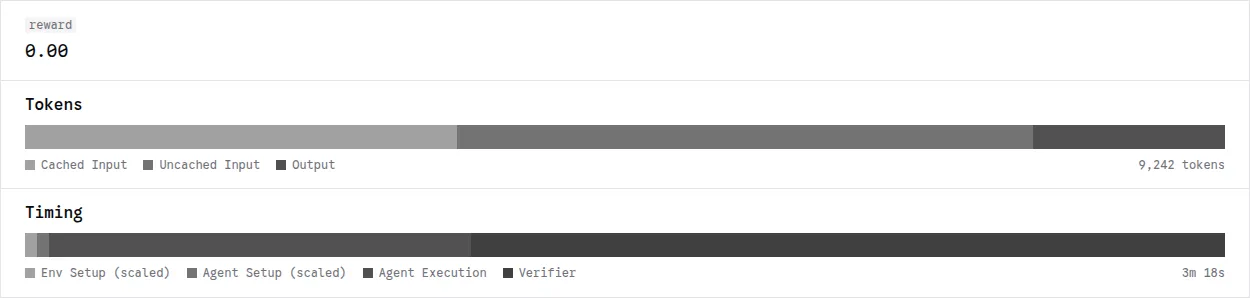
Read the timing bar as four phases:
These are recorded phase durations. The viewer labels setup segments scaled, so their widths are not proportional to elapsed time. Trial wall time also includes work between phases and cleanup. Kubernetes scheduling, runner startup, and the init container’s dataset download happen before the trial timings.
Follow a tool call
In Trajectory, read the task prompt and expand a tool call to inspect its
arguments and returned output. In this example, Pi uses bash to locate
separable.py. The OBSERVATIONS entry shows the path returned by the
sandbox:
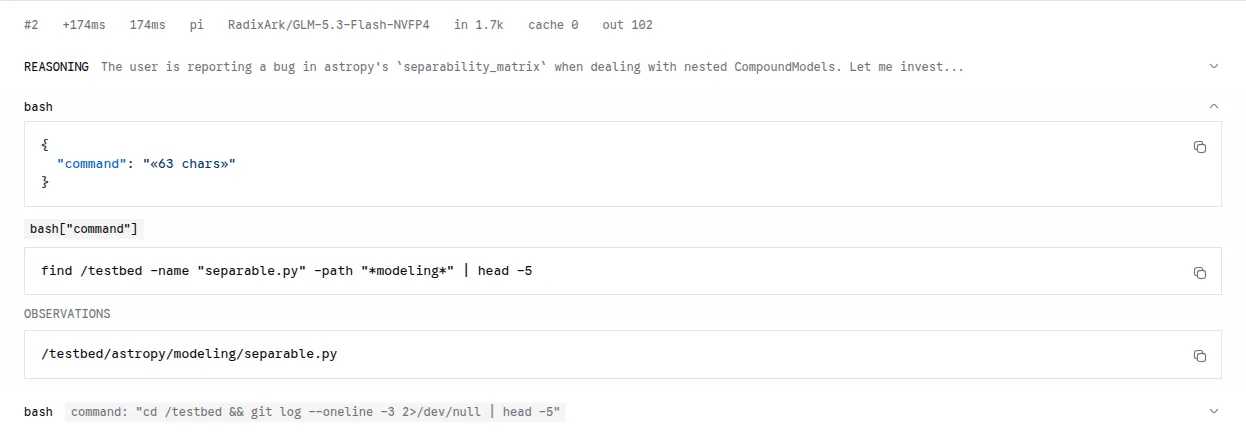
Continue through the following steps to see how Pi uses that output. The trajectory contains recorded messages and tool results. Interrupted recordings retain complete messages and flag unfinished calls. Differences between event timestamps are not isolated inference or tool durations.
Check the verifier outcome
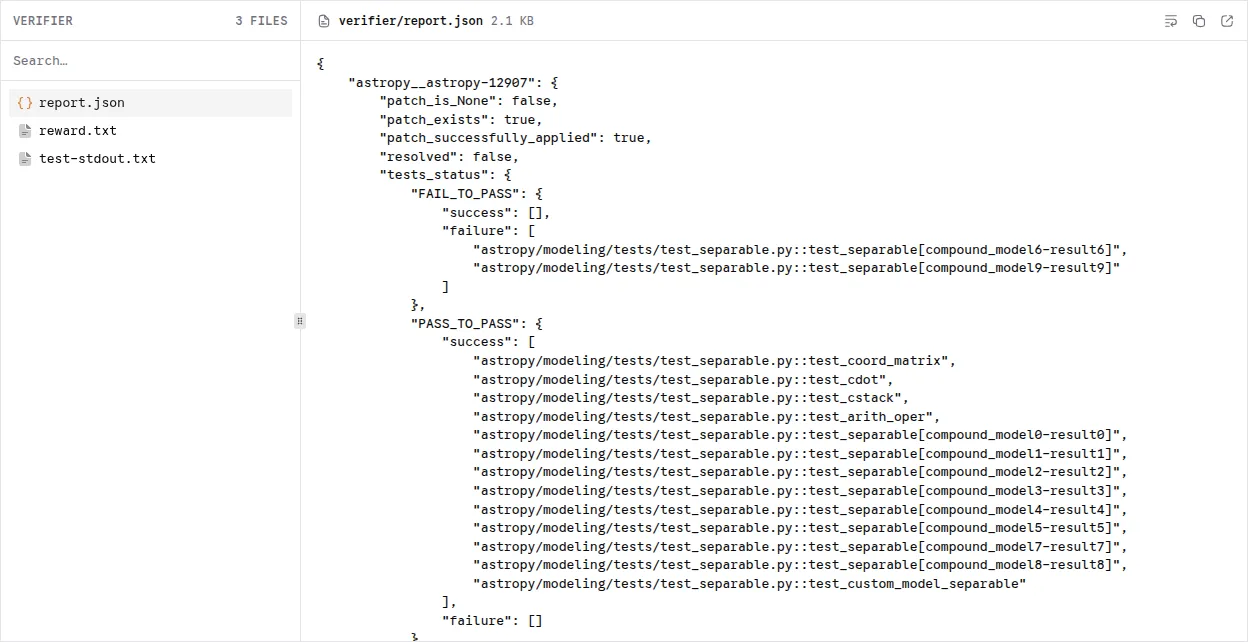
Open Verifier to inspect the test output and reward. A reward of 1 means
the task passed verification. A reward of 0 with no execution exception means
the run completed but the solution did not pass verification. This example
has 13 passing tests and 2 failing tests. Select report.json to see which
tests failed:
If Harbor reports an execution error, open Exception before interpreting the reward. A failed solution and a failed sandbox or model request require different fixes. Keep the copied results with the job configuration, templates, policies, and dataset revision so you can reproduce the run.
Optional extensions
Choose any of the following extensions after saving the first trial. Each can be used independently.
Optionally capture traces and sandbox metrics
Use Perfetto to inspect model and tool timing, or Grafana to inspect sandbox activity. Configure either view or both after saving your first trial. Harbor’s trajectory and verifier output remain available without this setup.
Configure collection
Stop active Harbor jobs before changing telemetry; the configuration changes can restart workers or the frontend. Complete the setup for each view you want:
Run an observed trial
Set job_name: swe-observed in harbor-job.yaml to keep this run separate from
swe-one. Update the ConfigMap and start another Job:
Repeat View and understand the trial with
JOB_NAME=swe-observed. Then inspect the views you configured:
Inspect measured spans in Perfetto
If you enabled tracing, wait for the frontend’s trace writer to flush after
the trial completes. From examples/agents/harbor-substrate, find the frontend
Pod using the MODEL_NAMESPACE and DGD_NAME values from tracing setup:
Copy the capture before replacing or deleting the frontend Pod; its trace volume is ephemeral. With multiple frontend replicas, collect each Pod’s segments into a separate directory and pass all segments to the converter.
Open Perfetto, select Open trace file, and load
results/swe-observed/trace.perfetto.json. Find the trial by session ID and
select a tool slice. In Current Selection, inspect its duration,
tool_call_id, status, and event_source.
The separate Qwen3-8B capture below shows a measured bash call lasting about
1 second alongside model requests. Your model, timings, and number of turns
will differ.
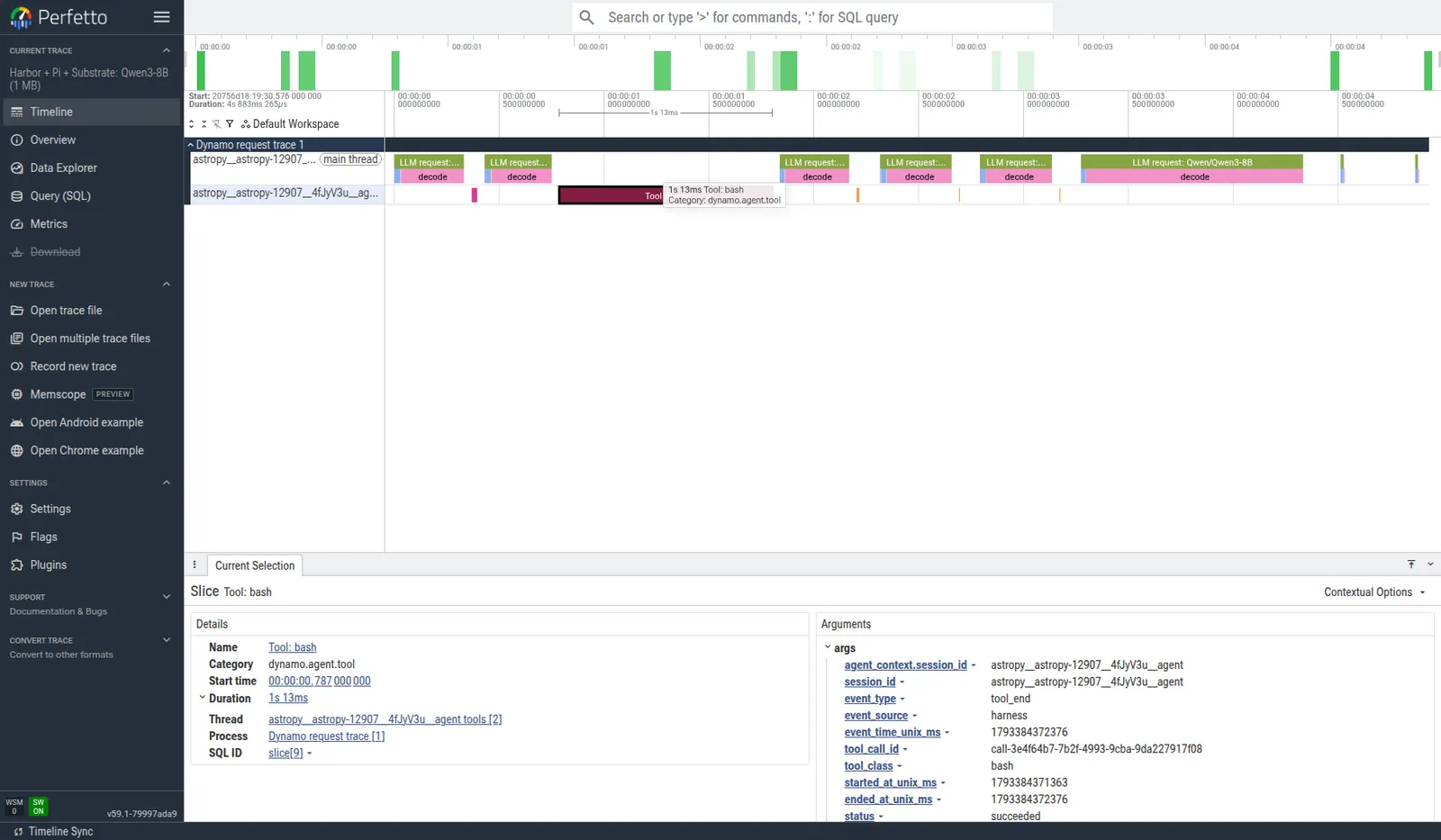
Match tool-call IDs against Pi’s log and confirm that model and tool records
share the session ID. A successful inference request alone does not prove
that tool-event delivery works. Request duration includes queueing, prefill,
and generation; tool spans measure Pi’s observed invocation. Spans marked
inferred or synthetic are not measured tool execution.
See Agent Tracing for these
capture boundaries.
Inspect sandbox activity in Grafana
If you enabled metrics, start a port-forward in a separate terminal. Replace the namespace and service if your Grafana installation uses different names:
Open http://localhost:3007/d/substrate-native-metrics and select the job’s
time window. Start with Bridge scrape healthy, then inspect Worker fleet
by state and the lifecycle panels. During the trial, a worker becomes
partial or at capacity, then returns to idle after cleanup.
This separate capture shows five ready worker Pods. One becomes partial while a sandbox is active, then returns to idle. Your fleet size depends on your worker pools.
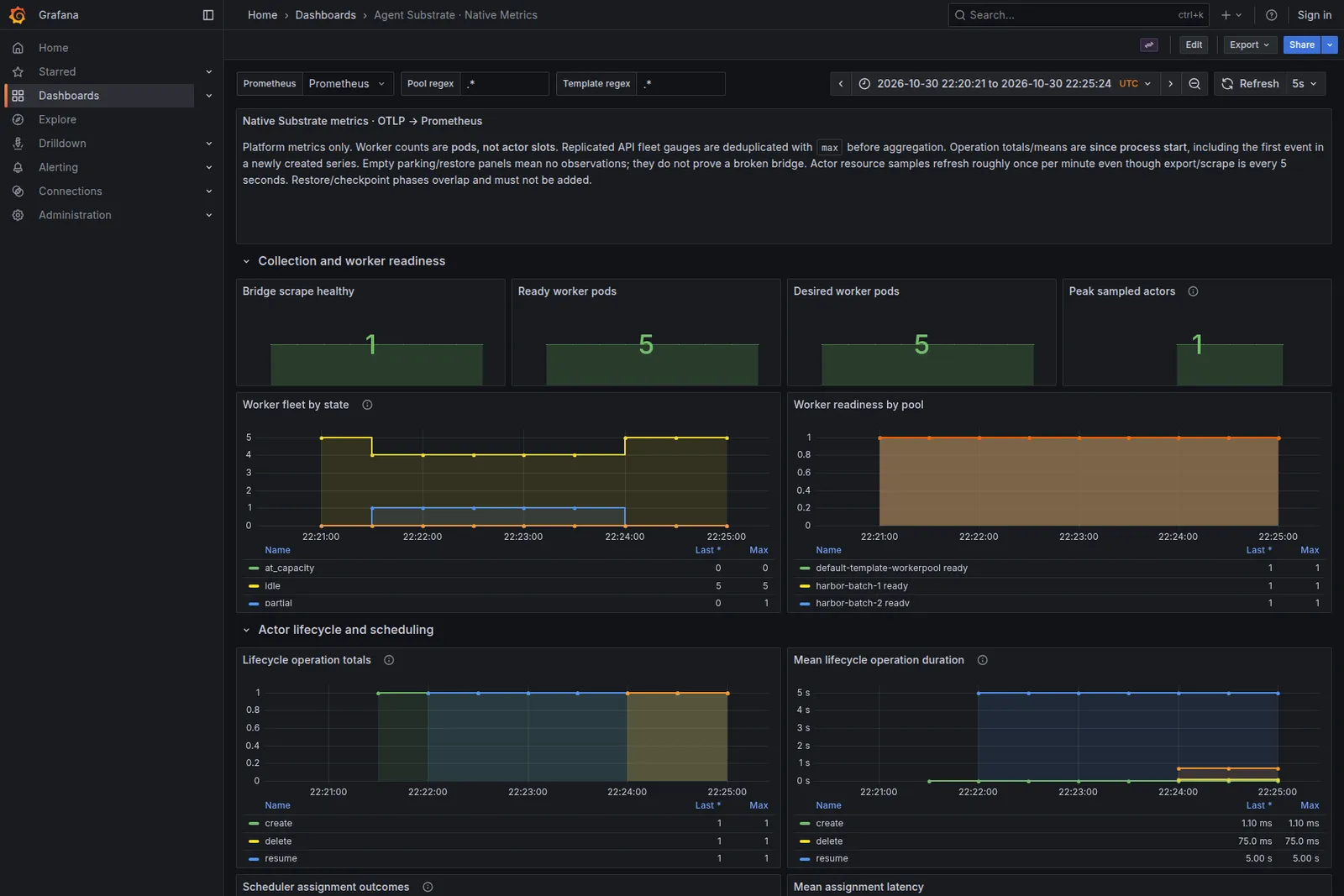
Check image-cache activity and resource usage next. Native CPU and memory samples arrive roughly once per minute, so short trials can miss samples. Empty restore panels are expected when a run only boots fresh actors. Operation totals and means are cumulative since process start, even when you select a shorter dashboard time window.
The native parking metrics are aggregate. They do not identify which Harbor
session waited, and their duration can include restoration. Use substrate.json
for the actor mapping; these views do not form one distributed trace.
For other panel semantics and cleanup, see
Monitor Substrate.
Optionally restore from a golden snapshot
This optional feature uses the object storage configured during Substrate
installation. With the default setup, golden snapshots go to
s3://ate-snapshots/ in RustFS; no additional storage deployment is needed.
If you use remote S3 or GCS, verify that the configured bucket and credentials
are working before enabling snapshots.
Create separate files for the optional golden configuration on the workstation:
In golden-template.yaml, change metadata.name to
swe-astropy-12907-pi-golden and set:
In golden-job.yaml, set job_name: swe-golden and map
astropy__astropy-12907 to swe-astropy-12907-pi-golden. Create and inspect the
template:
Read status.goldenSnapshotStatus.goldenTag, then fetch that tag:
Wait for status.snapshot.durableSnapshot.state to become
SNAPSHOT_STORAGE_STATE_COMPLETED, and require SNAPSHOT_FIDELITY_MEMORY.
Run an oracle Job against the golden template using the
verifier check before running Pi. Give
that oracle a new job_name, such as swe-golden-oracle. Then submit the
Pi configuration:
Golden snapshots reuse initial sandbox state. The prepared guest snapshot does not contain an initialized Pi conversation. Verify restore events and storage fidelity before attributing startup behavior to snapshots. Keep prepared-image and golden-snapshot runs in separate output directories.
Repeat View and understand the trial with
JOB_NAME=swe-golden before comparing the runs.
Compare trial latency
Keep the task, model settings, and cache state consistent when comparing the prepared-image and golden-snapshot runs. Compare Harbor’s complete trial wall time, including execution, verification, and cleanup. Record image build and push time separately. The first image pull and unpack are cold-start costs; the oracle warms the image cache only on its execution node.
Use substrate-timing.jsonl to break down environment preparation. Those
measurements do not include the complete agent and verifier execution.
Runner startup and the dataset init container happen before Harbor’s trial
timings.
Increase concurrency
For a small batch of prepared tasks, repeat the image build and template
creation for each task on the workstation. Give every template its own name,
and add each task to both tasks and
environment.kwargs.template_map in a copy of the job YAML. Keep each image
digest in its template. The init container already downloads the pinned
SWE-bench Verified task directories to /work/tasks.
Copy the job before configuring a batch:
For a two-task batch, set job_name: swe-batch and
n_concurrent_trials: 2 in batch-job.yaml. In workerpool.yaml, set
spec.replicas: 2 to provide two workers. Apply the pool, update the
ConfigMap, and submit the Job:
The selected node needs capacity for both worker Pods. To spread workers over
more nodes, install atelet and matching runtime assets there, then adjust
nodeSelector. To fit more actors per worker, increase worker resources while
preserving per-actor limits. Prewarm each additional task image and validate
any golden snapshots before starting the batch. Start with a small task
selection. For the full dataset, use the planned approach below to avoid building and publishing a custom image for every task.
A Harbor concurrency slot covers environment setup, agent setup, execution, verification, and cleanup. It is not a count of simultaneous model requests. Worker capacity limits resident actors, while the inference service has its own request limit. This example keeps actors resident through each trial. It does not automatically suspend Pi between model calls.
Repeat View and understand the trial with
JOB_NAME=swe-batch. Inspect each trial before adding more tasks or workers.
Run the full dataset
This section describes the planned workflow for all 500 SWE-bench Verified tasks. The example does not yet include the task-catalog generator or complete runtime verifier bootstrap, and this path has not been validated end to end. The supplied job and egress policy configure the prepared single-task path. Changing only the task image is insufficient.
Use each task’s published SWE-bench instance image and install the tutorial’s additional tools during trial setup. This avoids building and pushing hundreds of custom task images. The shared guest image is still built once per sandbox architecture. Instance images still consume registry bandwidth and node cache space when pulled.
The extension requires these changes:
- Generate one ActorTemplate per task and a batch job from the pinned task
catalog. Resolve each instance image to a digest for the sandbox architecture,
retain the shared guest image, and populate
tasksandtemplate_map. Report unavailable images rather than silently skipping tasks. - Upload the Dynamo provider from
/opt/harbor/agent-plugins/pi-pluginin the runner to/opt/pi-dynamo-providerin each actor throughenvironment.kwargs.uploads. Without/opt/pi-runtime.json, the patched Pi adapter falls back to installing Pi and building the provider. Add the tools required by each task’s Harborenvironment/Dockerfile, such asuv; referencing the instance image does not execute that Dockerfile. - Use separate batch job and egress files. Allow the model endpoint and the
package and download hosts needed by Pi, the provider, and the verifier.
Remove
UV_OFFLINE,PIP_NO_INDEX, andPIP_FIND_LINKSfrom the batch job’s verifier environment because the instance images do not contain our prepared dependency caches. Validate installation and oracle trials across different task environments before starting the full run. - Size the worker pool and results PVC, then set Harbor concurrency to the
validated resident actor capacity. Increase the runner Job’s
activeDeadlineSecondsto cover initialization and all queued trials; the default is three hours for the whole Job. Select all 500 tasks; Harbor starts new trials as concurrency slots become available. Save the results and account for every selected task, distinguishing setup failures from failed solutions.
The proposed starting point is eight workers with capacity for four actors each
and n_concurrent_trials: 32. This requires resizing the workers and validating
actor packing first. The checked-in pool still requests 2 CPUs and 6 GiB per
worker and accommodates one actor with the current 1 CPU and 4 GiB template.
Worker replicas count Pods, not nodes; replace the example’s fixed hostname
selector to allow placement across eligible sandbox nodes. Lower concurrency
if the inference endpoint becomes the bottleneck.
Every fresh trial on this path pays the runtime installation cost. Include that cost in trial wall time and report setup separately when comparing it with the prepared single-task path. Actors remain resident through each trial; automatic suspend and resume between model calls is outside this workflow.
Clean up
First save the results and native trace files. Confirm that Harbor deleted its actors. Use the CLI to list actors before removing any retained resources:
Keep the harbor-results PVC until you have exported every run you need.
Delete it separately when those results are no longer needed.
Delete only templates, golden tags, Secrets, and collector resources created
for this walkthrough. Keep shared Substrate services, storage, and inference
endpoints. Restore the previous telemetry configuration
before removing the Collector. If you added tracing to an existing frontend,
remove the tutorial’s trace additions by comparing with .build/frontend-before.yaml. For Kustomize,
remove those additions from the source or overlay and regenerate the manifest.
Apply the updated frontend manifest and stop the local viewer.