

Examples
The following examples demonstrate how to use HeavyConnect using the foreign data wrappers, servers, tables, and user mappings. The examples use the following directory structure and underlying Parquet files. The highlighted numbers on the graphic correspond to the numbered examples that follow.
Details of the commands used in the examples are available in the Command Reference.
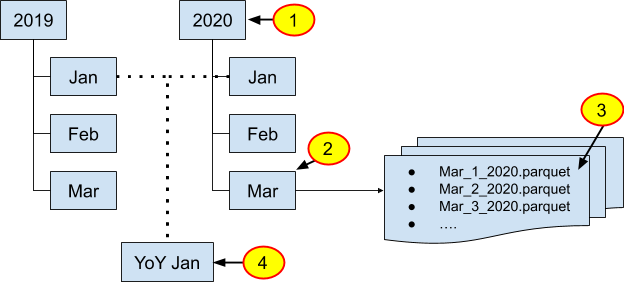
Example 1: Directory structures and refresh periods
HeavyConnect to the Parquet data organized in the year 2020. Users expect monthly updated data that has been added to existing data.
- Create a custom foreign server. This server is reused in all of the examples that follow.
- Create the foreign table to use. In the CREATE FOREIGN TABLE statement, specify the update type and scheduling.
You can now query and build dashboards using the foreign table example_year_2020.
Example 2: Directory structures and refresh periods
HeavyConnect to the Parquet data organized in the month of March. Users expect weekly updated data that has been added to the existing data.
- Reuse the foreign server created in Example 1.
- Create the foreign table for use. In the CREATE FOREIGN TABLE statement, specify the update type, scheduling, and the additional file path to the month of March.
When specifying a file path in the foreign table creation statement, the path is additive to the base path specified in the foreign server.
You can now query and build dashboards using the foreign table example_month_march.
Example 3: Directory structures and refresh periods
HeavyConnect to the Parquet data Mar_01_2020. Users expect daily updated data that may have been edited throughout the file.
- Use the foreign server you created in Example 1.
- Create the foreign table for use. In the CREATE FOREIGN TABLE statement, specify the update type, scheduling, and the additional file path to the month of March.
REFRESH_UPDATE_TYPE=‘ALL’ instructs the system to update all metadata and takes additional time for larger datasets. This can have an impact on performance when used with a short REFRESH_INTERVAL.
You can now query and build dashboards using the foreign table example_day_march_01.
Example 4: Directory structures and refresh periods
HeavyConnect to the Parquet data of year-over-year (YoY) January data. Users manually refresh the data that has been updated throughout the file.
- Create the YoY Jan directory with symlinks to the January directories.
- Use the foreign server provided by HeavyDB. You do not need to create a new one.
- Create the foreign table for use. In the CREATE FOREIGN TABLE statement, specify the update type, scheduling, the additional file path, and the default HeavyDB server.
To refresh the data, you need to issue the command REFRESH FOREIGN TABLES example_yoy_january.
You can now query and build dashboards using the foreign table example_yoy_january.
Example 5: AWS S3 Datastore
This example provides the full workflow required to HeavyConnect to a private S3 Parquet datastore.
See the AWS documentation for information on organizing your data and how folders are represented in S3.
- Create a custom S3 foreign server for the private S3 bucket.
- Set up credentials for the foreign server. In the CREATE USER MAPPING statement, set the S3 access keys and S3 secret key.
- Create the foreign table to use. In the CREATE FOREIGN TABLE statement, specify the update type and scheduling.
You can now query and build dashboards using the foreign table example_year_2020.
Example 6: AWS S3 Datastore
This example provides the full workflow required to HeavyConnect to a public S3 CSV datastore that uses the S3 Select access type.
- Create a custom S3 foreign server for the public S3 bucket.
- Set the public credentials for the foreign server, which uses the S3 Select access type. In the CREATE USER MAPPING statement, set the S3 access keys and S3 secret key.
- Create the foreign table using the S3 Select access type. In the CREATE FOREIGN TABLE statement, specify the update type and scheduling.
You can now query and build dashboards using the foreign table example_year_2020.
Example 7: Processing Access Logs
This example illustrates how the regex parsed file data wrapper can be used to query a local log file, which uses the Common Log Format standard. Assume that the log file has the following content:
Create a foreign table that extracts all the fields in the logs:
Tip: Use a regex visualizer tool with a sample of the text file when determining the “line_regex” string.
The table can now be queried using a HeavyDB client as normal:
The previous example uses the default provided “default_local_regex_parsed” server, which can be used to access files on the local file system without having to create a separate server object. Similar default servers exist for the CSV (default_local_delimited) and Parquet (default_local_parquet) data wrappers.
Example 8: Processing Multi-Line Access Logs
The above example shows how a log file can be queried using the regex parsed file data wrapper. However, in certain cases, log messages may span multiple lines. In such a case, a “line_start_regex” option can be used to indicate the start of a new entry.
Assume that the log file has the following content with some entries spanning multiple lines:
Create a foreign table that extracts all the fields in the logs:
The table can now be queried using a HeavyDB client as normal:
Example 9: PostgreSQL Access Using an ODBC DSN (Beta)
ODBC HeavyConnect is currently in beta.
This example illustrates how the ODBC data wrapper can be used to access data residing in a PostgreSQL RDMS.
- Download the PostgreSQL ODBC driver (see https://odbc.postgresql.org/ for more details. Alternatively, this can be done via an Operating System package manager).
- Add an
/etc/odbc.inifile with the following configuration:
Alternatively, the above configuration can be put in an .odbc.ini file in the home directory (i.e. ~/.odbc.ini), if the server process is started under a specific user account.
- Create a custom ODBC foreign server for the PostgreSQL database:
data_source_name is set to the name that is configured in the ~/.odbc.ini file.
- Set the credentials for the foreign server using a user mapping:
- Create a foreign table that references the above server:
You can now query the foreign table as normal.
For more information, see ODBC Data Wrapper Reference.
Example 10: PostgreSQL Access Using ODBC Connection String (Beta)
ODBC HeavyConnect is currently in beta.
The above example shows how an RDMS can be accessed using an ODBC configuration file that resides in the server. System administrator might not know and configure all possible RDMS databases that users want to use; the ODBC data wrapper provides an alternative of setting the configuration for remote RDMS databases using a connection string.
In this example, assume that data needs to be fetched from another PostgreSQL database called “my_postgres_db”, which is on a server with hostname “my_postgres.example.com” running on port 1234.
- Download the PostgreSQL ODBC driver (and drivers for all types of RDMS users are expected to use).
- Add an
/etc/odbcinst.inifile with configurations for all drivers:
Use an intuitive name for the driver. Ideally, this should be the official name of the RDMS, so that users can easily figure out the driver name to use when creating the foreign server object.
- Create a custom ODBC foreign server for the PostgreSQL database:
Users can create foreign server objects using their RDMS database details and name of the installed driver.
- Set the credentials for the foreign server using a user mapping:
When the “connection_string” option is used in the foreign server definition, the corresponding user mapping has to use a “credential_string” option, which contains the username and password.
- Create a foreign table that references the above server:
You can now query the foreign table as normal.
For more information, see ODBC Data Wrapper Reference.