# Copyright (c) 2022-2026, The Isaac Lab Project Developers (https://github.com/isaac-sim/IsaacLab/blob/main/CONTRIBUTORS.md).
# All rights reserved.
#
# SPDX-License-Identifier: BSD-3-Clause
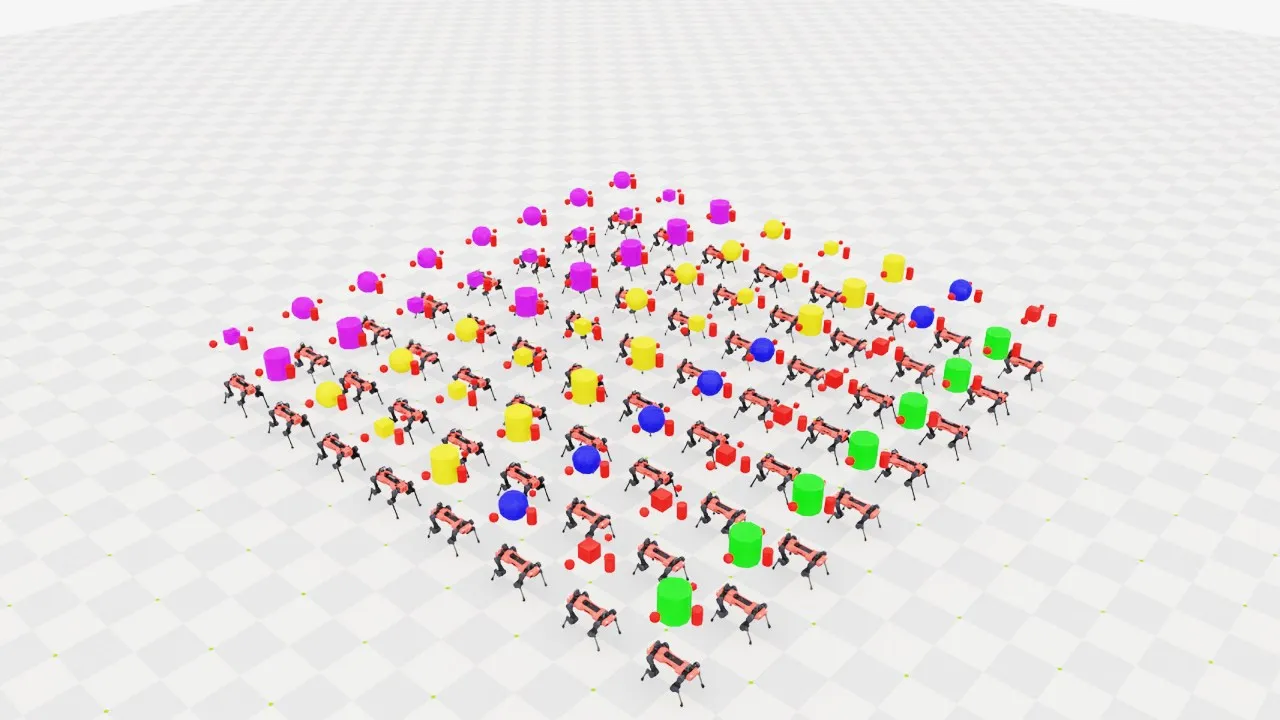
"""Spawn several asset types across cloned environments.
.. code-block:: bash
uvx isaaclab example multi-asset --num_envs 1024
"""
from __future__ import annotations
import argparse
from typing import TYPE_CHECKING
from isaaclab.app import add_launcher_args, launch_simulation
parser = argparse.ArgumentParser(
description="Example of spawning different objects in multiple environments.",
conflict_handler="resolve",
)
parser.add_argument("--num_envs", type=int, default=512, help="Number of environments to spawn.")
parser.add_argument(
"--physics", default="newton_mjwarp", choices=["isaacsim_physx", "newton_mjwarp"], help="Physics backend."
)
parser.add_argument("--max_steps", type=int, default=-1, help="Stop after this many steps; negative runs forever.")
add_launcher_args(parser)
parser.set_defaults(visualizer=["newton_gl"])
args_cli = parser.parse_args()
if args_cli.max_steps == 0 or args_cli.max_steps < -1:
parser.error("--max_steps must be positive or -1.")
from isaaclab_newton.sim.schemas import NewtonArticulationCfg
from isaaclab_physx.sim.schemas import PhysxArticulationCfg, PhysxRigidBodyCfg
import isaaclab.sim as sim_utils
from isaaclab.assets import ArticulationCfg, AssetBaseCfg, RigidObjectCfg, RigidObjectCollectionCfg
from isaaclab.physics import PhysicsCfg
from isaaclab.scene import InteractiveSceneCfg
from isaaclab_assets.robots.anymal import ANYDRIVE_3_LSTM_ACTUATOR_CFG # isort: skip
from isaaclab.utils import Timer, configclass, instantiate
from isaaclab.utils.assets import ISAACLAB_NUCLEUS_DIR
if TYPE_CHECKING:
from isaaclab.assets import Articulation, RigidObject, RigidObjectCollection
from isaaclab.scene import InteractiveScene
# Visual material presets for the multi-asset variants.
GREEN_MATERIAL = {"visual_material": sim_utils.PreviewSurfaceCfg(diffuse_color=(0.0, 1.0, 0.0), metallic=0.2)}
RED_MATERIAL = {"visual_material": sim_utils.PreviewSurfaceCfg(diffuse_color=(1.0, 0.0, 0.0), metallic=0.2)}
BLUE_MATERIAL = {"visual_material": sim_utils.PreviewSurfaceCfg(diffuse_color=(0.0, 0.0, 1.0), metallic=0.2)}
GOLD_MATERIAL = {"visual_material": sim_utils.PreviewSurfaceCfg(diffuse_color=(1.0, 0.75, 0.0), metallic=0.2)}
PURPLE_MATERIAL = {"visual_material": sim_utils.PreviewSurfaceCfg(diffuse_color=(0.5, 0.0, 1.0), metallic=0.2)}
OBJECT_PHYSICS = {
"rigid_props": PhysxRigidBodyCfg(solver_position_iteration_count=4, solver_velocity_iteration_count=0),
"mass_props": sim_utils.MassCfg(mass=1.0),
"collision_props": sim_utils.UsdPhysicsCollisionCfg(),
}
##
# Scene Configuration
##
@configclass
class MultiObjectSceneCfg(InteractiveSceneCfg):
"""Configuration for a multi-object scene."""
# ground plane
ground = AssetBaseCfg(prim_path="/World/defaultGroundPlane", spawn=sim_utils.GroundPlaneCfg())
# lights
dome_light = AssetBaseCfg(
prim_path="/World/Light", spawn=sim_utils.DomeLightCfg(intensity=3000.0, color=(0.75, 0.75, 0.75))
)
# rigid object
object: RigidObjectCfg = RigidObjectCfg(
prim_path="/World/envs/env_.*/Object",
spawn=sim_utils.MultiAssetSpawnerCfg(
assets_cfg=[
sim_utils.CylinderCfg(radius=0.3, height=0.6, **GREEN_MATERIAL),
sim_utils.CuboidCfg(size=(0.3, 0.3, 0.3), **RED_MATERIAL),
sim_utils.SphereCfg(radius=0.3, **BLUE_MATERIAL),
sim_utils.CylinderCfg(radius=0.3, height=0.6, **GOLD_MATERIAL),
sim_utils.CuboidCfg(size=(0.3, 0.3, 0.3), **GOLD_MATERIAL),
sim_utils.SphereCfg(radius=0.3, **GOLD_MATERIAL),
sim_utils.CylinderCfg(radius=0.3, height=0.6, **PURPLE_MATERIAL),
sim_utils.CuboidCfg(size=(0.3, 0.3, 0.3), **PURPLE_MATERIAL),
sim_utils.SphereCfg(radius=0.3, **PURPLE_MATERIAL),
],
random_choice=False,
**OBJECT_PHYSICS,
),
init_state=RigidObjectCfg.InitialStateCfg(pos=(0.0, 0.0, 2.0)),
)
# object collection
object_collection: RigidObjectCollectionCfg = RigidObjectCollectionCfg(
rigid_objects={
"object_A": RigidObjectCfg(
prim_path="/World/envs/env_.*/Object_A",
spawn=sim_utils.SphereCfg(radius=0.1, **RED_MATERIAL, **OBJECT_PHYSICS),
init_state=RigidObjectCfg.InitialStateCfg(pos=(0.0, -0.5, 2.0)),
),
"object_B": RigidObjectCfg(
prim_path="/World/envs/env_.*/Object_B",
spawn=sim_utils.CuboidCfg(size=(0.1, 0.1, 0.1), **RED_MATERIAL, **OBJECT_PHYSICS),
init_state=RigidObjectCfg.InitialStateCfg(pos=(0.0, 0.5, 2.0)),
),
"object_C": RigidObjectCfg(
prim_path="/World/envs/env_.*/Object_C",
spawn=sim_utils.CylinderCfg(radius=0.1, height=0.3, **RED_MATERIAL, **OBJECT_PHYSICS),
init_state=RigidObjectCfg.InitialStateCfg(pos=(0.5, 0.0, 2.0)),
),
}
)
# articulation
robot: ArticulationCfg = ArticulationCfg(
prim_path="/World/envs/env_.*/Robot",
spawn=sim_utils.MultiUsdFileCfg(
usd_path=[
f"{ISAACLAB_NUCLEUS_DIR}/Robots/ANYbotics/ANYmal-C/anymal_c.usd",
f"{ISAACLAB_NUCLEUS_DIR}/Robots/ANYbotics/ANYmal-D/anymal_d.usd",
],
random_choice=False,
rigid_props=PhysxRigidBodyCfg(
disable_gravity=False,
retain_accelerations=False,
linear_damping=0.0,
angular_damping=0.0,
max_linear_velocity=1000.0,
max_angular_velocity=1000.0,
max_depenetration_velocity=1.0,
),
articulation_props=[
PhysxArticulationCfg(
enabled_self_collisions=True, solver_position_iteration_count=4, solver_velocity_iteration_count=0
),
NewtonArticulationCfg(self_collision_enabled=True),
],
activate_contact_sensors=True,
),
init_state=ArticulationCfg.InitialStateCfg(
pos=(0.0, 0.0, 0.6),
joint_pos={
".*HAA": 0.0, # all HAA
".*F_HFE": 0.4, # both front HFE
".*H_HFE": -0.4, # both hind HFE
".*F_KFE": -0.8, # both front KFE
".*H_KFE": 0.8, # both hind KFE
},
),
actuators={"legs": ANYDRIVE_3_LSTM_ACTUATOR_CFG},
)
##
# Simulation Loop
##
def run_simulator(sim: sim_utils.SimulationContext, scene: InteractiveScene):
"""Runs the simulation loop."""
# Extract scene entities
# note: we only do this here for readability.
rigid_object: RigidObject = scene["object"]
rigid_object_collection: RigidObjectCollection = scene["object_collection"]
robot: Articulation = scene["robot"]
# Define simulation stepping
sim_dt = sim.get_physics_dt()
count = 0
step_count = 0
# Step while a visualizer window is still open (or none exist, e.g. headless); works for kit and newton.
while sim.is_running() and (args_cli.max_steps < 0 or step_count < args_cli.max_steps):
# Reset
if count % 250 == 0:
# reset counter
count = 0
# reset the scene entities
# object
root_pose = rigid_object.data.default_root_pose.torch.clone()
root_pose[:, :3] += scene.env_origins
rigid_object.write_root_pose_to_sim_index(root_pose=root_pose)
root_vel = rigid_object.data.default_root_vel.torch.clone()
rigid_object.write_root_velocity_to_sim_index(root_velocity=root_vel)
# object collection
default_pose_w = rigid_object_collection.data.default_body_pose.torch.clone()
default_pose_w[..., :3] += scene.env_origins.unsqueeze(1)
rigid_object_collection.write_body_pose_to_sim_index(body_poses=default_pose_w)
default_vel_w = rigid_object_collection.data.default_body_vel.torch.clone()
rigid_object_collection.write_body_com_velocity_to_sim_index(body_velocities=default_vel_w)
# robot
# -- root state
root_pose = robot.data.default_root_pose.torch.clone()
root_pose[:, :3] += scene.env_origins
robot.write_root_pose_to_sim_index(root_pose=root_pose)
root_vel = robot.data.default_root_vel.torch
robot.write_root_velocity_to_sim_index(root_velocity=root_vel)
# -- joint state
joint_pos = robot.data.default_joint_pos.torch
joint_vel = robot.data.default_joint_vel.torch
robot.write_joint_position_to_sim_index(position=joint_pos)
robot.write_joint_velocity_to_sim_index(velocity=joint_vel)
# clear internal buffers
scene.reset()
print("[INFO]: Resetting scene state...")
# Apply action to robot
robot.set_joint_position_target_index(target=robot.data.default_joint_pos.torch)
# Write data to sim
scene.write_data_to_sim()
# Perform step
sim.step()
step_count += 1
# Increment counter
count += 1
# Update buffers
scene.update(sim_dt)
def main():
"""Main function."""
with launch_simulation(cfg=PhysicsCfg(), launcher_args=args_cli) as physics_cfg:
sim_cfg = sim_utils.SimulationCfg(dt=0.005, device=args_cli.device, physics=physics_cfg)
sim = sim_utils.SimulationContext(sim_cfg)
# Set main camera
sim.set_camera_view([2.5, 0.0, 4.0], [0.0, 0.0, 2.0])
# Design scene
scene_cfg = MultiObjectSceneCfg(num_envs=args_cli.num_envs, env_spacing=2.0, replicate_physics=True)
if args_cli.physics == "newton_mjwarp":
# Newton views currently require a uniform body layout across worlds.
scene_cfg.object.spawn.assets_cfg = scene_cfg.object.spawn.assets_cfg[1:2]
scene_cfg.robot.spawn.usd_path = scene_cfg.robot.spawn.usd_path[0]
with Timer("[INFO] Time to create scene: "):
scene = instantiate(scene_cfg)
sim.reset()
print("[INFO]: Setup complete...")
run_simulator(sim, scene)
if __name__ == "__main__":
main()