

Base Command Manager Integration with Building Management System#
Introduction#
NVIDIA DGX NVL72 system has defined three different levels of liquid leak detection system:
Node/tray-level liquid detection, with (1) Cold Plate Leak sensor and (2) Inner Manifold Leak sensor.
Rack-level liquid detection, with leak sensing ropes and leak spot sensor located along piping and in the DGX GB200 compute racks.
Datacenter-level liquid detection, with leak spot sensor and sensing rope located in the cooling distribution units (CDUs), and alongside with the piping of the datacenter leak pipes.
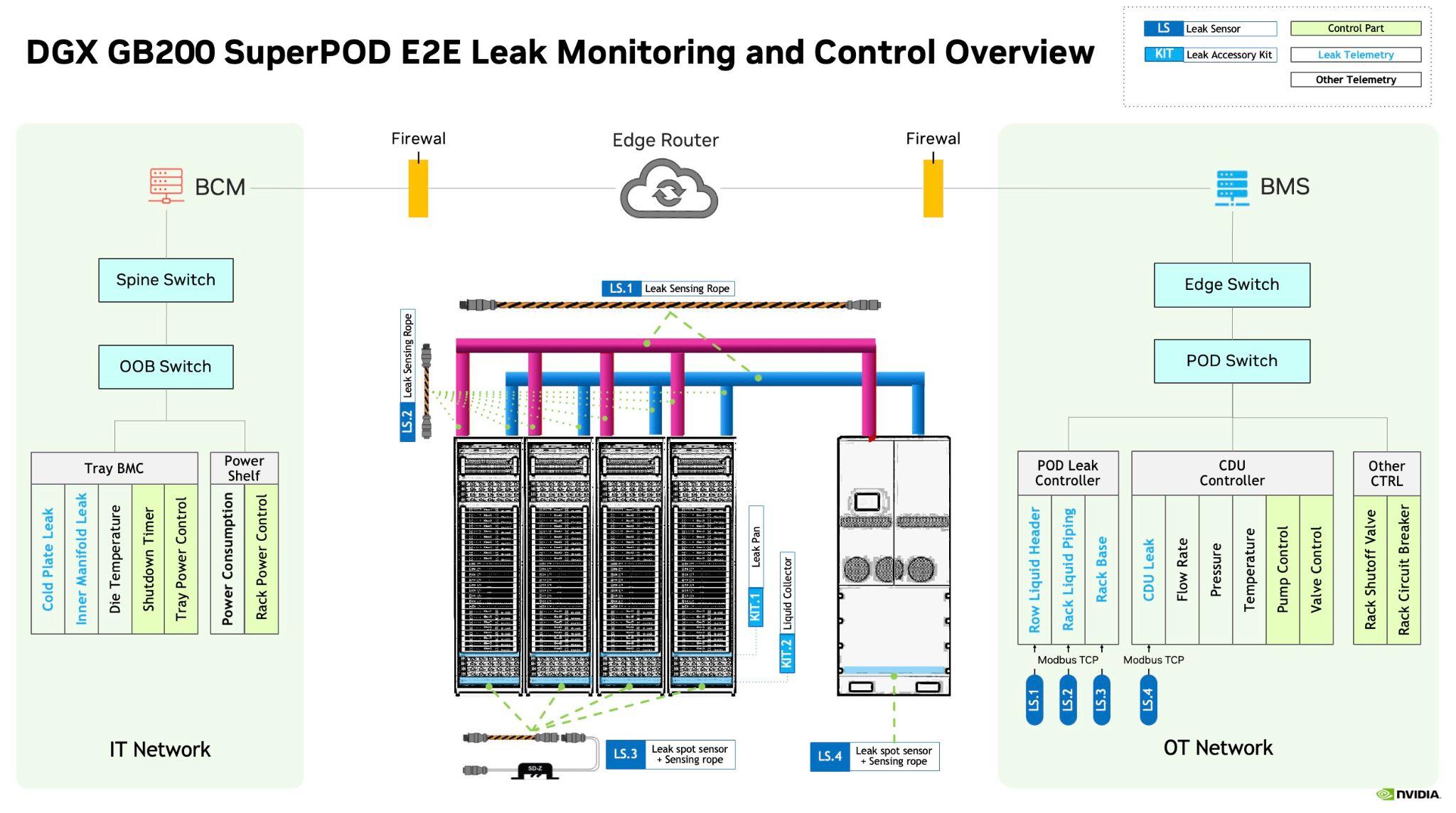
For DGX GB200, tray level liquid detection is handled by the system BMC on compute tray / switch tray. The rack level liquid detection is handled by a customer provided building management system (BMS) operating in the operational technology (OT) side of the datacenter.
NVIDIA Base Command Manager 11 provides native support for managing the leak event over the REDFISH interface from the BMC of the DGX GB200. To reach a common intelligence and allow centralized leak detection, power controlling and leak even reaction, we recommend to integrate the customer provided BMS.
Integration of BMS with BCM#
In order to integrate the customer provided BMS with BCM, we recommend all customers of DGX GB200 to align with our specification as provided in the following parts of this document.
Leak Detection Process#
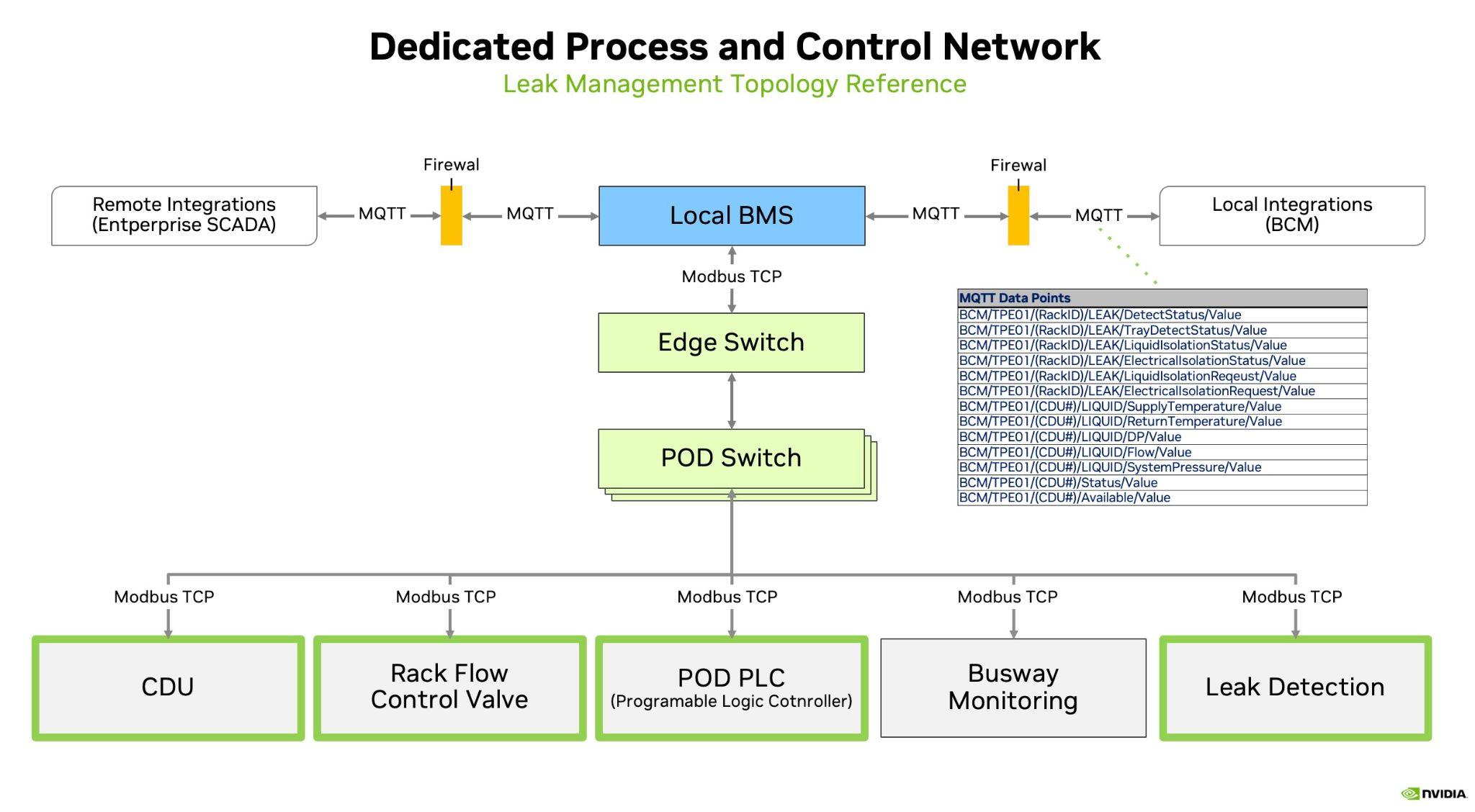
In the DGX GB200 based system, BCM expects a MQTT based BMS system following the data catalog as published by NVIDIA. MQTT is a publish-subscribe based communication protocol for IoT devices and provides fast broadcasting of messages, as well as low end to end latency.
NVIDIA BCM expects TCP/IP connectivity to and from the MQTT server that BMS system would provide. Note, that the MQTT server itself is not part of BCM, and must be provided by the customer or their BMS system integrator.
Moreover, NVIDIA recommends that the MQTT server is firewall protected with TLS or SSL enabled. This way, a mixing of the OT and IT side traffic can be avoided.
Setting up the BMS in BCM#
These are all the settings involved to BCM up as an MQTT client for a BMS system
[a03-p1-head-01->partition[base]]% get bms

NVIDIA conforming BMS

[a03-p1-head-01->partition[base]]% configurationoverlay

[a03-p1-head-01->configurationoverlay]% use mqtt

[a03-p1-head-01->configurationoverlay[mqtt]]% roles

[a03-p1-head-01->configurationoverlay[mqtt]->roles]% show mqtt

Parameter                Value
------------------------ -----------------------------------------------------------------------
Name                     mqtt
Revision
Type                     MQTTRole
Add services             yes
Servers                  <1 in submode>
CA certificate path      /cm/local/apps/cmd/pythoncm/lib/python3.12/site-packages/pythoncm/etc/cacert.pem
Private key path         /cm/local/apps/cmd/cm-mqtt/etc/mqtt.key
Certificate path         /cm/local/apps/cmd/cm-mqtt/etc/mqtt.pem
Write named pipe path    /var/spool/cmd/mqtt.pipe

[a03-p1-head-01->configurationoverlay[mqtt]->roles]% servers mqtt

[a03-p1-head-01->configurationoverlay[mqtt]->roles[mqtt]->servers]% list

Server (key)    Port    Disabled
--------------  ------  ----------
7.241.8.177     1883    norhy

[a03-p1-head-01->configurationoverlay[mqtt]->roles[mqtt]->servers]% show 7.241.8.177

Parameter                Value
------------------------ ------------------------------------------------
Revision
Server                   7.241.8.177
Port                     1883
Topic                    BCM/#
Disabled                 no
Username                 Bcm
Password                 *******
Transport                tcp
Protocol                 v3.1.1
Certificate required     yes
Check hostname           yes
CA certificate
Certificate
Private key
It is recommended to also define all the racks the BMS knows about inside BCM, even if those do not yet contain any nodes.
Define all the power circuits the BMS reports data for as well, these will be linked to the power circuit data that comes from MQTT.
[a03-p1-head-01->powercircuit]% list

Name (key)    Building    Location
-----------   --------    --------
RPP-B12-3
RPP-B14-3
RPP-B21-5
Defining the CDU as devices allows them to be shown as UP/DOWN
Via IP ping : if set
Via timestamp of latest data point reported by MQTT
[a03-p1-head-01->device]% list -t coolingdistributionunit

Type                    Hostname (key)    IP         Status
---------------------   --------------    --------   ----------------
CoolingDistributionUnit CDU01             0.0.0.0    [ UP ]
CoolingDistributionUnit CDU02             0.0.0.0    [ UP ]
In some instances, you might like to make additional BMS metrics available over Prometheus as part of the observability stack. As an example, you might configure it this way:
cm-manipulate-advanced-config.py PushMonitoringDeviceStatusMetrics=CDUStatus,CDULiquidSystemPressure,CDULiquidReturnTemperature
after which you should resart the BCM cmdaemon:
systemctl restart cmd
Data Catalog#
The data catalog file contains the complete specification for creating the required BCM MQTT namespace on the BMS. Each cell in the table is important and contains information needed to properly configure the MQTT topics and payloads.
The latest version of the data catalog is available at https://docs.nvidia.com/pdf/BCM-MQTT-Point%20Interface-Specification.pdf.
MQTT Broker Requirements#
The MQTT broker must be deployed as part of the BMS. BCM acts as an MQTT client and connects to the BMS MQTT broker.
Topic publishing responsibilities:
The BMS must publish all Metadata topics, even for topics where the associated Value topic is written to by BCM.
The BMS must publish Value Topics indicated in the data catalog that the BMS writes to.
BCM publishes Value Topics indicated in the data catalog that BCM writes to.
MQTT Payload Formats#
Value Topics#
Value Topics provide JSON payloads with a value and timestamp.
- Example Topic:
BCM/TPE01/A01/LIQUID/ReturnTemperature/Value- Example Payload:
{
  "value": 37.590332,
  "timestamp": 1731010913196
}
Metadata Topics#
Metadata Topics provide JSON payloads with the appropriate data defined in the spreadsheet.
- Example Topic:
BCM/TPE01/A01/LIQUID/ReturnTemperature/Metadata- Example Payload:
{
  "pointType": "RackLiquidReturnTemperature",
  "objectType": "rack",
  "engUnit": "C",
  "rackName": "A01",
  "rackID": "1234abcd"
}
Retained Messages#
Follow these guidelines for retained messages:
Metadata topics should all be retained.
Value topics that are not expected to update every few seconds must be retained. Setpoints and Binary Tags always fall into this category.
Consider retaining all messages when possible.
Heartbeat#
The BMS and BCM both write to the Heartbeat Value Topic, with the BMS writing first. The default heartbeat interval is expected to be 5 seconds.
General Requirements#
When implementing Metadata Topics, ensure they include all data shown in the “Metadata Payload Contains (JSON)” column of the data catalog CSV file.
Critical Metadata Fields:
pointType: This field is critical. Each pointType should have the specified Metadata as defined in the data catalog.
rackName and rackID: These must be coordinated between BCM and BMS prior to deployment. Rack Name and ID must allow association of a specific rack between the BMS and BCM.
CDUName, CDUID, circuitName, circuitID: CDU Name and ID, Circuit Name and ID must be unique for each CDU and Circuit but do not require coordination with BCM. BCM discovers these from the BMS.
Fault Type and Handling Recommendations#
Fault Type |
BMC |
BCM |
BMS |
|---|---|---|---|
Tray level leak detection |
|
|
NA |
Rack level leak detection (Detected by BCM) |
Same as above |
|
|
Rack level leak detection (Detected by BMS) |
Same as above |
NA |
|
Row level leak detection |
Same as above |
NA |
|
Sensor Fault (includes false alarms due to sensor misreadings) |
NA |
Call for onsite inspection (e.g., power drain procedure) |
Call for onsite inspection (e.g., power drain procedure) |