

Fine-Tune Gemma 3 and Gemma 3n
Fine-Tune Gemma 3 and Gemma 3n
This document explains how to fine-tune Gemma 3 and Gemma 3n using NeMo AutoModel. It outlines key operations, including initiating SFT and PEFT-LoRA runs and managing experiment configurations using YAML.
To set up your environment to run NeMo AutoModel, follow the Installation Guide.
Data
MedPix-VQA Dataset
The MedPix-VQA dataset is a comprehensive medical Visual Question-Answering dataset designed for training and evaluating VQA models in the medical domain. It contains medical images from MedPix, a well-known medical image database, paired with questions and answers that focus on medical image interpretation.
The dataset consists of 20,500 examples with the following structure:
- Training Set: 17,420 examples (85%)
- Validation Set: 3,080 examples (15%)
- Columns:
image_id,mode,case_id,question,answer
Preprocess the Dataset
NeMo AutoModel provides built-in preprocessing for the MedPix-VQA dataset through the make_medpix_dataset function. Here’s how the preprocessing works:
The preprocessing pipeline performs the following steps:
- Loads the dataset using the Hugging Face
datasetslibrary. - Extracts question-answer pairs by processing the
questionandanswerfields from the dataset. - Converts to the Hugging Face message list format to restructure the data into a chat-style format compatible with the Autoprocessor’s
apply_chat_templatefunction.
Use the Collate Functions
NeMo AutoModel provides specialized collate functions for different VLM processors. The collate function is responsible for batching examples and preparing them for model input.
Both Gemma 3 and Gemma 3n models work seamlessly with the Hugging Face AutoProcessor and use the default collate function:
The default collate function:
- Applies the processor’s chat template to convert message lists into model-ready inputs.
- Creates labels for training to guide supervised learning.
- Masks prompts and special tokens so that only answer tokens are considered during loss calculation.
Preprocess Custom Datasets
When using a custom dataset with a model whose Hugging Face AutoProcessor supports the apply_chat_template method, you’ll need to convert your data into the Hugging Face message list format expected by the apply_chat_template.
We provide examples demonstrating how to perform this conversion.
Some models, such as Qwen2.5 VL, have specific preprocessing requirements and require custom collate functions. For instance, Qwen2.5-VL uses the qwen_vl_utils.process_vision_info function to process images:
If your dataset requires custom preprocessing logic, you can define a custom collate function. To use it, specify the function in your YAML configuration:
We provide example custom collate functions that you can use as references for your implementation.
Run the Fine-Tune Script
Use the automodel CLI to launch fine-tuning with a YAML configuration file.
Apply YAML-Based Configuration
NeMo AutoModel uses a flexible configuration system that combines YAML configuration files with command-line overrides. This allows you to maintain base configurations while easily experimenting with different parameters.
The simplest way to run fine-tuning is with a YAML configuration file. We provide configs for both Gemma 3 and Gemma 3n.
These VLM recipes require the optional vlm dependency set, plus vlm-media for Qwen vision preprocessing (qwen_vl_utils). If you see ImportError: qwen_vl_utils is not installed, install both first:
(If you’re using pip: pip3 install "nemo-automodel[vlm,vlm-media]".)
Run Gemma 3 Fine-Tuning
- Single-GPU
- Multi-GPU
Run Gemma 3n Fine-Tuning
- Single-GPU
- Multi-GPU
Override Configuration Parameters
You can override any configuration parameter using dot-notation without modifying the YAML file:
Configure Model Freezing
NeMo AutoModel supports parameter freezing, allowing you to control which parts of a model remain trainable during fine-tuning. This is especially useful for VLMs, where you may want to preserve the pre-trained visual and audio encoders while adapting only the language model components.
With the freezing configuration, you can selectively freeze specific parts of the model to suit your training objectives:
Run Parameter-Efficient Fine-Tuning
For memory-efficient training, you can use Low-Rank Adaptation (LoRA) instead of full fine-tuning. NeMo AutoModel provides a dedicated PEFT recipe for Gemma 3:
To run PEFT with Gemma 3:
The LoRA configuration excludes vision and audio components from adaptation to preserve pre-trained visual representations:
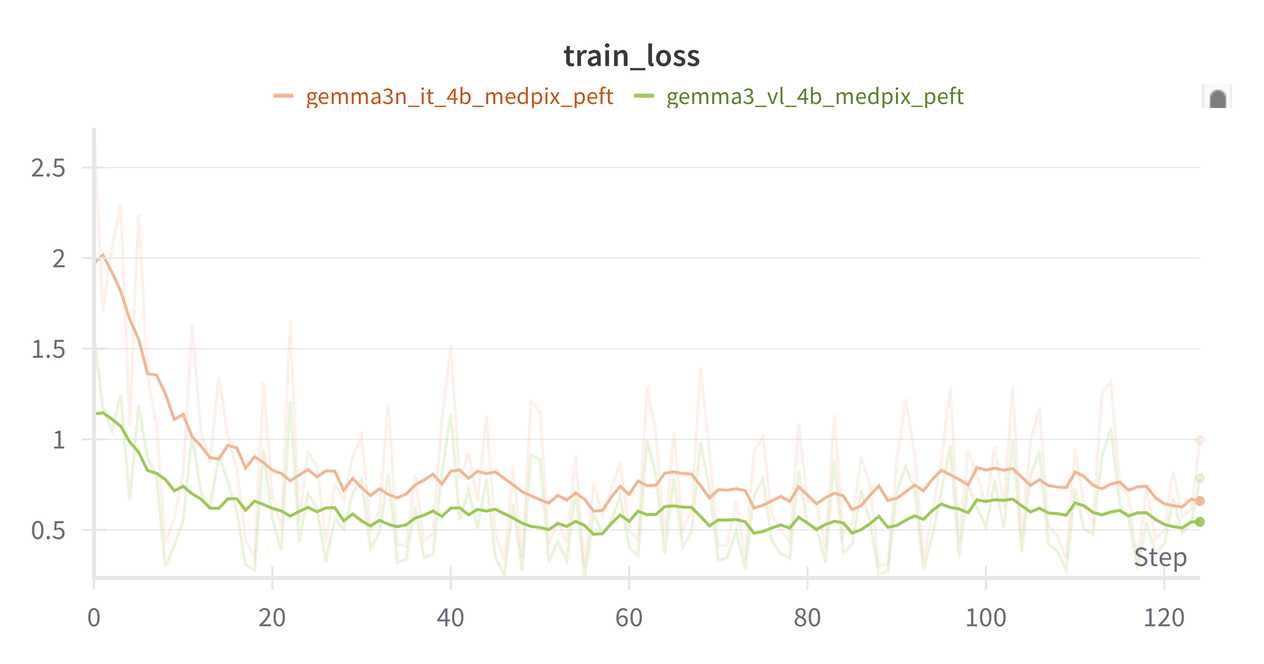
The training loss should look similar to the example below:
Checkpointing
We support training state checkpointing in either Safetensors or PyTorch DCP format.
Integrate Weights & Biases
You can enable W&B logging by setting your API key and configuring the logger:
Then, add the W&B configuration to your YAML file:
Run Inference
After fine-tuning your Gemma 3 or Gemma 3n model, you can use it for inference on new image-text tasks.
Generation Script
The inference functionality is provided through examples/vlm_generate/generate.py, which supports loading fine-tuned checkpoints and performing image-text generation.
Basic Usage
The output can be either text (default) or json, with an optional write file.
For models trained on MedPix-VQA, load the trained checkpoint and generate outputs using the following command. Be sure to specify the same base model used during training:
When checkpoints are saved from PEFT training, they contain only the adapter weights. To use them for generation, you need to specify the PEFT configuration. Run the following command to load and generate from adapters trained on MedPix-VQA:
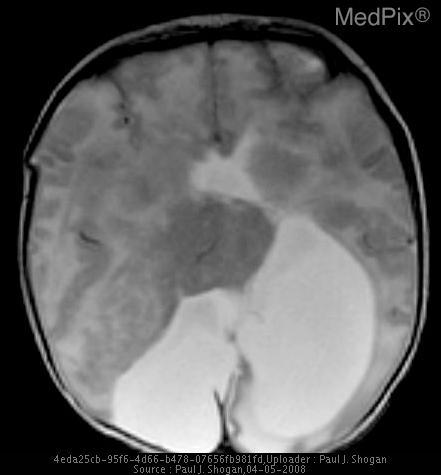
Given the following image:
And the prompt:
Example Gemma 3 response:
Example Gemma 3n response: