

Kubernetes Installation On An Air-gapped BCM Cluster
An air-gapped cluster environment is one where the cluster is not directly connected to the internet. Typically this is done to protect the cluster from remote intrusions.
Installation of Kubernetes in a non-air-gapped BCM cluster is covered in Chapter 4.
This appendix (Appendix B) describes how the following reference BCM air-gapped Kubernetes cluster can be created:
-
The cluster is air-gapped
-
The cluster uses Kubernetes version 1.34.7
-
The cluster is running BCM version 11.33.0 or 11.33.1
-
The BCM version is running on top of one of the following Linuxes:
-
Ubuntu 22.04
-
Ubuntu 24.04
-
Rocky Linux 9u3
-
RHEL 9u3
-
Appendix C describes how an existing BCM air-gapped Kubernetes cluster can be upgraded.
B.1 Initial Host Preparations For BCM Kubernetes Air-gapped Installation
The initial steps must be performed on an initial host computer that has internet access. The initial host requires:
-
Internet access
-
An OS that matches that of the air-gapped cluster: Ubuntu 22.04, Ubuntu 24.04, Ubuntu 26.04, Rocky Linux 9, or RHEL 9.
-
An architecture that matches that of the air-gapped cluster
-
Currently, the tarball supports one architecture at a time. So if the cluster has a mixed architecture, for example with the head node being x86-64 (using
x86_64RPM packages oramd64APT packages), but the Kubernetes control plane nodes being ARMv8 (usingarm64packages), then that requires a more customized approach.For architecture configurations, the
--helpoutput of the download Bash scripts (format:download_<descriptive label>.sh) indicates how the--archoption can be used. These scripts are located in theairgap-scriptsdirectory, described shortly.
-
-
The BCM package repositories must be configured on the initial host. The relevant BCM repository list files can be copied over from a working cluster with the same OS.
-
For Ubuntu, these files are of the form
cm-*.listandubuntu.sources, and are located within the/etc/apt/sources.list.d/directory.There are some known architecture-related bugs in the file specifications for the Ubuntu repositories. These should be fixed for the BCM 11.34 point release. The issues and associated workarounds for the 11.33 release are in the following files:
-
ubuntu.sources: The default Ubuntu sources file needs an architecture specification to be added. The default file can be replaced with the following deb822-format (man sources.list.5) text:Example
-
cm-cuda-ubuntu2404-*.list: The file for the default CUDA repositories list is modified as needed. Here, the “*” is eitherx86_64orarm64. The change is to allow CUDA packages to be picked up from whichever architecture is needed:Example
-
cm.list. The BCM repository list file is modified so that the extra architectures that are needed are specified:Example
In the preceding session:
-
The architecture key/value entries are specified for the repositories in the square brackets, using the traditional one-line format, but using a deb822 format is also possible.
-
The URLs specified in the preceding session take the <user>
:<password> format indicated. The values that are used for <user>:<password> should already be configured in the originalcm.listrepository file, and can simply be taken over. -
The server and path of the URL on the actual cluster may differ from the preceding example.
-
-
-
For RHEL variants these files should be
cm.repoandepel.repo, located within/etc/yum.repos.d/
-
-
The BCM
airgap-scriptsdirectory from the matching BCM version must be on the initial host. How the installation of that directory is carried out depends on ifcm-setupis on the initial host, as explained next.
If Run:ai is to be deployed on this cluster, then additional prerequisites must be in place before the Kubernetes installation begins:
-
three reserved IP addresses from the internal network
-
DNS records for the Run:ai control plane FQDN
-
two wildcard subdomains
-
a TLS certificate and private key
-
an NGC API key
None of these can be arranged once the cluster is air-gapped. Section B.2.8.1 has more details on these.
B.1.0.1 Initial Host Has cm-setup Installed
If the cm-setup package is already installed on the initial host, then for BCM version 11, the air-gap scripts are by default in the path defined by the environment variable K8S_AG_SCRIPTS.
Example
For BCM version 10, the Python directory path is python3.9 instead.
This environment variable path should be added to the existing PATH:
B.1.0.2 Initial Host Does Not Have cm-setup Installed
If the cm-setup package is not already installed on the initial host, then the administrator should define the air-gap scripts path, $K8S_AG_SCRIPTS, and then add the air-gap scripts to the PATH environment.
B.1.0.3 Using The Air-gap Scripts
-
helm 3.x(not 4.x at the time of writing, April 2026) must be added to/usr/local/bin/helmas per the instructions at https://helm.sh/docs/intro/install/.Alternatively, the following helper script, that BCM ships with
cm-setup, can be used:Example
Optionally, a Helm check can be carried out with:
Example
-
Skopeo, an image manager, is installed. This installation is carried out on the internet-connected host only, and not on the air-gapped head node. Skopeo is needed here in order to pull the container images that make up the tarball:
Example
The air-gapped head node obtains its own copy of Skopeo from the tarball, and no attempt should be made to install Skopeo there from a distribution repository (section B.2).
-
To work around a potential Docker Hub pull rate limit issue (https://docs.docker.com/docker-hub/usage/pulls/) the administrator can now sign up for an account at https://app.docker.com/signup, and authenticate with
skopeo login docker.io. This is to help with running the image installation scripts from theairgappeddirectory in the next bullet point.Any credentials are fine—the credentials will not end up in the air-gapped tarball or environment. They are only needed for authentication to conveniently pull images from Docker Hub. This is because unauthenticated pulls are limited to a rate of 100 per 6 hours. Authenticated pulls, on the other hand, are allowed at a rate of 200 per 6 hours, which should be sufficient for preparing the
airgappedtarball.
-
-
A working directory, for example
/root/airgapped, can then be created, and installation scripts within theairgappeddirectory can then be run:Example
The preceding scripted downloads are for Kubernetes version 1.34. To use a different version, such as v1.33 or v1.35, the
--kube-versionflag should be adjusted accordingly. If--kube-versionis not set ondownload_ubuntu_packages.sh,download_r9_packages.sh, ordownload_container_images.sh, each script falls back to its own default Kubernetes version, which is not necessarily the version that is to be deployed.download_helm_charts.shanddownload_crds.shtake no version-related option, and are unaffected by this.download_ubuntu_packages.sh,download_r9_packages.sh, anddownload_container_images.shalso accept a-c/--configoption, giving the path to acm-kubernetes-setup.confconfiguration file to read the Kubernetes version from, instead of--kube-version. Ondownload_ubuntu_packages.shanddownload_r9_packages.sh,--kube-versionand-care mutually exclusive: only one may be given. Ondownload_container_images.shboth may be given together, in which case--kube-versiontakes precedence over the value in the configuration file.Using
-cthis way requires acm-kubernetes-setup.conffile to already exist. That file is normally generated later, on the air-gapped head node (section B.2.1). To guarantee that the version downloaded here matches the version that is deployed later, the configuration can instead be generated ahead of time, before this step, and the resultingcm-kubernetes-setup.confcopied to the internet-connected host for use with-c.The charts fetched by
download_helm_charts.shdetermine which NVIDIA GPU Operator versions can be deployed later on. Thecm-kubernetes-setupwizard presents a list of GPU Operator versions, but in an air-gapped cluster only a version whose chart is among the downloaded ones can be installed. There is no route to fetch any of the others once the cluster is air-gapped.Certification and availability are separate properties: an asterisk next to a version in the wizard marks it as certified for NVIDIA AI Enterprise (section 6.7.1). A version that was downloaded is not necessarily a certified one, and a certified version is not necessarily among those that were downloaded.
The downloaded charts can therefore be listed before
cm-kubernetes-setupis run, so that the version picked in the wizard is known to be one that is available:The same
helm-chartsdirectory is present inside the extractedairgappeddirectory on the head node, so the charts can also be checked there.The charts are fetched from chart repositories on the internet, and the set of repositories that is used changes between BCM releases. BCM 11.34 fetches from four repositories that BCM 11.33 did not:
-
oci://cr.agentgateway.dev/charts/agentgateway, for the AgentGateway operator -
oci://cr.agentgateway.dev/charts/agentgateway-crds, for the AgentGateway CRDs operator -
https://argoproj.github.io/argo-helm, for the Argo CD operator
-
https://flannel-io.github.io/flannel, for the Flannel network plug-in
A site that restricts outbound connections from the internet-connected host must permit these destinations before
download_helm_charts.shis run. A site that is moving from BCM 11.33 must add them to any existing list of permitted destinations.The repository that serves the Calico CRDs chart, https://docs.tigera.io/calico/charts, is not a new one. It already served the Tigera Operator chart in BCM 11.33.
To ensure the commands all succeed, it is best to execute them in sequence and let them complete. The download scripts all write their output to the current working directory.
The downloads take a while, and are best run inside a
screenortmuxsession so that a dropped connection does not interrupt them. The container image download accounts for most of the elapsed time—on a test system with fast networking it took around 15 times as long as the package, chart, and CRD downloads put together. Absolute times depend on the available bandwidth, so a slow download is not in itself a sign that something has gone wrong.While the packages are downloading, APT emits warnings similar to:
One or more of these appears for each of the
packages,packages-head,packages-non-dgx, andpackages-cudadirectories. These warnings are expected and can be ignored. The_aptuser (with the underscore) cannot read the working directory when it is under/root, so APT drops its download sandbox and continues unsandboxed. The downloads themselves succeed, and the scripts exit normally. This is the same permission restriction that later requires the tarball to be extracted somewhere that APT can write to (section B.2).Without the Run:ai air-gapped package, the completed download is about 8.6 GB, of which the container images account for about 8.1 GB. The Run:ai package is a further 13–14 GB on top of that, so a working directory for a deployment that includes Run:ai needs upwards of 20 GB. Note that the
totalreported bylsin the listing that follows counts only the files in the directory itself, which is why it reflects the size of the Run:ai tarball rather than the size of the whole download. -
-
Run:ai air-gapped setup
If Run:ai is required in the air-gapped installation, then the Run:ai air-gapped package must also be downloaded to the working directory. The package is published as an NGC resource. The available versions are listed on the resource page at https://catalog.ngc.nvidia.com/orgs/nvidia/teams/runai/resources/runai-airgapp-package/version, and an NGC API key is needed to download it (https://docs.nvidia.com/ngc/latest/ngc-catalog-user-guide.html#ngc-api-keys):
Example
The <
runai version> part is replaced with the required patch version. For example:2.25.11, which gives a tarball named:runai-airgapped-package-2.25.11.tar.gzAlternatively, NVIDIA Run:ai Support can be contacted to request the appropriate tarball.
A minimum version of 2.23.60 is required, since that is when multi-arch support was added. The integrity of the downloaded file should be verified with
sha256sumagainst the checksum provided by NVIDIA Run:ai Support.The
cm-setup-runai-bcm11package must also be downloaded to the working directory. This package implements thecm-runai-setupwizard, and is not part of the Run:ai air-gapped tarball. Listing the contents of the tarball does not show it. The package is published separately, in the NVIDIA Mission Control package repository, which is publicly reachable and needs no credentials. The available versions are listed at:The package is published only as a
.deb, so an air-gapped Run:ai deployment on RHEL is not supported in this release. The package is architecture-specific, so the build that matches the head node architecture must be downloaded:Example
In the repository each package has a corresponding
.sha256file. The content of the.sha256file is the checksum. For thesha256sumutility to be able to check the package integrity, the.sha256file must have the file name of its corresponding package appended on the same line to the.sha256file checksum content:Example
The package must not be installed if the check reports anything other than
OK.The directory contents should then appear similar to:
-
Confirming the downloaded content is complete
Verifying nothing is missing before tarballing:
The download scripts run in the preceding steps make this repository complete for the release being installed. No additional package, image, or chart list needs to be assembled by hand. Each directory in the preceding listing corresponds to one content category:
-
packages,packages-head,packages-non-dgx, andpackages-cudahold the OS packages fetched bydownload_ubuntu_packages.shordownload_r9_packages.sh -
k8s-imagesholds the container images fetched bydownload_container_images.sh -
helm-chartsholds the Helm charts fetched bydownload_helm_charts.sh, from every chart repository this release depends on (see the repository list earlier in this section) -
crdsholds the CRD manifests fetched bydownload_crds.sh
The exact package names, image tags, and chart versions in each directory change between BCM and Kubernetes releases. Checking their contents against a fixed list is not useful. Instead, each category should be confirmed to have downloaded files before proceeding. A plain listing of the top-level directories is not enough:
packages,packages-head,packages-non-dgx, andpackages-cudaorganize their packages into subdirectories such asallandamd64, and those subdirectories can exist without containing any packages. Searching recursively for files avoids that gap:Example
A content category that produces no output has no downloaded files, even if its top-level directory (or a subdirectory within it) exists. Its download script did not complete, and should be re-run before the
airgappeddirectory is tarballed. -
-
The
airgappeddirectory can now be tarballed.In the tarball, the packages that are to be used by the software images must include all the architectures that are to be used by the Kubernetes cluster.
Example
The
airgapped.tgzfile should be saved to some transfer media (for example: a USB stick), and should be copied over to the active head node of the air-gapped cluster.
B.2 Head Node Preparation Steps
Before starting this section, the cluster’s control-plane, worker, and etcd nodes must already be assigned, as covered under Node assignment (section 4.2.8, here). This assignment is done using the same cm-kubernetes-setup wizard screens used here, is not air-gap-specific, and cannot be arranged once the cluster is air-gapped.
B.2.1 Generating The Air-gapped Kubernetes Setup Configuration
A local container registry (section 3.2) is needed on the air-gapped head node, so that Kubernetes operators can pull images. The registry itself is deployed in a later step, using the cm-container-registry-setup wizard (section B.2.3). First, however, a cm-kubernetes-setup.conf configuration file that is aware of this registry must be generated.
The configuration file is generated by running the cm-kubernetes-setup wizard TUI with special air-gap flags. These flags pre-configure the air-gap deployment mode and the registry address:
Example
cm-kubernetes-setup --airgap-registry <container_registry_address> --airgap-registry-as-helm
The <container_registry_address> part is replaced with the value: master.cm.cluster:5000 for the default Docker registry installation. When the wizard reaches the summary screen, the setup is not deployed—it merely has its configuration saved, so that there is a working cm-kubernetes-setup.conf file available for when the actual deployment is carried out later on.
B.2.1.1 Selecting The Run:ai Operator Dependencies
When the cm-kubernetes-setup wizard is run, with the intent of running Run:ai as well, the operator selection screen must include the dependencies that Run:ai requires. For Run:ai 2.25, these are:
-
NVIDIA GPU Operator
-
Grafana Operator
-
Kgateway
-
Knative Operator
-
Kubeflow Training Operator
-
Kubernetes Metrics Server
-
Kubernetes MPI Operator
-
Kubernetes State Metrics
-
LeaderWorkerSet Operator
-
MetalLB
-
Network Operator (technically optional, but recommended)
-
NIM Operator (optional)
-
Prometheus Adapter
-
Prometheus Operator Stack
The Run:ai operator and its prerequisites are described in more detail in section 6.11.
B.2.2 Unpacking The Files
The airgapped.tgz file that was copied over to the head node can then be extracted. For Ubuntu, extracting to a file system that APT can write to, such as /tmp, is recommended. This is because APT runs as the _apt user (with the underscore) during a part of the installation process, and _apt does not have sufficient permissions under /root to process the extracted files as needed. For Rocky Linux and RHEL the archive can be extracted in place, and the move to /tmp or similar is not needed.
Example
The system packages can now be installed onto the head node and the required software images, using the untarballed airgap system files together with the configuration file saved from earlier on. The command must be run from within the extracted airgapped directory, because the installer looks for the packages subdirectories relative to the current working directory:
Example
The packages that this step installs include Skopeo and its dependencies, which are carried in the packages-head directory of the tarball. Skopeo is required later on, when the container images are pushed into the local registry. It should not be installed on the head node with apt or dnf: an air-gapped head node has no distribution repository to install it from, and the step shown here has already provided it.
Run:ai is deployed separately, after the Kubernetes cluster has been deployed, with the cm-runai-setup wizard (section B.2.8).
If the air-gapped cluster has a secondary head node (section 15.1 of the Administrator Manual), then the system package installation does not have to be repeated on it. The --airgap-install-system-packages run on the active head node also updates the secondary head node. The tarball and the configuration file therefore do not have to be copied across for this step, and cm-kubernetes-setup should not be run on a passive head node.
This applies to the system package installation. Other components can still have their own secondary head node steps.
Earlier BCM releases did instruct that the tarball and the configuration file be copied to the secondary head node, and that the wizard be run there a second time with the --skip-headnode-check flag. That run reaches a stage which installs packages into the software image, and it is refused on a passive head node with the message This node is not the active head node (PASSIVE). The documented answer was Skip, which leaves the software image untouched. The message also suggests --force, which must not be used here. Software images are local to each head node and are synchronized from the active head node. This means that a write made on a passive head node is reverted at the next synchronization, and that until then the passive head node serves a different image to any node provisioning from it compared to the active head node.
Package installation for multiarch software images in the Kubernetes cluster is automatic. This is assuming that the software images have the packages for the required architectures in the tgz file.
B.2.3 Configuring The Container Registry
The container registry can now be configured with:
Example
root@basecm11:~# cm-container-registry-setup --skip-packages
The --skip-packages option means that the wizard assumes that the packages needed are already installed.
When configuring using the registry wizard, the active head node should be selected by the cluster administrator as the node to be used for the deployment.
The TUI asks for hosts to be set for the SSL certificate (figure B.1):
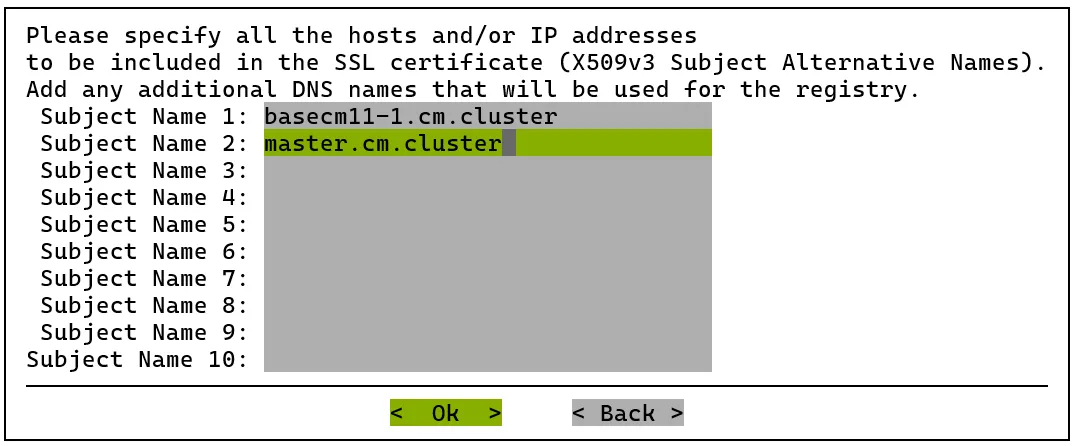
Figure B.1: SAN specification for SSL certificate
A custom domain name or additional subject name is set (master.cm.cluster in figure B.1), and the configuration is saved and deployed with the save and deploy option in the summary screen of the wizard.
Helm on the head node must be able to talk to this registry without TLS issues. The custom registry CA is therefore copied and trusted system-wide:
B.2.4 Configuring Docker For An Air-gapped Cluster
Docker can now be configured. Docker is currently only needed for the BCM Run:ai installation, and is configured with:
root@basecm11:~# cm-docker-setup --skip-packages
The active head node is chosen for the node for Docker, and the configuration is saved and deployed.
The successful deployment of Docker can be confirmed by running docker ps on the nodes on which it has been installed. The docker module must be loaded first, since the docker binary is not in the default path. The following output indicates readiness:
root@basecm11:~# module load docker root@basecm11:~# docker ps CONTAINER ID IMAGE COMMAND CREATED STATUS PORTS NAMES
Docker service initialization may take a few seconds.
Authenticating with docker login is not needed in this case, since images from Docker Hub are not going to be pulled.
B.2.5 Setting Up The Container Images And Helm Charts For An Air-gapped Cluster During Installation
From the airgapped directory, all Docker images and Helm charts can be pushed to the registry with:
B.2.6 Extracting The CRD Files For An Air-gapped Cluster During Installation
The downloaded CRD files can then be extracted using:
root@basecm11:~# $K8S_AG_SCRIPTS/extract_crds.sh
B.2.7 Deploying The Air-gapped Kubernetes Cluster
When the configuration is generated with the --airgap-registry and --airgap-registry-as-helm options (section B.2.1), the air-gap section of /root/cm-kubernetes-setup.conf is populated automatically. No manual editing of the file is normally needed. For reference, the relevant section then appears similar to:
If Run:ai is to be deployed, then the operators that Run:ai depends on must have been selected when this configuration was generated (section B.2.1.1).
Kubernetes can then be deployed with:
Run:ai itself is not deployed by cm-kubernetes-setup. It is deployed afterwards with the separate cm-runai-setup wizard (section B.2.8.3).
B.2.8 Decoupled Run:ai Deployment
Run:ai has its own wizard, cm-runai-setup. The command is part of the cm-setup package, and is present on a head node by default. The plugin that implements it is delivered separately, by the cm-setup-runai-bcm11 package. Running the wizard without that package fails with an error stating that the main component is not installed. The presence of the cm-runai-setup command therefore does not mean that Run:ai can be deployed. The cm-kubernetes-setup wizard is used to deploy Kubernetes itself and the operators that Run:ai depends on.
Run:ai is a separate product, with its own release cycle. BCM and Run:ai are released on the same cadence, so a BCM release has a Run:ai release that corresponds to it: BCM 11.33 corresponds to Run:ai 2.25, and BCM 11.34 corresponds to Run:ai 2.26. That correspondence is a matter of timing and not a restriction. Any Run:ai version can be deployed, provided that the version is still supported and has not reached end of life. The air-gapped tarball must match the version being deployed. For Run:ai 2.25.11 the tarball is named runai-airgapped-package-2.25.11.tar.gz.
B.2.8.1 Prerequisites For An Air-gapped Run:ai Deployment
The following prerequisites must be in place before cm-runai-setup is run. All of them have to be prepared either on the internet-connected host, or during the earlier Kubernetes deployment. None of them can be arranged once the cluster is air-gapped.
-
The
cm-setup-runai-bcm11package. If it is not already installed on the head nodes, then it must be downloaded on the internet-connected host and placed in theairgappeddirectory (section B.2.8.2). The wizard cannot install it itself, because the--skip-packagesflag that an air-gapped deployment requires also disables package installation. Checking whether thecm-runai-setupcommand exists is not a way to decide whether this prerequisite has been met, because that command is part ofcm-setupand is present whether or not the plugin package has been installed. -
Three reserved IP addresses, none of which may already be in use: one for the BCM gateway, one for the Run:ai control plane ingress, and one for Run:ai inference (Kourier). The address range that MetalLB is given during
cm-kubernetes-setupmust be large enough to cover all three. The wizard creates its own MetalLB address pools, so the addresses should be left free rather than placed in a pool beforehand. -
DNS records resolving the Run:ai control plane FQDN, a wildcard for workspace subdomains, and a wildcard for inference endpoints. For example
runai.example.comand*.runai.example.compointing at the control plane address, and*.runai-inference.example.compointing at the inference address. -
A TLS certificate and private key issued for the control plane FQDN, with the FQDN present in the Subject Alternative Name. A local CA certificate is also needed if the certificate is not issued by a publicly-trusted authority.
-
An NGC API key. The wizard requires a value for this even for an air-gapped deployment.
-
A directory holding the certificate, key and NGC API key that is reachable from the head node.
/cm/shared/runai/is the conventional location, and is used throughout the Run:ai documentation.
The wizard also enforces a password policy on the Tenants Manager administrator account: at least 8 characters, including at least one digit, one uppercase letter, and one special character.
B.2.8.2 Obtaining The cm-setup-runai-bcm11 Package
The cm-setup-runai-bcm11 package implements the cm-runai-setup wizard. The package source depends on whether the cluster has internet access, and on the operating system:
Clusters with internet access: No action is needed. The package is installed automatically when cm-runai-setup or cm-mission-control-setup is run.
Air-gapped clusters running Ubuntu: The package is downloaded on the internet-connected host during the initial host preparations, and placed in the airgapped directory so that it is included in the tarball. An air-gapped head node has no way to retrieve it later.
On the air-gapped head node, after the system packages have been installed (section B.2), the wizard package can then be installed.
Example
If the air-gapped cluster has a secondary head node (section 15.1 of the Administrator Manual), then the package must be installed on that head node too. The .deb file is held in a location that is local to each head node rather than on shared storage, so it must first be copied across:
Example
It is then installed on the secondary head node in the same way as on the primary head node:
Example
The cm-runai-setup wizard itself is run on the active head node only. The package is installed on the secondary head node so that the wizard remains available if the cluster fails over to that head node.
Air-gapped clusters running RHEL: An air-gapped Run:ai deployment is not supported in this release. Support is planned for a later release.
B.2.8.3 Running The cm-runai-setup Wizard
After Kubernetes has been deployed, together with the Run:ai operator dependencies, Run:ai itself is deployed with the cm-runai-setup wizard.
For an air-gapped deployment, the wizard must be run with the --skip-packages flag. Without this flag, the automatic update feature of the wizard attempts to reach the internet, and fails.
Example
The wizard prompts for:
-
the deployment type (self-hosted)
-
the node category for the Run:ai control plane (the same category as the Kubernetes control-plane nodes is recommended)
-
the control plane FQDN, and the paths to the certificate and private key
-
an administrator username and password for the Run:ai control plane
-
the gateway IP address. The address that the wizard offers is not necessarily one that MetalLB has been given, so it should be checked against the reserved addresses (section B.2.8.1) rather than accepted unchecked.
-
the LoadBalancer IP address used for Run:ai inference
If the wizard detects that it is deploying onto an air-gapped Kubernetes cluster, then it also prompts for the air-gapped registry, the Helm repository, the Helm CA certificate, and the location of the Run:ai air-gapped tarball. The Run:ai version itself is not prompted for in this case: it is taken from the operator defaults, and must match the version supplied in the tarball.
The wizard then checks the versions of the operators that Run:ai depends on, and reports each one against its requirement, before continuing to the deployment.
At the summary screen, Save & Exit should be selected if BCM point release 11.33 is being run. This is because deploying in a single run is prevented by a bug in the version of the wizard that ships with that release. The configuration is written to /root/cm-runai-setup.conf in either case, so a deployment that is interrupted can always be resumed from the saved configuration.
The deployment is then carried out with:
Example
The --skip-packages flag is only needed for air-gapped deployments.
When the setup completes, Run:ai should be up and running. This can be checked with, for example:
Example
B.2.8.4 Uninstalling Kubernetes And Run:ai
Uninstalling Kubernetes also removes Run:ai. The simplest method is to run the cm-kubernetes-setup wizard and select the uninstall option. Alternatively, the removal can be carried out from the command line:
Example
To remove only Run:ai, while leaving the Kubernetes cluster in place, the cm-runai-setup wizard provides an uninstall option. Equivalently, the removal can be carried out from the command line:
Example
B.2.9 Post-installation Automatic Provisioning
Section B.2 describes installing packages from the air-gapped tarball into software images. When deploying new software images for worker nodes, BCM cannot automatically provision them in air-gapped environments; this automatic provisioning functionality is available only in non-air-gapped clusters.
For air-gapped clusters, administrators must manually execute the relevant installation commands, adjusting the configuration file to specify the appropriate target nodes and node categories.