Skip to navigation

Using a task-space controller

View as Markdown

In the previous tutorials, we have joint-space controllers to control the robot. However, in many cases, it is more intuitive to control the robot using a task-space controller. For example, if we want to teleoperate the robot, it is easier to specify the desired end-effector pose rather than the desired joint positions.

In this tutorial, we will learn how to use a task-space controller to control the robot. We will use the controllers.DifferentialIKController class to track a desired end-effector pose command.

The Code

The tutorial corresponds to the run_diff_ik.py script in the scripts/tutorials/05_controllers directory.

# Copyright (c) 2022-2025, The Isaac Lab Project Developers (https://github.com/isaac-sim/IsaacLab/blob/main/CONTRIBUTORS.md).
# All rights reserved.
#
# SPDX-License-Identifier: BSD-3-Clause
"""
This script demonstrates how to use the differential inverse kinematics controller with the simulator.
The differential IK controller can be configured in different modes. It uses the Jacobians computed by
PhysX. This helps perform parallelized computation of the inverse kinematics.
~~~bash
# Usage
./isaaclab.sh -p scripts/tutorials/05_controllers/run_diff_ik.py
~~~
"""
"""Launch Isaac Sim Simulator first."""
import argparse
from isaaclab.app import AppLauncher
# add argparse arguments
parser = argparse.ArgumentParser(description="Tutorial on using the differential IK controller.")
parser.add_argument("--robot", type=str, default="franka_panda", help="Name of the robot.")
parser.add_argument("--num_envs", type=int, default=128, help="Number of environments to spawn.")
# append AppLauncher cli args
AppLauncher.add_app_launcher_args(parser)
# parse the arguments
args_cli = parser.parse_args()
# launch omniverse app
app_launcher = AppLauncher(args_cli)
simulation_app = app_launcher.app
"""Rest everything follows."""
import torch
import isaaclab.sim as sim_utils
from isaaclab.assets import AssetBaseCfg
from isaaclab.controllers import DifferentialIKController, DifferentialIKControllerCfg
from isaaclab.managers import SceneEntityCfg
from isaaclab.markers import VisualizationMarkers
from isaaclab.markers.config import FRAME_MARKER_CFG
from isaaclab.scene import InteractiveScene, InteractiveSceneCfg
from isaaclab.utils import configclass
from isaaclab.utils.assets import ISAAC_NUCLEUS_DIR
from isaaclab.utils.math import subtract_frame_transforms
##
# Pre-defined configs
##
from isaaclab_assets import FRANKA_PANDA_HIGH_PD_CFG, UR10_CFG # isort:skip
@configclass
class TableTopSceneCfg(InteractiveSceneCfg):
"""Configuration for a cart-pole scene."""
# ground plane
ground = AssetBaseCfg(
prim_path="/World/defaultGroundPlane",
spawn=sim_utils.GroundPlaneCfg(),
init_state=AssetBaseCfg.InitialStateCfg(pos=(0.0, 0.0, -1.05)),
)
# lights
dome_light = AssetBaseCfg(
prim_path="/World/Light", spawn=sim_utils.DomeLightCfg(intensity=3000.0, color=(0.75, 0.75, 0.75))
)
# mount
table = AssetBaseCfg(
prim_path="{ENV_REGEX_NS}/Table",
spawn=sim_utils.UsdFileCfg(
usd_path=f"{ISAAC_NUCLEUS_DIR}/Props/Mounts/Stand/stand_instanceable.usd", scale=(2.0, 2.0, 2.0)
),
)
# articulation
if args_cli.robot == "franka_panda":
robot = FRANKA_PANDA_HIGH_PD_CFG.replace(prim_path="{ENV_REGEX_NS}/Robot")
elif args_cli.robot == "ur10":
robot = UR10_CFG.replace(prim_path="{ENV_REGEX_NS}/Robot")
else:
raise ValueError(f"Robot {args_cli.robot} is not supported. Valid: franka_panda, ur10")
def run_simulator(sim: sim_utils.SimulationContext, scene: InteractiveScene):
"""Runs the simulation loop."""
# Extract scene entities
# note: we only do this here for readability.
robot = scene["robot"]
# Create controller
diff_ik_cfg = DifferentialIKControllerCfg(command_type="pose", use_relative_mode=False, ik_method="dls")
diff_ik_controller = DifferentialIKController(diff_ik_cfg, num_envs=scene.num_envs, device=sim.device)
# Markers
frame_marker_cfg = FRAME_MARKER_CFG.copy()
frame_marker_cfg.markers["frame"].scale = (0.1, 0.1, 0.1)
ee_marker = VisualizationMarkers(frame_marker_cfg.replace(prim_path="/Visuals/ee_current"))
goal_marker = VisualizationMarkers(frame_marker_cfg.replace(prim_path="/Visuals/ee_goal"))
# Define goals for the arm
ee_goals = [
[0.5, 0.5, 0.7, 0.707, 0, 0.707, 0],
[0.5, -0.4, 0.6, 0.707, 0.707, 0.0, 0.0],
[0.5, 0, 0.5, 0.0, 1.0, 0.0, 0.0],
]
ee_goals = torch.tensor(ee_goals, device=sim.device)
# Track the given command
current_goal_idx = 0
# Create buffers to store actions
ik_commands = torch.zeros(scene.num_envs, diff_ik_controller.action_dim, device=robot.device)
ik_commands[:] = ee_goals[current_goal_idx]
# Specify robot-specific parameters
if args_cli.robot == "franka_panda":
robot_entity_cfg = SceneEntityCfg("robot", joint_names=["panda_joint.*"], body_names=["panda_hand"])
elif args_cli.robot == "ur10":
robot_entity_cfg = SceneEntityCfg("robot", joint_names=[".*"], body_names=["ee_link"])
else:
raise ValueError(f"Robot {args_cli.robot} is not supported. Valid: franka_panda, ur10")
# Resolving the scene entities
robot_entity_cfg.resolve(scene)
# Obtain the frame index of the end-effector
# For a fixed base robot, the frame index is one less than the body index. This is because
# the root body is not included in the returned Jacobians.
if robot.is_fixed_base:
ee_jacobi_idx = robot_entity_cfg.body_ids[0] - 1
else:
ee_jacobi_idx = robot_entity_cfg.body_ids[0]
# Define simulation stepping
sim_dt = sim.get_physics_dt()
count = 0
# Simulation loop
while simulation_app.is_running():
# reset
if count % 150 == 0:
# reset time
count = 0
# reset joint state
joint_pos = robot.data.default_joint_pos.clone()
joint_vel = robot.data.default_joint_vel.clone()
robot.write_joint_state_to_sim(joint_pos, joint_vel)
robot.reset()
# reset actions
ik_commands[:] = ee_goals[current_goal_idx]
joint_pos_des = joint_pos[:, robot_entity_cfg.joint_ids].clone()
# reset controller
diff_ik_controller.reset()
diff_ik_controller.set_command(ik_commands)
# change goal
current_goal_idx = (current_goal_idx + 1) % len(ee_goals)
else:
# obtain quantities from simulation
jacobian = robot.root_physx_view.get_jacobians()[:, ee_jacobi_idx, :, robot_entity_cfg.joint_ids]
ee_pose_w = robot.data.body_pose_w[:, robot_entity_cfg.body_ids[0]]
root_pose_w = robot.data.root_pose_w
joint_pos = robot.data.joint_pos[:, robot_entity_cfg.joint_ids]
# compute frame in root frame
ee_pos_b, ee_quat_b = subtract_frame_transforms(
root_pose_w[:, 0:3], root_pose_w[:, 3:7], ee_pose_w[:, 0:3], ee_pose_w[:, 3:7]
)
# compute the joint commands
joint_pos_des = diff_ik_controller.compute(ee_pos_b, ee_quat_b, jacobian, joint_pos)
# apply actions
robot.set_joint_position_target(joint_pos_des, joint_ids=robot_entity_cfg.joint_ids)
scene.write_data_to_sim()
# perform step
sim.step()
# update sim-time
count += 1
# update buffers
scene.update(sim_dt)
# obtain quantities from simulation
ee_pose_w = robot.data.body_state_w[:, robot_entity_cfg.body_ids[0], 0:7]
# update marker positions
ee_marker.visualize(ee_pose_w[:, 0:3], ee_pose_w[:, 3:7])
goal_marker.visualize(ik_commands[:, 0:3] + scene.env_origins, ik_commands[:, 3:7])
def main():
"""Main function."""
# Load kit helper
sim_cfg = sim_utils.SimulationCfg(dt=0.01, device=args_cli.device)
sim = sim_utils.SimulationContext(sim_cfg)
# Set main camera
sim.set_camera_view([2.5, 2.5, 2.5], [0.0, 0.0, 0.0])
# Design scene
scene_cfg = TableTopSceneCfg(num_envs=args_cli.num_envs, env_spacing=2.0)
scene = InteractiveScene(scene_cfg)
# Play the simulator
sim.reset()
# Now we are ready!
print("[INFO]: Setup complete...")
# Run the simulator
run_simulator(sim, scene)
if __name__ == "__main__":
# run the main function
main()
# close sim app
simulation_app.close()

The Code Explained

While using any task-space controller, it is important to ensure that the provided quantities are in the correct frames. When parallelizing environment instances, they are all existing in the same unique simulation world frame. However, typically, we want each environment itself to have its own local frame. This is accessible through the scene.InteractiveScene.env_origins attribute.

In our APIs, we use the following notation for frames:

  • The simulation world frame (denoted as w), which is the frame of the entire simulation.
  • The local environment frame (denoted as e), which is the frame of the local environment.
  • The robot’s base frame (denoted as b), which is the frame of the robot’s base link.

Since the asset instances are not “aware” of the local environment frame, they return their states in the simulation world frame. Thus, we need to convert the obtained quantities to the local environment frame. This is done by subtracting the local environment origin from the obtained quantities.

Creating an IK controller

The ~controllers.DifferentialIKController class computes the desired joint positions for a robot to reach a desired end-effector pose. The included implementation performs the computation in a batched format and uses PyTorch operations. It supports different types of inverse kinematics solvers, including the damped least-squares method and the pseudo-inverse method. These solvers can be specified using the controllers.DifferentialIKControllerCfg.ik_method argument. Additionally, the controller can handle commands as both relative and absolute poses.

In this tutorial, we will use the damped least-squares method to compute the desired joint positions. Additionally, since we want to track desired end-effector poses, we will use the absolute pose command mode.

# Create controller
diff_ik_cfg = DifferentialIKControllerCfg(command_type="pose", use_relative_mode=False, ik_method="dls")
diff_ik_controller = DifferentialIKController(diff_ik_cfg, num_envs=scene.num_envs, device=sim.device)

Obtaining the robot’s joint and body indices

The IK controller implementation is a computation-only class. Thus, it expects the user to provide the necessary information about the robot. This includes the robot’s joint positions, current end-effector pose, and the Jacobian matrix.

While the attribute assets.ArticulationData.joint_pos provides the joint positions, we only want the joint positions of the robot’s arm, and not the gripper. Similarly, while the attribute assets.ArticulationData.body_state_w provides the state of all the robot’s bodies, we only want the state of the robot’s end-effector. Thus, we need to index into these arrays to obtain the desired quantities.

For this, the articulation class provides the methods ~assets.Articulation.find_joints and ~assets.Articulation.find_bodies. These methods take in the names of the joints and bodies and return their corresponding indices.

While you may directly use these methods to obtain the indices, we recommend using the managers.SceneEntityCfg class to resolve the indices. This class is used in various places in the APIs to extract certain information from a scene entity. Internally, it calls the above methods to obtain the indices. However, it also performs some additional checks to ensure that the provided names are valid. Thus, it is a safer option to use this class.

# Specify robot-specific parameters
if args_cli.robot == "franka_panda":
robot_entity_cfg = SceneEntityCfg("robot", joint_names=["panda_joint.*"], body_names=["panda_hand"])
elif args_cli.robot == "ur10":
robot_entity_cfg = SceneEntityCfg("robot", joint_names=[".*"], body_names=["ee_link"])
else:
raise ValueError(f"Robot {args_cli.robot} is not supported. Valid: franka_panda, ur10")
# Resolving the scene entities
robot_entity_cfg.resolve(scene)
# Obtain the frame index of the end-effector
# For a fixed base robot, the frame index is one less than the body index. This is because
# the root body is not included in the returned Jacobians.
if robot.is_fixed_base:
ee_jacobi_idx = robot_entity_cfg.body_ids[0] - 1
else:
ee_jacobi_idx = robot_entity_cfg.body_ids[0]

Computing robot command

The IK controller separates the operation of setting the desired command and computing the desired joint positions. This is done to allow for the user to run the IK controller at a different frequency than the robot’s control frequency.

The ~controllers.DifferentialIKController.set_command method takes in the desired end-effector pose as a single batched array. The pose is specified in the robot’s base frame.

# reset controller
diff_ik_controller.reset()
diff_ik_controller.set_command(ik_commands)

We can then compute the desired joint positions using the ~controllers.DifferentialIKController.compute method. The method takes in the current end-effector pose (in base frame), Jacobian, and current joint positions. We read the Jacobian matrix from the robot’s data, which uses its value computed from the physics engine.

# obtain quantities from simulation
jacobian = robot.root_physx_view.get_jacobians()[:, ee_jacobi_idx, :, robot_entity_cfg.joint_ids]
ee_pose_w = robot.data.body_pose_w[:, robot_entity_cfg.body_ids[0]]
root_pose_w = robot.data.root_pose_w
joint_pos = robot.data.joint_pos[:, robot_entity_cfg.joint_ids]
# compute frame in root frame
ee_pos_b, ee_quat_b = subtract_frame_transforms(
root_pose_w[:, 0:3], root_pose_w[:, 3:7], ee_pose_w[:, 0:3], ee_pose_w[:, 3:7]
)
# compute the joint commands
joint_pos_des = diff_ik_controller.compute(ee_pos_b, ee_quat_b, jacobian, joint_pos)

The computed joint position targets can then be applied on the robot, as done in the previous tutorials.

# apply actions
robot.set_joint_position_target(joint_pos_des, joint_ids=robot_entity_cfg.joint_ids)
scene.write_data_to_sim()

The Code Execution

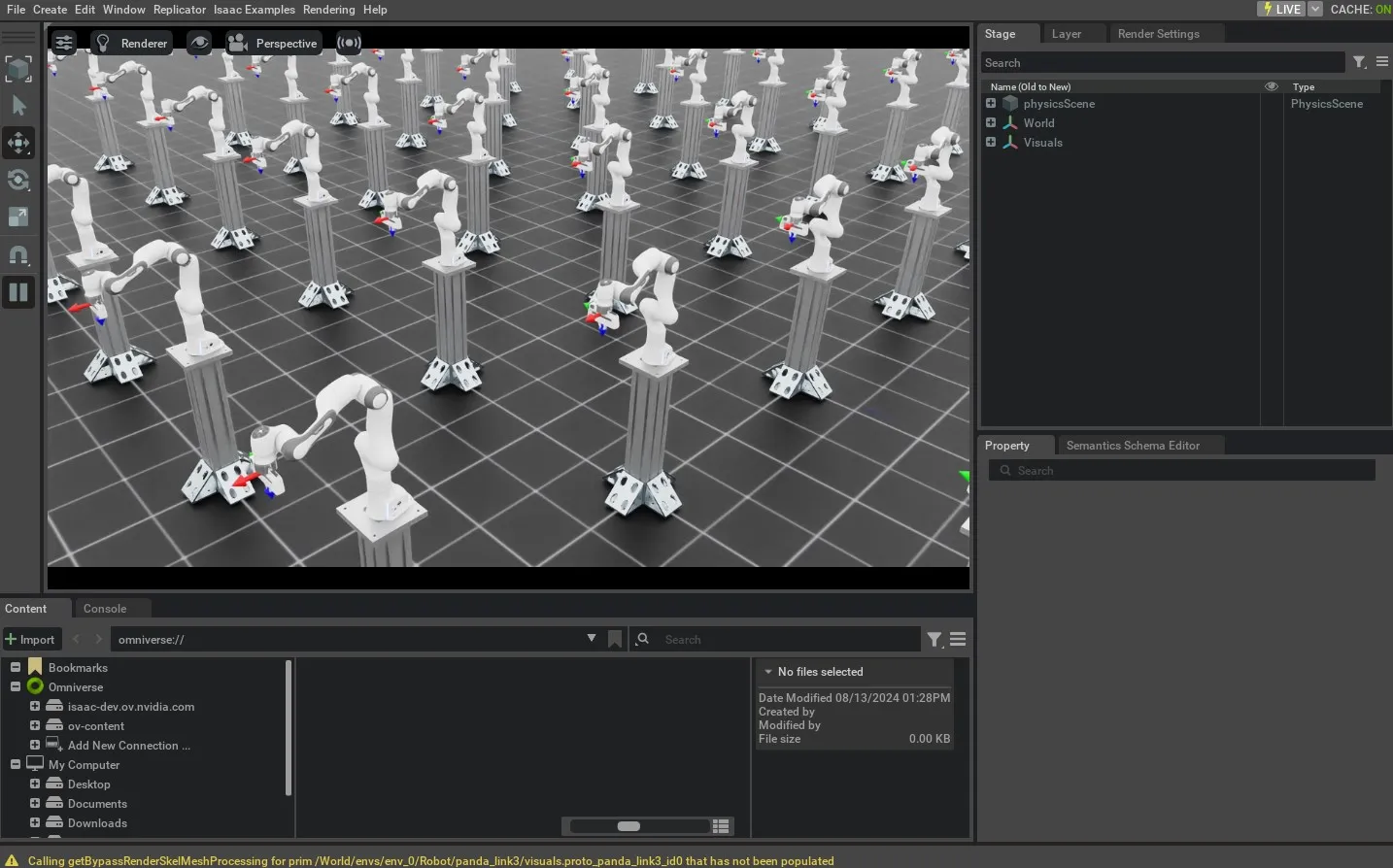
Now that we have gone through the code, let’s run the script and see the result:

./isaaclab.sh -p scripts/tutorials/05_controllers/run_diff_ik.py --robot franka_panda --num_envs 128

The script will start a simulation with 128 robots. The robots will be controlled using the IK controller. The current and desired end-effector poses should be displayed using frame markers. When the robot reaches the desired pose, the command should cycle through to the next pose specified in the script.
result of run_diff_ik.py

To stop the simulation, you can either close the window, or press Ctrl+C in the terminal.