Skip to navigation

Training the Jetbot: Ground Truth

View as Markdown

With the environment defined, we can now start modifying our observations and rewards in order to train a policy to act as a controller for the Jetbot. As a user, we would like to be able to specify the desired direction for the Jetbot to drive, and have the wheels turn such that the robot drives in that specified direction as fast as possible. How do we achieve this with Reinforcement Learning (RL)? If you want to cut to the end and checkout the result of this stage of the walk through, checkout this branch of the tutorial repository!

Expanding the Environment

The very first thing we need to do is create the logic for setting commands for each Jetbot on the stage. Each command will be a unit vector, and we need one for every clone of the robot on the stage, which means a tensor of shape [num_envs, 3]. Even though the Jetbot only navigates in the 2D plane, by working with 3D vectors we get to make use of all the math utilities provided by Isaac Lab.

It would also be a good idea to setup visualizations, so we can more easily tell what the policy is doing during training and inference. In this case, we will define two arrow VisualizationMarkers: one to represent the “forward” direction of the robot, and one to represent the command direction. When the policy is fully trained, these arrows should be aligned! Having these visualizations in place early helps us avoid “silent bugs”: issues in the code that do not cause it to crash.

To begin, we need to define the marker config and then instantiate the markers with that config. Add the following to the global scope of isaac_lab_tutorial_env.py

from isaaclab.markers import VisualizationMarkers, VisualizationMarkersCfg
from isaaclab.utils.assets import ISAAC_NUCLEUS_DIR
import isaaclab.utils.math as math_utils
def define_markers() -> VisualizationMarkers:
"""Define markers with various different shapes."""
marker_cfg = VisualizationMarkersCfg(
prim_path="/Visuals/myMarkers",
markers={
"forward": sim_utils.UsdFileCfg(
usd_path=f"{ISAAC_NUCLEUS_DIR}/Props/UIElements/arrow_x.usd",
scale=(0.25, 0.25, 0.5),
visual_material=sim_utils.PreviewSurfaceCfg(diffuse_color=(0.0, 1.0, 1.0)),
),
"command": sim_utils.UsdFileCfg(
usd_path=f"{ISAAC_NUCLEUS_DIR}/Props/UIElements/arrow_x.usd",
scale=(0.25, 0.25, 0.5),
visual_material=sim_utils.PreviewSurfaceCfg(diffuse_color=(1.0, 0.0, 0.0)),
),
},
)
return VisualizationMarkers(cfg=marker_cfg)

The VisualizationMarkersCfg defines USD prims to serve as the “marker”. Any prim will do, but generally you want to keep markers as simple as possible because the cloning of markers occurs at runtime on every time step. This is because the purpose of these markers is for debug visualization only and not to be a part of the simulation: the user has full control over how many markers to draw when and where. NVIDIA provides several simple meshes on our public nucleus server, located at ISAAC_NUCLEUS_DIR, and for obvious reasons we choose to use arrow_x.usd.

For a more detailed example of using VisualizationMarkers checkout the markers.py demo!

# Copyright (c) 2022-2025, The Isaac Lab Project Developers (https://github.com/isaac-sim/IsaacLab/blob/main/CONTRIBUTORS.md).
# All rights reserved.
#
# SPDX-License-Identifier: BSD-3-Clause
"""This script demonstrates different types of markers.
~~~bash
# Usage
./isaaclab.sh -p scripts/demos/markers.py
~~~
"""
"""Launch Isaac Sim Simulator first."""
import argparse
from isaaclab.app import AppLauncher
# add argparse arguments
parser = argparse.ArgumentParser(description="This script demonstrates different types of markers.")
# append AppLauncher cli args
AppLauncher.add_app_launcher_args(parser)
# parse the arguments
args_cli = parser.parse_args()
# launch omniverse app
app_launcher = AppLauncher(args_cli)
simulation_app = app_launcher.app
"""Rest everything follows."""
import torch
import isaaclab.sim as sim_utils
from isaaclab.markers import VisualizationMarkers, VisualizationMarkersCfg
from isaaclab.sim import SimulationContext
from isaaclab.utils.assets import ISAAC_NUCLEUS_DIR, ISAACLAB_NUCLEUS_DIR
from isaaclab.utils.math import quat_from_angle_axis
def define_markers() -> VisualizationMarkers:
"""Define markers with various different shapes."""
marker_cfg = VisualizationMarkersCfg(
prim_path="/Visuals/myMarkers",
markers={
"frame": sim_utils.UsdFileCfg(
usd_path=f"{ISAAC_NUCLEUS_DIR}/Props/UIElements/frame_prim.usd",
scale=(0.5, 0.5, 0.5),
),
"arrow_x": sim_utils.UsdFileCfg(
usd_path=f"{ISAAC_NUCLEUS_DIR}/Props/UIElements/arrow_x.usd",
scale=(1.0, 0.5, 0.5),
visual_material=sim_utils.PreviewSurfaceCfg(diffuse_color=(0.0, 1.0, 1.0)),
),
"cube": sim_utils.CuboidCfg(
size=(1.0, 1.0, 1.0),
visual_material=sim_utils.PreviewSurfaceCfg(diffuse_color=(1.0, 0.0, 0.0)),
),
"sphere": sim_utils.SphereCfg(
radius=0.5,
visual_material=sim_utils.PreviewSurfaceCfg(diffuse_color=(0.0, 1.0, 0.0)),
),
"cylinder": sim_utils.CylinderCfg(
radius=0.5,
height=1.0,
visual_material=sim_utils.PreviewSurfaceCfg(diffuse_color=(0.0, 0.0, 1.0)),
),
"cone": sim_utils.ConeCfg(
radius=0.5,
height=1.0,
visual_material=sim_utils.PreviewSurfaceCfg(diffuse_color=(1.0, 1.0, 0.0)),
),
"mesh": sim_utils.UsdFileCfg(
usd_path=f"{ISAAC_NUCLEUS_DIR}/Props/Blocks/DexCube/dex_cube_instanceable.usd",
scale=(10.0, 10.0, 10.0),
),
"mesh_recolored": sim_utils.UsdFileCfg(
usd_path=f"{ISAAC_NUCLEUS_DIR}/Props/Blocks/DexCube/dex_cube_instanceable.usd",
scale=(10.0, 10.0, 10.0),
visual_material=sim_utils.PreviewSurfaceCfg(diffuse_color=(1.0, 0.25, 0.0)),
),
"robot_mesh": sim_utils.UsdFileCfg(
usd_path=f"{ISAACLAB_NUCLEUS_DIR}/Robots/ANYbotics/ANYmal-C/anymal_c.usd",
scale=(2.0, 2.0, 2.0),
visual_material=sim_utils.GlassMdlCfg(glass_color=(0.0, 0.1, 0.0)),
),
},
)
return VisualizationMarkers(marker_cfg)
def main():
"""Main function."""
# Load kit helper
sim_cfg = sim_utils.SimulationCfg(dt=0.01, device=args_cli.device)
sim = SimulationContext(sim_cfg)
# Set main camera
sim.set_camera_view([0.0, 18.0, 12.0], [0.0, 3.0, 0.0])
# Spawn things into stage
# Lights
cfg = sim_utils.DomeLightCfg(intensity=3000.0, color=(0.75, 0.75, 0.75))
cfg.func("/World/Light", cfg)
# create markers
my_visualizer = define_markers()
# define a grid of positions where the markers should be placed
num_markers_per_type = 5
grid_spacing = 2.0
# Calculate the half-width and half-height
half_width = (num_markers_per_type - 1) / 2.0
half_height = (my_visualizer.num_prototypes - 1) / 2.0
# Create the x and y ranges centered around the origin
x_range = torch.arange(-half_width * grid_spacing, (half_width + 1) * grid_spacing, grid_spacing)
y_range = torch.arange(-half_height * grid_spacing, (half_height + 1) * grid_spacing, grid_spacing)
# Create the grid
x_grid, y_grid = torch.meshgrid(x_range, y_range, indexing="ij")
x_grid = x_grid.reshape(-1)
y_grid = y_grid.reshape(-1)
z_grid = torch.zeros_like(x_grid)
# marker locations
marker_locations = torch.stack([x_grid, y_grid, z_grid], dim=1)
marker_indices = torch.arange(my_visualizer.num_prototypes).repeat(num_markers_per_type)
# Play the simulator
sim.reset()
# Now we are ready!
print("[INFO]: Setup complete...")
# Yaw angle
yaw = torch.zeros_like(marker_locations[:, 0])
# Simulate physics
while simulation_app.is_running():
# rotate the markers around the z-axis for visualization
marker_orientations = quat_from_angle_axis(yaw, torch.tensor([0.0, 0.0, 1.0]))
# visualize
my_visualizer.visualize(marker_locations, marker_orientations, marker_indices=marker_indices)
# roll corresponding indices to show how marker prototype can be changed
if yaw[0].item() % (0.5 * torch.pi) < 0.01:
marker_indices = torch.roll(marker_indices, 1)
# perform step
sim.step()
# increment yaw
yaw += 0.01
if __name__ == "__main__":
# run the main function
main()
# close sim app
simulation_app.close()

Next, we need to expand the initialization and setup steps to construct the data we need for tracking the commands as well as the marker positions and rotations. Replace the contents of _setup_scene with the following

def _setup_scene(self):
self.robot = Articulation(self.cfg.robot_cfg)
# add ground plane
spawn_ground_plane(prim_path="/World/ground", cfg=GroundPlaneCfg())
# clone and replicate
self.scene.clone_environments(copy_from_source=False)
# add articulation to scene
self.scene.articulations["robot"] = self.robot
# add lights
light_cfg = sim_utils.DomeLightCfg(intensity=2000.0, color=(0.75, 0.75, 0.75))
light_cfg.func("/World/Light", light_cfg)
self.visualization_markers = define_markers()
# setting aside useful variables for later
self.up_dir = torch.tensor([0.0, 0.0, 1.0]).cuda()
self.yaws = torch.zeros((self.cfg.scene.num_envs, 1)).cuda()
self.commands = torch.randn((self.cfg.scene.num_envs, 3)).cuda()
self.commands[:,-1] = 0.0
self.commands = self.commands/torch.linalg.norm(self.commands, dim=1, keepdim=True)
# offsets to account for atan range and keep things on [-pi, pi]
ratio = self.commands[:,1]/(self.commands[:,0]+1E-8)
gzero = torch.where(self.commands > 0, True, False)
lzero = torch.where(self.commands < 0, True, False)
plus = lzero[:,0]*gzero[:,1]
minus = lzero[:,0]*lzero[:,1]
offsets = torch.pi*plus - torch.pi*minus
self.yaws = torch.atan(ratio).reshape(-1,1) + offsets.reshape(-1,1)
self.marker_locations = torch.zeros((self.cfg.scene.num_envs, 3)).cuda()
self.marker_offset = torch.zeros((self.cfg.scene.num_envs, 3)).cuda()
self.marker_offset[:,-1] = 0.5
self.forward_marker_orientations = torch.zeros((self.cfg.scene.num_envs, 4)).cuda()
self.command_marker_orientations = torch.zeros((self.cfg.scene.num_envs, 4)).cuda()

Most of this is setting up the book keeping for the commands and markers, but the command initialization and the yaw calculations are worth diving into. The commands are sampled from a multivariate normal distribution via torch.randn with the z component fixed to zero and then normalized to unit length. In order to point our command markers along these vectors, we need to rotate the base arrow mesh appropriately. This means we need to define a quaternion that will rotate the arrow prim about the z axis by some angle defined by the command. By convention, rotations about the z axis are called a “yaw” rotation (akin to roll and pitch).

Luckily for us, Isaac Lab provides a utility to generate a quaternion from an axis of rotation and an angle: isaaclab.utils.math.quat_from_axis_angle, so the only tricky part now is determining that angle.
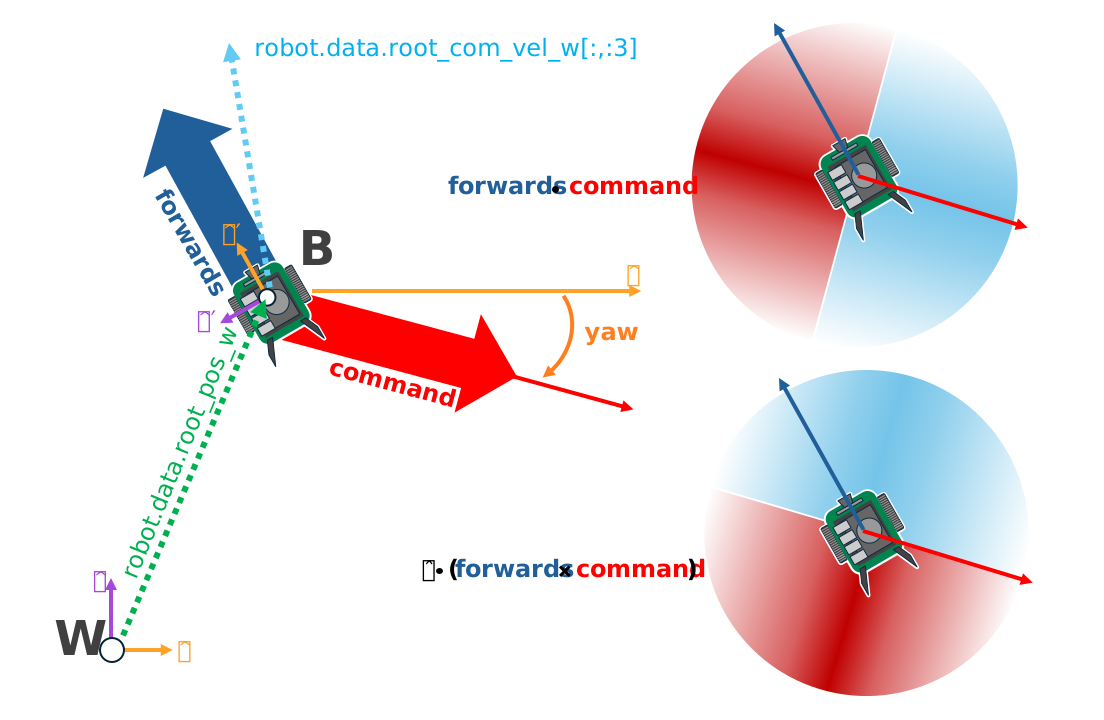
Useful vector definitions for training

The yaw is defined about the z axis, with a yaw of 0 aligning with the x axis and positive angles opening counterclockwise. The x and y components of the command vector define the tangent of this angle, and so we need the arctangent of that ratio to get the yaw.

Now, consider two commands: Command A is in quadrant 2 at (-x, y), while command B is in quadrant 4 at (x, -y). The ratio of the y component to the x component is identical for both A and B. If we do not account for this, then some of our command arrows will be pointing in the opposite direction of the command! Essentially, our commands are defined on [-pi, pi] but arctangent is only defined on [-pi/2, pi/2].

To remedy this, we add or subtract pi from the yaw depending on the quadrant of the command.

ratio = self.commands[:,1]/(self.commands[:,0]+1E-8) #in case the x component is zero
gzero = torch.where(self.commands > 0, True, False)
lzero = torch.where(self.commands < 0, True, False)
plus = lzero[:,0]*gzero[:,1]
minus = lzero[:,0]*lzero[:,1]
offsets = torch.pi*plus - torch.pi*minus
self.yaws = torch.atan(ratio).reshape(-1,1) + offsets.reshape(-1,1)

Boolean expressions involving tensors can have ambiguous definitions and pytorch will throw errors regarding this. Pytorch provides various methods to make the definitions explicit. The method torch.where produces a tensor with the same shape as the input with each element of the output is determined by the evaluation of that expression on only that element. A reliable way to handle boolean operations with tensors is to simply produce boolean indexing tensors and then represent the operation algebraically, with AND as multiplication and OR as addition, which is what we do above. This is equivalent to the pseudocode:

yaws = torch.atan(ratio)
yaws[commands[:,0] < 0 and commands[:,1] > 0] += torch.pi
yaws[commands[:,0] < 0 and commands[:,1] < 0] -= torch.pi

Next we have the method for actually visualizing the markers. Remember, these markers aren’t scene entities! We need to “draw” them whenever we want to see them.

def _visualize_markers(self):
# get marker locations and orientations
self.marker_locations = self.robot.data.root_pos_w
self.forward_marker_orientations = self.robot.data.root_quat_w
self.command_marker_orientations = math_utils.quat_from_angle_axis(self.yaws, self.up_dir).squeeze()
# offset markers so they are above the jetbot
loc = self.marker_locations + self.marker_offset
loc = torch.vstack((loc, loc))
rots = torch.vstack((self.forward_marker_orientations, self.command_marker_orientations))
# render the markers
all_envs = torch.arange(self.cfg.scene.num_envs)
indices = torch.hstack((torch.zeros_like(all_envs), torch.ones_like(all_envs)))
self.visualization_markers.visualize(loc, rots, marker_indices=indices)

The visualize method of VisualizationMarkers is like this “draw” function. It accepts tensors for the spatial transformations of the markers, and a marker_indices tensor to specify which marker prototype to use for each marker. So long as the first dimension of all of these tensors match, this function will draw those markers with the specified transformations. This is why we stack the locations, rotations, and indices.

Now we just need to call _visualize_markers on the pre physics step to make the arrows visible. Replace _pre_physics_step with the following

def _pre_physics_step(self, actions: torch.Tensor) -> None:
self.actions = actions.clone()
self._visualize_markers()

The last major modification before we dig into the RL training is to update the _reset_idx method to account for the commands and markers. Whenever we reset an environment, we need to generate a new command and reset the markers. The logic for this is already covered above. Replace the contents of _reset_idx with the following:

def _reset_idx(self, env_ids: Sequence[int] | None):
if env_ids is None:
env_ids = self.robot._ALL_INDICES
super()._reset_idx(env_ids)
# pick new commands for reset envs
self.commands[env_ids] = torch.randn((len(env_ids), 3)).cuda()
self.commands[env_ids,-1] = 0.0
self.commands[env_ids] = self.commands[env_ids]/torch.linalg.norm(self.commands[env_ids], dim=1, keepdim=True)
# recalculate the orientations for the command markers with the new commands
ratio = self.commands[env_ids][:,1]/(self.commands[env_ids][:,0]+1E-8)
gzero = torch.where(self.commands[env_ids] > 0, True, False)
lzero = torch.where(self.commands[env_ids]< 0, True, False)
plus = lzero[:,0]*gzero[:,1]
minus = lzero[:,0]*lzero[:,1]
offsets = torch.pi*plus - torch.pi*minus
self.yaws[env_ids] = torch.atan(ratio).reshape(-1,1) + offsets.reshape(-1,1)
# set the root state for the reset envs
default_root_state = self.robot.data.default_root_state[env_ids]
default_root_state[:, :3] += self.scene.env_origins[env_ids]
self.robot.write_root_state_to_sim(default_root_state, env_ids)
self._visualize_markers()

And that’s it! We now generate commands and can visualize it the heading of the Jetbot. We are ready to start tinkering with the observations and rewards.
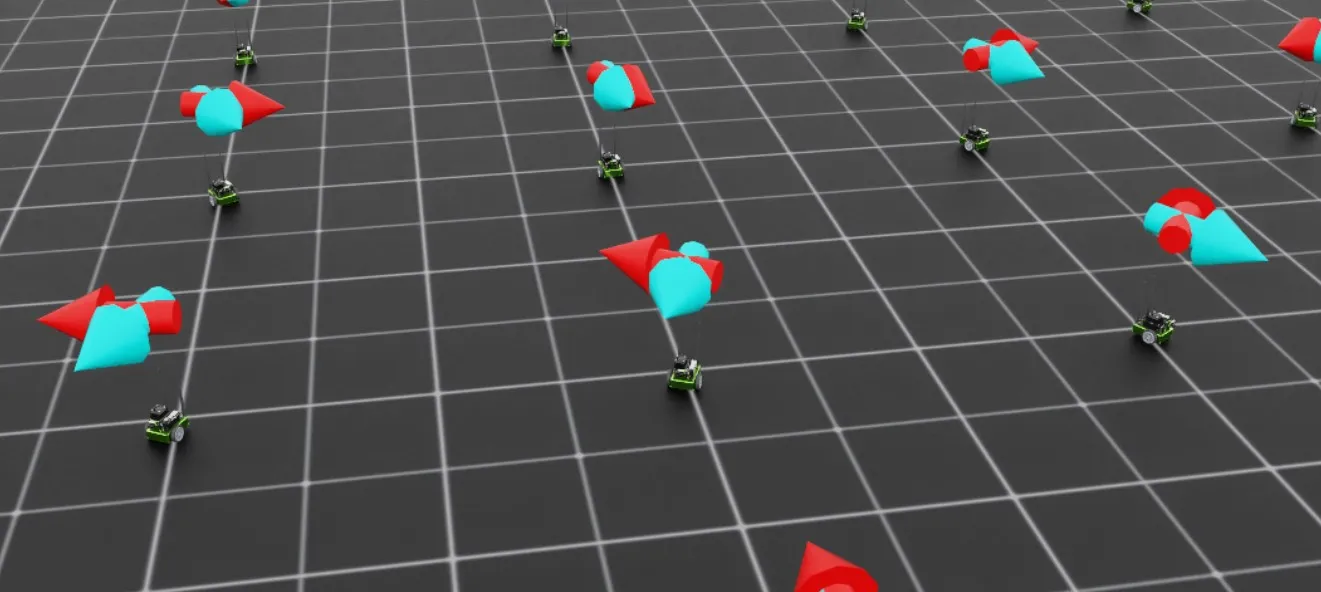
Visualization of the command markers