

Course Overview#
Welcome to Agentic Workflows in Isaac for Healthcare. In this training lab you’ll go from an empty checkout of the open-source i4h-workflows repository to a fine-tuned robot policy you record, train, and validate entirely in simulation. What makes this agentic is the loop below: you describe what you want in plain language, and the agent does the wiring while you stay in control.
Prefer a guided terminal experience? Start your coding agent with the Physical AI Tutor skill and ask it to tutor you through this course. It keeps the walkthrough in the CLI, adapts to your experience level, and pauses before each action-heavy step.
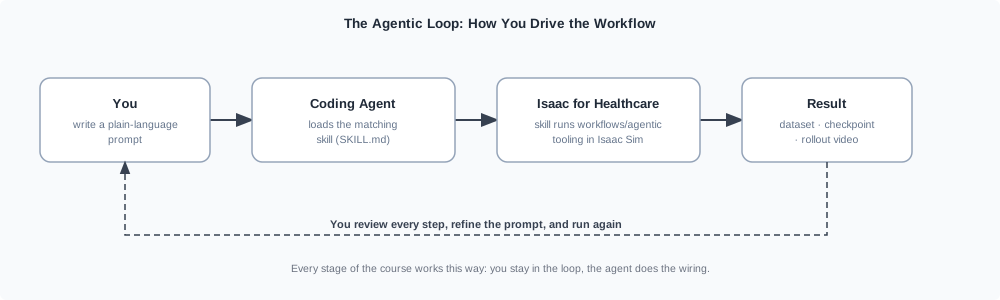
Every stage of the course runs this loop, with whichever coding agent you prefer: a plain-language prompt loads a matching skill (a SKILL.md playbook in the repo), which drives the real workflows/agentic/ tooling and hands back a result for you to review.#
The stages chain into one record-to-validate pipeline:
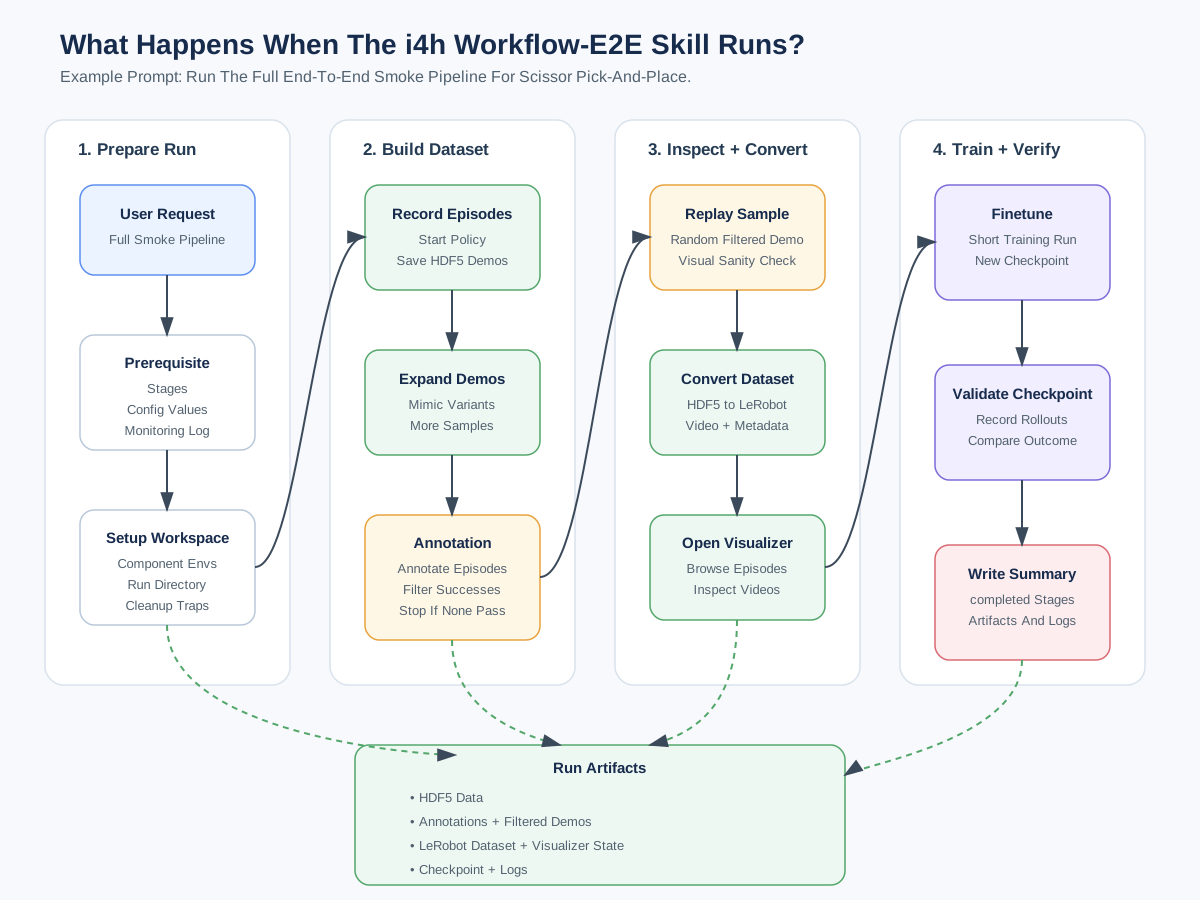
The end-to-end pipeline has four phases: prepare the run, build the dataset (record → expand → annotate), inspect & convert to LeRobot, then train & verify the policy. Human review stays in the loop.#
Run It With a Prompt#
The pipeline carries a task from raw demonstrations to a validated policy: it records demonstrations, prepares them into a training-ready dataset, fine-tunes a policy on that data, and rolls the policy out in simulation to check it. A single prompt runs that entire pipeline end-to-end as a smoke test:
Run end-to-end smoke pipeline for scissor pick and place.
A single prompt hides useful detail. In this course, run the pipeline one stage at a time and review each result before continuing. The stages form three phases:
Phase |
Pipeline stages |
What happens |
|---|---|---|
Collect data |
record → mimic → annotate → replay → convert → visualize |
Generate demonstrations by teleoperation, a state machine, or a pretrained policy, then prepare a LeRobot dataset. |
Train a VLA model |
fine-tune |
Fine-tune a GR00T or openpi vision-language-action policy on that dataset. |
Deploy it |
validate |
Roll the policy out in simulation and record episodes for human review. |
Not sure where to begin? Ask the routing skill, which points you to the right per-stage skill without running anything itself:
What does the i4h workflow include, and where should I start?
What Happens Under the Hood?#
The Isaac for Healthcare (i4h) workflow combines IsaacLab-Arena simulation with GR00T and openpi control policies. Its healthcare workflows add clinical sensors, anatomy, and robot embodiments that a general Isaac Lab task does not provide. Robotic ultrasound uses GPU ray tracing to model tissue interactions and generate B-mode images. Catheter navigation pairs patient vasculature digital twins and catheter physics with simulated X-ray fluoroscopy. Surgical tasks use dVRK PSM, dual-PSM, and STAR embodiments for precise reaching and instrument handling. The agentic workflow connects these simulation assets to data collection, training, and validation stages.
Supported Environments, Robots, and Models#
Each environment pairs a robot with a Hugging Face policy model, configured by a single YAML file under workflows/agentic/config/environments/.
Env id |
Robot |
HF model |
|---|---|---|
|
SO-ARM 101 (SO-101) |
|
|
Unitree G1 |
|
|
Unitree G1 |
|
|
Unitree G1 |
|
|
Franka-style arm |
|
|
dVRK PSM |
|
|
dVRK dual PSM |
|
|
STAR |
|
|
dVRK PSM |
|
|
dVRK PSM |
|
|
dVRK PSM |
|
The first five ship with policy-evaluation prompts you can run right away. Select an environment to see its prompt and example rollout:
Environment: scissor_pick_and_place
Evaluate scissor pick and place for 2 episodes using the shipped GR00T N1.5 policy.
Environment: locomanip_tray_pick_and_place
Evaluate locomanip tray pick and place for 1 episode.
Environment: locomanip_push_cart
Evaluate locomanip push cart for 1 episode.
Environment: assemble_trocar
Evaluate trocar assembly for 1 episode.
Environment: ultrasound_liver_scan
Evaluate ultrasound for 1 episode.
The surgical environments also support quick scripted smoke runs through the validation skill:
Run surgical_reach_psm with the state machine for 1 episode.
Run surgical_lift_needle with the state machine for 1 episode.
Optional deep dive:
Open an env YAML in workflows/agentic/config/environments/ and walk me through every field: how it binds a robot, cameras, policy stack, and model, and which tool reads each one.
How the Code Is Organized#
Under workflows/agentic/, each stage has a focused subproject: arena/ for simulation and
recording, policy/ for inference and training, dataset/ for LeRobot conversion and
visualization, plus the mimic/, annotator/, cosmos/, and common/ helpers. Skills drive
these subprojects using defaults from the env YAML.
The repository also includes workflows/catheter_navigation/ for fluoroscopy rendering,
vasculature digital twins, and XPBD catheter simulation. Its seven skills are listed in
The Skill Library.
Optional deep dive:
Give me a guided tour of the workflows/agentic/ subprojects (arena, policy, dataset, mimic, annotator, cosmos) and trace how a single prompt flows through them.
What’s Next?#
Now that you know what the workflow is and how the pieces fit, get your machine ready. Continue to Setup and Environments to check host requirements and run setup.