

Build Your Own Workflow#
Build new environments by forking the closest existing task and updating its contract. This preserves compatible assets, actions, policy routing, and dataset fields.
Learning Objectives#
By the end of this lesson, you’ll be able to:
Choose the scene, robot, policy stack, and base model for a new environment.
Fork the required arena and config files into their correct paths.
Add policy routing in the environment YAML (
stack,infer_module,train_module).Validate a new scene with the scene-edit bridge and zero-action runs.
Run It With a Prompt#
Natural-language prompts load the matching skill and run each create-and-edit step for review.
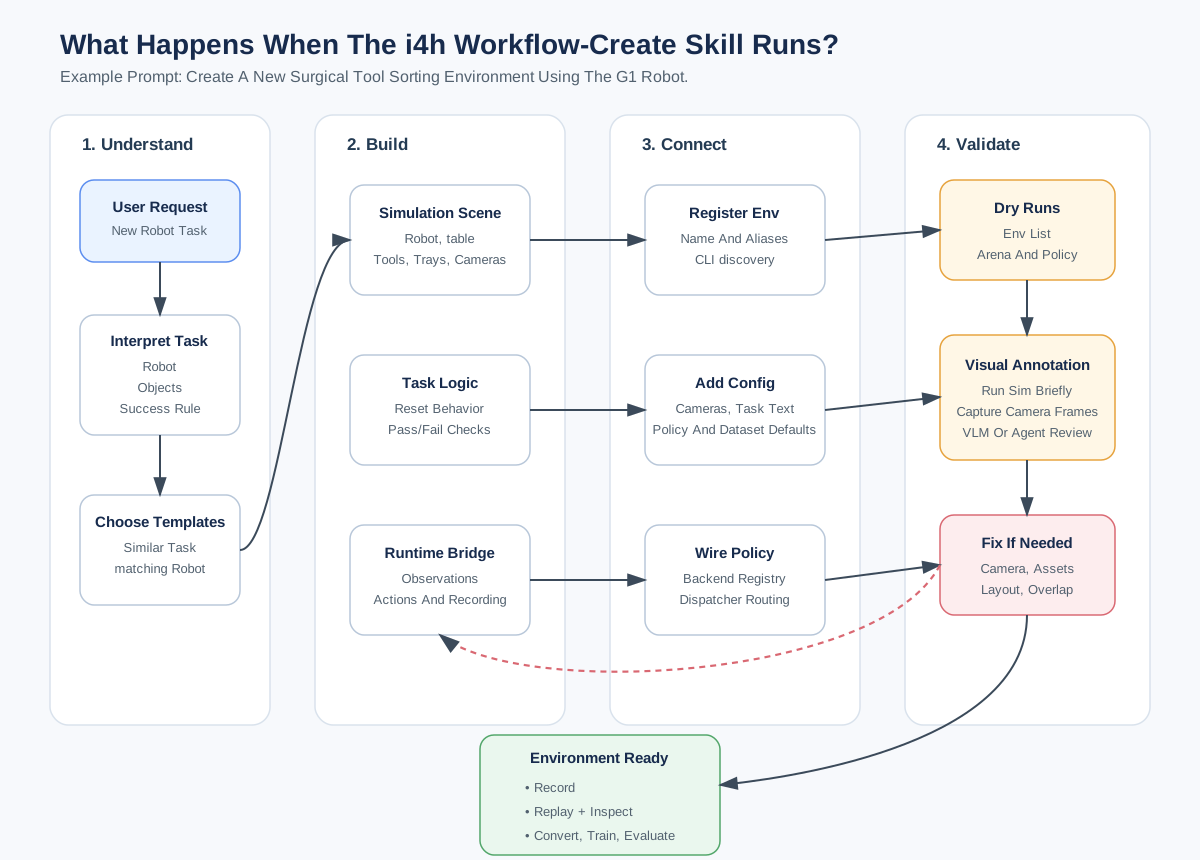
Creating an environment is a fork-and-validate loop: pick components, copy the nearest env’s files, route the policy in YAML, then probe the live scene through the bridge before baking changes back to source.#
Work through the prompts in order. After each prompt, compare the result with the expected outcome and complete the check before continuing.
1. Create a new environment
Create a new i4h environment for surgical tool sorting using G1 based on scissor_pick_and_place.
Expect: A new g1_surgical_tool_sort environment that combines the scissor task pattern
with the G1 locomanipulation robot, policy stack, runtime, and dataset contract.
Check: Confirm the new env appears in the environment list, its YAML uses unique health and bridge ports, and its generated Python modules import successfully.
2. Edit the scene in place and bake it
Edit the scene for the new env in live mode.
  - Add a new red cube on the table.
  - Increase the size of the red cube by 2x.
  - Shift G1 to the opposite side of the table and 4 ft away from table.
  - Add a room camera based on the current perspective view and include it in the dataset and policy camera config.
  - Bake all changes and stop.
Expect: The live scene opens for review before the tool bakes the robot position, cube, room camera, and camera mappings into source.
Check: Inspect the bridge view, confirm both cameras produce frames, then run a zero-action smoke test after baking.
3. Update the policy task description
Change policy task description to "Walk towards surgical table"
Expect: The agent updates policy.language_instruction in the env YAML. The next policy
launch receives the new instruction without changing the task geometry.
Check: Read the YAML value back and confirm the policy launcher resolves the same env.
4. Collect demonstrations on the new scene
Run teleop for 5 episodes.
Collect Data on Your New Scene#
A new environment has no pretrained policy. After the zero-action smoke test, use
teleoperation to collect its first demonstrations. Press B to begin an episode, N to save
a success, and R to retry. G1 uses the mode-based keyboard_23d device.
keyboard_23d Controls
Mode |
Select |
Controls |
|---|---|---|
Both hands |
|
|
Right hand |
|
|
Left hand |
|
Same movement and gripper keys as right-hand mode. |
Base navigation |
|
|
Torso orientation |
|
|
Base height |
|
|
At any time, L locks the selected mode and Space pauses or resumes.
Expect: Arena starts the new scene with G1’s keyboard_23d controls and records five
successful demonstrations to HDF5.
Check: Replay one saved episode and verify that the HDF5 contains five demonstrations, joint actions, joint states, and both camera streams.
5. Expand and visualize the dataset
Mimic 3 more episodes and visualize my dataset.
Expect: Mimic adds three perturbed trajectories, then the converter prepares the expanded dataset and opens the LeRobot visualizer.
Check: Confirm the visualizer shows eight episodes and that actions, states, head camera, and room camera data stay aligned.
6. Fine-tune and evaluate
Finetune for 200 steps with batch size of 32. Turn off vision tuning.
Run eval using new checkpoint for 300 timesteps.
Expect: The GR00T N1.6 trainer writes a 200-step checkpoint, then the policy daemon loads it for a 300-timestep Arena rollout.
Check: Confirm the training log reports loss, the checkpoint contains model and processor files, and the evaluation records a rollout without policy or Arena errors.
g1_surgical_tool_sort, edits and bakes the scene,
collects teleop demos, fine-tunes briefly, and evaluates the checkpoint in simulation.
What Happens Under the Hood?#
The skills drive a fork-and-validate loop: choose components, copy the nearest environment, route the policy in YAML, inspect the live scene, then bake only when the layout is right.
Choose Components#
The environment YAML at workflows/agentic/config/environments/<env>.yaml is the source of truth. Pick one option from each row; scene, robot, and policy are related but not automatically interchangeable.
Choice |
Examples |
|---|---|
Assets / scene |
|
Robot |
SO-ARM, Unitree G1, Franka-style arm, dVRK PSM, STAR |
Policy stack |
|
Foundation / base model |
|
A few stack rules constrain the pairing:
gr00t_n15: scissor envs, assemble-trocar inference, and surgical baseline envs.gr00t_n16: shared G1 locomanip code (policy.locomanip.*).gr00t_n17: SO-101 scissor training and inference, with optional TRT acceleration.openpi_pi0: ultrasound.Env YAMLs with
train_module: nullare inference or smoke-validation only.
Optional deep dive:
Explain the rules that constrain which robot, scene, and policy stack can be combined, and where those constraints live in the code.
Generated Files#
The g1_surgical_tool_sort workflow is generated as five environment contract files. Forking
keeps action spaces, asset patterns, and policy plumbing intact, but each generated file owns
a different surface. Select a file type to see what it owns:
Generated file: workflows/agentic/config/environments/g1_surgical_tool_sort.yaml
This file is the environment source of truth. It defines the G1 robot, head and room cameras, GR00T N1.6 base model and instruction, service ports, rollout limits, 43-DoF policy configuration, dataset keys, and dual-camera training mappings.
Generated file: workflows/agentic/arena/arena/assets/g1_surgical_tool_sort.py
This file defines the non-robot scene: ground, table, scissors, tweezers, red-cube distractor, red and blue destination trays, lights, and room camera. G1 and its head camera come from the embodiment.
Generated file: workflows/agentic/arena/arena/tasks/g1_surgical_tool_sort.py
This file defines randomized resets, paired tool-to-tray success checks, timeout and success termination, viewer and spacing configuration, and room-camera policy observation. It exposes the camera to the policy; recording is handled elsewhere.
Generated file: workflows/agentic/arena/arena/environments/g1_surgical_tool_sort_environment.py
This file resolves the configured embodiment, applies G1’s WBC base height, places the robot exactly 4 ft from the table center, and combines the scene, task, and teleoperation device. The YAML selects G1.
Generated file: workflows/agentic/arena/arena/runtimes/g1_surgical_tool_sort.py
This file re-exports the existing G1 locomanipulation policy I/O and runtime, preserving its Zenoh and GR00T rollout behavior.
Optional deep dive:
Diff my new env's five files against the originals I forked from and explain each change and why it was needed.
What’s Next?#
You can now fork, wire, and validate a new environment end to end. Next, you’ll look at the reusable building blocks that higher-level agentic behavior is composed from in The Skill Library.