

The Skill Library#
In Agentic Workflows in Isaac for Healthcare you drive the pipeline with natural-language prompts, not shell commands. Each prompt loads a focused skill from the repository. In source checkouts these live under skills/; when installed, they may live in your agent’s configured skills directory. Together they form a library you compose to move from raw scene to validated policy.
The current repository has 20 skills: 13 for the agentic robot-learning workflow and seven for the catheter-navigation workflow.
Learning Objectives#
By the end of this lesson, you’ll be able to:
Identify which skill drives each agentic or catheter-navigation stage.
Run the full pipeline with the
i4h-workflow-e2eskill.
Run It With a Prompt#
You smoke the whole pipeline by pasting one natural-language prompt to your coding agent. It loads the i4h-workflow-e2e skill, which chains every stage and keeps you in the loop to review each step.
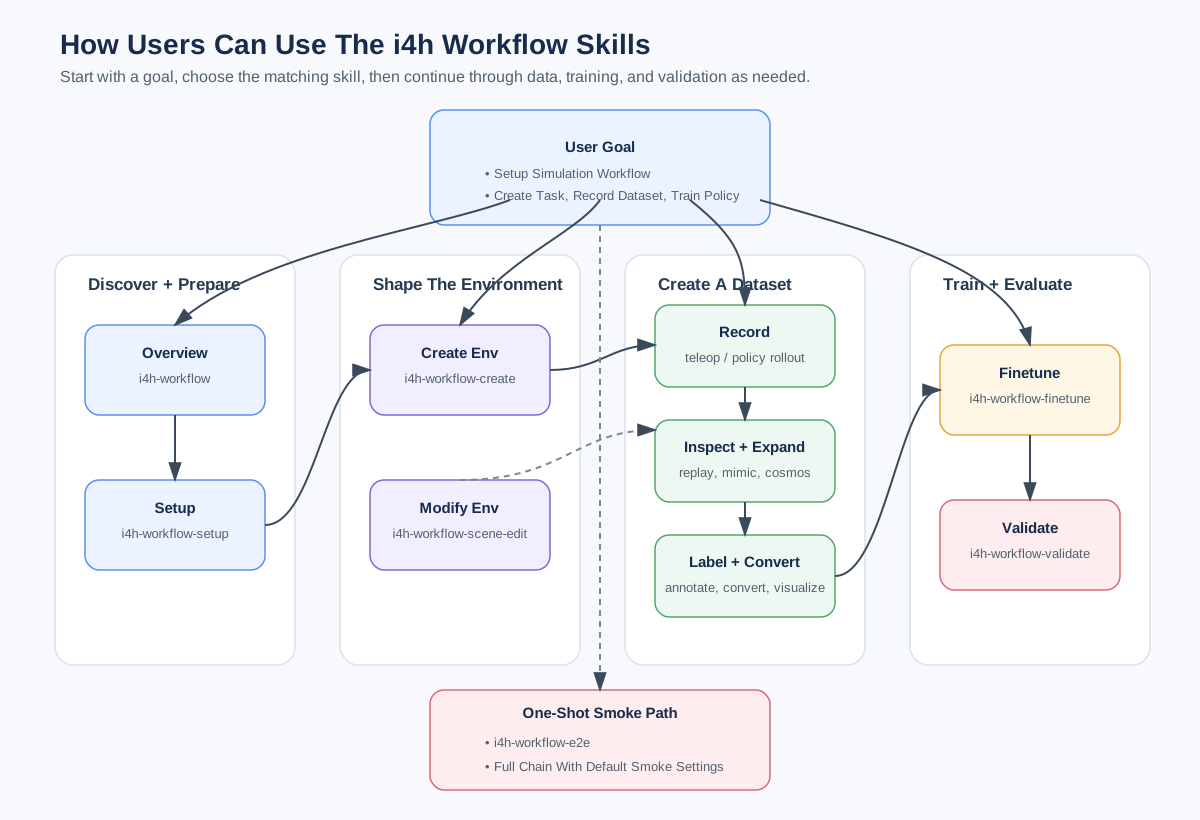
The skill library: each natural-language prompt loads one stage skill, which drives the corresponding workflows/agentic/ subproject (arena, policy, dataset, mimic, annotator, cosmos).#
Run end-to-end smoke pipeline for scissor pick-and-place.
What Happens Under the Hood?#
Every stage of the agentic workflow has its own skill. You compose them in sequence, or hand the whole sequence to the end-to-end skill. The sections below show how the library is organized and the commands that run beneath the prompt.
Agentic Workflow Skills#
The table lists each skill, its stage, and an example prompt.
Skill |
Stage / Purpose |
Example prompt |
|---|---|---|
|
Overview and routing |
|
|
Verify host requirements and run setup |
|
|
Create a new env from a template |
|
|
Edit an existing scene / task / camera |
|
|
Record teleoperated demos to HDF5 |
|
|
Replay HDF5 episodes in Isaac Sim |
|
|
Expand HDF5 demos with small noise |
|
|
VLM success labeling / filtering |
|
|
Convert HDF5 to a LeRobot dataset |
|
|
Serve the LeRobot HTML visualizer |
|
|
Fine-tune a GR00T / openpi PI0 policy |
|
|
Evaluate a policy / checkpoint, or run scripted state-machine smokes |
|
|
Run the full smoke pipeline |
|
Optional deep dive:
Open one SKILL.md and walk me through how its body drives the corresponding workflows/agentic/ subproject.
The Agentic Router and Limitations#
The i4h-workflow skill is the router: it runs no stage itself, it just orients you on what’s supported and which per-stage skill to invoke next. Start there (What does the i4h workflow include...) whenever you’re unsure.
Known limitations to consider before you plan a long run: i4h-workflow-dataset-teleop
is verified for keyboard, keyboard_23d, and so101_leader, while manus-gloves is not
verified; i4h-workflow-finetune and i4h-workflow-e2e are verified for the
scissor_pick_and_place smoke path first.
Optional deep dive:
Explain how the i4h-workflow routing skill uses each skill's description to decide which one to invoke.
One Prompt Runs Everything#
The i4h-workflow-e2e skill runs setup → record → mimic → annotate/filter → replay → convert
→ visualize → finetune → validate from one prompt. It is an unattended smoke test of the
record-to-validate loop.
Optional deep dive:
Walk me through the e2e script and how it chains the stages from setup through validate, including how it skips the optional ones.
What’s Next?#
You now know both skill families and how each skill maps to a stage. Next, author your own in Adding Your Own Skills.